
Video DownloadHelper 7.6.0 - Encountered Some Error
255 views
Skip to first unread message

Nurul Abser
Oct 25, 2022, 4:57:03 AM10/25/22
to Video DownloadHelper Q&A
Hi,
I recently reset the Windows 10 on my PC, and as a result, I installed Mozilla Firefox 105.0.3 (64-bit) and Video DownloadHelper 7.6.0.
However, neither of the two test videos I downloaded are playing.
However, neither of the two test videos I downloaded are playing.
Error Details:
Failed converting "Create an email signature from a template"
ffmpeg version n4.1.5-vdhcoapp Copyright (c) 2000-2020 the FFmpeg developers
built with gcc 9.3-win32 (GCC) 20200320
configuration: --cross-prefix=x86_64-w64-mingw32- --sysroot=/usr/x86_64-w64-mingw32/ --extra-ldflags=-static-libgcc --target-os=mingw32 --arch=x86_64 --prefix=/home/mig/git/vdhcoapp/converter/src-build/win/64/converter-build --extra-version=vdhcoapp --extra-cflags=-I/home/mig/git/vdhcoapp/converter/src-build/win/64/deps/include --extra-ldflags='-static-libgcc -L/home/mig/git/vdhcoapp/converter/src-build/win/64/deps/lib -L/home/mig/git/vdhcoapp/converter/src-build/win/64/zlib' --extra-libs=-lpthread --pkg-config=/usr/bin/x86_64-w64-mingw32-pkg-config --enable-shared --enable-gpl --enable-pthreads --disable-w32threads --enable-libmp3lame --enable-libopenjpeg --enable-libopus --enable-libtheora --enable-libvorbis --enable-libvpx --enable-libwebp --enable-libx265 --enable-libxvid --enable-libx264 --enable-libaom --enable-avresample --disable-doc
libavutil 56. 22.100 / 56. 22.100
libavcodec 58. 35.100 / 58. 35.100
libavformat 58. 20.100 / 58. 20.100
libavdevice 58. 5.100 / 58. 5.100
libavfilter 7. 40.101 / 7. 40.101
libavresample 4. 0. 0 / 4. 0. 0
libswscale 5. 3.100 / 5. 3.100
libswresample 3. 3.100 / 3. 3.100
libpostproc 55. 3.100 / 55. 3.100
[mov,mp4,m4a,3gp,3g2,mj2 @ 0000026e22ea9bc0] could not find corresponding trex
[mov,mp4,m4a,3gp,3g2,mj2 @ 0000026e22ea9bc0] error reading header
C:\Users\nazmu\AppData\Local\Temp\vdh-12036AGIsj6R0XvO8.tmp: Invalid data found when processing input
Failed converting "Create an email signature from a template"
ffmpeg version n4.1.5-vdhcoapp Copyright (c) 2000-2020 the FFmpeg developers
built with gcc 9.3-win32 (GCC) 20200320
configuration: --cross-prefix=x86_64-w64-mingw32- --sysroot=/usr/x86_64-w64-mingw32/ --extra-ldflags=-static-libgcc --target-os=mingw32 --arch=x86_64 --prefix=/home/mig/git/vdhcoapp/converter/src-build/win/64/converter-build --extra-version=vdhcoapp --extra-cflags=-I/home/mig/git/vdhcoapp/converter/src-build/win/64/deps/include --extra-ldflags='-static-libgcc -L/home/mig/git/vdhcoapp/converter/src-build/win/64/deps/lib -L/home/mig/git/vdhcoapp/converter/src-build/win/64/zlib' --extra-libs=-lpthread --pkg-config=/usr/bin/x86_64-w64-mingw32-pkg-config --enable-shared --enable-gpl --enable-pthreads --disable-w32threads --enable-libmp3lame --enable-libopenjpeg --enable-libopus --enable-libtheora --enable-libvorbis --enable-libvpx --enable-libwebp --enable-libx265 --enable-libxvid --enable-libx264 --enable-libaom --enable-avresample --disable-doc
libavutil 56. 22.100 / 56. 22.100
libavcodec 58. 35.100 / 58. 35.100
libavformat 58. 20.100 / 58. 20.100
libavdevice 58. 5.100 / 58. 5.100
libavfilter 7. 40.101 / 7. 40.101
libavresample 4. 0. 0 / 4. 0. 0
libswscale 5. 3.100 / 5. 3.100
libswresample 3. 3.100 / 3. 3.100
libpostproc 55. 3.100 / 55. 3.100
[mov,mp4,m4a,3gp,3g2,mj2 @ 0000026e22ea9bc0] could not find corresponding trex
[mov,mp4,m4a,3gp,3g2,mj2 @ 0000026e22ea9bc0] error reading header
C:\Users\nazmu\AppData\Local\Temp\vdh-12036AGIsj6R0XvO8.tmp: Invalid data found when processing input

mjs
Oct 25, 2022, 5:25:21 AM10/25/22
to Video DownloadHelper Q&A
It does not look like VDH can download the video from the Microsoft page. It's only showing small pieces of it , you will have to use ffmpeg.
Read through it , it may seem intimidating and hard but further down the discussion is a simplified way to do it

Wild Willy
Oct 25, 2022, 8:13:57 AM10/25/22
to Video DownloadHelper Q&A
I don't know how you're going to use ffmpeg on this thing. My Network Monitor showed no manifests, neither HLS (m3u8) nor DASH (mpd). I looked in the json files that were displayed but there was nothing even remotely resembling a pointer to a manifest. The closest I got was a series of MP4 fragments, and they were not susceptible to our usual trick of chopping off something on the end of the URL.
I could not even play the video in the web page. Clicking the play button had no effect at all. I found I could drag the slider button back & forth & it caused certain frames of the video to display. But the thing refused to launch playback for me.
But I did get it to download. It's rather convoluted & I think it's quite stupid. But this did result in an MP4 on my hard drive that did play just fine in VLC. Here are the steps:
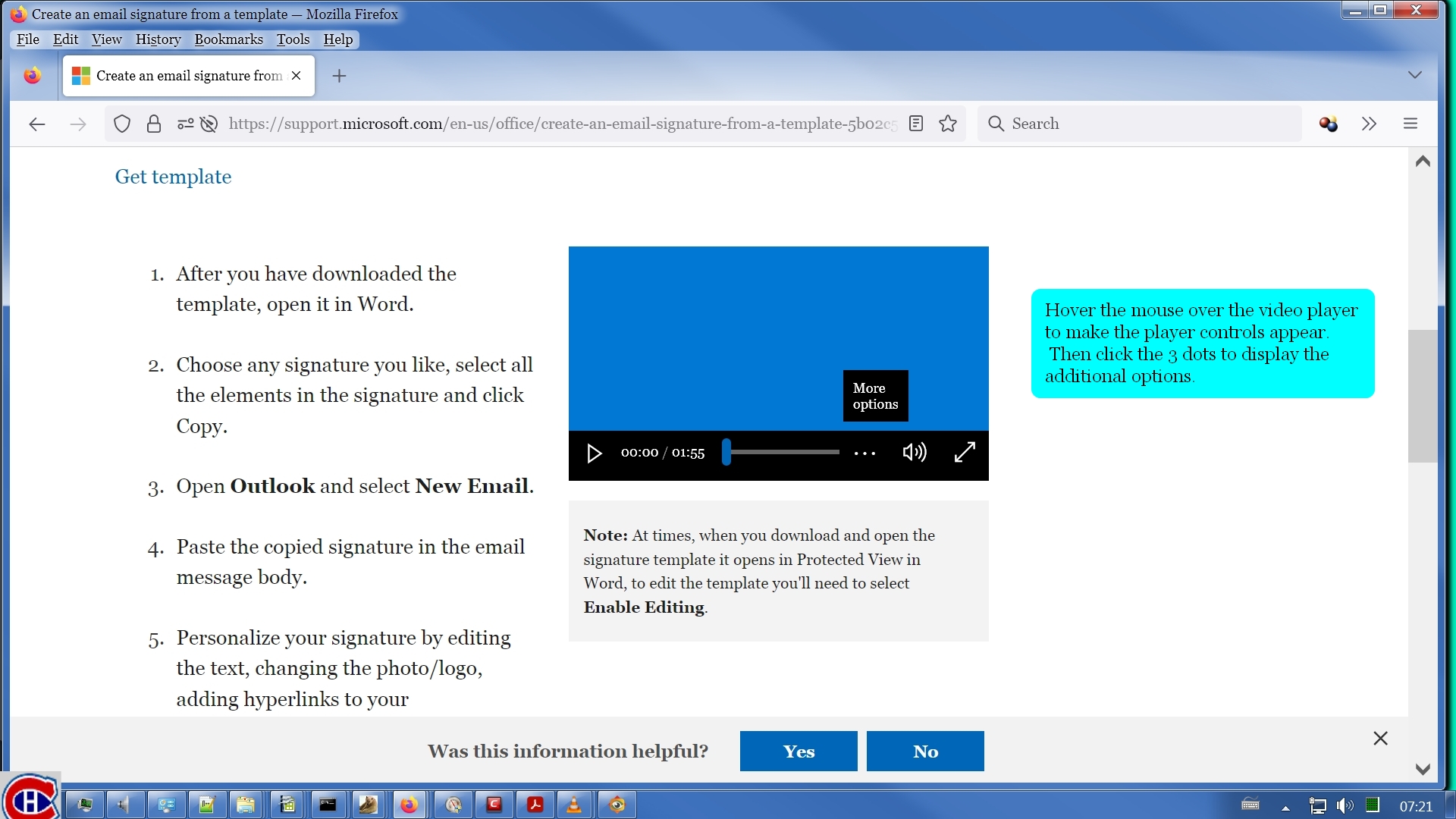
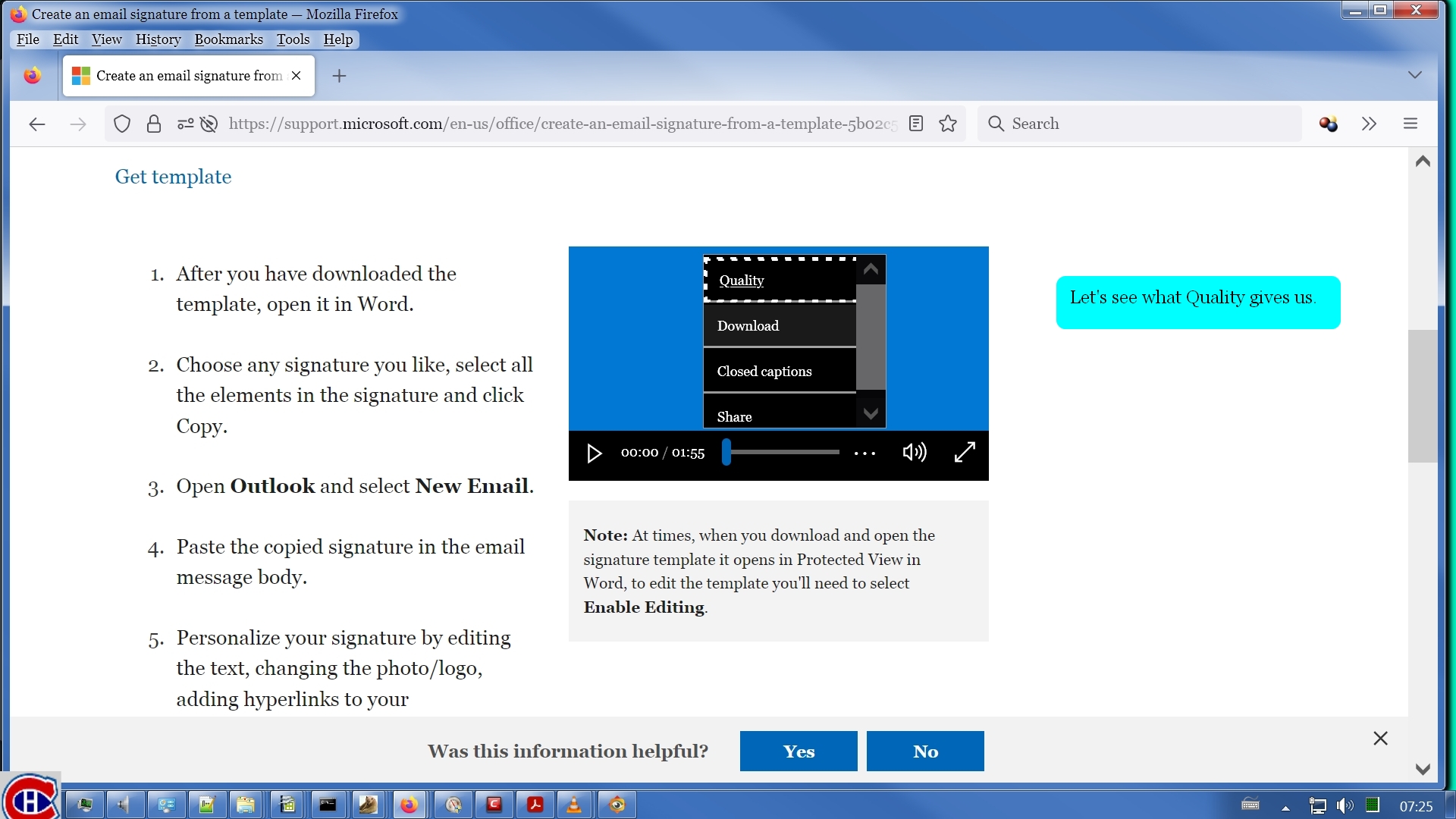


I could not even play the video in the web page. Clicking the play button had no effect at all. I found I could drag the slider button back & forth & it caused certain frames of the video to display. But the thing refused to launch playback for me.
But I did get it to download. It's rather convoluted & I think it's quite stupid. But this did result in an MP4 on my hard drive that did play just fine in VLC. Here are the steps:
This download took about 1 second. The resulting MP4 was 1920x1080, which is what I was hoping it would be for the highest "quality" of this video. It isn't really much of a video. The sound track is just some elevator music. The video is only barely a video. It looks like they filmed a PowerPoint presentation. So what exactly would be in any captions? This was one of the more annoying issues we've had to deal with here.
mjs
Oct 25, 2022, 7:27:27 PM10/25/22
to Video DownloadHelper Q&A
That's surprising that the site behaved like that but l think it played for me and there was a dash manifest which l put into ffmpeg to download it.
I'll have another look at it to see if I can repeat it.
Wild Willy
Oct 25, 2022, 7:50:29 PM10/25/22
to Video Download Helper Google Group
Of course. Why wouldn't it? I visited it just now & the video plays fine in the web
page. Plus, of course now I'm seeing a DASH manifest (mpd). Running it through ffprobe
shows 6 video streams of varying resolutions plus a single audio stream. Slightly odd
that they are all grouped under Program 0, not various Programs with a video Stream & an
audio Stream in each one. No matter. You can code an invocation of ffmpeg using the
information in this manifest. Piece of cake. Now why did I get such crap results
earlier? One of the mysteries of the universe.
I suppose what I did earlier wasn't a total waste. It shows that if you keep asking,
"What's this? What if I click this? What do I get when I try this?" you just might find
an alternative way of doing what you want. VDH doesn't work on every site & there are
usually multiple alternative solutions. You just need to look for them.
page. Plus, of course now I'm seeing a DASH manifest (mpd). Running it through ffprobe
shows 6 video streams of varying resolutions plus a single audio stream. Slightly odd
that they are all grouped under Program 0, not various Programs with a video Stream & an
audio Stream in each one. No matter. You can code an invocation of ffmpeg using the
information in this manifest. Piece of cake. Now why did I get such crap results
earlier? One of the mysteries of the universe.
I suppose what I did earlier wasn't a total waste. It shows that if you keep asking,
"What's this? What if I click this? What do I get when I try this?" you just might find
an alternative way of doing what you want. VDH doesn't work on every site & there are
usually multiple alternative solutions. You just need to look for them.
Reply all
Reply to author
Forward
0 new messages