
Videos missing audio for RoosterTeeth.com lately
150 views
Skip to first unread message

S.Carter
Jul 26, 2021, 12:21:08 PM7/26/21
to Video DownloadHelper Q&A
Hi, not sure if they have made some change on their site in the last week or so but I have been getting video with no audio lately (or, depending on the option I try, I might just get audio only).
Here is a recent URL where I only get a video:
And here is one from some months ago that worked (and still works):
Here are some more that are not working:
Mac OS 11.5
Firefox 90.0.2
VDH 7.6.0 (Licensed)
CoApp 1.6.3
I don't use Chrome but checked one of these with it and it seems to have the same problem.
Thanks for any help you can offer.

Wild Willy
Jul 26, 2021, 11:22:48 PM7/26/21
to Video Download Helper Google Group
I'm doing this on Windows 7 64-bit, Firefox 90.0.2 64-bit, licensed VDH 7.6.1a2 beta,
CoApp 1.6.3.
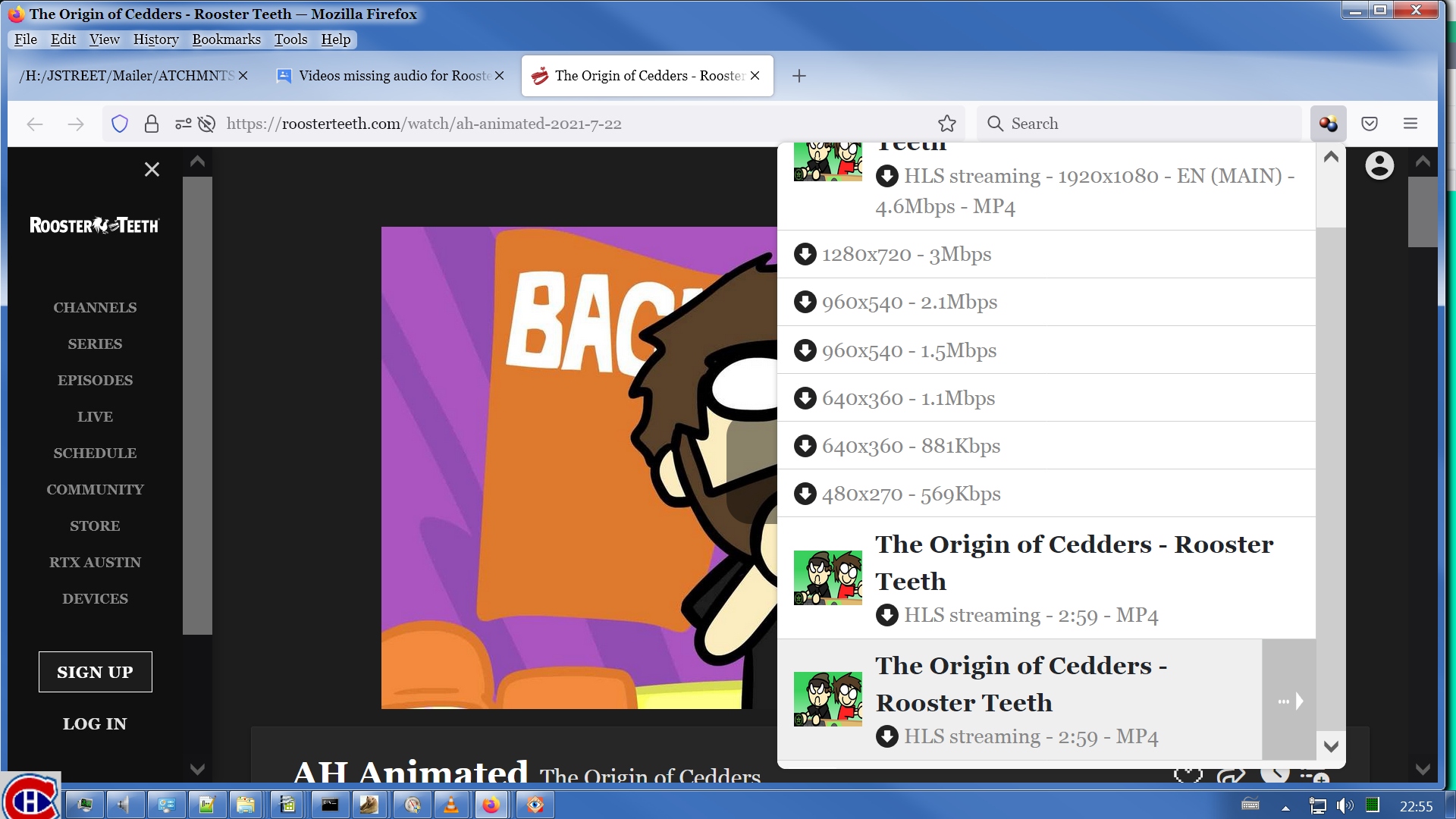
I visited your first URL & pulled up the VDH menu. I downloaded the first variant
offered, as shown in attached image Video Variant. After I downloaded that, I looked at
the Windows properties for the file & saw it was video without audio. So I went back to
the web page & looked at the VDH menu again. I had to scroll it down, then I downloaded
the variant offered at the bottom, as shown in the attached image Audio Variant. After I
downloaded that, the Windows properties showed it was audio without video. I'm showing
the details tab of the properties dialogs for both files in attached image Details. I
then played the 2 files in VLC using the synchronous playback technique I explained over
here:
https://groups.google.com/g/video-downloadhelper-q-and-a/c/YwvzcYm-fP0
You have to scroll that down a bit. Look for my post with 12 images in it, then read all
the images.
I am not going to go look at your other videos but I'm sure in each case there is a
similar technique that will get you the results you want. There is a certain amount of
guesswork involved here. I don't want to minimize that. You may have to experiment a
bit & it may take some trial & error before you get good results. I speculate that if
this didn't used to be necessary that the web site itself changed the way they are
presenting content. It may be a bit inconvenient but I think you'll just have to live
with it.


S.Carter
Jul 27, 2021, 9:43:29 AM7/27/21
to Video DownloadHelper Q&A
Thanks for taking a look. I was poking around at this last night and also found the separate audio stream as you have mentioned. I found also that once I have collected both streams, I can use the function built into VDH to combine the two, which works very quickly. Additionally, through digging around looking for the right stream I inadvertently discovered you can access the VDH menu by right clicking the video itself (in addition to the toolbar icon), and the list is much easier to navigate, with that lone audio stream nicely put at the bottom in it's own little section.
It's a little extra work but I'm glad this will still work for me! Their apps are terrible.

S.Carter
Jul 28, 2021, 9:06:14 PM7/28/21
to Video DownloadHelper Q&A
OK now they are just messing with me. Check out this video posted today, there are a TON of hits (in attached screenshot).
On this one I'm getting the error "Error MP2T - No data received". After a little googling that brought me to some posts in this forum I set "HLS as M2TS" in the settings. This gets me past the error but leaves me with an m2ts file that even VLC doesn't seem to know what to do with.
Any ideas?
Also, Here's a log that is left over at the end of the m2ts download:
Could not get information from media 'The Randomat Is Out Of Control - Gmod: TTT - Rooster Teeth' from file '/Users/ltcarter47/Downloads/The Randomat Is Out Of Control - Gmod TTT - Rooster Teeth.m2ts'. The file might be corrupted.{ "file": "/Users/ltcarter47/Downloads/The Randomat Is Out Of Control - Gmod TTT - Rooster Teeth.m2ts", "stat": { "dev": 16777220, "mode": 33188, "nlink": 1, "uid": 501, "gid": 20, "rdev": 0, "blksize": 4096, "ino": 170828164, "size": 1399680183, "blocks": 2753984, "atimeMs": 1627520091729.9568, "mtimeMs": 1627520071565.1587, "ctimeMs": 1627520071565.1587, "birthtimeMs": 1627519531006.4707, "atime": "2021-07-29T00:54:51.730Z", "mtime": "2021-07-29T00:54:31.565Z", "ctime": "2021-07-29T00:54:31.565Z", "birthtime": "2021-07-29T00:45:31.006Z" } } Exit code: 1 ffprobe version n4.1.5-vdhcoapp Copyright (c) 2007-2020 the FFmpeg developers built with Apple LLVM version 8.0.0 (clang-800.0.42.1) configuration: --arch=x86_64 --enable-runtime-cpudetect --enable-gpl --extra-version=vdhcoapp --enable-shared --enable-pthreads --prefix=/Users/mig/localgit/vdhcoapp/converter/src-build/mac/64/converter-build --enable-version3 --extra-cflags=-I/Users/mig/localgit/vdhcoapp/converter/src-build/mac/64/deps/include --extra-ldflags='-L/Users/mig/localgit/vdhcoapp/converter/src-build/mac/64/deps/lib -L/Users/mig/localgit/vdhcoapp/converter/src-build/mac/64/zlib' --pkg-config=pkg-config --enable-libvo-amrwbenc --enable-libopus --enable-libvorbis --enable-libvpx --enable-libx264 --enable-libmp3lame --enable-libxvid --enable-libopencore_amrnb --enable-libopencore_amrwb --enable-encoder=libvpx-vp9 --enable-libwebp --enable-zlib --enable-libopenjpeg --enable-libx265 --enable-libtheora --enable-libaom --disable-doc libavutil 56. 22.100 / 56. 22.100 libavcodec 58. 35.100 / 58. 35.100 libavformat 58. 20.100 / 58. 20.100 libavdevice 58. 5.100 / 58. 5.100 libavfilter 7. 40.101 / 7. 40.101 libswscale 5. 3.100 / 5. 3.100 libswresample 3. 3.100 / 3. 3.100 libpostproc 55. 3.100 / 55. 3.100 [mov,mp4,m4a,3gp,3g2,mj2 @ 0x7fb6ca808200] could not find corresponding trex [mov,mp4,m4a,3gp,3g2,mj2 @ 0x7fb6ca808200] error reading header /Users/ltcarter47/Downloads/The Randomat Is Out Of Control - Gmod TTT - Rooster Teeth.m2ts: Invalid data found when processing input

Wild Willy
Jul 29, 2021, 12:36:00 AM7/29/21
to Video Download Helper Google Group
I looked at that page & I am not getting the same content in the VDH menu. I don't know
why. You can see what I got in the attached image Video #1, I scrolled the menu down to
where the highlighted variant was so I could download it. VDH dutifully spent a few
minutes downloading whatever was behind that menu entry. But when the download ended, it
gave me the same error you got.
Time for plan B. I turned on the M2TS switch like you did. Then I reloaded the
extension just so VDH would approach the web page fresh. Then I reloaded the video page.
VDH now showed me essentially the same items except now it said M2TS instead of MP4. See
attached image Video #2. The highlighted variant downloaded successfully. But it
probably doesn't surprise you that VLC wouldn't play it for me. Too bad, because there's
clearly labeled audio-only variants, one of which I would have downloaded next.
Time to drop back 10 & punt. I've got one last trick up my sleeve & that's called a
manifest. I wondered if maybe this web site uses manifests. Not all web sites do, so I
was just taking a wildass stab in the dark. So, I opened the Network Monitor in Firefox
& reloaded the web page, as you can see in the attached image Manifest. When I saw that
I said to myself, "Self," I said, "this looks exactly like the operas, right down to the
funkyass URLs." Sure enough, when I opened the manifest by double clicking on the first
entry in the Network Monitor, it gave me a manifest that is so much like the operas I
think the same people who did the operas did this one. (I refer to the operas in the
past tense because, sadly, the Metropolitan Opera's free stream initiative has ended.)
So I downloaded an "opera" called Rooster Teeth. How? You're going to have to bite the
bullet (do roosters have teeth that can bite bullets?) & read the homeric epic located
here:
https://groups.google.com/g/video-downloadhelper-q-and-a/c/8V2cRB-bcK4
Sorry, there's no shortcuts. Either you're really motivated to learn what's there or
you're going to just give up. Your choice. The short version is that I used ffmpeg to
download the video stream as one file & the audio stream as another, thus creating an
"opera" from this Rooster Teeth video. I used a REXX script I constructed so I wouldn't
have to keep retyping the ridiculously non-intuitive ffmpeg parameters every time I got
an opera. I think of my REXX script as a wrapper for ffmpeg. I played the 2 files I got
synchronously in VLC & it plays fine, with both video & audio for the whole 25:43.
When I say ffmpeg, I'm talking about the tool you can get from ffmpeg.org, not the
captive ffmpeg that Michel embedded in VDH. Or maybe it's in the CoApp. I'm not quite
clear on that detail. But it's not particularly important. The point is, you have
something called ffmpeg as part of VDH/CoApp but it's not good for doing this sort of
thing. I've tried. It doesn't work.
Now the question is, given that this perfectly good manifest is here, why doesn't VDH put
up variants that download? It did for the operas. What's the deal here? I used the
manifest to get the parts using ffmpeg. You could say I kind of did it manually. Why
can't VDH do the same thing under program control? You'd think it would. I'd be most
interested to get Michel's take on this.


S.Carter
Jul 30, 2021, 12:47:05 PM7/30/21
to Video DownloadHelper Q&A
Willy, Thanks a lot for looking into this and all the info shared. I'm going to take some time reading through that opera thread over the next week and see if I can wrap my head around how to do this. I'm a bit of a novice with this sort of thing but can muddle my way through when motivated. I've toyed with ffmpeg here and there but it's been a long time and usually with a gui. We'll see if I'm still motivated once I have processed it all! haha.
Reply all
Reply to author
Forward
0 new messages