Wait Until %QTIME Problem

722 views
Skip to first unread message

Matthew Redmond

unread,
Apr 14, 2014, 1:10:44 PM4/14/14
to tas...@googlegroups.com
I am trying to use %qtime to create a timeout in Wait Until so that if the variable condition in the Wait Until is never met, the task does not get stuck there but can move on after a certain period of time. However, my task keeps getting stuck at the Wait Until, and I cannot figure out why.

I have tried changing the Wait Until interval to a shorter period of time, but the task still gets stuck.

Any help diagnosing the problem or any other suggestions on how to better do this would be greatly appreciated:

Refresh Data
A1: Perform Task [ Name:Refresh Data (Notify) Stop:Off Priority:5 Parameter 1 (%par1): Parameter 2 (%par2): Return Value Variable: ] 
A2: Variable Add [ Name:%RefreshData Value:1 Wrap Around:0 ] 
A3: Mobile Data [ Set:Off ] 
A4: Flash [ Text:Refresh Data (%RefreshData) Long:Off ] 
A5: Wait [ MS:0 Seconds:5 Minutes:0 Hours:0 Days:0 ] 
A6: Mobile Data [ Set:On ] 
A7: Wait Until [ MS:0 Seconds:5 Minutes:0 Hours:0 Days:0 ] If [ %Data ~ On | %qtime > 20 ]
A8: Variable Set [ Name:%RefreshRunning To:Off Do Maths:Off Append:Off ] 

Refresh Data (Notify)
A1: Notify [ Title:Data Refresh Text:In progress. Icon:hd_device_access_network_cell Number:0 Permanent:On Priority:3 ] 
A2: Wait Until [ MS:0 Seconds:5 Minutes:0 Hours:0 Days:0 ] If [ %RefreshRunning ~ Off ]
A3: Notify Cancel [ Title:Data Refresh Warn Not Exist:Off ] 

Matt R

unread,
Apr 14, 2014, 1:42:41 PM4/14/14
to tas...@googlegroups.com
What does the run log show? My first guess would be you need to lower the priority in the perform task action.

Matt

Matthew Redmond

unread,
Apr 14, 2014, 2:57:56 PM4/14/14
to tas...@googlegroups.com
The run log stops at the first "Refresh Data (Notify).Wait Until." It does not keep checking the Wait Until for either task in the set 5 second interval as I would expect it should be.

Neither increasing nor decreasing the perform task priority for the notify action helps; the run log shows it keeps getting stuck at this same place.

Matt R

unread,
Apr 14, 2014, 3:23:23 PM4/14/14
to tas...@googlegroups.com
When you changed the task priority (should be lowered), did you fully exit Tasker using the back button to apply your changes?

Matt

Matthew Redmond

unread,
Apr 14, 2014, 3:31:47 PM4/14/14
to tas...@googlegroups.com
I did, but I ended up finding what the problem was. These tasks are a part of a series of tasks that start each other through the perform task action, and instead of using %priority+1 or %priority-1 to order the flow of the tasks, I was trying to manage all the task priorities manually and somewhere along the line I set one of them wrong. So I corrected all the perform task actions to use either %priority+1 or %priority-1 (it was %priority -1 for the above perform task), and it all works now. :)

Thanks for your help! I hadn't even thought of checking the task priorities till you mentioned it.


On Mon, Apr 14, 2014 at 2:23 PM, Matt R <matthew.r...@gmail.com> wrote:
When you changed the task priority (should be lowered), did you fully exit Tasker using the back button to apply your changes?

Matt

--
You received this message because you are subscribed to a topic in the Google Groups "Tasker" group.
To unsubscribe from this topic, visit https://groups.google.com/d/topic/tasker/rfzHXlIvoEw/unsubscribe.
To unsubscribe from this group and all its topics, send an email to tasker+un...@googlegroups.com.
Visit this group at http://groups.google.com/group/tasker.
For more options, visit https://groups.google.com/d/optout.

Matthew Redmond

unread,
Apr 14, 2014, 5:41:24 PM4/14/14
to tas...@googlegroups.com
Never mind, I thought I had it fixed, but it keeps doing the same thing where it gets stuck at Refresh Data (Notify).Wait Until. And in the run log, it just stops at the first Wait Until and does not ever check it again, even the maximum interval is set to 5 seconds.

Also, sometimes it is running through Refresh Data (Notify) first and not finishing Refresh Data even though I have set the perform task priority to %priority-1.

Brandon Horwath

unread,
Apr 14, 2014, 7:06:16 PM4/14/14
to tas...@googlegroups.com
Try using a for loop and smaller wait intervals.

For example, wait 2 minutes

For %wait do 1:120
Wait for 1 second IF condition desired matches
End for

Matt R

unread,
Apr 14, 2014, 7:06:41 PM4/14/14
to tas...@googlegroups.com
Maybe try shortening a test case to only have the one perform task without other things running? Also, is there a reason you're doing it as a separate perform task?

Matt

Manu Pinazo

unread,
Apr 15, 2014, 1:43:13 AM4/15/14
to tas...@googlegroups.com
It's the first time I hear about %qtime, when was this added?
It can save me an action here and there in some tasks where I try to achieve the same.

I tried just the same you are doing it in a test task and for me it exits just fine when qtime is bigger than desired timeout, however you can try to use what I was using until now to achieve this same thing:

Variable Set [ Name:%timeout To: %TIMES + 20 Do Maths:On Append:Off ]
Wait Until [ MS:0 Seconds:5 Minutes:0 Hours:0 Days:0 ] If [ %Data ~ On | %TIMES > %timeout ]

Rich D

unread,
Apr 15, 2014, 5:42:31 AM4/15/14
to Tasker Google Groups Post


>
> Maybe try shortening a test case to only have the one perform task without other things running? 

+1

It   could be a longer wait from a previous task. Waits are not shown in the run log when they are started. To stop the endless loop you can open any task in the task edit screen and press the stop   button . This will stop all tasks. Then  check the run log to see what tasks have been stopped.

Matthew Redmond

unread,
Apr 15, 2014, 2:11:05 PM4/15/14
to tas...@googlegroups.com
@Brandon H: I thought of doing this and likely will implement this in the future if I continue having problems with Wait Until, but I just liked the idea of doing it with one action line instead of having to always create a loop. But perhaps a For Loop is the more reliable way to go if multiple Wait Untils have this problem of getting stuck...

@Matt R: I mainly was doing these as separate tasks just to test how to get Wait Untils in different tasks running in parallel to work together. I did combine them into one task with one Wait Until which works perfectly fine for the purpose I'm using it, but I wanted to find a way to get that function to work in two if possible and to determine what I was doing wrong that was causing it, just for future projects.

@Manu P: I believe %qtime has been around for awhile, not sure when it came. It's very useful though. And I'll try that method and see if it changes anything. I'm thinking now though that the problem is more with Tasker not continuing to check the Wait Until if two Wait Untils start to run at the same time, rather than something messing up with %qtime. Because that's what seems to be happening per the Run Log (it just freezes at one of the Wait Untils, though other tasks can continue to function fine).

@Rich D: When it gets stuck at the Wait Until and I stop the task, the only two tasks which stop according to the Run Log are the Refresh Data and Refresh Data (Notify), so it does not appear to be a conflict with a previous task...

Matthew Redmond

unread,
Apr 15, 2014, 2:20:03 PM4/15/14
to tas...@googlegroups.com
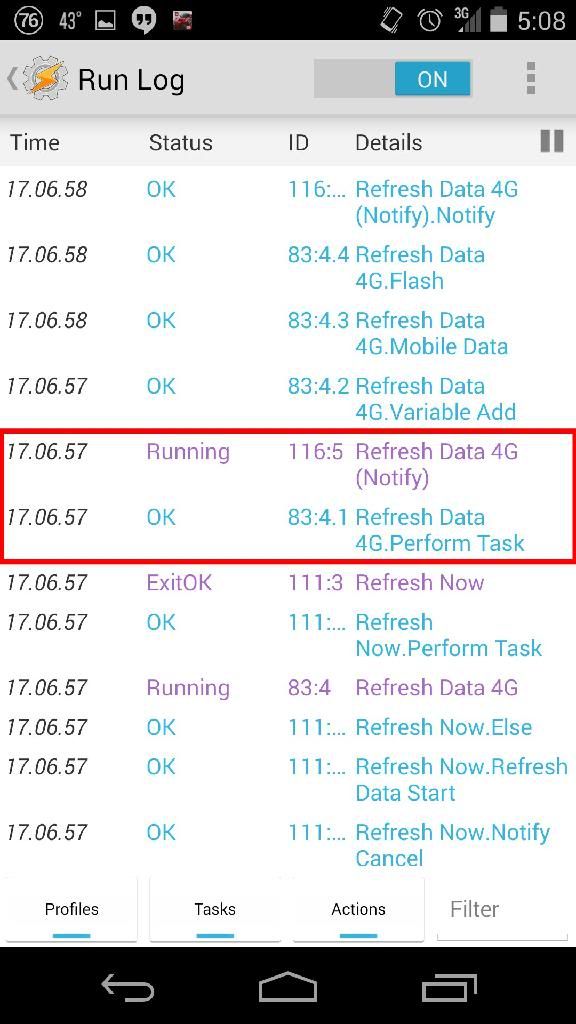
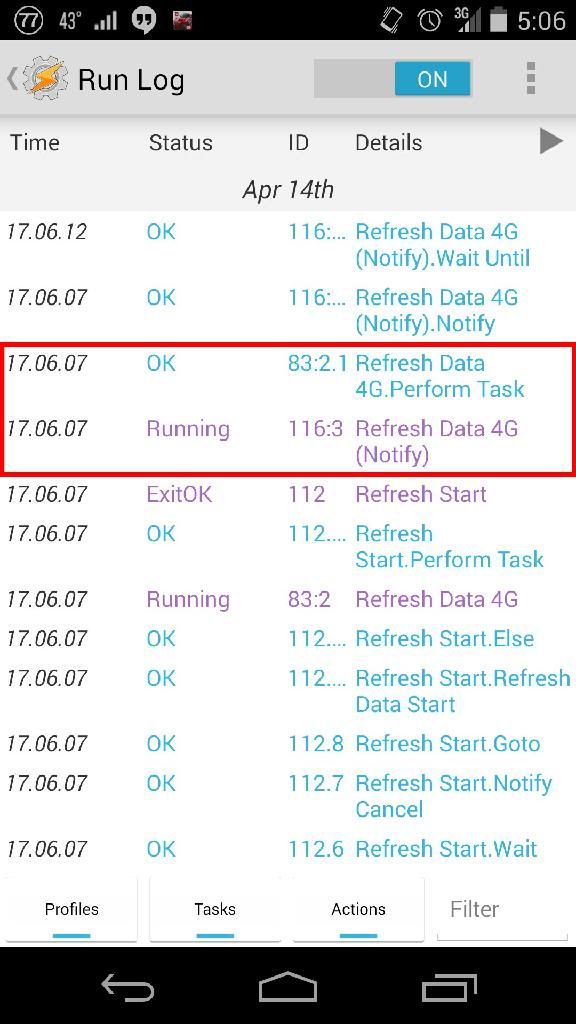
So the interesting thing I've found is that the Wait Untils only get stuck in this particular instance if the Refresh Data (Notify) task somehow starts in the Run Log before Refresh Data.Perform Task has run. I'm not sure how that can happen since the Refresh Data.Perform Task is what causes Refresh Data (Notify) to run and Refresh Data (Notify) is set to run at %priority-1, but according to the Run Log, this is happening, and the Wait Until only gets stuck when this happens.

This is how it should run (Refresh Data 4G is the same task as Refresh Data, but checks if %Data4G ~ On):


This is how it runs when the Wait Untils get stuck:


Any explanations?

Matt R

unread,
Apr 15, 2014, 2:40:34 PM4/15/14
to tas...@googlegroups.com
Is the task "Refresh Start" launching the task "Refresh Data 4G (Notify)"?  That's what it looks like in that second run log.

Matt

Matthew Redmond

unread,
Apr 15, 2014, 3:01:45 PM4/15/14
to tas...@googlegroups.com
Sorry, I should have explained that. No, it is launching "Refresh Data 4G", and then "Refresh Data 4G" is supposed to launch "Refresh Data 4G (Notify)." There are two ways the Refresh Data can be launched: either through a notification button which launches the "Refresh Now" seen in the first picture, which then launches "Refresh Data," or if you don't select one of buttons in the notification in 1.5 minutes, Refresh Start automatically launches Refresh Data. The problem only happens whenever Refresh Start launches Refresh Data.

Matt R

unread,
Apr 15, 2014, 3:15:59 PM4/15/14
to tas...@googlegroups.com
So for both Perform Task actions, the run log indicates that the task is starting ("running") BEFORE the Perform Task action actually launches it?  Sounds like a bug.

Pent, any ideas why this could happen?  Last bit of priority weirdness that needs to get fixed?

Matt

Rich D

unread,
Apr 15, 2014, 5:42:12 PM4/15/14
to Tasker Google Groups Post

:


>
> Sorry, I should have explained that. No, it is launching "Refresh Data 4G", and then "Refresh Data 4G" is supposed to launch "Refresh Data 4G (Notify)." There are two ways the Refresh Data can be launched: either through a notification button

Could you explain exactly what you mean by a 'notification button'

Could you also post the Refresh now' , 'Refresh data' and the 'Refresh start' tasks

Thanks,    Rich.

Matthew Redmond

unread,
Apr 15, 2014, 6:12:58 PM4/15/14
to tas...@googlegroups.com
By notification button, I mean the Action options from the Notify action. 

I have since streamlined and made this profile much more efficient and simple, but here are the original tasks that were causing this problem:

Refresh Start (Old) (112)
A1: If [ %Data4G ~ Off | %Data ~ Off ]
A2: Variable Set [ Name:%RefreshRunning To:On Do Maths:Off Append:Off ] 
A3: If [ %SCREEN ~ On ]
A4: Notify [ Title:Data Refresh Needed Text:Refresh data connection now or later? Icon:hd_device_access_network_cell Number:0 Permanent:On Priority:3 Actions:(3) ] 
A5: Wait Until [ MS:0 Seconds:2 Minutes:0 Hours:0 Days:0 ] If [ %qtime > 90 | %Data4G ~ On &+ %Data ~ On ]
A6: Notify Cancel [ Title:Data Refresh Needed Warn Not Exist:Off ] 
A7: Goto [ Type:Action Label Number:1 Label:Refresh Data Start ] 
A8: Else 
A9: If [ %Data4G ~ Off & %Data ~ Off ]
A10: Perform Task [ Name:Refresh Data (Old) Stop:On Priority:%priority+1 Parameter 1 (%par1): Parameter 2 (%par2): Return Value Variable: ] 
A11: Else If [ %Data4G ~ Off ]
A12: Perform Task [ Name:Refresh Data 4G (Old) Stop:On Priority:%priority+1 Parameter 1 (%par1): Parameter 2 (%par2): Return Value Variable: ] 
A13: Else 
A14: Variable Set [ Name:%RefreshRunning To:Off Do Maths:Off Append:Off ] 
A15: End If 
A16: End If 
A17: End If

Refresh Now (Old) (111)
A1: Stop [ With Error:Off Task:Refresh Start (Old) ] 
A2: Notify Cancel [ Title:Data Refresh Needed Warn Not Exist:Off ]
A3: If [ %Data4G ~ Off & %Data ~ Off ]
A4: Perform Task [ Name:Refresh Data (Old) Stop:On Priority:%priority+1 Parameter 1 (%par1): Parameter 2 (%par2): Return Value Variable: ] 
A5: Else If [ %Data4G ~ Off ]
A6: Perform Task [ Name:Refresh Data 4G (Old) Stop:On Priority:%priority+1 Parameter 1 (%par1): Parameter 2 (%par2): Return Value Variable: ] 
A7: Else 
A8: Variable Set [ Name:%RefreshRunning To:Off Do Maths:Off Append:Off ] 
A9: End If

Refresh Data (Old) (108)
A1: Perform Task [ Name:Refresh Data (Notify) (Old) Stop:Off Priority:%priority-1 Parameter 1 (%par1): Parameter 2 (%par2): Return Value Variable: ] 
A2: Variable Add [ Name:%RefreshData Value:1 Wrap Around:0 ] 
A3: Mobile Data [ Set:Off ] 
A4: Flash [ Text:Refresh Data (%RefreshData) Long:Off ] 
A5: Wait [ MS:0 Seconds:5 Minutes:0 Hours:0 Days:0 ] 
A6: Mobile Data [ Set:On ] 
A7: Wait Until [ MS:0 Seconds:5 Minutes:0 Hours:0 Days:0 ] If [ %Data ~ On | %qtime > 30 ]
A8: Variable Set [ Name:%RefreshRunning To:Off Do Maths:Off Append:Off ] 
A9: If [ %WIFII ~ *connection* ]
A10: Variable Add [ Name:%WiFiConnected Value:1 Wrap Around:0 ] 
A11: End If

Refresh Data (Notify) (Old) (96)
A1: Notify [ Title:Data Refresh Text:In progress. Icon:hd_device_access_network_cell Number:0 Permanent:On Priority:3 ] 
A2: Wait Until [ MS:0 Seconds:5 Minutes:0 Hours:0 Days:0 ] If [ %RefreshRunning ~ Off ]
A3: Notify Cancel [ Title:Data Refresh Warn Not Exist:Off ]

The bold line is the action it freezes up on when entering Refresh Data through Refresh Start. The three notification actions listed in 112.4 are to Perform Task Refresh Now, Refresh Later, or Refresh Cancel, all with %priority+1.
Reply all
Reply to author
Forward
0 new messages