Profile On, but task not executed

2,126 views
Skip to first unread message

Pat Bouvry

unread,
Jun 29, 2017, 11:06:39 PM6/29/17
to Tasker
LG V20 Android 7.0

I created a profile to turn down the phone ring sound every weekday morning while at work (see attached picture).  The related task shows as active in the notification area, but the sound is NOT changed.  The task only works when I manually activate it (pressing play).

I have to do this every morning.  What's the point of buying Tasker if it can't even perform the simple task of lowering the phone's sound.

If anyone knows why Tasker is not working, your help would be appreciated. 
(I haven't blocked Tasker's notifications, and it runs in Foreground)

Thanks, Pat
Tasker Profile.png

Pent

unread,
Jun 30, 2017, 1:54:13 AM6/30/17
to Tasker

I created a profile to turn down the phone ring sound every weekday morning while at work (see attached picture).  The related task shows as active in the notification area, but the sound is NOT changed.

Please check Menu / More / Run Log and see if there's any problem with running the
task at the time you have specified (possibly because the device is off).

Pent

Duck Redbeard

unread,
Jun 30, 2017, 3:40:51 AM6/30/17
to Tasker
Is device administrator enabled relevant to this action?

Pent

unread,
Jun 30, 2017, 6:23:52 AM6/30/17
to Tasker
Don't know, OP didn't mention action(s) being used, but probably not.

Pent

Patrick Bouvry

unread,
Jun 30, 2017, 6:52:00 AM6/30/17
to tas...@googlegroups.com
Tasker has the 'phone administration' on (in phone settings). 
When I press on devise admin (in Tasker), nothing happens. 

I turned on Log Run, and will report on the next failure. 
Thanks for your help. 

Pat


On Jun 30, 2017 18:24, "Pent" <crafty...@gmail.com> wrote:
Don't know, OP didn't mention action(s) being used, but probably not.

Pent

--
You received this message because you are subscribed to a topic in the Google Groups "Tasker" group.
To unsubscribe from this topic, visit https://groups.google.com/d/topic/tasker/JpBpqeyUOLY/unsubscribe.
To unsubscribe from this group and all its topics, send an email to tasker+unsubscribe@googlegroups.com.
Visit this group at https://groups.google.com/group/tasker.
For more options, visit https://groups.google.com/d/optout.

Pat Bouvry

unread,
Jul 5, 2017, 4:14:22 AM7/5/17
to Tasker
Hi Pent and Duck,

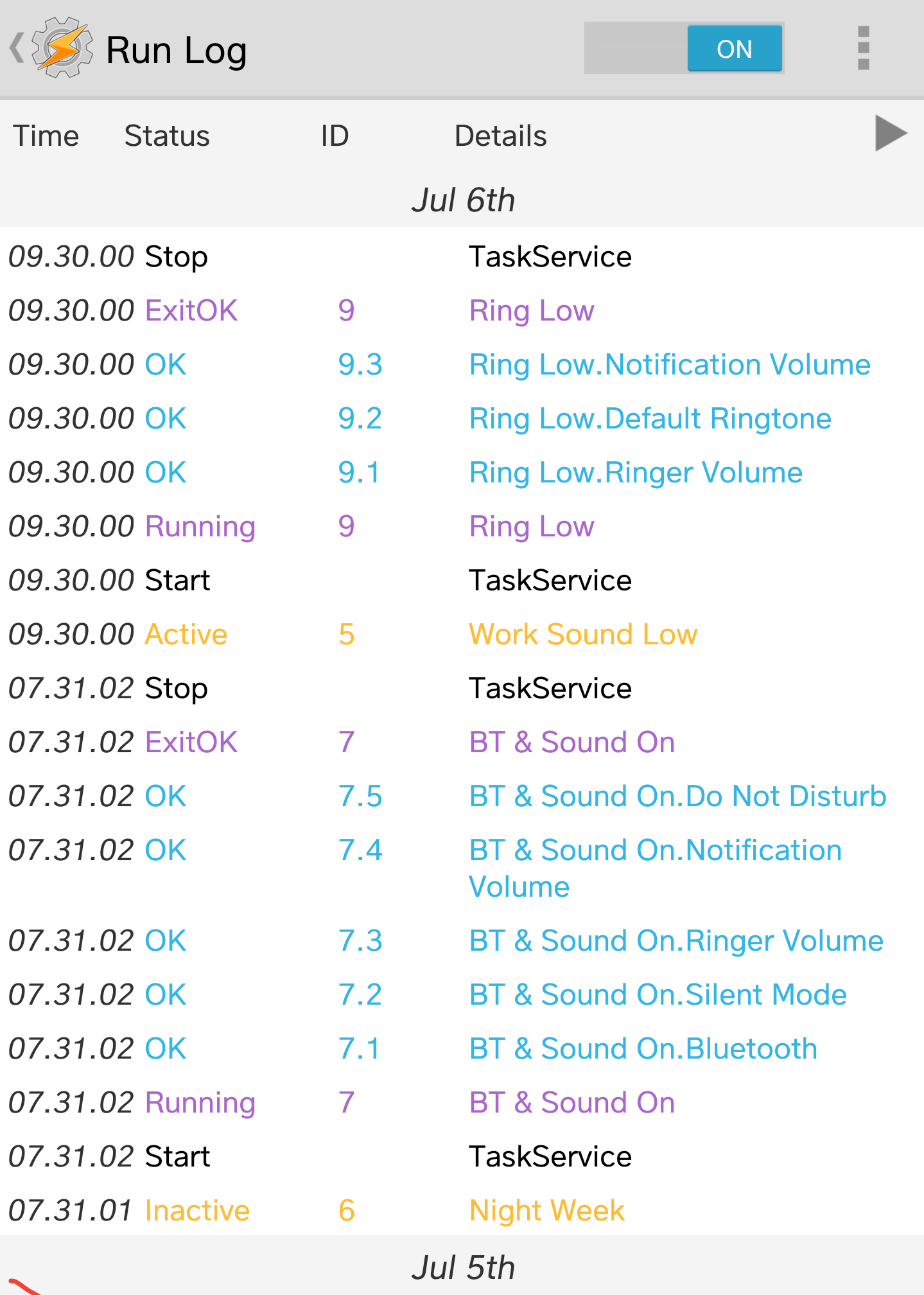
Please see the Run Log results attached.

The profile shows as being on, but the phone ring levels have not changed.
The task has therefore not been applied, despite Tasker's indication.

Regards,
Pat 
2017-07-05 16_07.jpg
2017-07-05 16_02.jpg

Rich D

unread,
Jul 5, 2017, 5:04:04 AM7/5/17
to Tasker Google Groups Post

Your profile fired and task ran at 9:30 am. The times on your screen caps show you are checking at 4:02 pm.  A lot can happen in that amount of time like another app setting volume , Android setting volume, another Tasker task setting volume...

1. Did you check the entire run log to see if Tasker ran any more actions in this time frame?

2. Have you been able to check the volume level a few moments after the profile has gone active?

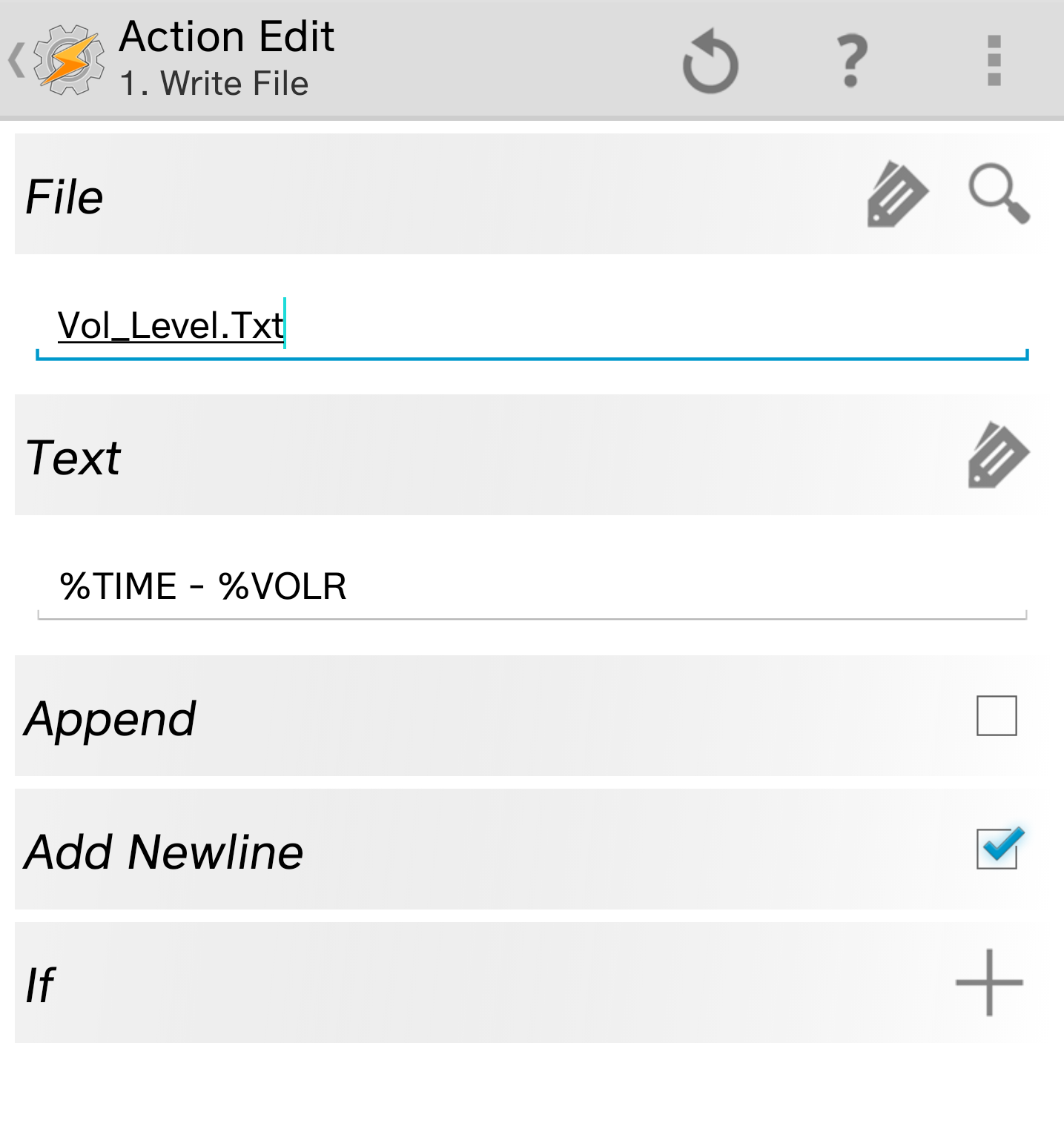
My suspicion would be another app. You can monitor the volume level with a profile with a context of State / variable  / variable value : %VOLR . Then in the task write to a file with a time stamp and the current volume (%VOLR). This should let you know when the volume is getting changed. 


Rich D

unread,
Jul 5, 2017, 6:36:07 AM7/5/17
to Tasker Google Groups Post


Edit....

You can monitor the volume level with a profile with a context of Event / variable  / variable set : %VOLR .

Pat Bouvry

unread,
Jul 5, 2017, 10:56:02 PM7/5/17
to Tasker
Thanks Rich,

The sound-change task again did not work this morning, despite what Run Log says.  Had to run it manually.

I've tried to create the profile you mentioned but am unsure how to make the task to write the file - please see attached.
Thanks again for your help.

Pat
2017-07-06 10_19.jpg
2017-07-06 10_45.jpg
2017-07-06 10_46.jpg

Rich D

unread,
Jul 6, 2017, 5:01:42 AM7/6/17
to Tasker Google Groups Post


Thanks Rich,

The sound-change task again did not work this morning, despite what Run Log says.  Had to run it manually.

1. At what time did you check the volume setting?
2. Could you attach the complete run log? You can find it at Tasker/log


I've tried to create the profile you mentioned but am unsure how to make the task to write the file - please see attached.
Thanks again for your help.

Could you paste both profile descriptions here.


To post your profile or task here...  Long press on the profile or task name / ( 3 dot menu with 4.0+ ) export / export "DESCRIPTION" to clipboard (not XML)

Any linked tasks will be exported with the profile they are linked to..

To be able to export, The beginner mode needs to be off and the profile needs to be named by you (Not the Tasker listed name.  Tasker will list your profile with the context name if you have not given it one).


Robert Ryan

unread,
Jul 7, 2017, 12:38:10 PM7/7/17
to Tasker
@Pat Bouvry

I know it sounds unrelated, but what version of the Google app do you have? Some recent versions have been causing problems with profile/task activation.

Pat Bouvry

unread,
Jul 10, 2017, 1:57:42 AM7/10/17
to Tasker
@Robert Ryan,

Android Tasker is version 4.9u4.  Android ia 7.0 (Feb 1, 2017).

Pat Bouvry

unread,
Jul 10, 2017, 2:03:28 AM7/10/17
to Tasker
I noticed something else: The task 'Ring Low' (see attached) is only partially activated by Profile 'Work Sound Low'.  Of the 3 items, only 'Notification Volume' is not adjusted automatically.  The ringer volume and Default ringtone are correctly adjusted (all works correctly manually though).  I changed the order of items to lower Notification Volume first, but the same problem happens: the Notification Volume is not automatically adjusted and stays high.  I'm not sure if that's a hint to corner the problem.


2017-07-10 10_03.jpg
2017-07-10 10_02.jpg

Pat Bouvry

unread,
Jul 10, 2017, 2:15:55 AM7/10/17
to Tasker
@Rich D

 
1. At what time did you check the volume setting?
Around  9:45 (15 min after the profile kicks in)

2. Could you attach the complete run log? You can find it at Tasker/log
OK, see attached.
 
3. Could you paste both profile descriptions here.
Pasted here below:

Profile: Work Sound Low (5)
Time: From 09:30 Till 18:30
Day: Mon, Tue, Wed, Thu or Fri
Enter: Ring Low (9)
A1: Notification Volume [ Level:1 Display:Off Sound:Off ]
A2: Ringer Volume [ Level:2 Display:Off Sound:Off ]
A3: Default Ringtone [ Type:Ringer Sound:Snowflakes ]
Exit: Ring Default (10)
A1: Default Ringtone [ Type:Ringer Sound:Bulletproof Ringtone ]
A2: Ringer Volume [ Level:15 Display:Off Sound:Off ] A3: Notification Volume [ Level:11 Display:Off Sound:Off ]  

Note: everything else seems to work correctly (my other profiles, the Exit task on this profile.  It's just this Notification that seems to be the problem.
runlog.txt

Rich D

unread,
Jul 11, 2017, 8:39:20 AM7/11/17
to Tasker Google Groups Post


Profile: Work Sound Low (5)
Time: From 09:30 Till 18:30
Day: Mon, Tue, Wed, Thu or Fri
Enter: Ring Low (9)
A1: Notification Volume [ Level:1 Display:Off Sound:Off ]
A2: Ringer Volume [ Level:2 Display:Off Sound:Off ]
A3: Default Ringtone [ Type:Ringer Sound:Snowflakes ]
Exit: Ring Default (10)
A1: Default Ringtone [ Type:Ringer Sound:Bulletproof Ringtone ]
A2: Ringer Volume [ Level:15 Display:Off Sound:Off ] A3: Notification Volume [ Level:11 Display:Off Sound:Off ]  

Note: everything else seems to work correctly (my other profiles, the Exit task on this profile.  It's just this Notification that seems to be the problem.

The run log shows Tasker is working as expected and not resetting the notify volume.

I would doubt it has to do with how the task is started but more with when it is started.   I am still suspecting another app or Android intrefering. 

1. Do you have your do not disturb settings Shut off?
2. Check in your android settings under sound -> do not disturb -> automatic rules to be sure they are all off as well.


The other thing to check would be if it is a screen off issue. To do this the easiest way would be to put a action -> alert -> pop up - Time out: 5 sec ,  Then a wait of 2 seconds as the first action in the task. This will turn on the screen for a few seconds while the volumes are set. 


Were you able to get the other profile I mentioned working? This would tell you if another app is resetting the notify volume at that time. It should look like this.


Profile: Log Notify Volumes (210)
Event: Variable Set [ Variable:%VOLN Value:* User Variables Only:Off ]
Enter: Notify Vol Set (283)
A1: Write File [ File:Notify_vol_log.txt Text:%DATE - %TIME - %VOLN Append:On Add Newline:On ] 


Then just check the file "Notify_vol_log.txt" to see when your notify Vol has been set. 

I attached it as well..
Log_Notify_Volumes.prf.xml

Pat Bouvry

unread,
Aug 25, 2017, 1:27:17 AM8/25/17
to Tasker
Hello Rich D,

Thanks for your help.  I have tried your suggestion over the last few weeks and have noticed that the file only logs Notification Levels sporadically.
For example, I had a test running at 11:42 every day, but it doesn't seem to appear much in the log file (see attached).

I've had my phone screen opened a couple of times at 9:30 (the correct time when the notification volume change should happen) and then I got the screen notification working ok (but nothing showing in the log file).  I noticed the screen notification many times at the 'test' time at 11:43 many days (but nothing in the log file).

Today, I also noticed a 'memory error' message - see attached.  I also attached a description export FYI.

So to summarise, the Notification Volume is still not automatically changed by Tasker despite the profiles and tasks present, except apparently when I'm looking at my open screen (although it did happen on its own for the 11:42 tests).

I understand if the above doesn't help pinpoint the error.

Do you have any other idea of what I should try to get Tasker to automatically change the Notification Volume?

Thanks again, Pat
Notify_Vol_Level 170825.txt
memory errors 2017-08-25 11_23.jpg
datadescr.txt

Rich D

unread,
Aug 25, 2017, 5:47:26 AM8/25/17
to Tasker Google Groups Post

You did not answer my question about the 'do not disturb'   you show this task


Task: DNT Off (2)
A1: Do Not Disturb [ Mode:All ] 

Wich I believe will "turn on" the dnd mode.  What android version do you have and how do you keep your 'do not disturb'  set.

Pat Bouvry

unread,
Aug 25, 2017, 6:03:47 AM8/25/17
to Tasker
Apologies.  Yes my DNT is off in the phone' settings.  It doesn't work well by its own (does not shut off automatically when supposed to).  That's why I use tasker to turn it on or off.  But I believe no profiles are using that task...

Pat Bouvry

unread,
Aug 25, 2017, 6:07:08 AM8/25/17
to Tasker
Android version is 7.0 (feb1 2017) Build no. NRD90M.  Phone is LG V20 (LG-H990N).   DND is off all the time in Settings.


On Friday, 25 August 2017 17:47:26 UTC+8, Rich D wrote:

Rich D

unread,
Aug 25, 2017, 7:58:46 AM8/25/17
to Tasker Google Groups Post


It appears  None of the times in the log exactly match the times of your profiles. They all seem to be from setting it manually.

What happens when you run the task manually with the play button?

If it fails when running with the play button try simplifying the task and run just the 'set notification' volume action

Rich D

unread,
Aug 25, 2017, 6:05:48 PM8/25/17
to Tasker Google Groups Post

Apologies.  Yes my DNT is off in the phone' settings.  It doesn't work well by its own (does not shut off automatically when supposed to).  That's why I use tasker to turn it on or off.  But I believe no profiles are using that task...

You are using it here.


Task: BT &  Sound On (7)
A1: Bluetooth [ Set:On ] 
A2: Vibrate Mode [ Mode:Off ] 
A3: Ringer Volume [ Level:15 Display:Off Sound:Off ] 
A4: Notification Volume [ Level:12 Display:Off Sound:Off ] 
A5: Do Not Disturb [ Mode:All ] 

And action A5 is turning it "on" not "off" . If my understanding is correct "all" will turn it on and "none" will turn it off. 

Pat Bouvry

unread,
Aug 28, 2017, 11:03:10 PM8/28/17
to Tasker
Hi Rich,

Yes, you are correct.  However this task is only called on the weekends and this profile has never been problematic.  

Recently, I'm getting those 'Memory Errors" (see attached) and the "Work Sound Low" profile ('Ring Low' task) is not kicking in at all (and I had my screen open when it was supposed to happen - 9:30).  Any idea what this could mean?

Thanks, Pat
memory errors 2017-08-25 11_23.jpg

Pat Bouvry

unread,
Aug 28, 2017, 11:04:52 PM8/28/17
to Tasker
When running the task manually (with the play button), all elements in the task seem to work perfectly. 

Rich D

unread,
Aug 29, 2017, 5:27:30 AM8/29/17
to Tasker Google Groups Post


Yes, you are correct.  However this task is only called on the weekends and this profile has never been problematic.  

But if it turned on over the weekend would it not still be on for the week?


Recently, I'm getting those 'Memory Errors"

Those are just warnings an "usually" dont mean anything. just that the memory was getting low so android most likely killed some background app. I was getting these on my brand new pixel c.  If you have just recently turned on the pop up errors then that is why you are just noticing them now. 


"Work Sound Low" profile ('Ring Low' task) is not kicking in at all (and I had my screen open when it was supposed to happen - 9:30).  Any idea what this could mean?

Have you tried all the relevant options here..


Rich D

unread,
Aug 29, 2017, 5:43:40 AM8/29/17
to Tasker Google Groups Post


When running the task manually (with the play button), all elements in the task seem to work perfectly. 

And running them manually triggers the test profile and makes a log entry?

I would add more to the logging file as well.  At the end of every task associated with settings these volumes make a entry that has the task name and current time. 


Is this a new profile that never worked correctly or is it one that was broken by a update? 

Rich D

unread,
Aug 29, 2017, 5:46:11 AM8/29/17
to Tasker Google Groups Post

 "Work Sound Low" profile ('Ring Low' task) is not kicking in at all

Did you check the Tasker run log when this happened to see if the profile went active?

Do you have Tasker set to run in foreground in tasker preferences / monitor ?

Pat Bouvry

unread,
Aug 29, 2017, 6:41:04 AM8/29/17
to Tasker
Hi Rich,


But if it turned on over the weekend would it not still be on for the week?
The DND mode 'ALL' you're referencing turns DND OFF.  I don't have any task which turns it ON (this would be mode 'none').  So DND is forced always off.

And running them manually triggers the test profile and makes a log entry?
No, there doesn't seem to be any log entry in 'Notify_Vol_Level.txt' when manually running the 'Ring Low' task.  There should be, no?
 
I would add more to the logging file as well.  At the end of every task associated with settings these volumes make a entry that has the task name and current time. 
ok, I changed the file text to write: %DATE - %TIME - %VOLN - %TRUN - %PACTIVE
I manually ran it and it appends the file correctly: "8-29-17 - 18.18 - 12 - ,write file, - ,Work Sound Low,".
Is this what you meant?
 
Is this a new profile that never worked correctly or is it one that was broken by a update? 
 I believe the 'Work Sound Low' profile never really worked for lowering the Notification Sound at 9:30 every weekday.  I don't recall anything changing following an update.
 
Did you check the Tasker run log when this happened to see if the profile went active?
The Run Log show "Work Sound Low" profile as active at 9:30 every weekday, with task "Ring Low" running its components correctly (see attached run log).  However the notification level doesn't seem to adjust itself as would be predicted by the task working correctly.

Do you have Tasker set to run in foreground in tasker preferences / monitor ?
Yes, Tasker is set to run in foreground.  I also turned on 'Debug to System Log' and 'Debug to Internal Storage'.  Not sure if that's useful.

Many thanks again for your patient help.  Hope we can find the bug.

Pat 
Runlog ALL 180829.txt

Rich D

unread,
Aug 30, 2017, 5:20:37 AM8/30/17
to Tasker Google Groups Post


> No, there doesn't seem to be any log entry in 'Notify_Vol_Level.txt' when manually running the 'Ring
Low' task.  There should be, no?

I just noticed you are monitoring the variable %VOLR and we wanted to monitor the variable %VOLN. Please change that and see if %VOLN is getting changed by some other app. 

And this profile will only fire when the volume is actually changed the volume. To properly manually test, you need to manually set the notify volume to something other that what the action is setting it to.


> ok, I changed the file text to write: %DATE - %TIME - %VOLN - %TRUN - %PACTIVE
> I manually ran it and it appends the file correctly: "8-29-17 - 18.18 - 12 - ,write file, - ,Work Sound Low,".
> Is this what you meant?

Correct. Did you do this for each task that changes the notify volume?


> Did you check the Tasker run log when this happened to see if the profile went active?

>
> The Run Log show "Work Sound Low" profile as active at 9:30 every weekday, with task "Ring Low" running its components correctly (see attached run log).  However the notification level doesn't seem to adjust itself as would be predicted by the task working correctly.
>

I think I misunderstood this part. 

  I Thought you had meant your screen was on and it was time for the profile to go active and "nothing" happened. Meaning you did not see the "profile" go active.


Rich D

unread,
Aug 30, 2017, 5:23:17 AM8/30/17
to Tasker Google Groups Post

Please  post the run log after you have changed the %VOLR to  %VOLR and a few of the profiles have cycled and failed. 

Rich D

unread,
Aug 30, 2017, 5:26:45 AM8/30/17
to Tasker Google Groups Post

I just checked and I had mistakenly posted to test for %VOLR so I apologize for that.. :(  

Rich D

unread,
Aug 30, 2017, 5:32:44 AM8/30/17
to Tasker Google Groups Post

Wow.. I still can't get it correct....


CORRECTION!!!!!


Please  post the run log after you have changed the %VOLR to  %VOLN and a few of the profiles have cycled and failed. 

Pat Bouvry

unread,
Aug 30, 2017, 5:58:33 AM8/30/17
to Tasker
Hi Rich,

It started to be confusing, so I recorded all items as of today so you can have a fresh set of data to analyse.
  • This morning at 9:30, the profile "Work Sound Low" kicked in correctly while I was looking at the open screen (run log shows no error, no memory error + got the screen message), BUT the notification level did not adjust itself (see attached result).
  • At 11:25, I ran the 'Ring Low' task manually (called by "Work Sound Low"), and the notification sound then adjusted itself correctly (see attached result & run log screenshot) 
  • I noticed that none of those events (automatic or manual) were recorded in the Notify_Vol_level.txt file, despite me having changed the "Notify Volume" profile to %VOLN (instead of %VOLR).  So I turned off that separate profile and copied the "Write File" task into both the "Ring Low" and "Ring Default" tasks, to ensure the file entry was done when those tasks are run. (see new Notify_vol_level.txt and Datadescr.txt files attached).
I believe this morning was quite clear that in the best conditions, Tasker's "Work Sound Low" profile is not able to correctly change the Notification Volume automatically, despite the task being able to do so manually later.  So I recreated the initial puzzle which triggered this question, and you have attached all the data related to it.

Please let me know if anything is missing or if you need more info.
Thanks, Pat

Sound levels after profile run 2017-08-30 11_24.jpg
Sound levels after manual run 2017-08-30 11_26.jpg
Run Log 2017-08-30 15_15.jpg
Notifiy_Vol_Level 170830.txt
Datadescr 170830.txt
runlog 170830.txt

Pat Bouvry

unread,
Aug 30, 2017, 9:59:58 PM8/30/17
to Tasker
Rich,

An interesting fact this morning.  With my "Write File" action now inserted in the "Ring Low" task, the entry "8-31-17 - 09.30 - 1 - ,Ring Low, - ,Work Sound Low," was done at 9:30, but the notification level of 1 is incorrect.  I had to manually run the "Ring Low" task at 9:50 to lower it at 1. (see attached Notifu_Vol_Level.txt file)

Therefore, what is written in the file is either incorrect, or if it's correct, the Notification Volume come right back up to its former level after the successful run of the task. Not sure if that info is useful.

Pat
Notify_Vol_Levels 170831.txt

Rich D

unread,
Aug 31, 2017, 5:19:11 AM8/31/17
to Tasker Google Groups Post
  • I noticed that none of those events (automatic or manual) were recorded in the Notify_Vol_level.txt file, despite me having changed the "Notify Volume" profile to %VOLN (instead of %VOLR).  So I turned off that separate profile and copied the "Write File" task into both the "Ring Low" and "Ring Default" tasks, to ensure the file entry was done when those tasks are run. (see new Notify_vol_level.txt and Datadescr.txt files attached).
I Think I would leave that profile active and change the data written to the log to clearly indicate it is from the notify volume profile. I am not sure why it does not detect Tasker changing the volumes (it does on my device) but it does record when you manually change it or when another app may change it. 


I believe this morning was quite clear that in the best conditions, Tasker's "Work Sound Low" profile is not able to correctly change the Notification Volume automatically, despite the task being able to do so manually later.  So I recreated the initial puzzle which triggered this question, and you have attached all the data related to it.


This one is very strange.  I have created some test profiles with time triggers and all works as expected on my device. However I can not completely test the exact same actions because my tablet does not have the phone answer as noted in the docs some devices link the notify volume with the ringer volume. 

Could you try creating these new profiles and tasks and set the times to run a few minutes in the future and stay active for 1hr and test both the volume up and down and check to see if it changes the notify volume? . In the tasks set only the notify volume. This will isolate the issue from the other actions. 

Profile: Notify Up (228)
Time: From  4:57AM Till  5:46AM
Enter: Turn Up (218)
A1: Notification Volume [ Level:7 Display:Off Sound:Off ] 

Profile: Notify Down (229)
Time: From  5:02AM Till  5:49AM
Enter: Turn Down (226)

Rich D

unread,
Aug 31, 2017, 5:27:13 AM8/31/17
to Tasker Google Groups Post


Therefore, what is written in the file is either incorrect, or if it's correct, the Notification Volume come right back up to its former level after the successful run of the task. Not sure if that info is useful.


Well it does seem to indicate my theory  all along that another app or Android is changing it back. 

One more thing I noticed is you "only" have the "play sound' option in the set notify volume action set for the "ring low" task and it is not set in all the rest. You could try changing that as well. 

Try those other test profiles and let me know how it goes.. 

Oh, one more thing to try is long press the profile name -> properties and turn off the 'Restore settings ' option.  This should not be affecting things and if it were it should show in the run log if Tasker is changing things but we are running out of options here... :)

Rich D

unread,
Aug 31, 2017, 5:33:08 AM8/31/17
to Tasker Google Groups Post
If the test profiles do work I would also wait a while and see if something changes the volume back.   

Pak

unread,
Sep 19, 2017, 5:43:20 PM9/19/17
to Tasker
I didn't read all of every post here, but stupid question... Did anyone consider if the profile on exit is simple restoring the volumes on exit? This would explain why when having the task run via the profile it sets then resets the notification volumes, but when running the task manually there is no profile being exited so volumes stay as changed?

On Thursday, June 29, 2017 at 11:06:39 PM UTC-4, Pat Bouvry wrote:

I created a profile to turn down the phone ring sound every weekday morning while at work (see attached picture).  The related task shows as active in the notification area, but the sound is NOT changed.  The task only works when I manually activate it (pressing play).

Rich D

unread,
Sep 19, 2017, 5:57:58 PM9/19/17
to Tasker Google Groups Post


> I didn't read all of every post here, but stupid question... Did anyone consider if the profile on exit is simple restoring the volumes on exit?

This would be shown in the run log and it is not.

Pat Bouvry

unread,
Sep 21, 2017, 10:31:02 PM9/21/17
to Tasker
Hi Guys,

Rich, New info: I can confirm that the notification volume change is occurring correctly at 9:30 on weekdays, especially when I have my screen open.  All levels are adjusted correctly.  However, as some point in the hour following that change, the notification volume is put back to its default high level (9 or 10), and the ring tone is not affected (stays low).  So the profile seems to work, but as you suggested, something else is putting the notification level back up.  No idea what it could be.  I've attached a recent notify_vol_level, datadescr and runlog files FYI.

Note: the profile to record the Notification Sound Level changes doesn't seem to record anything when the Notification Sound changes by itself (maybe the profile trigger "%VOLN" is not set correctly.  Hence we can't know when the level is put back up by another process, only if it's called by the Sound Low task or lowered manually in the phone' settings.  Also, I still get those "low memory" messages in Tasker - I understood from you that these were not related to the sound level issue (just to confirm).

I've been away and have not implemented the profiles you suggested on Aug 31st yet, but I'll get on it now.  

Notify_Vol_Level.rtf
datadescr.pdf
runlog 170922.txt

Rich D

unread,
Sep 22, 2017, 4:51:02 AM9/22/17
to Tasker Google Groups Post


I've been away and have not implemented the profiles you suggested on Aug 31st yet, but I'll get on it now.  

Ok, let me know how things work with new test profiles.. 

Pat Bouvry

unread,
Dec 20, 2017, 10:35:58 PM12/20/17
to Tasker
Hello Rich,

Long time since my last update.
However, I wanted to let you know that this problem is also occurring with a completely different LG V20 phone, which would indicate that TASKER having a problem with setting (and keeping) notification volume levels, or that Android 7.0 on the LG V20 is interfering by resetting it back in a fairly consistent way.  

Please see attached my latest files.  However, if you can't point out anything from them, I believe we'll have to resign ourselves to Tasker not being a solution to set notification volume levels on this device model, and end this thread.

Thanks again for your amazing help and support.  I hope Tasker can be a success, and it's a shame we were not able to solve this problem.

Best wishes for the holidays and for the new year.
Pat
datadescr (3).txt
runlog.txt
Notify_Vol_Level (2).Txt
runlog.txt

eeeemc

unread,
Dec 21, 2017, 5:39:29 AM12/21/17
to Tasker
Hello ,

My Profile : From: 8:30PM till 12:30AM

TASK:

1. "IF" ( Condition ) %TIME > 22:50
2. Media Volumn level 4
3. System Volumn level 3
4. END IF

This profile make me feel works as " I am watching it working " since the time above is at night where I usually watching YouTube.
------> right at 8:30PM, my phone screen drop down status bar showing me the volumn bar turn to the left ( lower )
I also can hear Youtube sounds immediately lower.

I am not sure if above task ,1, 2, 3 & 4 suits your situation.

Tks edmond

Patrick Bouvry

unread,
Dec 21, 2017, 5:47:58 AM12/21/17
to tas...@googlegroups.com
Thanks Edmond, I'll give it a try.

Adjusting volume levels at certain times should be a basic function easier to achieve in Tasker.

Thanks, Pat

--
You received this message because you are subscribed to a topic in the Google Groups "Tasker" group.
To unsubscribe from this topic, visit https://groups.google.com/d/topic/tasker/JpBpqeyUOLY/unsubscribe.
To unsubscribe from this group and all its topics, send an email to tasker+unsubscribe@googlegroups.com.
Visit this group at https://groups.google.com/group/tasker.
For more options, visit https://groups.google.com/d/optout.

eeeemc

unread,
Dec 21, 2017, 5:48:18 AM12/21/17
to Tasker
in addition..........................

After you build the next task, look around the play button at bottom of the screen during when you are still in the task page.
Press the play button.

""""OF COURSE""" ====> you can set the "dummy time" of what is your time now say if your time is now 1am.

Set from 1am to 1:02 am, so that you can "ALSO" check back if all volumn settings return normal after "1:02am"

If eveyrthing works, once you press play button, you should see the drop down notification + see the volumn turn to your setting levels.........

Tks edmond.

eeeemc

unread,
Dec 21, 2017, 5:57:57 AM12/21/17
to Tasker


Rich D

unread,
Dec 22, 2017, 7:13:45 AM12/22/17
to Tasker Google Groups Post

Long time since my last update.

Welcome back. 


However, I wanted to let you know that this problem is also occurring with a completely different LG V20 phone,   

Ok.


Please see attached my latest files.  However, if you can't point out anything from them, I believe we'll have to resign ourselves to Tasker not being a solution to set notification volume levels on this device model, and end this thread.

Sorry, I do not believe my last post was very clear. These test profiles were just to test the set notify action when you had some time to be able to monitor the settings and see if they are getting set and see if something is changing them. I would suggest disabling all the other profiles that set the notify volume then only enable the 'notify down' profile ant set the times to go off 5 min in the future and stay active for for a hr. Make sure the notify is currently not set to 1. Then check to see if the notify gets set to one and check back every so often to see if something else resets it.  Then disable the 'notify down' and enable the ' 'notify up'  and try that one.

Profile: Notify Up (228)
Time: From  4:57AM Till  5:46AM
Enter: Turn Up (218)
A1: Notification Volume [ Level:7 Display:Off Sound:Off ] 

Profile: Notify Down (229)
Time: From  5:02AM Till  5:49AM
Enter: Turn Down (226)
A1: Notification Volume [ Level:1 Display:Off Sound:Off ] 

I have not had time to go through all the data but will look at it when I can. I also have a new pixel 2 xl so can now test is the call volume affects the settings.

Could you also double check you dnd settings to make sure you do not have it set to automatically come on in the dnd settings. I see you are still setting it to 'all' in one of the tasks. The dnd is the most likely suspect "I think.."


Rich D

unread,
Dec 22, 2017, 7:16:41 AM12/22/17
to Tasker Google Groups Post
Open the dnd settings and click on the 'more settings'  option and check the 'automatic rules'


Rich D

unread,
Dec 25, 2017, 7:42:46 AM12/25/17
to Tasker Google Groups Post
Have you noticed the issue occurring at any particular time?

Does it happen consistently or randomly?

Has it happened with all of the tasks or just certain ones?

How often do you reboot your device.


You are getting a lot of 'monitor starts' with means Tasker is restarting frequently. 
This usually means Tasker is getting killed by android. Could you double check all relevant settings here.

Rich D

unread,
Dec 25, 2017, 7:52:59 AM12/25/17
to Tasker Google Groups Post
Do you have a app called AVG installed?

Rich D

unread,
Dec 26, 2017, 5:35:01 AM12/26/17
to Tasker Google Groups Post
Reply all
Reply to author
Forward
0 new messages