
Profile On, but task not executed

Pat Bouvry

Pent
I created a profile to turn down the phone ring sound every weekday morning while at work (see attached picture). The related task shows as active in the notification area, but the sound is NOT changed.
Please check Menu / More / Run Log and see if there's any problem with running the
task at the time you have specified (possibly because the device is off).
Pent

Duck Redbeard
Pent
Pent
Patrick Bouvry
Don't know, OP didn't mention action(s) being used, but probably not.
Pent
--
You received this message because you are subscribed to a topic in the Google Groups "Tasker" group.
To unsubscribe from this topic, visit https://groups.google.com/d/topic/tasker/JpBpqeyUOLY/unsubscribe.
To unsubscribe from this group and all its topics, send an email to tasker+unsubscribe@googlegroups.com.
Visit this group at https://groups.google.com/group/tasker.
For more options, visit https://groups.google.com/d/optout.
Pat Bouvry

Rich D
Rich D
Edit....
You can monitor the volume level with a profile with a context of Event / variable / variable set : %VOLR .
Pat Bouvry
Rich D
Thanks Rich,The sound-change task again did not work this morning, despite what Run Log says. Had to run it manually.
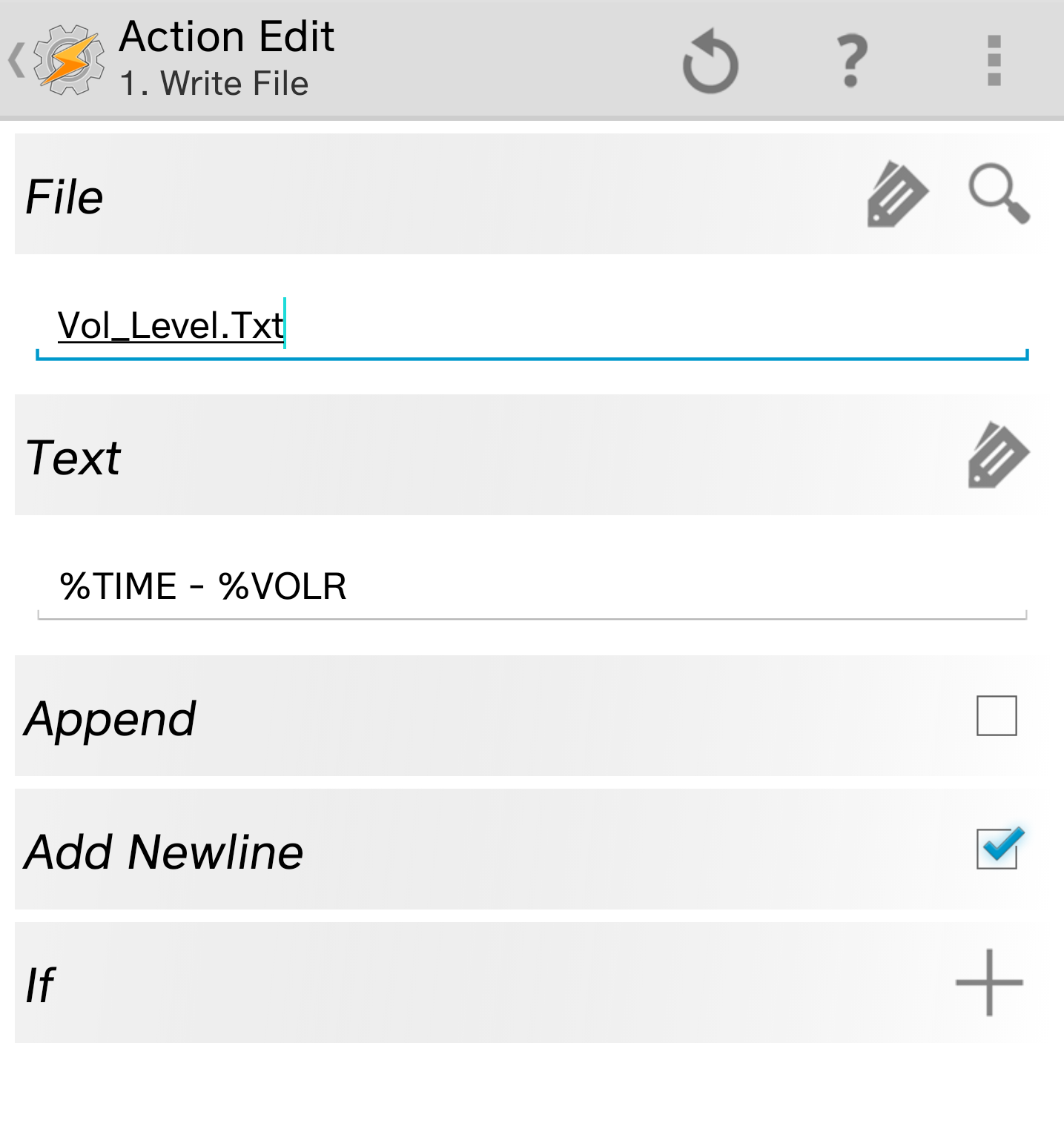
I've tried to create the profile you mentioned but am unsure how to make the task to write the file - please see attached.Thanks again for your help.

Robert Ryan
I know it sounds unrelated, but what version of the Google app do you have? Some recent versions have been causing problems with profile/task activation.
Pat Bouvry
Android Tasker is version 4.9u4. Android ia 7.0 (Feb 1, 2017).
Pat Bouvry
Pat Bouvry
1. At what time did you check the volume setting?
2. Could you attach the complete run log? You can find it at Tasker/log
3. Could you paste both profile descriptions here.
Profile: Work Sound Low (5)
Time: From 09:30 Till 18:30
Day: Mon, Tue, Wed, Thu or Fri
Enter: Ring Low (9)
A1: Notification Volume [ Level:1 Display:Off Sound:Off ]
A2: Ringer Volume [ Level:2 Display:Off Sound:Off ]
A3: Default Ringtone [ Type:Ringer Sound:Snowflakes ]
Exit: Ring Default (10)
A1: Default Ringtone [ Type:Ringer Sound:Bulletproof Ringtone ]
A2: Ringer Volume [ Level:15 Display:Off Sound:Off ] A3: Notification Volume [ Level:11 Display:Off Sound:Off ]
Rich D
Profile: Work Sound Low (5)
Time: From 09:30 Till 18:30
Day: Mon, Tue, Wed, Thu or Fri
Enter: Ring Low (9)
A1: Notification Volume [ Level:1 Display:Off Sound:Off ]
A2: Ringer Volume [ Level:2 Display:Off Sound:Off ]
A3: Default Ringtone [ Type:Ringer Sound:Snowflakes ]
Exit: Ring Default (10)
A1: Default Ringtone [ Type:Ringer Sound:Bulletproof Ringtone ]
A2: Ringer Volume [ Level:15 Display:Off Sound:Off ] A3: Notification Volume [ Level:11 Display:Off Sound:Off ]Note: everything else seems to work correctly (my other profiles, the Exit task on this profile. It's just this Notification that seems to be the problem.
Pat Bouvry
For example, I had a test running at 11:42 every day, but it doesn't seem to appear much in the log file (see attached).
I've had my phone screen opened a couple of times at 9:30 (the correct time when the notification volume change should happen) and then I got the screen notification working ok (but nothing showing in the log file). I noticed the screen notification many times at the 'test' time at 11:43 many days (but nothing in the log file).
So to summarise, the Notification Volume is still not automatically changed by Tasker despite the profiles and tasks present, except apparently when I'm looking at my open screen (although it did happen on its own for the 11:42 tests).
I understand if the above doesn't help pinpoint the error.
Do you have any other idea of what I should try to get Tasker to automatically change the Notification Volume?
Thanks again, Pat
Rich D
Pat Bouvry
Pat Bouvry
On Friday, 25 August 2017 17:47:26 UTC+8, Rich D wrote:
Rich D
It appears None of the times in the log exactly match the times of your profiles. They all seem to be from setting it manually.
What happens when you run the task manually with the play button?
If it fails when running with the play button try simplifying the task and run just the 'set notification' volume action
Rich D
Apologies. Yes my DNT is off in the phone' settings. It doesn't work well by its own (does not shut off automatically when supposed to). That's why I use tasker to turn it on or off. But I believe no profiles are using that task...
Pat Bouvry
Yes, you are correct. However this task is only called on the weekends and this profile has never been problematic.
Pat Bouvry
Rich D
Yes, you are correct. However this task is only called on the weekends and this profile has never been problematic.
Recently, I'm getting those 'Memory Errors"
"Work Sound Low" profile ('Ring Low' task) is not kicking in at all (and I had my screen open when it was supposed to happen - 9:30). Any idea what this could mean?
Rich D
When running the task manually (with the play button), all elements in the task seem to work perfectly.
Rich D
"Work Sound Low" profile ('Ring Low' task) is not kicking in at all
Pat Bouvry
But if it turned on over the weekend would it not still be on for the week?
And running them manually triggers the test profile and makes a log entry?
I would add more to the logging file as well. At the end of every task associated with settings these volumes make a entry that has the task name and current time.
I manually ran it and it appends the file correctly: "8-29-17 - 18.18 - 12 - ,write file, - ,Work Sound Low,".
Is this a new profile that never worked correctly or is it one that was broken by a update?
Did you check the Tasker run log when this happened to see if the profile went active?
Do you have Tasker set to run in foreground in tasker preferences / monitor ?
Rich D
> No, there doesn't seem to be any log entry in 'Notify_Vol_Level.txt' when manually running the 'Ring
Low' task. There should be, no?
I just noticed you are monitoring the variable %VOLR and we wanted to monitor the variable %VOLN. Please change that and see if %VOLN is getting changed by some other app.
And this profile will only fire when the volume is actually changed the volume. To properly manually test, you need to manually set the notify volume to something other that what the action is setting it to.
> ok, I changed the file text to write: %DATE - %TIME - %VOLN - %TRUN - %PACTIVE
> I manually ran it and it appends the file correctly: "8-29-17 - 18.18 - 12 - ,write file, - ,Work Sound Low,".
> Is this what you meant?
Correct. Did you do this for each task that changes the notify volume?
> Did you check the Tasker run log when this happened to see if the profile went active?
>
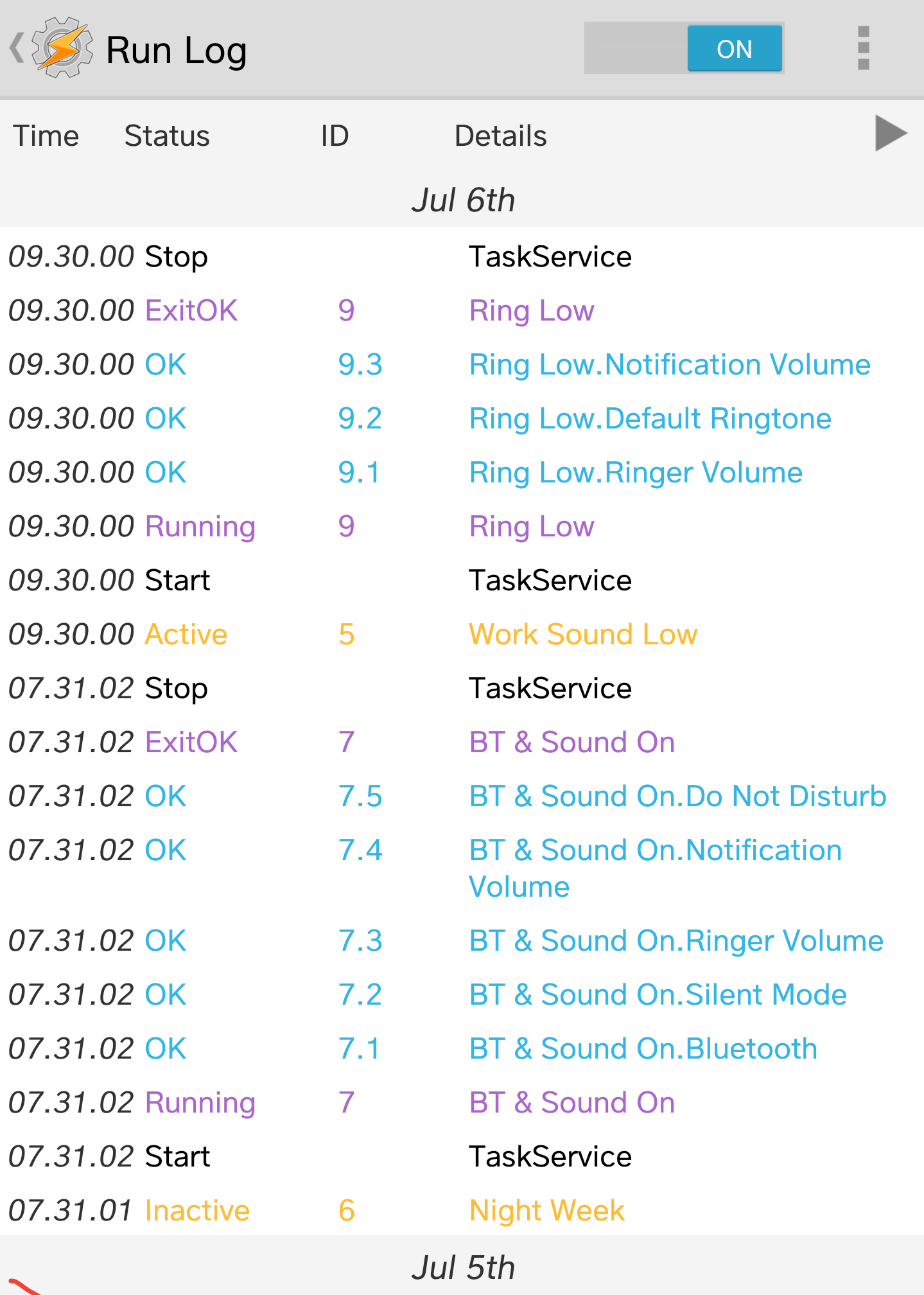
> The Run Log show "Work Sound Low" profile as active at 9:30 every weekday, with task "Ring Low" running its components correctly (see attached run log). However the notification level doesn't seem to adjust itself as would be predicted by the task working correctly.
>
I think I misunderstood this part.
I Thought you had meant your screen was on and it was time for the profile to go active and "nothing" happened. Meaning you did not see the "profile" go active.
Rich D
Rich D
Rich D
CORRECTION!!!!!
Please post the run log after you have changed the %VOLR to %VOLN and a few of the profiles have cycled and failed.
Pat Bouvry
- This morning at 9:30, the profile "Work Sound Low" kicked in correctly while I was looking at the open screen (run log shows no error, no memory error + got the screen message), BUT the notification level did not adjust itself (see attached result).
- At 11:25, I ran the 'Ring Low' task manually (called by "Work Sound Low"), and the notification sound then adjusted itself correctly (see attached result & run log screenshot)
- I noticed that none of those events (automatic or manual) were recorded in the Notify_Vol_level.txt file, despite me having changed the "Notify Volume" profile to %VOLN (instead of %VOLR). So I turned off that separate profile and copied the "Write File" task into both the "Ring Low" and "Ring Default" tasks, to ensure the file entry was done when those tasks are run. (see new Notify_vol_level.txt and Datadescr.txt files attached).
Thanks, Pat
Pat Bouvry
Therefore, what is written in the file is either incorrect, or if it's correct, the Notification Volume come right back up to its former level after the successful run of the task. Not sure if that info is useful.
Rich D
- I noticed that none of those events (automatic or manual) were recorded in the Notify_Vol_level.txt file, despite me having changed the "Notify Volume" profile to %VOLN (instead of %VOLR). So I turned off that separate profile and copied the "Write File" task into both the "Ring Low" and "Ring Default" tasks, to ensure the file entry was done when those tasks are run. (see new Notify_vol_level.txt and Datadescr.txt files attached).
I believe this morning was quite clear that in the best conditions, Tasker's "Work Sound Low" profile is not able to correctly change the Notification Volume automatically, despite the task being able to do so manually later. So I recreated the initial puzzle which triggered this question, and you have attached all the data related to it.
Rich D
Therefore, what is written in the file is either incorrect, or if it's correct, the Notification Volume come right back up to its former level after the successful run of the task. Not sure if that info is useful.
Rich D

Pak
On Thursday, June 29, 2017 at 11:06:39 PM UTC-4, Pat Bouvry wrote:
I created a profile to turn down the phone ring sound every weekday morning while at work (see attached picture). The related task shows as active in the notification area, but the sound is NOT changed. The task only works when I manually activate it (pressing play).
Rich D
> I didn't read all of every post here, but stupid question... Did anyone consider if the profile on exit is simple restoring the volumes on exit?
This would be shown in the run log and it is not.
Pat Bouvry
Rich D
I've been away and have not implemented the profiles you suggested on Aug 31st yet, but I'll get on it now.
Pat Bouvry
Please see attached my latest files. However, if you can't point out anything from them, I believe we'll have to resign ourselves to Tasker not being a solution to set notification volume levels on this device model, and end this thread.
Best wishes for the holidays and for the new year.

eeeemc
My Profile : From: 8:30PM till 12:30AM
TASK:
1. "IF" ( Condition ) %TIME > 22:50
2. Media Volumn level 4
3. System Volumn level 3
4. END IF
This profile make me feel works as " I am watching it working " since the time above is at night where I usually watching YouTube.
------> right at 8:30PM, my phone screen drop down status bar showing me the volumn bar turn to the left ( lower )
I also can hear Youtube sounds immediately lower.
I am not sure if above task ,1, 2, 3 & 4 suits your situation.
Tks edmond




Patrick Bouvry
Adjusting volume levels at certain times should be a basic function easier to achieve in Tasker.
Thanks, Pat
--
You received this message because you are subscribed to a topic in the Google Groups "Tasker" group.
To unsubscribe from this topic, visit https://groups.google.com/d/topic/tasker/JpBpqeyUOLY/unsubscribe.
To unsubscribe from this group and all its topics, send an email to tasker+unsubscribe@googlegroups.com.
Visit this group at https://groups.google.com/group/tasker.
For more options, visit https://groups.google.com/d/optout.
eeeemc
After you build the next task, look around the play button at bottom of the screen during when you are still in the task page.
Press the play button.
""""OF COURSE""" ====> you can set the "dummy time" of what is your time now say if your time is now 1am.
Set from 1am to 1:02 am, so that you can "ALSO" check back if all volumn settings return normal after "1:02am"
If eveyrthing works, once you press play button, you should see the drop down notification + see the volumn turn to your setting levels.........
Tks edmond.
eeeemc


Rich D
Long time since my last update.
However, I wanted to let you know that this problem is also occurring with a completely different LG V20 phone,
Please see attached my latest files. However, if you can't point out anything from them, I believe we'll have to resign ourselves to Tasker not being a solution to set notification volume levels on this device model, and end this thread.
Sorry, I do not believe my last post was very clear. These test profiles were just to test the set notify action when you had some time to be able to monitor the settings and see if they are getting set and see if something is changing them. I would suggest disabling all the other profiles that set the notify volume then only enable the 'notify down' profile ant set the times to go off 5 min in the future and stay active for for a hr. Make sure the notify is currently not set to 1. Then check to see if the notify gets set to one and check back every so often to see if something else resets it. Then disable the 'notify down' and enable the ' 'notify up' and try that one.