Easiest way to prevent playback of multiple files

961 views
Skip to first unread message

Anhtu Vu

unread,
Sep 15, 2014, 11:49:07 PM9/15/14
to ql...@googlegroups.com
I just bought Qlab and thinking of using for film festival playback. One of the problem i can foresee is accidentally triggering two films at once. Is there an easy way to disable this ?? I did a search and someone recommended arm /disarm and key trigger but i have no idea how to set it up. Any help for this newbie would be much appreciated. Thx

mic

unread,
Sep 16, 2014, 3:26:37 AM9/16/14
to ql...@googlegroups.com
Hi,

probably it's not the exact answer you were waiting, but if you accidentally run a cue that wasn't meant to run, you have the option to select it with your mouse and then press "s" to stop it. It'll stop just that cue, all the others running will go on running.
ciao
michele

Joshua Langman

unread,
Sep 16, 2014, 10:35:46 AM9/16/14
to ql...@googlegroups.com
You can enable a long wait time in Double-GO Protection (workspace settings), say 2 seconds, meaning that for two seconds after you fire a cue it won't let you fire the next one.

Anhtu Vu

unread,
Sep 16, 2014, 10:52:05 AM9/16/14
to ql...@googlegroups.com
Thanks guys for the suggestions…

@Joshua, where is the Double-GO, i looked in the preference and ca't seem to find it. Thx

On Tue, Sep 16, 2014 at 10:35 AM, Joshua Langman <jlangma...@gmail.com> wrote:
You can enable a long wait time in Double-GO Protection (workspace settings), say 2 seconds, meaning that for two seconds after you fire a cue it won't let you fire the next one.

--
--
Change your preferences or unsubscribe here:
http://groups.google.com/group/qlab
 
Follow Figure 53 on Twitter: http://twitter.com/Figure53

---
You received this message because you are subscribed to a topic in the Google Groups "QLab" group.
To unsubscribe from this topic, visit https://groups.google.com/d/topic/qlab/KjGM77pPYDQ/unsubscribe.
To unsubscribe from this group and all its topics, send an email to qlab+uns...@googlegroups.com.
For more options, visit https://groups.google.com/d/optout.

Lucas Krech

unread,
Sep 16, 2014, 11:11:58 AM9/16/14
to ql...@googlegroups.com
Second item down in the General Preferences. "Minimum time required…"

-L

*insert witty mobile device advertising here*
You received this message because you are subscribed to the Google Groups "QLab" group.
To unsubscribe from this group and stop receiving emails from it, send an email to qlab+uns...@googlegroups.com.

Joshua Langman

unread,
Sep 16, 2014, 12:19:48 PM9/16/14
to ql...@googlegroups.com
Workspace settings is the gear icon in the lower right corner of the window, not the Preferences menu item.

Anhtu Vu

unread,
Sep 16, 2014, 7:55:16 PM9/16/14
to ql...@googlegroups.com
Oh ''minimum time required'' was what you guys meant….i already tried it…it won't cut it as accidental triggers can happen anytime….man! how difficult is it to add a ''no two clips can be played at once'' option in the preference!!!

On Tue, Sep 16, 2014 at 12:19 PM, Joshua Langman <jlangma...@gmail.com> wrote:
Workspace settings is the gear icon in the lower right corner of the window, not the Preferences menu item.

--

Joshua Langman

unread,
Sep 16, 2014, 8:25:29 PM9/16/14
to ql...@googlegroups.com
Anhtu, QLab isn't made for film festivals. In the course of using QLab on many, many theatre shows I have never had a situation where I would want a no-two-things-can-be-played-at-once setting. The beauty of QLab for theatrical designers is the ease with which it lets you play an unlimited number of things at once — that's what we love about it. So respectfully, I don't think such a setting would be relevant to QLab's primary user base. The answer, instead, is hire a trustworthy operator with reliable fingers.

However, that said, you can accomplish exactly what you want, like so:

For each film in the festival, create a Group cue, and set the Mode to "Start first child and enter into group" (the default).

Disarm every group except the first (uncheck the Armed box in the Basics tab of the Inspector).

The groups look like this:

1  Group cue: first film
Video cue: film file; auto-follow
Arm cue (targets second group)

etc. So each video file follows to a cue that arms the next group only when the video is complete. For extra protection, you could also have a cue that arms the current group. make sure this is the last thing in the group that's fired.

Lucas Krech

unread,
Sep 16, 2014, 8:26:07 PM9/16/14
to ql...@googlegroups.com
This actually got me thinking that in place of or in addition to the no arm until key up there was an option to set a key that rearms the GO button. Essentially building in a safety. 

This could be solved by placing the cues on a second cue list and the main list with only start cues which target it that disarm after GO and get re-armed via hot key. But would be a neat feature to have built in globally. 


-L

*insert witty mobile device advertising here*
You received this message because you are subscribed to the Google Groups "QLab" group.
To unsubscribe from this group and stop receiving emails from it, send an email to qlab+uns...@googlegroups.com.

Joshua Langman

unread,
Sep 16, 2014, 8:28:26 PM9/16/14
to ql...@googlegroups.com
One additional note: Disarming subsequent cues will NOT prevent QLab from firing them; it will only prevent the cue's action from executing. This means that your playhead will still move to the next cue. So if you fire a cue by mistake, you will need to manually reposition the playhead by selecting the next cue you wish to fire.

Joshua Langman

unread,
Sep 16, 2014, 8:36:26 PM9/16/14
to ql...@googlegroups.com
By the way, another recent thread about using QLab for film festivals:


In my first comment, I give an example of some more advanced programming that can actually add a nice professional touch to your festival by gracefully fading from each film to a static festival logo and then into the next film on cue.

Dave "luckydave" Memory

unread,
Sep 16, 2014, 8:43:55 PM9/16/14
to ql...@googlegroups.com
Here's a script that could do the job for you:

tell application id "com.figure53.qlab.3" to tell front workspace
set activeCues to active cues as list
set activeCount to count activeCues
if activeCount is equal to 1 then
go
end if
end tell

The trick here is you put it in a script cue, and give that cue a hotkey trigger. When you press the hotkey, it'll put the script into the active cues, so when the active cues are counted, it should give you a total of 1 if no other cues are running. But if other cues are running, it just does nothing. So, use this as your go button, and you only get one cue at a time possible to be triggered. Note that if you add fades or groups, this won't work, and you'll need to adjust it appropriately. You may want to adjust it to work only with video cues, for instance.

This is more in line with how QLab works. It's not cluttered with features that are useful to a limited number of QLab users, so if you need something very specific like this, you can create the functionality you need with scripts.

Willo

unread,
Sep 16, 2014, 8:55:26 PM9/16/14
to ql...@googlegroups.com
A simple solution, if you have a jittery trigger finger, but aren't too worried about absolute precision, would be to separate each film cue with four or five Memo cues.
These are simply blank cues that don't do anything (you use them to write notes to yourself). They will separate and space out your video cues.

So if you cue a film and then happen to hit the spacebar while it's running, it will do nothing but move a bit down your list of 'spacer' cues. 

When it comes time to cue the next film, you hit the space bar until you get past your couple of memo cues and trigger the next video cue. If you go past the next video cue it won't affect anything, because that too will be followed by several Memo cues, as a safety.


Cheers,
Craig

Tyler

unread,
Sep 16, 2014, 9:51:24 PM9/16/14
to ql...@googlegroups.com
http://vimeo.com/25246917

Ki Pro is a more robust solution for what you are trying to accomplish

Anhtu Vu

unread,
Sep 16, 2014, 10:40:16 PM9/16/14
to ql...@googlegroups.com
Nah, We used the Ki Pro for a while...very good as a prores recorder for camera but not as a playback machine for film festival....

Anyways, thx everyone for chiming in, i will use Qlab for our multimedia installation and for that purpose it's great. As for the film festival playback, i'll keep using our rig for now because having to write scripts and/or adding this and that command just to prevent a simple double trigger seems more hassle than it's worth.


--

Daniel Richert

unread,
Sep 17, 2014, 5:40:29 AM9/17/14
to ql...@googlegroups.com
You could disable keyboard whit this little nice app, 


and lauching the app could also be scipted to a cue.

Chris Eschweiler

unread,
Sep 17, 2014, 7:32:25 AM9/17/14
to ql...@googlegroups.com
Anhtu,

PlaybackPro from DT Video Labs may be a good choice. 

Mac-based, it's robust and simple. It allows clips to loop, or freeze when finished. You can also link clips together for ongoing playback. 

It will also accept stills for interstitial between videos that will function as "holds". 

One housekeeping note: if you're using a Mac with a single rotational drive, you want the clips to live on an external FireWire or USB 3.0 drive to eliminate OS-related drive access from inadvertently affecting playback. 

I've been using it for several years…solid. Going to run two systems this morning, in fact. 

HTH…

Chris

Sent from an iGadget

On Tuesday, September 16, 2014 6:49:07 AM UTC+3, Anhtu Vu wrote:
I just bought Qlab and thinking of using for film festival playback. One of the problem i can foresee is accidentally triggering two films at once. Is there an easy way to disable this ?? I did a search and someone recommended arm /disarm and key trigger but i have no idea how to set it up. Any help for this newbie would be much appreciated. Thx

--
--
Change your preferences or unsubscribe here:
http://groups.google.com/group/qlab
 
Follow Figure 53 on Twitter: http://twitter.com/Figure53

---
You received this message because you are subscribed to the Google Groups "QLab" group.
To unsubscribe from this group and stop receiving emails from it, send an email to qlab+uns...@googlegroups.com.

Rasmus Kreiner

unread,
Sep 17, 2014, 7:55:21 AM9/17/14
to ql...@googlegroups.com
Another thing that you can do is to:
  - Create a start cue in a separate cue list that targets your main cue list. 
  - Once you've started the film you can disarm the start cue, and rearm the start cue once the film has finished. 
  - Lastly, you remove space as the go button in the key map of your show, and assign this as the hot key for your start cue.

If this doesn't make sense I've attached a muck up show that should display this.

Best,
Rasmus


Den 16/09/2014 kl. 05.49 skrev Anhtu Vu <mia.s...@gmail.com>:

I just bought Qlab and thinking of using for film festival playback. One of the problem i can foresee is accidentally triggering two films at once. Is there an easy way to disable this ?? I did a search and someone recommended arm /disarm and key trigger but i have no idea how to set it up. Any help for this newbie would be much appreciated. Thx

Double go protection.cues

Anhtu Vu

unread,
Sep 17, 2014, 9:31:08 AM9/17/14
to ql...@googlegroups.com
Hi Chris,

I did try Playback pro from DT Video Labs. Unfortunately, the quality was not up to par. Just like all other playback solution we've tried (Playback Pro, PVS's pro video server, Softron's on air video, Just Play from Tools on air), in order to have a playlist you must import files with the same frame rate or the software will consolidate it to the frame rate you  have set for the playlist and no matter how you slice it, pull up / down or any other methods used to conform frame rate simply look horrible.


You received this message because you are subscribed to a topic in the Google Groups "QLab" group.
To unsubscribe from this topic, visit https://groups.google.com/d/topic/qlab/KjGM77pPYDQ/unsubscribe.
To unsubscribe from this group and all its topics, send an email to qlab+uns...@googlegroups.com.

Chris Eschweiler

unread,
Sep 17, 2014, 10:07:48 AM9/17/14
to ql...@googlegroups.com
Hi Anhtu,

Not sure the issues are caused by Playback Pro. Computers and projectors use the power to determine their display timing. The hardware in the US is based in 60 Hz

When files with frame rates that aren't  based on a multiple of 60 are displayed, mathematics is performed to make the final output conform to the 60 cycle output.  

You are correct: playing a 24fps clip will lose its original look. Degradation can be mitigated by re-exporting those clips at 29.97fps or 59.94 fps.

I've found this gives the best playback of legacy cinema-oriented clips. 

Let the flames…BEGIN!  ;-)

Sent from an iGadget

Rich Walsh

unread,
Sep 17, 2014, 10:16:14 AM9/17/14
to ql...@googlegroups.com
You're not seriously proposing that video sync is derived from the mains frequency are you? Is that why my computer gets sluggish at dinner time when the load on the national grid jumps and the turbines in Battersea physically slow down?

Computers do NOT use power to derive clocks. My laptop's on battery at the moment: how does that work?

Rich

Anhtu Vu

unread,
Sep 17, 2014, 10:49:39 AM9/17/14
to ql...@googlegroups.com
Hey Chris,

I work as an online editor and mixer for film and broadcast, i can't speak for others but i can tell you with certainty that myself and all the producers i've worked with have NEVER seen a frame rate change done in hardware or software that look any good and acceptable for big screen. Frame rate consolidation looks horrid in Playback Pro….and NO  degradation CANNOT be mitigated by re-exporting. We use some of the best hardware and software technology money can buy for this task (Clispter, Amberfinn ICR, Barko' Image Pro, Terranex),some are better than others for different task but at the end of the day, frame rate changes look bad. 

Chris Eschweiler

unread,
Sep 17, 2014, 12:18:00 PM9/17/14
to ql...@googlegroups.com
Sigh… 

No. Not at all.

From Wikipedia:

(Snip)

The NTSC field refresh frequency in the black-and-white system originally exactly matched the nominal 60 Hzfrequency of alternating current power used in the United States. Matching the field refresh rate to the power source avoided intermodulation (also calledbeating), which produces rolling bars on the screen. When color was added to the system, the refresh frequency was shifted slightly downward to 59.94 Hz to eliminate stationary dot patterns in the difference frequency between the sound and color carriers, as explained below in "Color encoding". Synchronization of the refresh rate to the power incidentally helped kinescope cameras record early live television broadcasts, as it was very simple to synchronize a film camera to capture one frame of video on each film frame by using the alternating current frequency to set the speed of the synchronous AC motor-drive camera. By the time the frame rate changed to 29.97 Hz for color, it was nearly as easy to trigger the camera shutter from the video signal itself…

<snip>

Bottom line: 24fps doesn't work smoothly in the digital realm.

24 Frames per second was chosen mostly because it was the minimum fps that would yield an acceptable viewing experience and minimize the number of feet of film needed in a time when filmstock was quite expensive. 

Ha! It's Arcane Fact Wednesday. How about them apples! (Adopt ridiculous impression oddly reminiscent of Quentin Tarantino.)


Sent from an iGadget

Chris Eschweiler

unread,
Sep 17, 2014, 12:39:00 PM9/17/14
to ql...@googlegroups.com
True, though "bad" is broad and subjective. 

Here's my humble opinion:

Before the first frame of a project is shot, it's important to consider the end product's destination. Working backwards from that, a good workflow can be derived. 

To that end, I think that it's better to err on the higher frame rate side, working artfully in post to achieve the cinematic aesthetic from there. 

Starting by shooting 24fps limits your options down the road, which if you think about it makes sense: you have captured the least amount of data available.

I feel your pain. In my day-to-day experience, requesting files be re-exported to minimize artifacts usually results in a pissing contest, raising the ire of someone who feels that these sort of change requests  "ruin" their artistic vision. My job is to make things look as good as possible with a particular pile of gear that fit within a particular budget.

Sent from an iGadget

Rich Walsh

unread,
Sep 17, 2014, 3:14:37 PM9/17/14
to ql...@googlegroups.com
Now there's me reading a sentence like "Computers and projectors use the power to determine their display timing" and interpreting it in English. That sentence is complete rubbish. As is "24fps doesn't work smoothly in the digital realm". Yes the history of the original rates of NTSC and PAL analogue video shows they are related to the prevalent average mains frequency in their respective regions, but that frequency necessarily fluctuates through the day and computers simply don't use it: they don't even (on the whole) see AC, do they?

Computers are capable of generating more or less any clock speed imaginable; that doesn't mean that video displayed at a rate other than that it was shot at will look good. You might want to read this article:


Or perhaps you're really stating the first law of thermodynamics? Computers do indeed use energy (the time integral of power) to determine timing, and in fact to do everything else they do. It's not relevant to how to interpolate missing data when converting frame rates though. It's sample-rate conversion, that's all: generally offline is better than realtime; you only want to do it once, and you want to end up at the final playback speed.

Rich

Paul Gotch

unread,
Sep 17, 2014, 3:33:01 PM9/17/14
to ql...@googlegroups.com
On 17 Sep 2014, at 20:14, Rich Walsh <rich...@mac.com> wrote:

Now there's me reading a sentence like "Computers and projectors use the power to determine their display timing" and interpreting it in English. That sentence is complete rubbish.

Very old analogue video equipment may have use power frequencies however anything even analogue equipment manufactured in the last 30 years will be be clocked either from an embedded clock in or with the video signal or by quartz crystal.

As is "24fps doesn't work smoothly in the digital realm".

The OP is probably confused by 24p encoding on DVDs achieved

Michael Long

unread,
Sep 17, 2014, 3:41:35 PM9/17/14
to ql...@googlegroups.com, dontrepl...@comcast.net
On Wednesday, September 17, 2014 12:18:00 PM UTC-4, Chris Eschweiler wrote:
Bottom line: 24fps doesn't work smoothly in the digital realm.

Well this discussion has gotten pretty far off-topic, but I'll throw in my two cents. It is my understanding that 29.97 and its various relatives were devised to work with early analog video devices where the AC current could be a problem. Once people started recording digitally, that's when new video frames rates such as 24P appeared on the market. Almost every movie theatre I go to nowadays projects films digitally, and I can guarantee they are projected at 24fps (or perhaps 23.976fps, depending on their system). Except those Hobbit films, which are projected at 48fps.

This does, however, bring up something I've wondered about QLab: how does it handle videos of varying frame rates? Does it play them all in their native frame rates? Is there any advantage to keeping all videos in the same frame rate?

--
Michael Long
Projection Designer (and video editor) - Philadelphia

Paul Gotch

unread,
Sep 17, 2014, 3:44:08 PM9/17/14
to ql...@googlegroups.com
On 17 Sep 2014, at 20:32, Paul Gotch <pa...@chiark.greenend.org.uk> wrote:
> The OP is probably confused by 24p encoding on DVDs achieved

Grr hit send by accident.

24p encoding achieved by encoding within the field information of NTSC DVDs running at 30fps with detection and pull down which frequently fails to work properly.

Basically playing back non native frame rates on a LCD is a solved issue in terms of the video processing required.

Obviously it's better if you can match the configuration to the output device but realistically unless you are dealing with proper digital cinema projectors and playout equipment then it might not be achievable.

Obviously it's good practice if possible to cross code the original material to match the output device offline using the best quality and therefore usually slowest algorithms rather than doing it at playout time.

-p

sosmarci

unread,
Sep 19, 2014, 4:45:46 AM9/19/14
to ql...@googlegroups.com

Greetings everyone, as this is my first post in the group, from Budapest, Hungary.

I went with a totally different approach on this issue, since I also needed a solution for preventing accidentally run more than the exact cue I need at the time, or run it a bit sooner because of shaking hands.
I made a simple remote control from an USB keyboard, using parts you probably can get from radioshack. The electronics from the keyboard was put in the box sized roughly 1" x 2" x 3", and the spacebar button (the big red one), and other two was hardwired to the connectors responsible for triggering the key needed.
Not only it prevents accidental launches because of the force and travel it needs to be pressed, but also I can put the remote on the mixing desk within a smaller reach from the faders.
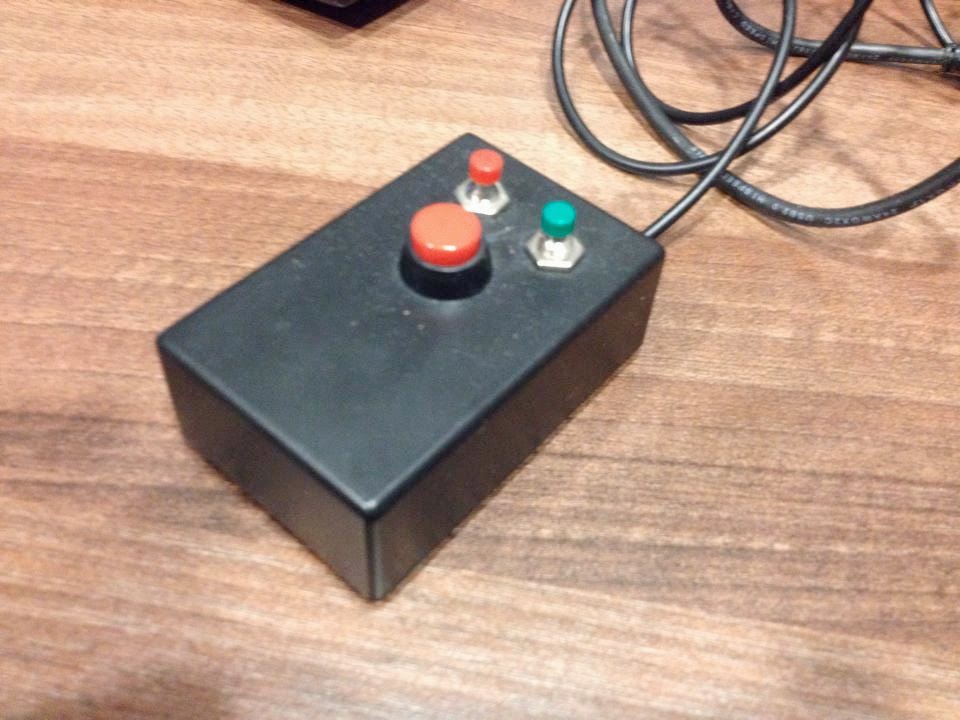
Another solution could be, and can be perhaps a feature request, that all cues could have a "SAFE" attribute that if checked, it ignores the GO command until it has finished.

Drew Schmidt

unread,
Sep 19, 2014, 7:46:39 AM9/19/14
to ql...@googlegroups.com
Alright
Here's a thought

There's really two problems with ops hitting "GO" too early. 1) They get trigger happy and hit GO too quickly executing multiple cues or 2) they bump the spacebar with their elbow. An accidental press of GO.

We can fix the first problem by editing the "Minimum time required" 

What if the fix for number two was to simply to use a combination of keystrokes, much like Ctrl+Alt+Del for the windows login screen. I just went into Settings>KeyMap and setup GO on a workspace to be Shift+Space. I know others who will remove this shortcut all together and require the op to use the mouse instead. 

Anhtu Vu

unread,
Sep 19, 2014, 9:57:48 PM9/19/14
to ql...@googlegroups.com


The simplest and most elegant solution would be for the folks at Qlab to add a ''no two clips can be played at once'' option in the preference. I understand this software was originally created for theater so one would want to fire multiple cue at once but hey why not broaden your user base and how hard can it be to add that simple feature. Since i posted this question/request a few days ago, there are lots of views and over 25 replies, an indication that it's a fairly in popular request.

Chris Ashworth

unread,
Sep 19, 2014, 10:03:49 PM9/19/14
to Anhtu Vu, ql...@googlegroups.com
Hi Anhtu,

Thanks for your thoughts and feedback on this!

In this case, my respectful answer is that I do not foresee us adding this option.  It is less a matter of difficulty, and more a matter of maintaining the focus of the design of the software. 

Folks have provided a number of ways of achieving this goal, which reflects how “off label” functions are typically covered in QLab — the stuff most important to our primary design goals is (hopefully) baked in, but we believe some things are best left done via other mechanisms like scripting or other techniques.

I’d recommend using one of the many solutions provided by the folks on the list.

Best,
Chris
Reply all
Reply to author
Forward
0 new messages