
Easiest way to prevent playback of multiple files

Anhtu Vu

mic

Joshua Langman
Anhtu Vu
You can enable a long wait time in Double-GO Protection (workspace settings), say 2 seconds, meaning that for two seconds after you fire a cue it won't let you fire the next one.
--
--
Change your preferences or unsubscribe here:
http://groups.google.com/group/qlab
Follow Figure 53 on Twitter: http://twitter.com/Figure53
---
You received this message because you are subscribed to a topic in the Google Groups "QLab" group.
To unsubscribe from this topic, visit https://groups.google.com/d/topic/qlab/KjGM77pPYDQ/unsubscribe.
To unsubscribe from this group and all its topics, send an email to qlab+uns...@googlegroups.com.
For more options, visit https://groups.google.com/d/optout.

Lucas Krech
You received this message because you are subscribed to the Google Groups "QLab" group.
To unsubscribe from this group and stop receiving emails from it, send an email to qlab+uns...@googlegroups.com.
Joshua Langman
Anhtu Vu
Workspace settings is the gear icon in the lower right corner of the window, not the Preferences menu item.
--
Joshua Langman
Lucas Krech
You received this message because you are subscribed to the Google Groups "QLab" group.
To unsubscribe from this group and stop receiving emails from it, send an email to qlab+uns...@googlegroups.com.
Joshua Langman
Joshua Langman

Dave "luckydave" Memory

Willo

Tyler
Anhtu Vu
--

Daniel Richert

Chris Eschweiler
Sent from an iGadget
On Tuesday, September 16, 2014 6:49:07 AM UTC+3, Anhtu Vu wrote:
I just bought Qlab and thinking of using for film festival playback. One of the problem i can foresee is accidentally triggering two films at once. Is there an easy way to disable this ?? I did a search and someone recommended arm /disarm and key trigger but i have no idea how to set it up. Any help for this newbie would be much appreciated. Thx
--
--
Change your preferences or unsubscribe here:
http://groups.google.com/group/qlab
Follow Figure 53 on Twitter: http://twitter.com/Figure53
---
You received this message because you are subscribed to the Google Groups "QLab" group.
To unsubscribe from this group and stop receiving emails from it, send an email to qlab+uns...@googlegroups.com.

Rasmus Kreiner
I just bought Qlab and thinking of using for film festival playback. One of the problem i can foresee is accidentally triggering two films at once. Is there an easy way to disable this ?? I did a search and someone recommended arm /disarm and key trigger but i have no idea how to set it up. Any help for this newbie would be much appreciated. Thx
Anhtu Vu
You received this message because you are subscribed to a topic in the Google Groups "QLab" group.
To unsubscribe from this topic, visit https://groups.google.com/d/topic/qlab/KjGM77pPYDQ/unsubscribe.
To unsubscribe from this group and all its topics, send an email to qlab+uns...@googlegroups.com.
Chris Eschweiler
Sent from an iGadget

Rich Walsh
Anhtu Vu
Chris Eschweiler
Bottom line: 24fps doesn't work smoothly in the digital realm.
Sent from an iGadget
Chris Eschweiler
Sent from an iGadget
Rich Walsh
Paul Gotch
Now there's me reading a sentence like "Computers and projectors use the power to determine their display timing" and interpreting it in English. That sentence is complete rubbish.
As is "24fps doesn't work smoothly in the digital realm".

Michael Long
Bottom line: 24fps doesn't work smoothly in the digital realm.
Well this discussion has gotten pretty far off-topic, but I'll throw in my two cents. It is my understanding that 29.97 and its various relatives were devised to work with early analog video devices where the AC current could be a problem. Once people started recording digitally, that's when new video frames rates such as 24P appeared on the market. Almost every movie theatre I go to nowadays projects films digitally, and I can guarantee they are projected at 24fps (or perhaps 23.976fps, depending on their system). Except those Hobbit films, which are projected at 48fps.
This does, however, bring up something I've wondered about QLab: how does it handle videos of varying frame rates? Does it play them all in their native frame rates? Is there any advantage to keeping all videos in the same frame rate?
--
Michael Long
Projection Designer (and video editor) - Philadelphia
Paul Gotch
> The OP is probably confused by 24p encoding on DVDs achieved
24p encoding achieved by encoding within the field information of NTSC DVDs running at 30fps with detection and pull down which frequently fails to work properly.
Basically playing back non native frame rates on a LCD is a solved issue in terms of the video processing required.
Obviously it's better if you can match the configuration to the output device but realistically unless you are dealing with proper digital cinema projectors and playout equipment then it might not be achievable.
Obviously it's good practice if possible to cross code the original material to match the output device offline using the best quality and therefore usually slowest algorithms rather than doing it at playout time.
-p

sosmarci
Greetings everyone, as this is my first post in the group, from Budapest, Hungary.
I
went with a totally different approach on this issue, since I also
needed a solution for preventing accidentally run more than the exact
cue I need at the time, or run it a bit sooner because of shaking hands.
I
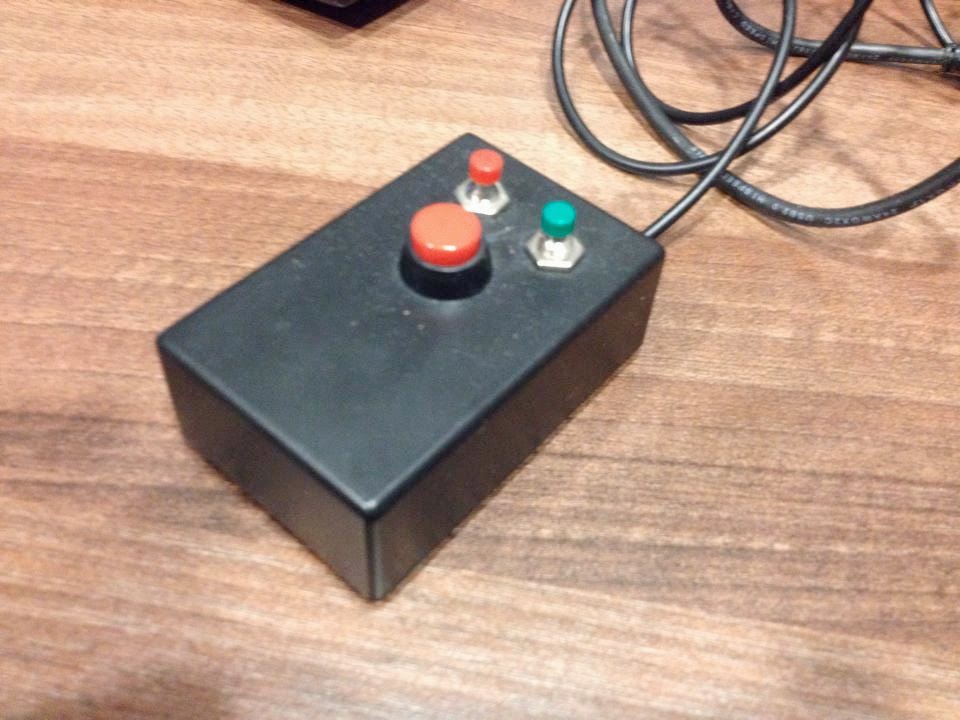
made a simple remote control from an USB keyboard, using parts you
probably can get from radioshack. The electronics from the keyboard was
put in the box sized roughly 1" x 2" x 3", and the spacebar button (the
big red one), and other two was hardwired to the connectors responsible
for triggering the key needed.
Not only it prevents accidental
launches because of the force and travel it needs to be pressed, but
also I can put the remote on the mixing desk within a smaller reach from
the faders.

Drew Schmidt
Anhtu Vu
The simplest and most elegant solution would be for the folks at Qlab to add a ''no two clips can be played at once'' option in the preference. I understand this software was originally created for theater so one would want to fire multiple cue at once but hey why not broaden your user base and how hard can it be to add that simple feature. Since i posted this question/request a few days ago, there are lots of views and over 25 replies, an indication that it's a fairly in popular request.
