
"Invalid Query" error when trying to update a record in a Fusion Table

Forrest Kendall

Taifun
 Fusiontables and how to fix them
Trying to push the limits of App Inventor!
Snippets and
Tutorials from
Pura Vida Apps by
 Taifun.
Forrest Kendall
Forrest Kendall
Forrest Kendall
Taifun
Forrest Kendall


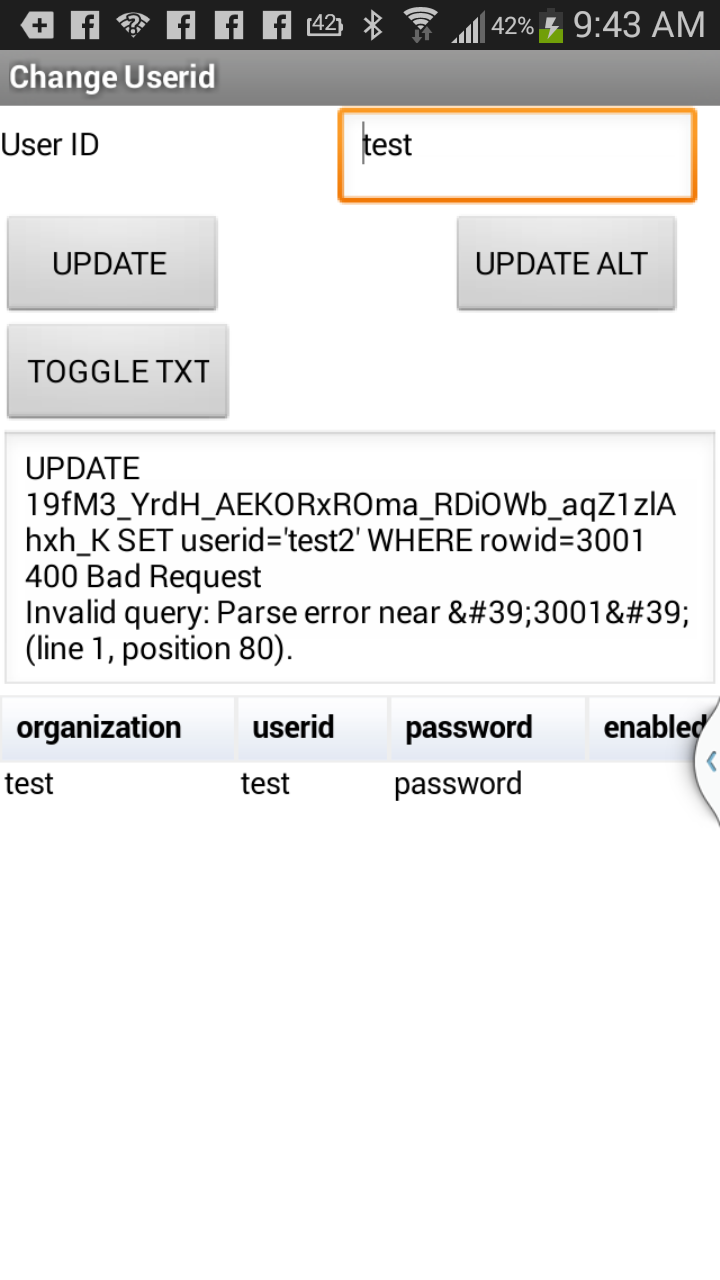
The next screen shot shows the text box with both the UPDATE query string (built in the click event for the button logic above. The text box also shows the results of the UPDATE query.

Abraham Getzler
Taifun
I extracted the ROWID from the queried record.
The SELECT QUERY was as follows:
SELECT rowid,userid,password,organization,delimiter FROM <table id key> WHERE ....
I then parsed the record on the string ",delimiter", The parsed the data record on commas (",").
set myList to list from csv table get result
set firstDataRow to select list item myList
2
set rowid to select list item firstDataRow
1
Forrest Kendall
Taifun
Forrest Kendall
Taifun
If you look at the first screen image (from my phone) it shows the record id (rowid) as 3001, right below it I verified that its length is 4 (i.e. there are no hidden characters in the rowid string.
I verified that its length is 4 (i.e. there are no hidden characters in the rowid string.
Forrest Kendall
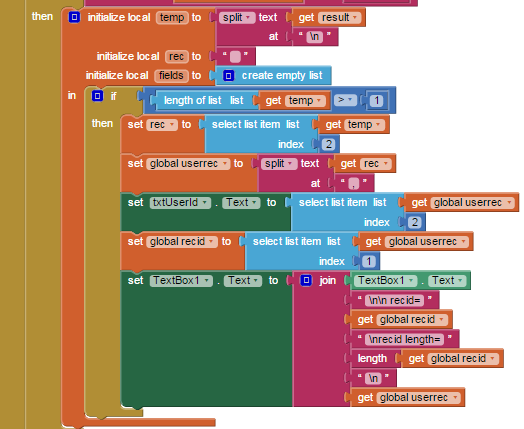
temp - receives the split (parsed) result of the SELECT query - parsed on newline (\n). This should have removed all newline characters.
temp has a list of the returned records: List item 1 - header record; List item 2 - the data record including the rowid.
rec - string that has record number 2 in it (a CSV string)
userrec - is a list - it contains the split (parse) record 2 (rec string) - parsed on commas (,)
global recid - receives the first item of the userrec list; this should be the rowid returned with as part of the SELECT query
global recid is used when build the UPDATE query string segement "rowid=" + global recid
Abraham Getzler
Forrest Kendall
Taifun
Forrest Kendall
Forrest Kendall
Forrest Kendall

Paul LeChef
Taifun
Forrest Kendall
Forrest Kendall
Forrest Kendall
Taifun
<row_id> | The ID of the row you want to update.
A quoted string. To get the row ID, perform a SELECT before the UPDATE. |