VERSION 3.6 SEP 2020 DEVELOPMENT BUILD

2,394 views
Skip to first unread message

Mark Liversedge

unread,
Sep 6, 2020, 2:39:02 AM9/6/20
to golden-cheetah-users
Available here:

Report build issues here.

Thanks
Mark

Ron George

unread,
Sep 6, 2020, 3:17:41 PM9/6/20
to golden-cheetah-users
Thanks Mark. I was on the previously released development version (GoldenCheetah_v3.6-DEV2006_x64) and spotted an apparent bug where the performance plots weren't updating correctly as you clicked on different activities and sometimes spurious values being thrown in for altitude, slope etc. Going to re-install now and see if I spot the same issue. 

-RG

Ron George

unread,
Sep 6, 2020, 3:40:12 PM9/6/20
to golden-cheetah-users
Same thing.

Imported gpx file of a strava activity into GC 3.6 Sept 2020 dev build.  The altitude, altitde/slope and slope graphs are not updating as per new imported activity; its borrowing the previous activity's information for those plots which is incorrect. 

I can report this in github. 

I'll be moving back to the old stable version to get my work done.

-RG

Mark Liversedge

unread,
Sep 7, 2020, 3:56:44 AM9/7/20
to golden-cheetah-users
Hi Ron

I cannot recreate this at all, be interesting to hear if anyone else has a problem.

Mark

Mark Liversedge

unread,
Sep 7, 2020, 4:20:05 AM9/7/20
to golden-cheetah-users
On Monday, 7 September 2020 08:56:44 UTC+1, Mark Liversedge wrote:
I cannot recreate this at all, be interesting to hear if anyone else has a problem.

OK - so it appears that the chart doesn't go blank when there is no data to plot.

Mark

José Luis García Pallero

unread,
Sep 7, 2020, 5:16:55 AM9/7/20
to golden-cheetah-users
Hello:

I've installed this new build and I can't see the "Edit" tab in the "Activities" view. Was deleted this tab?

Remco Boerwinkel

unread,
Sep 7, 2020, 5:29:12 AM9/7/20
to golden-cheetah-users
Hi jose,

IIRC this tab has moved to details tab as an sub tab like Notes/Device etc.

Kind regards,
Remco

Op ma 7 sep. 2020 11:17 schreef José Luis García Pallero <jgpa...@gmail.com>:
--
_______________________________________________
Golden-Cheetah-Users mailing list
golden-che...@googlegroups.com
http://groups.google.com/group/golden-cheetah-users?hl=en
---
You received this message because you are subscribed to the Google Groups "golden-cheetah-users" group.
To unsubscribe from this group and stop receiving emails from it, send an email to golden-cheetah-u...@googlegroups.com.
To view this discussion on the web visit https://groups.google.com/d/msgid/golden-cheetah-users/0eb3ce44-681e-450b-9731-2ab6e7d37eccn%40googlegroups.com.

Mark Liversedge

unread,
Sep 7, 2020, 5:56:13 AM9/7/20
to golden-cheetah-users
On Monday, 7 September 2020 10:29:12 UTC+1, RB wrote:
IIRC this tab has moved to details tab as an sub tab like Notes/Device etc.

Yes- the "Details" and "Editor" charts are combined into a "Data" chart that includes metadata like Notes as well as the raw sample data.

Mark

José Luis García Pallero

unread,
Sep 7, 2020, 6:50:53 AM9/7/20
to golden-cheetah-users
Thank you

El lun., 7 sept. 2020 a las 11:56, Mark Liversedge
(<liver...@gmail.com>) escribió:
> --
> _______________________________________________
> Golden-Cheetah-Users mailing list
> golden-che...@googlegroups.com
> http://groups.google.com/group/golden-cheetah-users?hl=en
> ---
> You received this message because you are subscribed to the Google Groups "golden-cheetah-users" group.
> To unsubscribe from this group and stop receiving emails from it, send an email to golden-cheetah-u...@googlegroups.com.
> To view this discussion on the web visit https://groups.google.com/d/msgid/golden-cheetah-users/0885e7b4-ad91-4301-8b89-44059ef3339eo%40googlegroups.com.


--
*****************************************
José Luis García Pallero
jgpa...@gmail.com
(o<
/ / \
V_/_
Use Debian GNU/Linux and enjoy!
*****************************************

Tomaz Sustar

unread,
Sep 7, 2020, 10:17:25 AM9/7/20
to golden-che...@googlegroups.com

Hi there,


I have just installed the new build and I have noticed couple of things which might be helpful.


I have multi athlete setup and it looks like the athlete which is loaded by default cannot be closed. If I open another athlete I get close button available but not for the default user.


Under “activities “ – “details” – “Notes” – field is not clearly visible (although it works ok - you can enter/edit  text).

I’m using GC under Windows10.


Thank you guys for your amazing work !!!


Regards,

      Tomaz

--

_______________________________________________
Golden-Cheetah-Users mailing list
golden-che...@googlegroups.com
http://groups.google.com/group/golden-cheetah-users?hl=en
---
You received this message because you are subscribed to the Google Groups "golden-cheetah-users" group.
To unsubscribe from this group and stop receiving emails from it, send an email to golden-cheetah-u...@googlegroups.com.

Mark Liversedge

unread,
Sep 7, 2020, 10:26:54 AM9/7/20
to golden-cheetah-users
On Monday, 7 September 2020 15:17:25 UTC+1, Tomaz Sustar wrote:

Hi there,


I have just installed the new build and I have noticed couple of things which might be helpful.


I have multi athlete setup and it looks like the athlete which is loaded by default cannot be closed. If I open another athlete I get close button available but not for the default user.


Yes- this is deliberate at present, but will likely be fixed to allow a state where there is no currently selected athlete.


Under “activities “ – “details” – “Notes” – field is not clearly visible (although it works ok - you can enter/edit  text).


This hasn't changed, although the aesthetic is a bit cleaner now.

Thanks
Mark

Tomaz Sustar

unread,
Sep 8, 2020, 3:06:01 AM9/8/20
to golden-che...@googlegroups.com

Mark thank you for your explanation.


I performed a clean install on another computer (Win10 64bit) and  the »Notes« filed has the same color as background. I think this is not expected behavior.


Regards,

       Tomaz

--

_______________________________________________
Golden-Cheetah-Users mailing list
golden-che...@googlegroups.com
http://groups.google.com/group/golden-cheetah-users?hl=en
---
You received this message because you are subscribed to the Google Groups "golden-cheetah-users" group.
To unsubscribe from this group and stop receiving emails from it, send an email to golden-cheetah-u...@googlegroups.com.

Kalle Arsch

unread,
Sep 8, 2020, 12:46:29 PM9/8/20
to golden-cheetah-users
Hi Mark,

just tried out GC 3.6 on macOS 10.14.6, it is a lot slower than 3.5- scrolling and selecting tabs to the point were it's hardly usable. 
Anything I could try to fix that?

BRGDS
D

Mark Liversedge

unread,
Sep 8, 2020, 5:33:11 PM9/8/20
to golden-cheetah-users
On Tuesday, 8 September 2020 17:46:29 UTC+1, Kalle Arsch wrote:
just tried out GC 3.6 on macOS 10.14.6, it is a lot slower than 3.5- scrolling and selecting tabs to the point were it's hardly usable. 
Anything I could try to fix that?

Please make sure you install to a folder and don't run direct from the dmg.

Mark

JustinL

unread,
Sep 8, 2020, 11:06:30 PM9/8/20
to golden-cheetah-users
macOS High Sierra (10.13). I really enjoy the new Overview chart, however, I get a black box covering the entire chart after clicking on another chart then back to Overview. This happens in both Activities and Trends. If I restart GC, the box disappears. I tried tabbed chart view, tiled chart view,  a new athlete on a fresh install, and different themes but each ended up with the same result. I do not have this problem with the June 2020 development build. 

Also, in a Trends Overview chart, when using the Bests tile for running "Pace", the ranking is reversed of what is expected, e.g. a 10 minute mile is ranked higher than a 9 minute mile.

Mark Liversedge

unread,
Sep 9, 2020, 4:38:06 AM9/9/20
to golden-cheetah-users
On Wednesday, 9 September 2020 04:06:30 UTC+1, JustinL wrote:
macOS High Sierra (10.13). I really enjoy the new Overview chart, however, I get a black box covering the entire chart after clicking on another chart then back to Overview. This happens in both Activities and Trends. If I restart GC, the box disappears. I tried tabbed chart view, tiled chart view,  a new athlete on a fresh install, and different themes but each ended up with the same result. I do not have this problem with the June 2020 development build. 


This has been fixed in the repo, it was related to using opengl which doesn't work well on MacOS.
 
Also, in a Trends Overview chart, when using the Bests tile for running "Pace", the ranking is reversed of what is expected, e.g. a 10 minute mile is ranked higher than a 9 minute mile.

This is likely a bug !

Mark

Kalle Arsch

unread,
Sep 9, 2020, 6:15:27 AM9/9/20
to golden-cheetah-users
GC is running out of the app folder.
Also:  on startup and when changing from activities to trends view the whole UI looks like it's "zoomed in and cropped" for about 3 seconds.

About UI:  The new layout is a bit restricting on a 15" notebook.  First thought:  I'm loosing screen real estate compared to 3.5, also with the tabs now needing more space or every tab using the same space irrespective of the number of characters of the tabs name.  That will involve a lot more scrolling in the tabs-bar.

Casper Murtonen

unread,
Sep 11, 2020, 8:07:58 AM9/11/20
to golden-cheetah-users
I have the same issues on Windows 10, both with GC 3.6 running very slowly (yet using almost no CPU or memory etc.), and with the new activities layout and tabs adding too much empty space between items.  Also, moving the Activites/Trends/etc. on to the left has not helped with this - perhaps an option under View to not show them?  Also as the contrast between the background and the gridlines in most plots has been reduced they are now almost invisible on my display.

Both the development release and a build from source have issues with running slow.

Ale Martinez (Please don't email or cc me)

unread,
Sep 11, 2020, 10:11:22 AM9/11/20
to golden-cheetah-users
El viernes, 11 de septiembre de 2020, 9:07:58 (UTC-3), Casper Murtonen escribió:
I have the same issues on Windows 10, both with GC 3.6 running very slowly (yet using almost no CPU or memory etc.)

Last v3.6DEV2009 had display hardware acceleration enabled and this provoked severe performance issues with some display drivers, that change was reverted and the installer re-uploaded yesterday, you can download again and reinstall to check if this is fixed.

Casper Murtonen

unread,
Sep 11, 2020, 9:03:07 PM9/11/20
to golden-cheetah-users
The current build on appveyor (ci.3291) works.  The earlier v3.6DEV2009 release with OpenGL disabled didn't.  Thanks

Mark Liversedge

unread,
Sep 12, 2020, 3:21:41 AM9/12/20
to golden-cheetah-users
On Saturday, 12 September 2020 02:03:07 UTC+1, Casper Murtonen wrote:
The current build on appveyor (ci.3291) works.  The earlier v3.6DEV2009 release with OpenGL disabled didn't.  Thanks

Out of curiosity, what GPU do you use?

Kalle Arsch

unread,
Sep 12, 2020, 4:48:20 AM9/12/20
to golden-cheetah-users
Just tried the latest snapshot build (SEP 05 2020 ID 4002) - still same behavior on macOS 10.14.6

Casper Murtonen

unread,
Sep 12, 2020, 5:13:08 AM9/12/20
to golden-cheetah-users
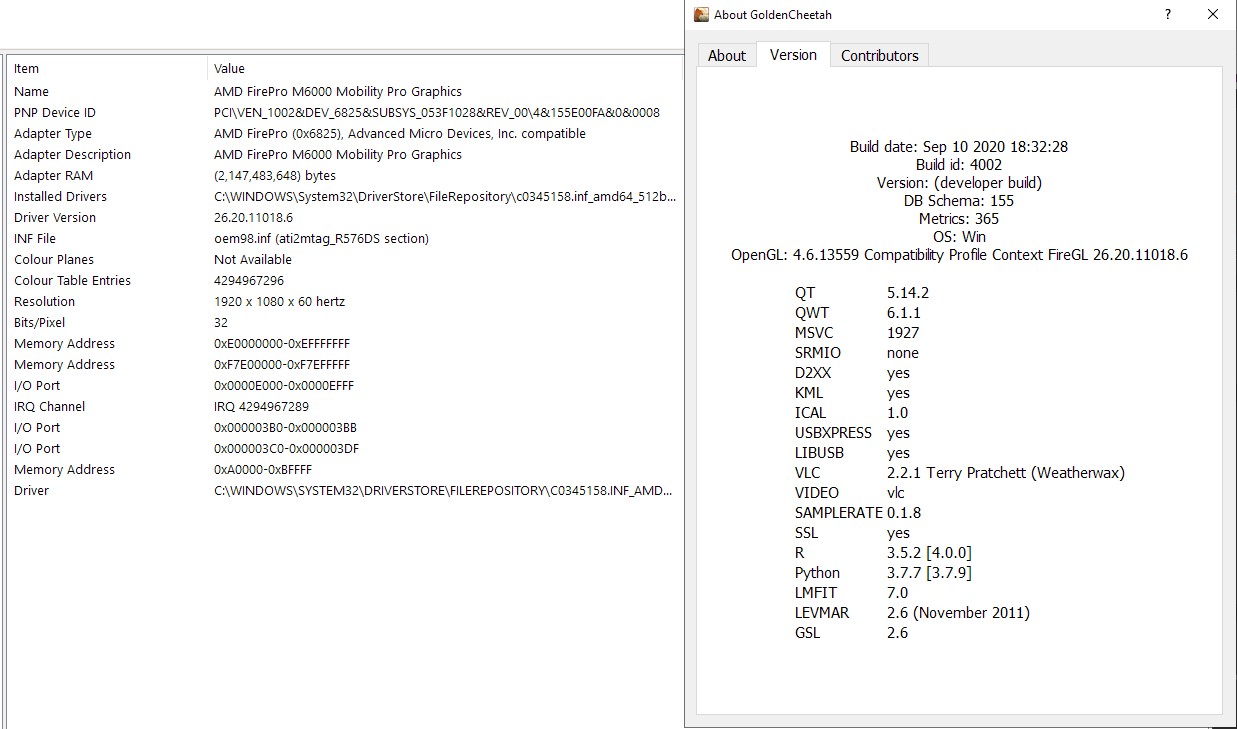
AMD FirePro M6000

gc_gpu.png

Ale Martinez (Please don't email or cc me)

unread,
Sep 12, 2020, 10:17:47 AM9/12/20
to golden-cheetah-users
El sábado, 12 de septiembre de 2020, 5:48:20 (UTC-3), Kalle Arsch escribió:
Just tried the latest snapshot build (SEP 05 2020 ID 4002) - still same behavior on macOS 10.14.6

Currently last snapshot and dev2009 are the same, neither was updated yet, only Windows builds. 

Rui_B

unread,
Sep 12, 2020, 3:55:27 PM9/12/20
to golden-cheetah-users
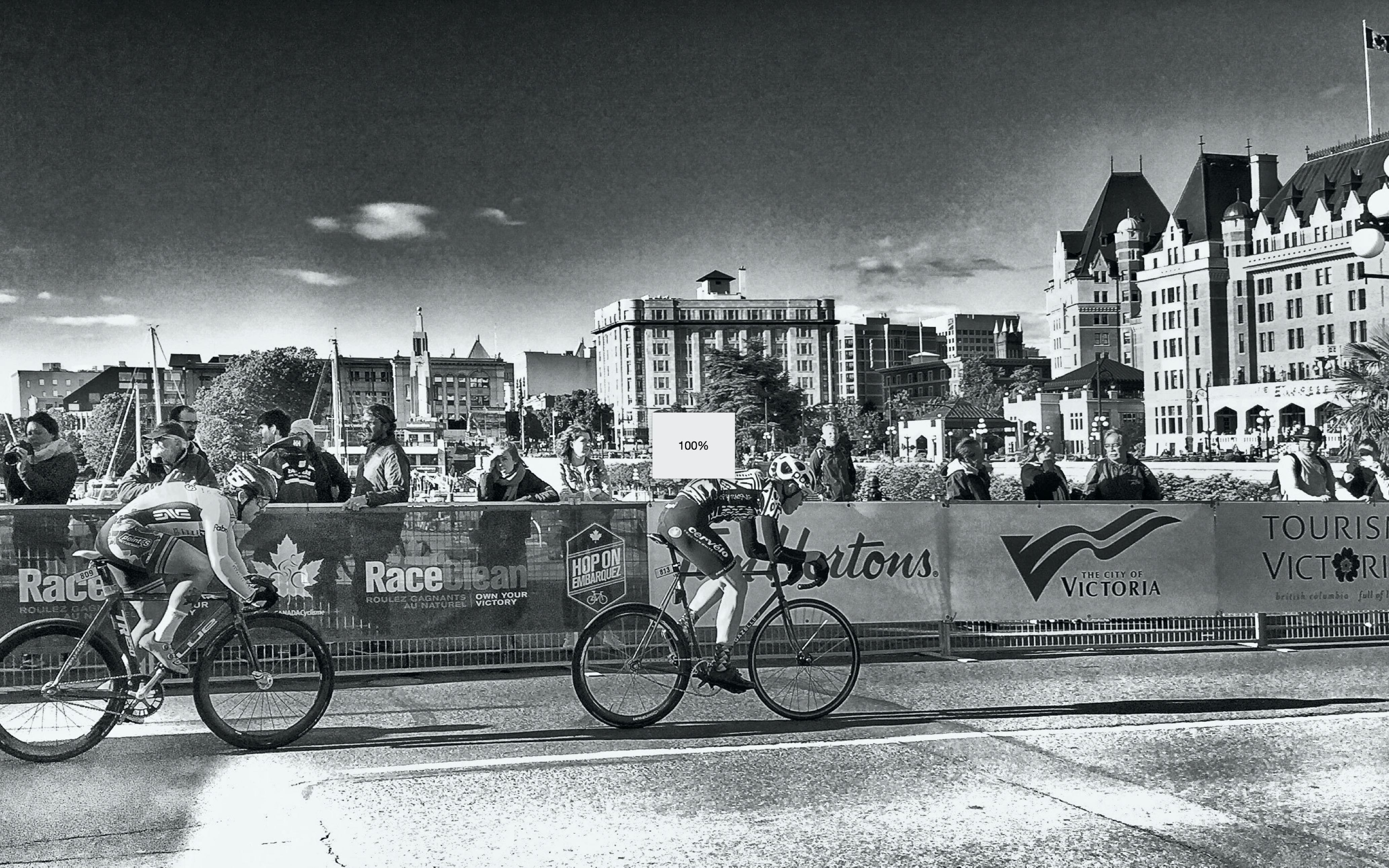
I'm having a problem launching GC

I'm using:
Screenshot 2020-09-12 at 12.45.43 .jpg

and I get as far as this when launching: — only the % of file loading indicator, then GC hangsScreenshot 2020-09-12 at 12.32.31 .jpg

On Saturday, September 5, 2020 at 11:39:02 PM UTC-7 Mark Liversedge wrote:

Ale Martinez (Please don't email or cc me)

unread,
Sep 13, 2020, 1:06:26 PM9/13/20
to golden-cheetah-users
El miércoles, 9 de septiembre de 2020, 5:38:06 (UTC-3), Mark Liversedge escribió:
On Wednesday, 9 September 2020 04:06:30 UTC+1, JustinL wrote:
macOS High Sierra (10.13). I really enjoy the new Overview chart, however, I get a black box covering the entire chart after clicking on another chart then back to Overview. This happens in both Activities and Trends. If I restart GC, the box disappears. I tried tabbed chart view, tiled chart view,  a new athlete on a fresh install, and different themes but each ended up with the same result. I do not have this problem with the June 2020 development build. 


This has been fixed in the repo, it was related to using opengl which doesn't work well on MacOS.

Now macOS snapshot build is updated to include that fix and to use the recently released Qt5.15.1 which supposedly fix related issues on WebEngine: http://goldencheetah-binaries.s3-website-us-east-1.amazonaws.com/?prefix=MacOS/

TJDunnigan

unread,
Sep 13, 2020, 4:43:47 PM9/13/20
to golden-cheetah-users
Crash on close (Mac 10.15.6)

On closing GC having entered new ride data, it crashes. Crash report attached.

Does not crash when closing without new ride data.
GC 3.6 DEV build 4001 crash.txt

Ale Martinez (Please don't email or cc me)

unread,
Sep 14, 2020, 9:09:32 AM9/14/20
to golden-cheetah-users
The crash log indicates a problem in graphics device, it would be interesting to know if it also happens with latest snapshot built on newer Qt libraries: http://goldencheetah-binaries.s3-website-us-east-1.amazonaws.com/?prefix=MacOS/

TJDunnigan

unread,
Sep 14, 2020, 3:23:13 PM9/14/20
to golden-cheetah-users
I installed the snapshot build and entered a new activity. GC crashed upon closing.
Crash report attached.

GoldenCheetah_2020-09-14-120931_MacBook-Pro2018.txt

Ale Martinez (Please don't email or cc me)

unread,
Sep 15, 2020, 3:39:26 PM9/15/20
to golden-cheetah-users
El lunes, 14 de septiembre de 2020, 16:23:13 (UTC-3), TJDunnigan escribió:
I installed the snapshot build and entered a new activity. GC crashed upon closing.
Crash report attached.

There is a new snapshot build specifically intended to solve this issue, if you want to try: http://goldencheetah-binaries.s3-website-us-east-1.amazonaws.com/?prefix=MacOS/ 

TJDunnigan

unread,
Sep 15, 2020, 11:06:13 PM9/15/20
to golden-cheetah-users
I did not have the opportunity to add a new activity (and due to surgery today, won't for a while), but this snapshot build opened and closed without problem.
If you want me to try to add an activity to test, you could send me a .fit file dated 9/15 or later and I'd be happy to test.

Rui_B

unread,
Sep 16, 2020, 1:16:05 PM9/16/20
to golden-cheetah-users
my attempt crashed upon launch...  same as before (see post on this thread from Sept 12)

I'm wondering if anyone else is having the same problem. ... I'm installing 

Ale Martinez (Please don't email or cc me)

unread,
Sep 16, 2020, 1:30:10 PM9/16/20
to golden-cheetah-users
El miércoles, 16 de septiembre de 2020, 14:16:05 (UTC-3), Rui_B escribió:
my attempt crashed upon launch...  same as before (see post on this thread from Sept 12)

Posting the crash log may help with debugging, otherwise it is hard to know. 

Mark Liversedge

unread,
Sep 16, 2020, 4:47:13 PM9/16/20
to golden-cheetah-users
Did you get a crash log, or are you getting a beach ball waiting?
My personal experience on Catalina was the first launch took a very long time (several minutes) -- not sure why, or what the OS is doing, but it clears after that first time.

Mark

Ale Martinez (Please don't email or cc me)

unread,
Sep 25, 2020, 11:04:01 AM9/25/20
to golden-cheetah-users
If it hangs, without generating a crash log, it could be an instance of https://github.com/GoldenCheetah/GoldenCheetah/issues/3611?

Last snapshot build uses Qt 5.14.1 to avoid it, if you want to try: http://goldencheetah-binaries.s3-website-us-east-1.amazonaws.com/?prefix=MacOS/

El miércoles, 16 de septiembre de 2020, 14:16:05 (UTC-3), Rui_B escribió:

Rui_B

unread,
Sep 25, 2020, 4:41:14 PM9/25/20
to golden-cheetah-users
I may have been getting the beach ball... but mostly I was hearing the cooling fans screaming and I went to the Force Quit window ( option+comand-esc ) there was an indication that GC was not responding and it was in red). I Force Quit it, but did not find a log file, nor a core file.... this does not mean one was not generated.

I've subsequently tried Ale's link (below) and as you suggested, after a long first launch, it worked. Prob a software security analysis. process

Thank you.

Rui_B

unread,
Sep 26, 2020, 3:10:09 AM9/26/20
to golden-cheetah-users
wow... this is looking very nice - gr8 work all.


Thank you

Mark Liversedge

unread,
Sep 27, 2020, 3:19:26 AM9/27/20
to golden-cheetah-users
On Friday, 25 September 2020 21:41:14 UTC+1, Rui_B wrote:
I've subsequently tried Ale's link (below) and as you suggested, after a long first launch, it worked. Prob a software security analysis. process

Its a deadlock when refreshing metrics - a bug

Mark

mlt.m...@googlemail.com

unread,
Oct 15, 2020, 7:30:22 AM10/15/20
to golden-cheetah-users
I have some problems with the Linux version.

1. When I compare data with "compare date ranges" and then click on the bar to pull it up, it disappears. This is only when an R chart available and GC is restarted when the R chart is added for the first time. Without an R chart everything is normal.
compare date ranges.png


2. If the trend charts created with bars and labels, the numbers disappear when you touch the y-axis with the mouse.
trend charts2.png

3. If a new metric is created under options app and automatically restarted, the metrics are not available. After a manual restart of GC, the new metric is available.
restart.png

4. When GC installed and started for the first time CP History and Vo2max chart have the wrong parameters.
Ext to ext
falsa1.png
falsa2.png
falsa3.png

5. User Chart are all functions already integrated? I wanted to test the WKO4 Power Duration chart and I get the error message "Function store not known" and " Function fetch not known".
User Chart.png

Many thanks for the help and support.

Ale Martinez (Please don't email or cc me)

unread,
Oct 15, 2020, 10:00:59 AM10/15/20
to golden-cheetah-users
El jueves, 15 de octubre de 2020, 8:30:22 (UTC-3), mlt.m...@googlemail.com escribió:
I have some problems with the Linux version.

1. When I compare data with "compare date ranges" and then click on the bar to pull it up, it disappears. This is only when an R chart available and GC is restarted when the R chart is added for the first time. Without an R chart everything is normal.
compare date ranges.png


2. If the trend charts created with bars and labels, the numbers disappear when you touch the y-axis with the mouse.
trend charts2.png

3. If a new metric is created under options app and automatically restarted, the metrics are not available. After a manual restart of GC, the new metric is available.
restart.png


I cannot read that message but it looks like it is reporting some problem in your config that needs to be fixed. It should not appear when you add custom metrics and your config is Ok.
 
4. When GC installed and started for the first time CP History and Vo2max chart have the wrong parameters.
Ext to ext
falsa1.png
falsa2.png
falsa3.png


Model names have changed in v3.6, we need to fix the affected charts before release.
 
5. User Chart are all functions already integrated? I wanted to test the WKO4 Power Duration chart and I get the error message "Function store not known" and " Function fetch not known".
User Chart.png

This chart needs a feature not included in this release, to use it you need to upgrade to v3.6 snapshot from main site. 

TJDunnigan

unread,
Oct 15, 2020, 4:13:27 PM10/15/20
to golden-cheetah-users
This problem occurs for me with Mac OS, build 4002.

Apparently, when I installed this build, it converted all my previous athlete weights to kilograms (in Activities, Details prior to install date).
I've always used Imperial units and manually entered my weight in pounds in Details.

I've continued to enter weight in pounds and now from install date to present, in Trends, Athlete Weight chart, I weigh over 370 pounds! (so my entered weights in pounds since install date are treated as kg and converted to pounds for the chart). 

Ale Martinez (Please don't email or cc me)

unread,
Oct 15, 2020, 4:24:40 PM10/15/20
to golden-cheetah-users
The imperial conversion bug is fixed in last snapshot, previous values are no affected but the ones entered afterwards need to be fixed.

https://github.com/GoldenCheetah/GoldenCheetah/commit/0dfa8f0e0082d05bb1ed5d7fca34dbb8e0bca2b9

mlt.m...@googlemail.com

unread,
Oct 15, 2020, 4:25:59 PM10/15/20
to golden-cheetah-users
1. I can see the behaviour also with a new created user.
There are no other charts added for the new user.
How the error can be reproduced.
    A. Create a new user
    B. add a few workouts
    C. check if the comparison works.
    D. Add an R chart. The error is only on the R chart, but on all other types it is ok.
    E. Restart GC.
    F. Check the comparison again. Now it should not go anymore.
    G. Delete the R chart
    H. Restart GC
    I. Now the comparison should go again.

2. normally, touching the vertical axis label hides the data.
When creating a trend chart with bar and data labels.
A number above the bar when the vertical axis label is touched, the numbers will disappear, which it should. If the corser is moved to a different position the numbers above the bar should reappear but this does not happen. First after reloading the chart.
Add a little movie that explains it better.

3. If a change is made in the athlete library, e.g. a new metric or a new colour keyword is created, the change is saved but not applied on restart.
e.g.
options → Data Fields → Colour Keywords → change the color of FTP → Save
Then comes the window. athlete library1.png Answer with yes.
After the automatic restart the color should have changed but it didn't.
First when GC is closed and restarted the color is changed.

4. and 5. done

Many thanks for the help and support.
hides number.mp4

Ale Martinez (Please don't email or cc me)

unread,
Oct 15, 2020, 5:34:52 PM10/15/20
to golden-cheetah-users
El jueves, 15 de octubre de 2020, 17:25:59 (UTC-3), mlt.m...@googlemail.com escribió:
1. I can see the behaviour also with a new created user.
There are no other charts added for the new user.
How the error can be reproduced.
    A. Create a new user
    B. add a few workouts
    C. check if the comparison works.
    D. Add an R chart. The error is only on the R chart, but on all other types it is ok.
    E. Restart GC.
    F. Check the comparison again. Now it should not go anymore.
    G. Delete the R chart
    H. Restart GC
    I. Now the comparison should go again.

I can reproduce using an R chart, but I have no idea which the problem is. Switching to Tile Mode and back to Tab Move is a workaround to avoid this behavior.
 
2. normally, touching the vertical axis label hides the data.
When creating a trend chart with bar and data labels.
A number above the bar when the vertical axis label is touched, the numbers will disappear, which it should. If the corser is moved to a different position the numbers above the bar should reappear but this does not happen. First after reloading the chart.
Add a little movie that explains it better.

I am not sure I understand, if you click on a scale to hide data series you need to click again to display them.
 
3. If a change is made in the athlete library, e.g. a new metric or a new colour keyword is created, the change is saved but not applied on restart.
e.g.
options → Data Fields → Colour Keywords → change the color of FTP → Save
Then comes the window. athlete library1.png 

It seems to be something weird with you Athlete library setting for this to happen, see https://github.com/GoldenCheetah/GoldenCheetah/wiki/UG_Preferences_General

mlt.m...@googlemail.com

unread,
Oct 15, 2020, 8:26:31 PM10/15/20
to golden-cheetah-users
2. Yes almost.
Normal is I move the cursor to the scale and hide the numbers - without clicking.
I get out of the scale area and the numbers appear automatically.
Only with the bar it is not so, they do not appear automatically.
I have to open the chart again to see the numbers.
Maybe you can see it better in this movie.

hides number2.mp4

mlt.m...@googlemail.com

unread,
Oct 15, 2020, 8:34:03 PM10/15/20
to golden-cheetah-users
was too big so the second post

3. easier - in GC 3.5 I changed the Colour Keywords, saved them and when the window came I said yes and GC restarted automatically and the changes were applied.
With GC 3.6 it's like this, I say yes to the windows and GC restarts automatically and doesn't apply the changes.
I close GC and restart GC and only then the changes are applied.
Has the location for metadata.xml and usermetrics.xml changed?
I add a movie too.
Colour Keywords2.mp4

Ale Martinez (Please don't email or cc me)

unread,
Oct 16, 2020, 9:54:31 AM10/16/20
to golden-cheetah-users
El jueves, 15 de octubre de 2020, 21:34:03 (UTC-3), mlt.m...@googlemail.com escribió:
was too big so the second post

3. easier - in GC 3.5 I changed the Colour Keywords, saved them and when the window came I said yes and GC restarted automatically and the changes were applied.
With GC 3.6 it's like this, I say yes to the windows and GC restarts automatically and doesn't apply the changes.
I close GC and restart GC and only then the changes are applied.

The reason GC is warning about a change in Athlete Library when you haven't changed that setting is because Athlete Library is blank in your config, you need to set it to the right path as explained in https://github.com/GoldenCheetah/GoldenCheetah/wiki/UG_Special-Topics_Setting-the-athlete-library and, after the next restart, this warning will not appear again when you change anything else and changes will be applied immediately (there are some exceptions s.t. R/Python config).
 
Has the location for metadata.xml and usermetrics.xml changed?

metadata.xml was moved from athlete config to general settings, parallel to usermetrics.xml which was not moved.

mlt.m...@googlemail.com

unread,
Oct 20, 2020, 3:06:20 PM10/20/20
to golden-cheetah-users
Thank you very much that has solved my problem.

Branden Meltingtallow

unread,
Oct 27, 2020, 12:27:45 AM10/27/20
to golden-cheetah-users
I am unable to select or see the "more..." button in tabbed view.  Only way is to go to tiled view.  Fresh Win10 and GC install.  Any remedy to this?

Thanks

kub3r4

unread,
Oct 27, 2020, 12:49:57 AM10/27/20
to golden-cheetah-users
If you move cursor on tab, you should see small triangle/arrow next to tab name, pointing down. You need to click on triangle/arrow to see "More" menu. Click on tab won't do it. It needs to be triangle/arrow.

I don't know if others can see image you posted, but i can only see lines and lines of characters.

Branden Meltingtallow

unread,
Oct 27, 2020, 10:25:21 AM10/27/20
to golden-cheetah-users
Thank you, I never spotted that.  I knew that I was missing something as no one had mentioned it.  

Branden
Message has been deleted

Branden Meltingtallow

unread,
Nov 10, 2020, 12:09:54 PM11/10/20
to golden-cheetah-users
Another question.  How do I create a new athlete in this build outside of the initial pop up box dialog if no default athlete is opened?  I tried ctrl+N and there are no options under Athlete or that I can see in the Athlete module that displays all the athletes.

Thanks,

Ale Martinez

unread,
Nov 10, 2020, 12:53:20 PM11/10/20
to golden-cheetah-users
On Tuesday, November 10, 2020 at 2:09:54 PM UTC-3, Branden Meltingtallow wrote:
Another question.  How do I create a new athlete in this build outside of the initial pop up box dialog if no default athlete is opened?  I tried ctrl+N and there are no options under Athlete or that I can see in the Athlete module that displays all the athletes.

Add/Remove athletes will likely be added to Athletes view, but it is work in progress and still unavailabe.

To get the Choose Athlete dialog box, which allows to create and delete athletes, you can start GoldenCheetah with -- as a command line parameter.

Branden Meltingtallow

unread,
Nov 10, 2020, 3:33:48 PM11/10/20
to golden-cheetah-users
Thank you Ale, appreciate the quick response!

Rui_B

unread,
Nov 12, 2020, 4:53:21 PM11/12/20
to golden-cheetah-users
Hello everyone,

Has anyone tried this build on Mac OS 11.01 (Big Sur) yet?


Cheers,

Rui


TJDunnigan

unread,
Nov 13, 2020, 1:30:58 PM11/13/20
to golden-cheetah-users
The snapshot development build 4002 (which I believe is an extension of 3.6) ran fine on Big Sur. I successfully did an erg training session and added the ride.

Rui_B

unread,
Nov 13, 2020, 6:25:57 PM11/13/20
to golden-cheetah-users
Excellent, Thank you.

Ale Martinez

unread,
Nov 15, 2020, 4:10:41 PM11/15/20
to golden-cheetah-users
There is an updated snapshot build available including fixes for the issues reported in this thread and others from github plus some new features s.t. Live Map Chart, Video on macOS, etc.

c c

unread,
Nov 23, 2020, 4:04:04 PM11/23/20
to golden-cheetah-users
Hi in this version, i have a fresh install on pc , where is athlete setting? hr , cp, weight...

Ale Martinez

unread,
Nov 23, 2020, 4:30:33 PM11/23/20
to golden-cheetah-users
El lunes, 23 de noviembre de 2020 a la(s) 18:04:04 UTC-3, c c escribió:
Hi in this version, i have a fresh install on pc , where is athlete setting? hr , cp, weight...

c c

unread,
Nov 23, 2020, 4:36:20 PM11/23/20
to golden-cheetah-users
ok thx in my pc it is not visible... and with mouse over all blu color

Ale Martinez

unread,
Nov 23, 2020, 4:46:27 PM11/23/20
to golden-cheetah-users
El lunes, 23 de noviembre de 2020 a la(s) 18:36:20 UTC-3, c c escribió:
ok thx in my pc it is not visible... and with mouse over all blu color

May be you can try other Theme in Options > Appearance for a better combination.

Scud Bee

unread,
Dec 3, 2020, 11:44:19 AM12/3/20
to golden-cheetah-users
Hi,
I've installed this build couple of days ago (under MacOS 10.14.6), used 3.5 before. At the first start the app was not responding forever (like 20-25 min) using all CPU resources and fans screaming. I thought, first start, maybe it recalculates all metrics and does some other cpu-intensive first-launch-staff. Now, I just added one simple metric, literally just assigning an integer number, and when I hit "Save", it went into the computing frenzy or whatever it is again.
Is this a bug? Is there any way to fix it?
(I need to rewrite some metrics using samples function, and it's not going to be possible if the app becomes unresponsive for that long each time I save)

Ale Martinez

unread,
Dec 3, 2020, 11:49:46 AM12/3/20
to golden-cheetah-users
Likely this problem https://github.com/GoldenCheetah/GoldenCheetah/issues/361, in snapshot build this is avoided going back to Qt5.14, in fact it is better to install snapshots instead of this dev build since it includes fixes for the problems reported and some new features.

Scud Bee

unread,
Dec 3, 2020, 12:38:35 PM12/3/20
to golden-cheetah-users
Thank you, I've installed the most recent snapshot (the one linked at the GC website's main page), and now it stays responsive, but still used most of the CPU resources for quite some time. It seems that it recalculated all user metrics although I just added one simple one.
Is there any specific need to recalculate ALL metrics when one is added/updated?

Ale Martinez

unread,
Dec 3, 2020, 1:10:51 PM12/3/20
to golden-cheetah-users
El jueves, 3 de diciembre de 2020 a la(s) 14:38:35 UTC-3, Scud Bee escribió:
Thank you, I've installed the most recent snapshot (the one linked at the GC website's main page), and now it stays responsive, but still used most of the CPU resources for quite some time.

Since user metrics are global, the recommended way to work on them when you have too many activities for a fast recomputation on your hardware, is to use an athlete with a few activities, once you are done go back to open the real one and wait for metrics recomputation just once.

Scud Bee

unread,
Dec 3, 2020, 4:19:52 PM12/3/20
to golden-cheetah-users
Yes, that would be a workaround. I still fail to see a reason (maybe there is one) to recalculate all metrics when just one is added or modified. Why not recalculate just this one new metric? Also, there should be no problem to check if any other metric uses the changed one before recalculating it over all activities, and to not recalculate if it doesn't. This would be rather obvious approach, so there must be some specific reason for total recalculation. Do you happen to know what it is?

Ale Martinez

unread,
Dec 3, 2020, 5:08:20 PM12/3/20
to golden-cheetah-users
El jueves, 3 de diciembre de 2020 a la(s) 18:19:52 UTC-3, Scud Bee escribió:
Yes, that would be a workaround. I still fail to see a reason (maybe there is one) to recalculate all metrics when just one is added or modified. Why not recalculate just this one new metric? Also, there should be no problem to check if any other metric uses the changed one before recalculating it over all activities, and to not recalculate if it doesn't. This would be rather obvious approach, so there must be some specific reason for total recalculation. Do you happen to know what it is?

You can look by yourself starting from: https://github.com/GoldenCheetah/GoldenCheetah/blob/35606d321c3993bc4ff49d84f3c6cdf1f1cba711/src/Core/Context.cpp#L91, if you come up with a better scheme, please make a Pull Request.

Scud Bee

unread,
Dec 4, 2020, 10:21:16 AM12/4/20
to golden-cheetah-users
I'm trying to rewrite some of my metrics using the samples() function, and it seems that there is a problem. 

Adding a new metric using the following example from the user's guide https://github.com/GoldenCheetah/GoldenCheetah/wiki/UG_Special-Topics_Creating-User-Metrics#poor-performance-using-the-sample-function (with capitalized POWER) 

{

relevant { Data contains "P"; }

value { sum(samples(POWER) * recIntSecs); }

count { count(samples(POWER)) * recIntSecs; }

}

As is it sends GC into a beachball freeze as soon as I click on Test. Without the "count" function it works all right.

Am I missing something?

Ale Martinez

unread,
Dec 4, 2020, 11:17:26 AM12/4/20
to golden-cheetah-users
El viernes, 4 de diciembre de 2020 a la(s) 12:21:16 UTC-3, Scud Bee escribió:
I'm trying to rewrite some of my metrics using the samples() function, and it seems that there is a problem. 

Adding a new metric using the following example from the user's guide https://github.com/GoldenCheetah/GoldenCheetah/wiki/UG_Special-Topics_Creating-User-Metrics#poor-performance-using-the-sample-function (with capitalized POWER) 

{

relevant { Data contains "P"; }

value { sum(samples(POWER) * recIntSecs); }

count { count(samples(POWER)) * recIntSecs; }

}

As is it sends GC into a beachball freeze as soon as I click on Test. Without the "count" function it works all right.

Am I missing something?

Scud Bee

unread,
Dec 4, 2020, 11:47:12 AM12/4/20
to golden-cheetah-users
Ah! That's... enlightening.

Ale Martinez

unread,
Dec 4, 2020, 11:59:27 AM12/4/20
to golden-cheetah-users
Message has been deleted

Scud Bee

unread,
Dec 4, 2020, 4:24:03 PM12/4/20
to golden-cheetah-users
Screenshot_gc.png

Ale Martinez

unread,
Dec 4, 2020, 4:47:58 PM12/4/20
to golden-cheetah-users
El viernes, 4 de diciembre de 2020 a la(s) 18:24:03 UTC-3, Scud Bee escribió:
Screenshot_gc.png

There are two errors there: power needs to be POWER and length() should be used instead of count() to compute the length of the samples vector.

BTW, This request https://groups.google.com/g/golden-cheetah-users/c/2XIr7ESQCkw/m/L80HPtBAAAAJ has not received too much attention, but let's try again.

Scud Bee

unread,
Dec 4, 2020, 5:09:19 PM12/4/20
to golden-cheetah-users
What's the difference between count() and length() besides count returning 1 if the passed value is not a vector, and length returning 0 in that case?

Ale Martinez

unread,
Dec 4, 2020, 5:24:45 PM12/4/20
to golden-cheetah-users
El viernes, 4 de diciembre de 2020 a la(s) 19:09:19 UTC-3, Scud Bee escribió:
What's the difference between count() and length() besides count returning 1 if the passed value is not a vector, and length returning 0 in that case?

Scud Bee

unread,
Dec 4, 2020, 6:49:43 PM12/4/20
to golden-cheetah-users
From the wiki:

length(v) - since v3.6
Will return the number of elements in a vector. If the passed value is not a vector then a value of 0 will be returned. See also count().

count(v ..)
Returns the number of elements in a variable or list of variables, if it is a vector a count of the elements in the vector, if it is a numeric value it will return 1. See also length.

since samples() returns a vector, both functions should return the number of elements in that vector, i.e. give identical results.
What's the difference?

Ale Martinez

unread,
Dec 4, 2020, 6:57:53 PM12/4/20
to golden-cheetah-users
El viernes, 4 de diciembre de 2020 a la(s) 20:49:43 UTC-3, Scud Bee escribió:
From the wiki:

length(v) - since v3.6
Will return the number of elements in a vector. If the passed value is not a vector then a value of 0 will be returned. See also count().

count(v ..)
Returns the number of elements in a variable or list of variables, if it is a vector a count of the elements in the vector, if it is a numeric value it will return 1. See also length.

since samples() returns a vector, both functions should return the number of elements in that vector, i.e. give identical results.
What's the difference?

In that case there is no difference but the name, which matters when you are defining a local function with the same name, since it overrides the builtin function.

TJDunnigan

unread,
Dec 5, 2020, 5:20:20 PM12/5/20
to golden-cheetah-users
Hi Ale,
I tried to fix the weight by going to Activities>Details and entering the correct weight in pounds, but even after re-saving the activity the weight displays in converted Kg in the summary (and in charts).
I have a weight in pounds in the Athlete profile.
So I do not know where/how I can fix the weight in a stretch of about 6 weeks of activities.

On Thursday, October 15, 2020 at 1:24:40 PM UTC-7 Ale Martinez wrote:
The imperial conversion bug is fixed in last snapshot, previous values are no affected but the ones entered afterwards need to be fixed.

https://github.com/GoldenCheetah/GoldenCheetah/commit/0dfa8f0e0082d05bb1ed5d7fca34dbb8e0bca2b9

Message has been deleted

Ale Martinez

unread,
Dec 5, 2020, 7:39:25 PM12/5/20
to golden-cheetah-users
El sábado, 5 de diciembre de 2020 a la(s) 19:20:20 UTC-3, TJDunnigan escribió:
Hi Ale,
I tried to fix the weight by going to Activities>Details and entering the correct weight in pounds, but even after re-saving the activity the weight displays in converted Kg in the summary (and in charts).
I have a weight in pounds in the Athlete profile.
So I do not know where/how I can fix the weight in a stretch of about 6 weeks of activities.

You need to update those entries in Athlete Settings > Measures > Body, the Weight tag for activities is ignored when you use the time depending settings as explained in https://github.com/GoldenCheetah/GoldenCheetah/wiki/UG_Special-Topics_Weight-settings 

raf...@tfrank.de

unread,
Dec 24, 2020, 11:14:34 AM12/24/20
to golden-cheetah-users
Hi Mark,

never before installed an developers build. Did now since I was setting up my new Notebook complete from scratch and figured why not.

Would that threat be the right place to mention not bugs but simply what I as a user like or what I don't like as much in the new version?

I would have something regarding the default UI looks (font, colors) for mac.

And I have my gripes with the new  activities details page. Lots of clutter I don't need (change history, several long technical sensor ID, internal filenames, my own name) all stuff that distracts a self trained athlete as well as a trainer (sans the athlete name) supervising several atheletes from the real info on that page. That is date, RPE, and notes at the foremost.

And I often use and edit in the raw table. That ones screen real estate got cut by having it as a separate sub pane in the details pane rather than it's own complete pane...

cheers
Torsten

Mark Liversedge schrieb am Montag, 7. September 2020 um 11:56:13 UTC+2:
On Monday, 7 September 2020 10:29:12 UTC+1, RB wrote:
IIRC this tab has moved to details tab as an sub tab like Notes/Device etc.

Yes- the "Details" and "Editor" charts are combined into a "Data" chart that includes metadata like Notes as well as the raw sample data.

Mark

raf...@tfrank.de

unread,
Dec 24, 2020, 1:01:26 PM12/24/20
to golden-cheetah-users
On the same topic, when using the "tile view" (dunno if that is the right name in GC Lingo for this), I would suggest the then smaller tiles would need some automatic "pruning" of contents for this overview to make sense.

Else the smaller viewing "windows" of the separate tiles are getting overwhelmed with unscaled parts (e.g. the legend in the CP diagram) or text boxes which where already too small to begin with in their original home (e.g. the notes field in the 'Details' pane - see my last post) are now completely non-sensical. 

I made an annotated screen shot how my app window looks on my 13 " Macbook Pro:
GC_Tiles_View_annotated_.png

Ale Martinez

unread,
Dec 24, 2020, 1:32:49 PM12/24/20
to golden-cheetah-users
El jueves, 24 de diciembre de 2020 a la(s) 13:14:34 UTC-3, raf...@tfrank.de escribió:
And I have my gripes with the new  activities details page. Lots of clutter I don't need (change history, several long technical sensor ID, internal filenames, my own name) all stuff that distracts a self trained athlete as well as a trainer (sans the athlete name) supervising several atheletes from the real info on that page. That is date, RPE, and notes at the foremost.

raf...@tfrank.de

unread,
Dec 26, 2020, 7:23:07 AM12/26/20
to golden-cheetah-users
Thank you Ale for your answer. And also in the M1 Thread about xml.

Point is - even I as a long time Golden Cheetah User still dread the (for me still with around 30-40 % trial and error connected) Task of editing the data fields and test whether all functions the way it is supposed to be after my editing.

I would have no clue to edit the XML files in a way that the outcome would be a pleasing one.

It's great that GC is custom editable.

I guess my suggestion framed as a question would then be:

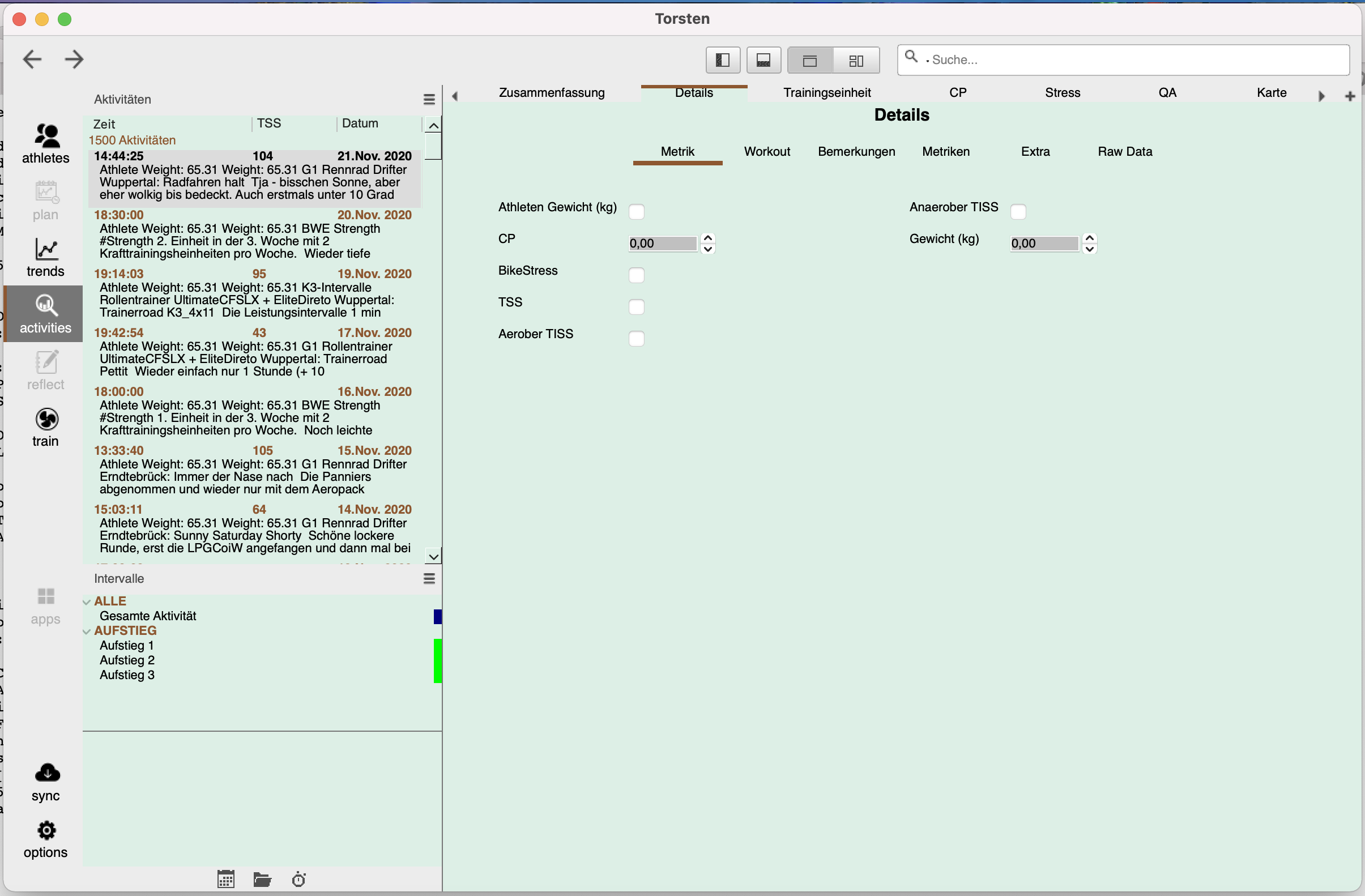
Do you think that the following view is an enticing and convincing view for a new (or any) Golden Cheetah user? Or would you deem it cluttered and summarizing a host of different informations. From which some indeed could be called "technical details of the activity" (i.e. sensor IDs and stuff) and some would be rather called "Description and Notes". The latter ones one of the main interfaces and actions an athlete in general, an selfcoached athlete and a coach of an athlete needs to do with an activity. That is: writing/reading the notes and give/recognize the RPE etc.

-->
Bildschirmfoto 2020-12-26 um 13.11.51.png

I hope your answer to that question is "No".

And if so, then I'd suggest to change this for the better default experience. 
If there are no great ideas in this direction how to do this or it would be deemed too much work which would be sorely needed in other parts of the development process (which I could totally understand) then my suggestion would be: just revert this view back like it is in the current normal version.

cheers
Torsten

Mark Liversedge

unread,
Dec 26, 2020, 7:30:37 AM12/26/20
to golden-cheetah-users
On Saturday, 26 December 2020 at 12:23:07 UTC raf...@tfrank.de wrote:
Do you think that the following view is an enticing and convincing view for a new (or any) Golden Cheetah user?

That is not the default view since a) the color scheme is not the default and b) the metadata setup is wrong.
Not sure how you got into that setup, I'm guessing its either a bug or downgrade without restoring a backup ?

Mark

Ale Martinez

unread,
Dec 26, 2020, 5:32:07 PM12/26/20
to golden-cheetah-users
El sábado, 26 de diciembre de 2020 a la(s) 09:30:37 UTC-3, Mark Liversedge escribió:
b) the metadata setup is wrong.
Not sure how you got into that setup, I'm guessing its either a bug or downgrade without restoring a backup ?

Ale Martinez

unread,
Dec 27, 2020, 8:25:21 AM12/27/20
to golden-cheetah-users
The bug provoking a weird Details char with only Extra and Raw Data tabs after upgrading to v3.6 is fixed in last snapshot builds, if you were affected,  steps to fix are:
  1. Download and install GC from http://goldencheetah-binaries.s3-website-us-east-1.amazonaws.com/
  2. Remove metadata.xml file from GC root folder, parallel to your athlete’s folder(s)
  3. Run the new version and a new default metadata.xml will be automatically generated 
Obviously step 2 is NOT required if you are not affected by this issue (great majority of users), it can be installed and run as usual.

RoKA

unread,
Dec 27, 2020, 3:43:27 PM12/27/20
to golden-cheetah-users
Dear Ale and Mark,

Thank you very much for the workaround and the snapshot build 2020-12-27.
I noticed the issue with the metadata.xml after installing V3.6 snapshot builds from scratch.
Already replacing the metadata.xml (V3.6) with the metadata.xml (V3.5) fixed the issue.

GC V3.5 is my installation I use for logging and analyzing my activities and GC V3.6 (Snapshots) for exploring the new features mainly OVERVIEW
(Activities and Trends) and the TRAIN with Live Map.

Currently I am smoothing an IM70.3 course with the following tools:
1) GPSprune (https://activityworkshop.net/software/gpsprune/download.html): binding the course to the road
2) Peter Wards GPX Editor (https://combobulatory.blogspot.com/p/gpx-viewer): smoothing elevation changes

The smoothing takes some effort but the first processed 4Km works like a charm in TRAIN with Live Map.

The new features OVERVIEW and TRAIN with Live Map are awesome and I am looking forward for the new PLAN functionality.

Regards Rolf

raf...@tfrank.de

unread,
Dec 28, 2020, 8:26:34 AM12/28/20
to golden-cheetah-users
Hi Mark,

indeed it's not the default color scheme nor the default font, since I had to change these first things after starting up the 3.6 GC. The default color scheme suffered from a boxy, haphazard lego blocks look and more importantly, the default font was very garish (serif, soft fuzzy rendering) and even wasn't sitting  centered in the fields and cutting into the field borders (see second screenshot).

GC_3_60_Screenie_01_first_default_Look.png

GC_3_60_Screenie_02_default_look-font_and_cuttingfields.png

But Ale must have had the right idea.
I just downloaded the last build from the GC site: Build date: Dec 27 2020 00:36:15 Build id: 4002

Before opening that one for the first time, I deleted the metadata.xml from GC root folder as told in the readme. Before doing that I looked into the one sitting there. It was very short and innocent looking, having only two entry blocks for calendar training text or something.

The new metadata.xml is way longer and seems to feature my personal entries and field settings like "Fahrrad" and such.

And - it helped. I guess I see the details page now as it should render:

GC_3_60_27122020-Snapshot_Screenie_03_Details.png

Now I can totally live with that :) I will uphold my issue with the fact that this arrangement cuts into the usable screen real estate especially when looking at the raw data:

GC_3_60_27122020-Snapshot_Screenie_04_Wasted-Space.png

What would your second guess refer to ("downgrade without restoring a backup")? I think I kinda "upgraded" by using the November 3.6 Developer built against the 3.5 edition I used before. I just copied my normal GC folder to my new laptop and then pointed the new GC towards it.

cheers,
Torsten

raf...@tfrank.de

unread,
Dec 28, 2020, 8:27:35 AM12/28/20
to golden-cheetah-users
Hi Ale,

bingo, that solved it instantly. Thank you. :)

cheers,
Torsten

Ale Martinez schrieb am Sonntag, 27. Dezember 2020 um 14:25:21 UTC+1:

raf...@tfrank.de

unread,
Dec 28, 2020, 8:56:39 AM12/28/20
to golden-cheetah-users
Tile view:

I know that one is still very much in development. It looks already a bit better than in 3.5 I guess. 
Tried to re-arrange and scale a few boxes. That's nice.

I reckon the auto-scaling of the contents needs more work still. Especially for the "notes" field. I tried to make that one wider to give the text more space at the same letter size or better yet with a slightly increased letter size. The result was the opposite than I hoped for. The tile got bigger, but the letter size even smaller. The other way around would be more intuitive (and helpful). But in the end also the means to enter a letter size via the options menu would be perfect.

Not the default view (but after a bit of trying stuff out). Important tidbit here: letter size in the notes field:
Bildschirmfoto 2020-12-28 um 14.44.01.png


Made the tile "Bemerkungen" bigger which resulted in even smaller text:
Bildschirmfoto 2020-12-28 um 14.44.46.png

BTW: where did the calendar view go in 3.6?
Can't find it anywhere.

Or is it supposed to be accessed via "plan" or "reflect" on the left side pane? Which are always greyed out for me. Maybe not yet implemented? Or only accessible when you enter planned activities (never did this in GC yet, I have weekly / short term goals in mind and work them accordingly, don't microplan weekly minutes or TSS in advance).

cheers,
Torsten

Mark Liversedge schrieb am Sonntag, 6. September 2020 um 08:39:02 UTC+2:
Available here:

Report build issues here.

Thanks
Mark

raf...@tfrank.de

unread,
Dec 28, 2020, 9:01:51 AM12/28/20
to golden-cheetah-users
Minor correction: I referred to the "Dashboard" and not the tile view obviously. My bad. :) Tile view suffers from the point I mentioned earlier in that this one needs even more intelligent scaling, placements and prunings of elements in the tile contents like axis, legend boxes etc. 

Dashboard on the other hand seems nice already. 

Nigel Van de Velde

unread,
Dec 29, 2020, 11:28:46 AM12/29/20
to golden-cheetah-users
Hi,

I've been reorganizing my setup a bit and have been playing with the new tiled Overview in the Trend tab.
Could it be that there are still some issues with the bubble charts? When I add a bubble chart with Activity_Date as X-axis, then the X-axis doesn't show the beginning of the selected period/season. See screenshot below. Seelcted season should start on 1 January and it only shows data starting from respectively 10/02 - 16/02 - 06/02.

Working on the last snapshot for Linux (2020-12-27T01:03:15.000Z 241.6 MB GoldenCheetah_v3.6-DEV_x64.AppImage)

Kind regards,

Nigel

Overview.png

Ale Martinez

unread,
Dec 29, 2020, 6:54:22 PM12/29/20
to golden-cheetah-users
El martes, 29 de diciembre de 2020 a la(s) 13:28:46 UTC-3, nige...@gmail.com escribió:
Hi,

I've been reorganizing my setup a bit and have been playing with the new tiled Overview in the Trend tab.
Could it be that there are still some issues with the bubble charts? When I add a bubble chart with Activity_Date as X-axis, then the X-axis doesn't show the beginning of the selected period/season. See screenshot below. Seelcted season should start on 1 January and it only shows data starting from respectively 10/02 - 16/02 - 06/02.

Martin Poettgen

unread,
Dec 29, 2020, 7:21:05 PM12/29/20
to golden-cheetah-users
Hi .
I installed the (GoldenCheetah_v3.6-DEV2006_x64 as well as the GoldenCheetah_v3.6-DEV_x64.exe.
Both versions don't start on my win10 notebook. I choose the athlet, than it counts to 100% - thats it - no program window appears.
So i reinstalled the 3.5 stable release. This works propper.
Thx
MAP

Ale Martinez

unread,
Dec 30, 2020, 10:45:15 AM12/30/20
to golden-cheetah-users
El martes, 29 de diciembre de 2020 a la(s) 21:21:05 UTC-3, map...@googlemail.com escribió:
Hi .
I installed the (GoldenCheetah_v3.6-DEV2006_x64 as well as the GoldenCheetah_v3.6-DEV_x64.exe.
Both versions don't start on my win10 notebook. I choose the athlet, than it counts to 100% - thats it - no program window appears.

Upgrade to v3.6 requires a full metric cache recomputation, which may take a while depending on your hardware and number of activities, so may be you just need to wait to terminate, if it crashes a log file will be added to GC data folder.
Running GoldenCheetah.exe --debug from a command prompt will display additional information at the console.

Martin Poettgen

unread,
Dec 30, 2020, 1:58:23 PM12/30/20
to golden-cheetah-users
Thx. I installed GoldenCheetah_v3.6-DEV_x64 again and started. I am waiting now for > 20 minutes for the program windows to appear. I don't see the app in task manager. 
Thx
MAP
It is loading more messages.
0 new messages