
Excel-DNA keep looking for excel 15 interop while i have office 365 (16) installed.

Yanxun Hu


Govert van Drimmelen
I think this relates to a bug in Visual Studio when adding COM references to .NET Core projects.
Instead, I suggest you remove that reference and add the ExcelDna.Interop package:
<ItemGroup>
<PackageReference Include="ExcelDna.AddIn" Version="1.6.0-preview4" />
<PackageReference Include="ExcelDna.Interop" Version="15.0.0-preview2" />
</ItemGroup>
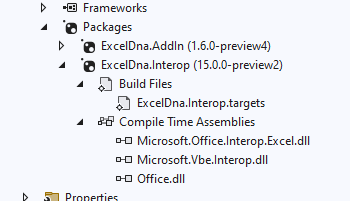
-Govert
From: exce...@googlegroups.com <exce...@googlegroups.com> On Behalf Of Yanxun Hu
Sent: 28 July 2022 16:21
To: Excel-DNA <exce...@googlegroups.com>
Subject: [ExcelDna] Excel-DNA keep looking for excel 15 interop while i have office 365 (16) installed.
I created an project with excel dna 1.6 preview 4, targeting .net framework 6,
this is reference added

now when i run this add in in debug or release mode, i get this error as soon as i create a new sheet

Runtime [Error] Unhandled exception in async delegate call. : FileNotFoundException - Could not load file or assembly 'Microsoft.Office.Interop.Excel, Version=15.0.0.0, Culture=neutral, PublicKeyToken=71e9bce111e9429c'. The system cannot find the file specified.
i don't have office 15 on my pc, only have office 365 installed.
puzzled, please help
--
You received this message because you are subscribed to the Google Groups "Excel-DNA" group.
To unsubscribe from this group and stop receiving emails from it, send an email to exceldna+u...@googlegroups.com.
To view this discussion on the web visit https://groups.google.com/d/msgid/exceldna/1998b5a4-e92b-4ae0-8dc8-e1d759d3e757n%40googlegroups.com.

xlFAQ
Check out the latest version by Govert as at https://groups.google.com/g/exceldna/c/FX5NoaiDu_o/m/GHwusAPNBgAJ the same resolving the similar error I too had reported!