
How to enable PPAPI Flash support in DCEF3 branch 2454
1,657 views
Skip to first unread message

vhanla
Nov 3, 2015, 9:20:55 PM11/3/15
to delphichromiumembedded
DCEF3 branch 2454 now introduces Chromium version 45 which was announced a few hours ago by the author of DCEF Henri Gourvest and it is awesome..
However, I noticed that Flash was not working anymore, so digging in CEF and Chromium forums I found out that Chromium version 45 officially dropped NPAPI support, but it still supports PPAPI, so we need to add --enable-system-flash to our program's executable shortcut (command line params) in order to enable Flash again for our program.
However, I noticed that Flash was not working anymore, so digging in CEF and Chromium forums I found out that Chromium version 45 officially dropped NPAPI support, but it still supports PPAPI, so we need to add --enable-system-flash to our program's executable shortcut (command line params) in order to enable Flash again for our program.
Notice: we might need to make sure to use CefCommandLineArgsDisabled := False; ( Cef Command Line support is enabled ) in our project source in order to use that parameter mentioned above, but it is False by default, so we don't need to worry, but who knows, you might have had disabled it for some reason xD.
A system-wide installation of Pepper Flash that will be automatically discovered and loaded by CEF on Windows and OS X can be downloaded from https://get2.adobe.com/flashplayer/otherversions/ (choose "FP for Opera and Chromium -- PPAPI") in Step 2). To enable use the system-wide installation pass the --enable-system-flashcommand-line argument. — Marshall GreenblattBut there is another alternative, which will help us to add those command line arguments before starting chromium, and get rid of unwanted command lines or shortcuts (.lnk) that the user should include to enable Flash in our program.
Just like adding a custom path for our cache directory, we also need to modify the Project's source.
This is the event we need to modify:
CefOnBeforeCommandLineProcessing
By default is set to nil so we will need a custom procedure to add that switcher (--enable-system-flash or any other one you might also need) to our chromium component.
So it will look something like this:
program guiclient;
...
procedure CustomCommandLine (const processType: ustring; const commandLine: ICefCommandLine);
begin
commandLine.AppendSwitch('--enable-system-flash'); // since it doesn't need any value, that's enough, otherwise use AppendSwitchWithValue(switch, value);
end;
begin
CefCache := 'cache';
...
CefOnBeforeCommandLineProcessing := CustomCommandLine;
...
CefSingleProcess := False;
if not CefLoadLibDefault then Exit;
...
Application.Initialize;
...
end.
That's it, now we will have PPAPI Flash working again in our project.
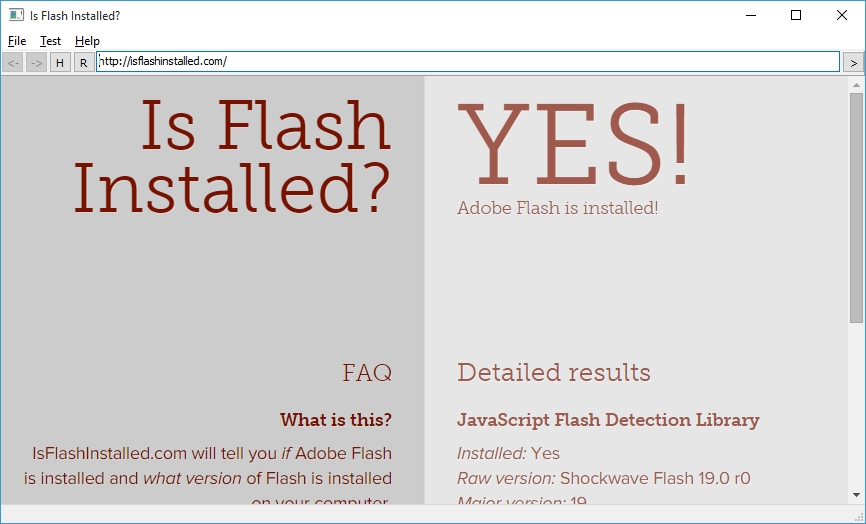
More about CefCommandLine at http://magpcss.org/ceforum/apidocs3/projects/(default)/CefCommandLine.html
PS: Please correct me if something is wrong in my code, but I've tested it and it seems to work just fine, anyhow, maybe something related to the TOnBeforeCommandLineProcessing event procedure correct usage.

Squall Leonhart
Nov 14, 2015, 6:07:26 AM11/14/15
to delphichromiumembedded
PPAPI Flash buggy in games, I returned on NPAPI, doing so, download libs froms branch 2526
среда, 4 ноября 2015 г., 6:20:55 UTC+4 пользователь vhanla написал:
procedure OnBeforeCommandLineProcessing(const processType: ustring;
const commandLine: ICefCommandLine);
begin
commandLine.AppendSwitch('always-authorize-plugins');
commandLine.AppendSwitch('enable-npapi');
commandLine.AppendSwitchwithvalue('load-plugin', 'NPSWF32.dll');
end;
среда, 4 ноября 2015 г., 6:20:55 UTC+4 пользователь vhanla написал:
Message has been deleted
vhanla
Nov 15, 2015, 4:05:18 PM11/15/15
to delphichromiumembedded
By default plugins are not enabled for hardware acceleration so you need to enable Pepper 3D Rendering and Accelerated Plugins.
That'll do, since Google is going to deprecate NPAPI support, I recommend to stick to PPAPI, besides, I've noticed NPAPI Flash uses more memory and seems to release less than PPAPI.
Here a list of interesting switches, you might want to look to Pepper related ones and Accelerated hardware ones. However, some of them might have been deprecated, I'm not sure which works, since there is no mention of --enable-system-flash.
  commandLine.AppendSwitch('--enable-gpu-plugin');  commandLine.AppendSwitch('--enable-accelerated-plugins');
  ...
  commandLine.AppendSwitch('--enable-system-flash');
That'll do, since Google is going to deprecate NPAPI support, I recommend to stick to PPAPI, besides, I've noticed NPAPI Flash uses more memory and seems to release less than PPAPI.
Here a list of interesting switches, you might want to look to Pepper related ones and Accelerated hardware ones. However, some of them might have been deprecated, I'm not sure which works, since there is no mention of --enable-system-flash.
Squall Leonhart
Nov 15, 2015, 4:28:27 PM11/15/15
to delphichromiumembedded
Thanks , I'll try , ppapi problem may exist in the implementation of the dcef3, what is downloaded from the website Test App https://cefbuilds.com/ there connected a PPAPI flash and there were no problems at work. It is in the examples that come with dcef3 if you compile and connect PPAPI flash that often starts with brakes flash. I attached a flash tester , load it in guiclient.exe or cefclient.exe, several times to restart the program , you will understand what I mean.
понедельник, 16 ноября 2015 г., 1:05:18 UTC+4 пользователь vhanla написал:
понедельник, 16 ноября 2015 г., 1:05:18 UTC+4 пользователь vhanla написал:
vhanla
Nov 15, 2015, 4:30:08 PM11/15/15
to delphichromiumembedded
It is weird, those command line switches work with branch 2454, even though they were removed in 2012 as it states here (in red text)
http://peter.sh/experiments/chromium-command-line-switches/?date=2011-06-09
I've tested some flash games which without those commandlines run very slowly, but applying them they work without frame drops,
http://peter.sh/experiments/chromium-command-line-switches/?date=2011-06-09
I've tested some flash games which without those commandlines run very slowly, but applying them they work without frame drops,

Michael
Jun 27, 2016, 4:22:54 PM6/27/16
to delphichromiumembedded
I've just tried the new branch Henry posted:
with both I have the PPAPI rendering issue like Squall Leonhart reported. With CEF3 testapp rendering is OK on all attempts.
Any idea how could this be fixed for DCEF3?
Thanks!

Liu Zen
Jan 10, 2017, 10:02:59 AM1/10/17
to delphichromiumembedded
I Just try use pepper flash from chrome,it work
在 2015年11月4日星期三 UTC+8上午10:20:55,vhanla写道:
procedure AppendCefCmdline(const processType: ustring; const cmd: ICefCommandLine);
begin
cmd.AppendSwitchWithValue('ppapi-flash-version','18.0.0.232');
cmd.AppendSwitchWithValue('ppapi-flash-path','PepperFlash\\pepflashplayer.dll');
end;
CefOnBeforeCommandLineProcessing :=AppendCefCmdline;在 2015年11月4日星期三 UTC+8上午10:20:55,vhanla写道:
Squall Leonhart
Jan 10, 2017, 3:27:22 PM1/10/17
to delphichromiumembedded
In last version PPAPI right already
вторник, 10 января 2017 г., 18:02:59 UTC+3 пользователь Liu Zen написал:
вторник, 10 января 2017 г., 18:02:59 UTC+3 пользователь Liu Zen написал:
Reply all
Reply to author
Forward
0 new messages