
RuntimeError
128 views
Skip to first unread message

이지원
Jan 29, 2022, 11:14:52 AM1/29/22
to cpax_forum
Hello,
There's a problem when I ran
'$cpac run /media/12T/ABIDE/CASE1/any_dir /media/12T/ABIDE/CASE1/case1_default_output participant --data_config_file /media/12T/ABIDE/CASE1/data_config_case1.yml'
for 5 participants.
The number of output files is func: 306, anat: 56, and all parcipants are the same.
So, I wonder where the error occurred.

There's a problem when I ran
'$cpac run /media/12T/ABIDE/CASE1/any_dir /media/12T/ABIDE/CASE1/case1_default_output participant --data_config_file /media/12T/ABIDE/CASE1/data_config_case1.yml'
for 5 participants.
The number of output files is func: 306, anat: 56, and all parcipants are the same.
So, I wonder where the error occurred.
nipype version 1.0.0+git69-gdb2670326-1
cpac version 0.3.2.post1
Thank you,
LEE

Jon Clucas, MIS
Feb 1, 2022, 12:13:30 PM2/1/22
to cpax_forum
Hi Lee,
Your output directory tree should look something like
/media/12T/ABIDE/CASE1/case1_default_output
├── cpac_data_config_${TIMESTAMP}.yml
├── cpac_pipeline_config_${TIMESTAMP}_min.yml
├── cpac_pipeline_config_${TIMESTAMP}.yml
├── log
├── cpac_data_config_${TIMESTAMP}.yml
├── cpac_pipeline_config_${TIMESTAMP}_min.yml
├── cpac_pipeline_config_${TIMESTAMP}.yml
├── log
│ └── cpac_cpac_default
│ └── ${subject}
│ └── ${subject}
└── output
└── cpac_cpac_default
└── ${subject}
├── anat
└── func
└── ${subject}
├── anat
└── func
Are there any files with filenames beginning with crash in the top-level log subdirectory in your output directory? If so, can you share those? Can you also please share the cpac_pipeline_config_${TIMESTAMP}_min.yml file?
The only error apparent from the screenshot is excessive memory usage report generation, which shouldn't hurt anything other than debugging out-of-memory errors and future optimization.
The number of output files is func: 306, anat: 56, and all parcipants are the same.
You mean each participant has 306 functional outputs and 56 anatomical outputs? Or 306 functional and 56 anatomical total, divided evenly among subjects? Or one subject seems to have run repeatedly without any of the other subjects running? Or something else?
Thanks for reaching out with your questions, and thanks in advance for the clarification.
이지원
Feb 7, 2022, 8:32:13 PM2/7/22
to cpax_forum
Hi Jon Clucas,
I'm sorry for my belated reply.


1. Many files beginning with crash existed in the log subdirectory in my output directory as shown below.
I share top-level crash file.
3 cpac_pipeline_config_${TIMESTAMP}_min.yml files in case1_default_output directory.
So, I share these files too.
2. I mean each participant has 306 functional outputs and 56 anatomical outputs.
I hope this error will be resolved.
Thank you for your help.
LEE
2022년 2월 2일 수요일 오전 2시 13분 30초 UTC+9에 Jon Clucas, MIS님이 작성:
Jon Clucas, MIS
Feb 8, 2022, 10:05:09 AM2/8/22
to cpax_forum
> I'm sorry for my belated reply.
No apology necessary!
---
Those crash-DATE-TIME-*-connectome.*.txt crashfiles are a result of a known issue in C-PAC v1.8.2 (at least the attached crashfile is; I assume they're all the same issue, one for each matrix that failed to generate). The only outputs that should be affected are connectome matrices. The issue has been resolved for v1.8.3 (which will be released soon). In the meantime, if you don't need / care about the connectome matrices, you can just add
timeseries_extraction:
connectivity_matrix:
using:
measure:
connectivity_matrix:
using:
measure:
to your pipeline configuration file (setting timeseries_extraction.connectivity_matrix.using and timeseries_extraction.connectivity_matrix.measure both empty) to prevent C-PAC from attempting to generate these files. Alternatively, you could cpac --tag nightly run /media/12T/ABIDE/CASE1/any_dir
/media/12T/ABIDE/CASE1/case1_default_output participant
--data_config_file /media/12T/ABIDE/CASE1/data_config_case1.yml to use the latest v1.8.3 development image that already includes the fix for this issue.
---
> 3 cpac_pipeline_config_${TIMESTAMP}_min.yml files in case1_default_output directory.
Each time you run C-PAC, C-PAC will generate a cpac_pipeline_config_${TIMESTAMP}.yml and a cpac_pipeline_config_${TIMESTAMP}_min.yml (both show specifically what pipeline was run after C-PAC initialized, the *_min.yml showing just the difference between what was run and the default pipeline). Thanks for sharing them; from these files I can see the output and log directory are the only things differing from the default pipeline for these runs.
---
> each participant has 306 functional outputs and 56 anatomical outputs
The number of outputs will depend not only on the pipeline configuration, but also the number and types of input images.
Are you missing outputs you expected (besides the connectome matrices)? Or do you have extra outputs you weren't expecting? Or are you just asking if that's a reasonable number?
Thanks,
Jon
이지원
Feb 9, 2022, 2:50:45 AM2/9/22
to cpax_forum
Hi
Jon Clucas,


Files and directories in local /media/12T/ABIDE/CASE1/outputs => Container's /output directory.


I have some questions.
1. When cpac utils data_config build /media/12T/ABIDE/CASE1/data_settings.yml and
cpac run /media/12T/ABIDE/CASE1/any_dir /media/12T/ABIDE/CASE1/case1_default_output participant --data_config_file /media/12T/ABIDE/CASE1/data_config_case1.yml
commands are ran sequentially, each time to run C-PAC generate different container. Is that right?
Files and directories in local /media/12T/ABIDE/CASE1/case1_defalut_output/outputs => Container's /output directory.
These two containers generated are different So, they can't interfere each other. Right?
2. I want to bind /tmp to working directory I specified. (not current working directory)
Shown below is a default pipeline configuration file.
If I want to bind /media/12T/ABIDE/CASE1/working (local) with /case1_working(arbitrarily I set container's directory name).
How can I do?
In other words, I'm curious how to change the container's directory name arbitrarily(/tmp -> /case1_working) and how to bind with working directory in local(
/media/12T/ABIDE/CASE1/working ).
3. I'm also curious about the same method in the output_directory.
4. What differences in crash and logs directories?
Sometimes /logs was generated and sometimes /crash was generated when I run c-pac command.
5. > each participant has 306 functional outputs and 56 anatomical outputs.
I mean I just asking if that's a reasonable number.
Thank you,
LEE
2022년 2월 9일 수요일 오전 12시 5분 9초 UTC+9에 Jon Clucas, MIS님이 작성:
Message has been deleted
이지원
Feb 9, 2022, 3:50:34 AM2/9/22
to cpax_forum
6. I got error when I run C-PAC with configuration file.

and I got errors as shown below.
/media/12T/ABIDE/CASE1/case1_pipeline$ cpac --tag nightly run /media/12T/ABIDE/CASE1/case1_pipeline/any_dir /media/12T/ABIDE/CASE1/case1_pipeline participant --data_config_file /media/12T/ABIDE/CASE1/case1_pipeline/data_config_case1.yml --pipeline_file /media/12T/ABIDE/CASE1/case1_pipeline/preproc_pipeline_config.yml
Please let me know how I can resolve..
Thank you,
LEE
2022년 2월 9일 수요일 오후 4시 50분 45초 UTC+9에 이지원님이 작성:
Jon Clucas, MIS
Feb 14, 2022, 4:21:00 PM2/14/22
to cpax_forum
Note: we released v1.8.3 last Friday, so if you upgrade your local latest image (cpac pull --tag latest) you won't need to use --tag nightly to run with the fix for the connectome matrices.
1. When cpac utils data_config build /media/12T/ABIDE/CASE1/data_settings.yml and
cpac run /media/12T/ABIDE/CASE1/any_dir /media/12T/ABIDE/CASE1/case1_default_output participant --data_config_file /media/12T/ABIDE/CASE1/data_config_case1.yml
commands are ran sequentially, each time to run C-PAC generate different container. Is that right?
Files and directories in local /media/12T/ABIDE/CASE1/outputs => Container's /output directory.
Files and directories in local /media/12T/ABIDE/CASE1/case1_defalut_output/outputs => Container's /output directory.
These two containers generated are different So, they can't interfere each other. Right?
The answer depends on the bindings.

In this example (from the screenshots you provided), your outputs and logs are independent and can't interfere with each other, but /media/12T/ABIDE/CASE1 and /tmp in both containers are bound read/write to /media/12T/ABIDE/CASE1 on your real machine. Those bindings could interfere with each other (they probably won't, but it's almost always preferable to bind your input data read-only, to prevent any chance of corrupting those data ― you can do that here simply by not running from your data directory, i.e., running from another directory).
2. I want to bind /tmp to working directory I specified. (not current working directory)
Shown below is a default pipeline configuration file.
If I want to bind /media/12T/ABIDE/CASE1/working (local) with /case1_working(arbitrarily I set container's directory name).
How can I do?
In other words, I'm curious how to change the container's directory name arbitrarily(/tmp -> /case1_working) and how to bind with working directory in local( /media/12T/ABIDE/CASE1/working ).
See C-PAC latest documentation » User Documentation » C-PAC Quickstart » cpac (Python package) » Usage or cpac --help for a complete list of cpac optional arguments
To set a working directory other than the current working directory as the bound working directory, give cpac the --working_dir PATH flag with the desired working directory, like
cpac --working_dir /media/12T/ABIDE/CASE1/working run $BIDS_DIR $OUTPUTS_DIR participant
To bind /media/12T/ABIDE/CASE1/working (local) to /case1_working (in container), just give cpac a custom binding like
cpac --custom_binding /media/12T/ABIDE/CASE1/working:/case1_working run $BIDS_DIR $OUTPUTS_DIR participant
or
cpac -B /media/12T/ABIDE/CASE1/working:/case1_working run $BIDS_DIR $OUTPUTS_DIR participant
To change the name of the working directory in the container (/tmp → /case1_working) , change pipeline_setup['working_directory']['path'] from /tmp to /case1_working (where it says /tmp in the screenshot you provided). Note: this directory either needs to already exist in the container or needs to be provided with a bind mount.
pipeline_setup:
working_directory:
path: /case1_working
To do all of the above, make the change to your pipeline configuration file and use both the custom binding and the working directory flag, like
cpac --working_dir /media/12T/ABIDE/CASE1/working --custom_binding /media/12T/ABIDE/CASE1/working:/case1_working run $BIDS_DIR $OUTPUTS_DIR participant --pipeline_file $PIPELINE_CONFIGURATION
I'm curious why you'd want to change the ephemeral working directory path inside the container ― that path will no longer exist once the container no longer exists, and binding to /tmp in the container (which the --working_directory PATH flag does) would have the same effect locally as (setting the local working directory + setting pipeline_setup['working_directory']['path'] to a custom path location + binding that custom path location to the local working directory)
3. I'm also curious about the same method in the output_directory.
4. What differences in crash and logs directories?
Sometimes /logs was generated and sometimes /crash was generated when I run c-pac command.
We have an open issue to clarify questions 3 & 4. Years ago, before C-PAC was containerized, these all mattered more and need to be cleaned up. They only apply to the paths inside the container and almost certainly shouldn't matter for users running recent versions of C-PAC ― the directory provided to the positional output_dir argument for cpac run will locally house subdirectories that include log, output, and working (working only while the pipeline is running or if the --save_working_dir flag is provided to cpac run or if pipeline_setup['working_directory']['remove_working_dir'] is set to False in the pipeline configuration provided)
5. each participant has 306 functional outputs and 56 anatomical outputs.
I mean I just asking if that's a reasonable number.
It certainly makes sense for there to be many more functional files than crashfiles, but to know for sure depends on both the pipeline configuration and the input data. That each participant has the same number of output files is encouraging that the pipeline is behaving consistently across subjects. A future version of C-PAC will provide a log file of what outputs should be expected given the pipeline configuration and input data.
6. I got error when I run C-PAC with configuration file.
/media/12T/ABIDE/CASE1/case1_pipeline$ cpac --tag nightly run /media/12T/ABIDE/CASE1/case1_pipeline/any_dir /media/12T/ABIDE/CASE1/case1_pipeline participant --data_config_file /media/12T/ABIDE/CASE1/case1_pipeline/data_config_case1.yml --pipeline_file /media/12T/ABIDE/CASE1/case1_pipeline/preproc_pipeline_config.yml
and I got errors as shown below.
Please let me know how I can resolve..
Are there any crashfiles (crash-*.txt) in /media/12T/ABIDE/CASE1/case1_pipeline/log? From those screenshots, I can tell something unexpected happened, but I can't tell what.
이지원
Feb 16, 2022, 12:54:55 AM2/16/22
to cpax_forum
Hi Jon Clucas!
This image shows many crashfiles(crash-*.txt) in /media/12T/ABIDE/CASE1/case_pipeline/log.
I shared these files.
In crash-*.txt, 'FileNotFoundError: File /media/12T/ABIDE/CASE1/case1/0051456/session_1/rest_1/rest.nii.gz does not exist!' message comes out.
But I can find this rest.nii.gz file on the path I just mentioned.

2. Another problem is that I can see default preprocessing step when I run CPAC with default pipeline file but, I don't know which file came from which step.

In other words, I can see preprocessing steps but I confuse which file is came out from which step as output.
Are there any files that I can refer to?
I want to know output for each preprocessing step.
Thank you,
LEE
2022년 2월 15일 화요일 오전 6시 21분 0초 UTC+9에 Jon Clucas, MIS님이 작성:
이지원
Feb 16, 2022, 6:59:57 AM2/16/22
to cpax_forum
3. When I run

/media/12T/ABIDE/CASE3$ cpac --working_dir /media/12T/ABIDE/CASE3/working --tag nightly run /media/12T/ABIDE/CASE3/any_dir /media/12T/ABIDE/CASE3/case3_default_output participant --data_config_file /media/12T/ABIDE/CASE3/data_config_s3abide.yml,I got error because /media/12T/ABIDE/CASE3 directory is read-only.
When I run in /media/12T/ABIDE/CASE3, the container can recognize /media/12T/ABIDE/CASE3, I don't know why it's read-only.
2022년 2월 16일 수요일 오후 2시 54분 55초 UTC+9에 이지원님이 작성:
Jon Clucas, MIS
Feb 16, 2022, 5:24:39 PM2/16/22
to cpax_forum
1.This image shows many crashfiles(crash-*.txt) in /media/12T/ABIDE/CASE1/case_pipeline/log.
I shared these files.
In crash-*.txt, 'FileNotFoundError: File /media/12T/ABIDE/CASE1/case1/0051456/session_1/rest_1/rest.nii.gz does not exist!' message comes out.
But I can find this rest.nii.gz file on the path I just mentioned.
You can find that path on your machine, but that doesn't mean the path would exist in the container.
This is running cpac --tag nightly run
/media/12T/ABIDE/CASE1/case1_pipeline/any_dir
/media/12T/ABIDE/CASE1/case1_pipeline participant --data_config_file
/media/12T/ABIDE/CASE1/case1_pipeline/data_config_case1.yml
--pipeline_file
/media/12T/ABIDE/CASE1/case1_pipeline/preproc_pipeline_config.yml? You can see in the screenshot you provided above 
that your local /media/12T/ABIDE/CASE1/case1 is not bound to your container.
I assume /media/12T/ABIDE/CASE1/case1_pipeline/data_config_case1.yml includes /media/12T/ABIDE/CASE1/case1/0051456/session_1/rest_1/rest.nii.gz? If so, you've discovered a bug in cpac (the commandline wrapper). Do you mind sharing your data_config_case1.yml to help us find this bug?
The idea of cpac (the commandline wrapper) is to handle these bindings for you (the user, not necessarily you specifically), so you don't have to manually bind everything you need to your Docker container. It's intended to find all the paths you need from your data config and bind them to your container.
I think if you use /media/12T/ABIDE/CASE1/case1 as the first positional (bids_dir) argument (where you currently have /media/12T/ABIDE/CASE1/case1_pipeline/any_dir), your run should find its data.
2. Another problem is that I can see default preprocessing step
when I run CPAC with default pipeline file but, I don't know which file
came from which step.
In other words, I can see preprocessing steps but I confuse which file is came out from which step as output.
Are there any files that I can refer to?
I want to know output for each preprocessing step.
Only outputs that have keys in this table make their way to the output/cpac_{pipeline_name}/{subject}_{session} subdirectory of your output directory. Many intermediate outputs are created and either stored in working subdirectory or destroyed after the run to conserve space (depending on your configuration and run command).
Your output directory tree should look something like this:
.
├── cpac_data_config_{TIMESTAMP}.yml
├── cpac_pipeline_config_{TIMESTAMP}.yml
├── cpac_pipeline_config_{TIMESTAMP}.yml
├── log
│ └── pipeline_{pipeline_name}
│ └── {subject}_{session}
│ ├── callback.log
│ ├── callback.log.html
│ ├── callback.log.resource_overusage.txt
│ ├── engine.log
│ ├── pypeline.log
│ └── subject_info_ {subject}_{session}.pkl
├── output
│ └── cpac_{pipeline_name}
│ └── {subject}_{session}
│ ├── anat
│ └── func
└── working
└── cpac_{subject}_{session}
└── {node_string}_{pipe_number}
├── {node_output_file(s)}
├── _inputs.pklz
├── _node.pklz
├── _report
├── cpac_data_config_{TIMESTAMP}.yml
├── cpac_pipeline_config_{TIMESTAMP}.yml
├── cpac_pipeline_config_{TIMESTAMP}.yml
├── log
│ └── pipeline_{pipeline_name}
│ └── {subject}_{session}
│ ├── callback.log
│ ├── callback.log.html
│ ├── callback.log.resource_overusage.txt
│ ├── engine.log
│ ├── pypeline.log
│ └── subject_info_ {subject}_{session}.pkl
├── output
│ └── cpac_{pipeline_name}
│ └── {subject}_{session}
│ ├── anat
│ └── func
└── working
└── cpac_{subject}_{session}
└── {node_string}_{pipe_number}
├── {node_output_file(s)}
├── _inputs.pklz
├── _node.pklz
├── _report
│ └── report.rst
├── command.txt
└── {node_string}_{pipe_number}.pklz
└── {node_string}_{pipe_number}.pklz
(the working directory will only be there if you run with --save_working_dir, if your pipeline configuration includes
pipeline_setup:
working_directory:
remove_working_dir: False
or if your pipeline is currently running.)
output: The non-JSON files in output/cpac_{pipeline_name}/{subject}_{session}/anat and output/cpac_{pipeline_name}/{subject}_{session}/func should each have a corresponding JSON file (the same filename except a different extension). Those JSON files contain objects with the keys 'CpacProvenance' and 'Sources' ― these JSON files aren't super human-readable, but they allow you to trace the series of steps leading to the corresponding output file.
log: pypeline.log documents the sequence of nodes that are connected, initialized and run, including the names of the nodes and the working directory where intermediate files are/were stored
working: includes all the intermediate files referenced in log, plus runtime information in zipped Python pickle files and the text files command.txt and _report/report.rst. report.rst includeds runtime inputs and outputs, so between pypeline.log and all the report.rst files, one could theoretically manaully step through the whole workflow.
So if you have an output file and want to know where it came from, check out its corresponding JSON file. If you want to know what a particular node output, check that node's working directory.
3. When I run
/media/12T/ABIDE/CASE3$ cpac
--working_dir /media/12T/ABIDE/CASE3/working --tag nightly run
/media/12T/ABIDE/CASE3/any_dir
/media/12T/ABIDE/CASE3/case3_default_output participant
--data_config_file /media/12T/ABIDE/CASE3/data_config_s3abide.yml,I got error because /media/12T/ABIDE/CASE3 directory is read-only.
When I run in /media/12T/ABIDE/CASE3, the container can recognize /media/12T/ABIDE/CASE3, I don't know why it's read-only.
You set a custom working directory (/media/12T/ABIDE/CASE3/working) so your current working directory won't be bound automatically. Your data configuration file (/media/12T/ABIDE/CASE3/data_config_s3abide.yml) is in /media/12T/ABIDE/CASE3, so cpac is binding that directory read-only to read the data configuration. I'll open an issue so a future version will only bind the data configuration file itself as read-only instead of the whole directory.
이지원
Mar 3, 2022, 7:07:27 AM3/3/22
to cpax_forum
Hi Jon Clucas!

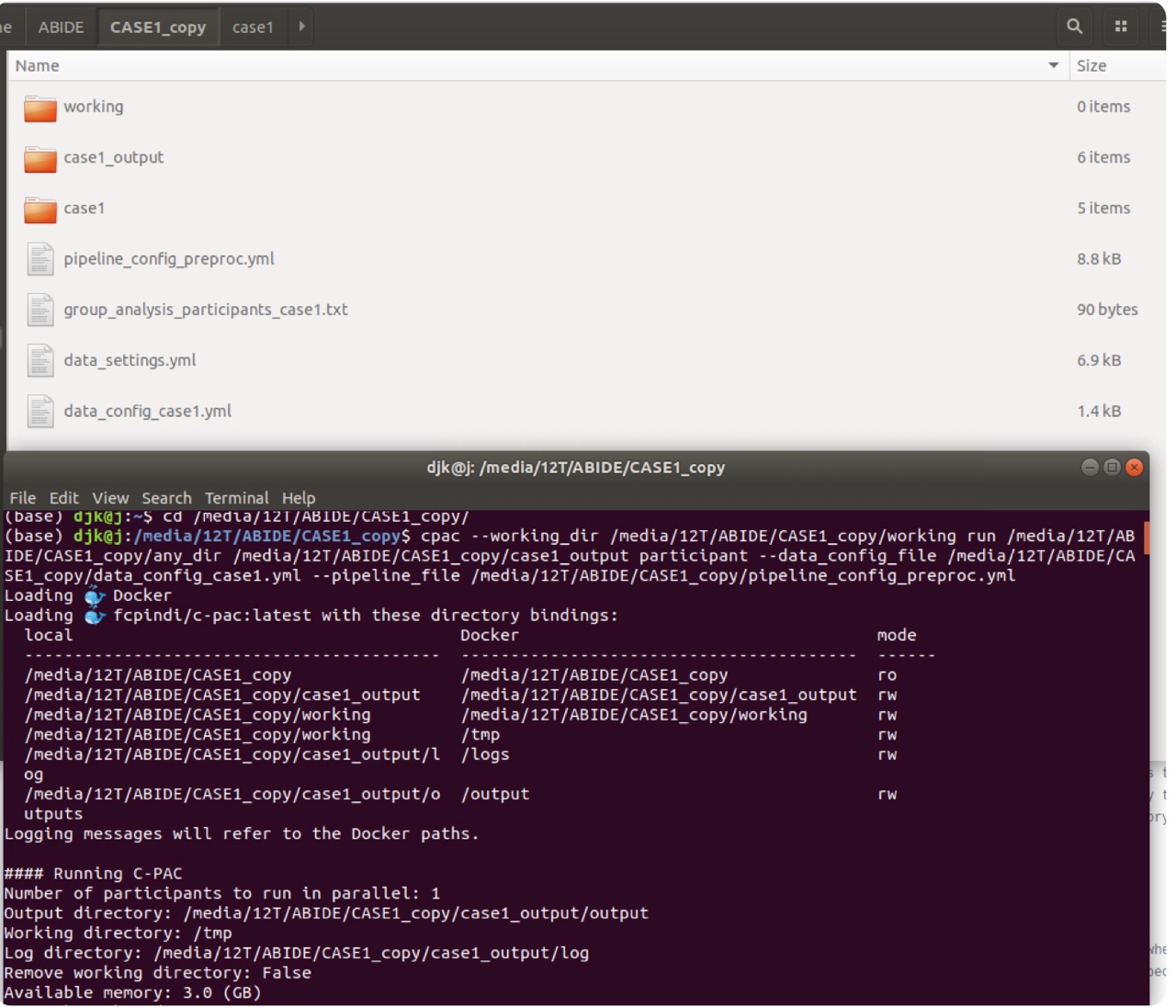


I have another question, so I'm asking.
1. Like the picture shown below, --custom_binding local_path:container_path means these two directories to bind.
But don't you need permission to create a directory under /? I'm curious why is there no problem.
2. Now, I know why current working directory is read-only.
But, /media/12T/ABIDE/CASE1_copy directory is read-only, how can subdirectories like /media/12T/ABIDE/CASE1_copy/case1_output and /media/12T/ABIDE/CASE1_copy/working be created under it? (before binding)
3. I changed pipeline_setup['working_directory']['path'] from /tmp to /media/12T/ABIDE/CASE3/working like the underline shown below and bound with /media/12T/ABIDE/CASE3/working(local) using
--working_dir.
But Why is /tmp suddenly bound? (I replaced /tmp → /media/12T/ABIDE/CASE3/working and /tmp is never specified anywhere.)
4. In this figure, is the /media/12T/practice is read-write and the /media, /media/12T directories are read-only? So the permission was denied?
5. There is something to check about the container's working directory role.
Working Directory: Directory where CPAC should store temporary and intermediate files.
Are the tasks during pre-processing stored in container's working directory and moved to the bound local through the bind path?
Always appreciate the detailed explanation.
Thanks for your help.
Thanks for your help.
LEE
2022년 2월 17일 목요일 오전 7시 24분 39초 UTC+9에 Jon Clucas, MIS님이 작성:
Jon Clucas, MIS
Mar 8, 2022, 4:50:28 PM3/8/22
to cpax_forum
1. Like the picture shown below, --custom_binding local_path:container_path means these two directories to bind.
But don't you need permission to create a directory under /? I'm curious why is there no problem.
You mean how /case1_working is created inside the Docker container? The image you're using is configured so that the root directory in the built container is writable. The path on your machine (/media/12T/ABIDE/CASE1/working) is not an immediate child of /, so there's no issue there.But don't you need permission to create a directory under /? I'm curious why is there no problem.
2. Now, I know why current working directory is read-only.
But, /media/12T/ABIDE/CASE1_copy directory is read-only, how can subdirectories like /media/12T/ABIDE/CASE1_copy/case1_output and /media/12T/ABIDE/CASE1_copy/working be created under it? (before binding)
3. I changed pipeline_setup['working_directory']['path'] from /tmp to /media/12T/ABIDE/CASE3/working like the underline shown below and bound with /media/12T/ABIDE/CASE3/working(local) using
--working_dir.
But Why is /tmp suddenly bound? (I replaced /tmp → /media/12T/ABIDE/CASE3/working and /tmp is never specified anywhere.)
4. In this figure, is the /media/12T/practice is read-write and the /media, /media/12T directories are read-only? So the permission was denied?
5. There is something to check about the container's working directory role.
Working Directory: Directory where CPAC should store temporary and intermediate files.
Are the tasks during pre-processing stored in container's working directory and moved to the bound local through the bind path?
The bindings are pointers, so there's no movement involved between the output directory in the container and the bound local path; those paths are addresses to the same location from the container and the local environment respectively.
Thanks again for bringing your concerns to our attention. Both of the bugs mentioned here had not been caught yet as far as I know.
이지원
Mar 10, 2022, 3:14:59 AM3/10/22
to cpax_forum
Hi,
Jon Clucas !

Thanks for the reply.
But I have a few questions about your answer.
But I have a few questions about your answer.
In answer 2.
I mean /media/12T/ABIDE/CASE1_copy directory in container is read-only but, how can subdirectories are created under /media/12T/ABIDE/CASE1_copy directory in container?
When I ran like this shown below, I got error and output directory couldn't be created because /media/12T/ABIDE is read-only.
So, I thought subdirectories can't be created if pararent directory is read-only in container.
But look at the previous question, /media/12T/ABIDE/CASE1_copy is read-only in container then how can subdirectories are created under /media/12T/ABIDE/CASE1_copy directory in container?
In answer 5.
I found
1. Bind paths are essentially tunnels between my local environment and my container.
2. So when a local path is bound to a path in a container, any files or subdirectories in that local path are also accessible at that path in the container and vice versa.
3. Any changes locally are reflected in the container, and any changes in the container are reflected locally but only at bound paths.
Why you said 'so there's no movement involved between the output directory in the container and the vound local path' ?
At the moment of binding, bounded a local path and a container path get same structure? (because any changes are reflected each other)
Thank you,
LEE
2022년 3월 9일 수요일 오전 6시 50분 28초 UTC+9에 Jon Clucas, MIS님이 작성:
Jon Clucas, MIS
Mar 11, 2022, 5:04:16 PM3/11/22
to cpax_forum
Hi Lee,
I mean /media/12T/ABIDE/CASE1_copy directory in container is read-only but, how can subdirectories are created under /media/12T/ABIDE/CASE1_copy directory in container?
They aren't. They're created locally before being bound to the container.
When I ran like this shown below, I got error and output directory couldn't be created because /media/12T/ABIDE is read-only.
I believe that director is read-only due to an issue raised earlier in this thread: your data config is in that directory and cpac doesn't want to override your data config, so it's binding read-only. It's a to-be-fixed design flaw that cpac is binding the whole directory instead of just the file read-only. The workaround would be to put the data config somewhere that isn't above anywhere in the tree you want to write (e.g., you could have it somewhere like /media/12T/ABIDE/configs/data_config_abide.yml)
Why you said 'so there's no movement involved between the output directory in the container and the vound local path' ?
At the moment of binding, bounded a local path and a container path get same structure? (because any changes are reflected each other)
There's no movement or reflection; the in-container paths are the addresses by which the container platform can access those particular file or directory locations. The files and directories only exist in one place, but it's a place that's visible to both your local filesystem and your container. The bindings specify how the local addresses correspond to the in-container addresses. Check out Docker's Use volumes to see an illustration or Singularity's Bind Paths and Mounts to see details about Singularity's implementation. The idea is similar to hardlinking except that the local addresses won't work in the container and vice-versa unless they're bound to matching paths.
이지원
Mar 14, 2022, 10:20:50 PM3/14/22
to cpax_forum
Hi, Jon Clucas !

Thanks for helping me understand.
In preprocessing steps (https://fcp-indi.github.io/docs/latest/user/preprocessing)
1. Anatomical and functional MNI space normalization finished files are required(Funtional to EPI-Template Registration step) and those files will be 4d data.
Output/cpac_{subject}_{session}/{subject}_{session}/func/{subject}_{session}_task-func-1_space-template_desc-preproc-1(2)_bold.nii.gz is the file I want and expect?
2. After ROI Time Series Extraction step, are the
Output/cpac_{subject}_{session}/{subject}_{session}/func/{subject}_{session}_task-func-1_{atlas name}desc-Mean-1(2)_timeseries.1D,
Output/cpac_{subject}_{session}/{subject}_{session}/func/{subject}_{session}_task-func-1_{atlas name}desc-ndmg-1(2)_correlations.csv
files are ROI(time x ROI) and functional correlation(ROI x ROI), respectively?
3. Please tell me the difference between 'desc-Mean' and 'desc-ndmg' in filename.
** I use default pipeline configuration.
** {subject}_{session}_task-func-1_space-template_desc-preproc-1(2)_bold.nii.gz file is too large to send so please refer to the json file.
Thank you,
LEE
2022년 3월 12일 토요일 오전 7시 4분 16초 UTC+9에 Jon Clucas, MIS님이 작성:
Reply all
Reply to author
Forward
0 new messages