
Problems with Tracking - 'Find Contours'
499 views
Skip to first unread message

Ana Cruz
Oct 27, 2016, 5:55:01 AM10/27/16
to Bonsai Users
Hi Gonçalo,
I am experiencing some difficulties with tracking. I have a video of a rat running on a linear track with a LED on his head. For now, as a first step, I just want to track the LED and I have used your tutorials as inspiration for my (very small and unfinished!) workflow. But it is returning an error on 'Find Contours' and I am not exactly sure why...as you can see in the picture, I only have two modules before 'Find Contours', the 'FileCapture' and the 'Threshold'. The video is on a greyscale and I use a high threshold to detect the LED.
Thanks in advance for the help.

Niccolò Bonacchi
Oct 28, 2016, 6:03:59 AM10/28/16
to Ana Cruz, Bonsai Users
What is the error?
--
N
--
You received this message because you are subscribed to the Google Groups "Bonsai Users" group.
To unsubscribe from this group and stop receiving emails from it, send an email to bonsai-users+unsubscribe@googlegroups.com.
Visit this group at https://groups.google.com/group/bonsai-users.
To view this discussion on the web visit https://groups.google.com/d/msgid/bonsai-users/84fbd4ba-d059-4948-bf9c-943d1ebf78e3%40googlegroups.com.
For more options, visit https://groups.google.com/d/optout.

goncal...@gmail.com
Oct 28, 2016, 6:15:40 AM10/28/16
to Ana Cruz, Bonsai Users
Hi Ana,
It seems like you may be missing a Grayscale node after FileCapture. I know it’s counter-intuitive but this node always converts images to RGB even if the underlying video is grayscale.
Threshold works even with colour images (each channel will be thresholded independently), but FindContours requires single channel (gray) images.
Hope this helps!
--
You received this message because you are subscribed to the Google Groups "Bonsai Users" group.
To unsubscribe from this group and stop receiving emails from it, send an email to bonsai-users...@googlegroups.com.
Ana Cruz
Oct 28, 2016, 6:23:32 AM10/28/16
to Bonsai Users, anasof...@gmail.com
Hi Gonçalo (and Nico),
Yesterday, out of despair, I did try the GreyScale node and it worked. But I wanted to know either way what you guys would reply, as (like you said) feels counter-intuitive to use greyscale for this video.
Thanks a lot ;)


oyard...@fau.edu
Feb 12, 2021, 5:01:26 PM2/12/21
to Bonsai Users
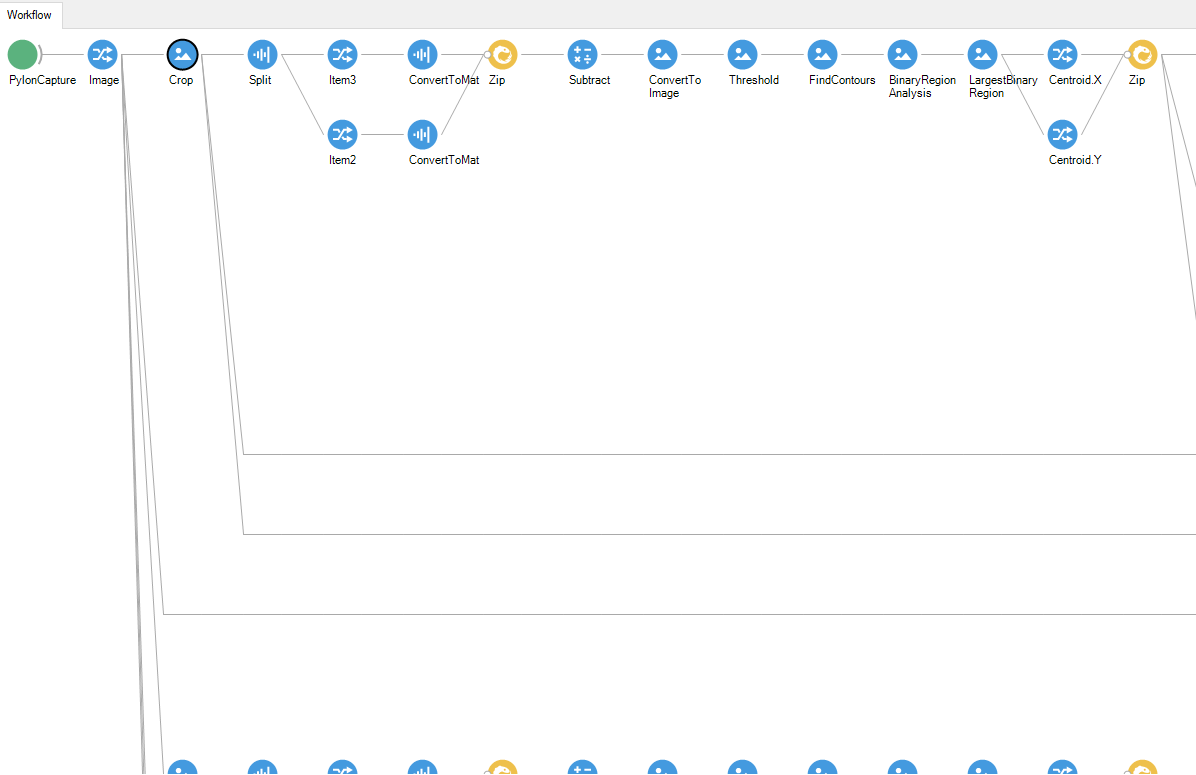
So I recently started tracking a red LED hat that my rats where in a cage which has a camera setup using Bonsai. I attached a PNG file of a screenshot of part of my workflow; after camera capture and crop, I split the image into RGB color channels, and then convert the images for the Green and Red channels to a matrix consisting of RGB values. Then I subtract the Green channel from the Red channel to remove all of the green in the image and leave only Red. What about the Blue channel? Green and Blue are similar enough that it doesn't matter which you subtract from Red, and because I have an optogenetic stimulation protocol applied that emits green light from the tips of the patch cords, and because I don't know how to remove both Green and Blue channels, I decided to remove the Green channel. Then I convert my newly calculated matrix of values that represents the image in the Red channel after having remove the Green channel back into an image which is more or less like a gray scale image, except that the white pixels translates to red and the black pixels translates to all of the other colors in the image. The Threshold node allows the gating of objects (that must be red at this point in the workflow branch, otherwise they wouldn't show up in the image) to be at least a certain level of brightness; set the parameters for Threshold Type to Binary, leave the Maximum Value at 255, and then adjust the Threshold Value while Bonsai is running live and you have the object in which you are trying to track present in the camera frame; I suggest setting it low enough of course to still detect the object over and above any or everything else, but high enough above the other objects that you can feel confident that Bonsai won't lose track of the object in different contexts (eg the rat is at a different location in the camera's frame than when you were adjusting parameters, and at this location the red LED hat happens to appear less bright in Bonsai). The FindContours node allows the gating of objects to be at least and not more than a certain size; however, by this point in the workflow branch the FindContours node should not have to contribute to the detection of the object of interest (over and above any or everything else), but if so you should reconsider the design of the cage or whatever the object is in (ie change the materials, the color of the materials, the object you are tracking, the size of the object you are tracking, etc.). I set the parameters for the FindContours node in my workflow to a MinimumArea of one pixel and MaximumArea of 100000, and the Method is set to ChainApproxNone which may be important but I'm not entirely sure, it's just what works. If it's multiple objects of interest that you are tracking I suggest using the FindContours max and min parameters as you need them; just make sure they aren't very stringent as you might lose the object more frequently, which is why I set my MinimumArea to 1 (eg the rat is rearing and the red LED hat happens to become smaller as an image in the camera frame because of perspective). By now we've reached the BinaryRegionAnalysis / LargestBinaryRegion nodes, which collectively do most of the work at least when conditions are good (ie all of the other previous nodes did what they needed to do), so after that we can get the data we want. Output (right-click the LargestBinaryRegion node Output > X Float, Y Float) gives us our XY-coordinates, which I save as a csv in my workflow after the Zip node pairs them (X,Y) to later analyze in MATLAB; as well, I use a branch in the workflow to calculate velocity values using those XY-coordinates, and I save that as another csv file, too. Anything else you can come up with for your experiment that you want to measure using Bonsai starts here at this point in the workflow branch, right after all of the previous nodes I've described. Good luck, and I hope my example helps you. Let me know if you have any issues adapting it to your setup.
Best,
oyard...@fau.edu
Feb 12, 2021, 5:02:40 PM2/12/21
to Bonsai Users
my rats wear********** in the cage....
Reply all
Reply to author
Forward
0 new messages