
How to do Validation-bubble-message for FF in Webdriver ???
375 views
Skip to first unread message

Kishore K
Oct 29, 2013, 1:01:49 AM10/29/13
to webd...@googlegroups.com
Hi All,
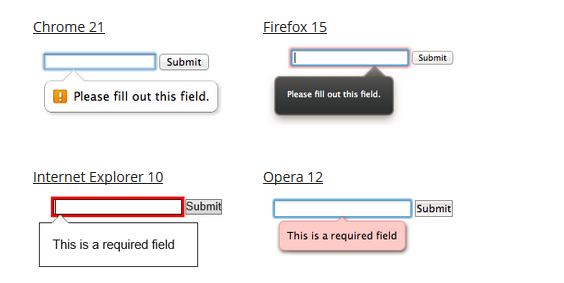
I'm currently creating scripts for SPA (Single Page Applications) using Webdriver . Could anyone please let me know ,how to validate Bubble-Messages in Firfox using Webdriver ???
For reference i have attached the Alerts ,i have given ...
I can't share my code due to company policies..!!!
Regards,
Kishore

darrell
Oct 29, 2013, 7:46:10 AM10/29/13
to webd...@googlegroups.com
Without any example of how they were implemented it would be impossible to tell you how to automate it. I can say that if any browser can display it, it is nothing more than HTML and Javascript. If you can figure out how it is implemented you can figure out how to detect it with Selenium.
For example, on this Google Group if I place my pointer over the red "POST REPLY" button a message appears below the button saying "Post reply". When I look at the DOM I see:
<div tabindex="0" role="button" class="GOXWDPBBOT GOXWDPBBB1"
aria-hidden="false" data-title="Post reply" aria-label="Post reply" aria-pressed="false">
<input type="text" tabindex="-1" role="presentation"
style="opacity: 0; height: 1px; width: 1px; z-index: -1; overflow: hidden; position: absolute;">
<span class="GOXWDPBBCU">Post reply</span>
</div>
When I float over the button I see the class of the div attribute changes to have 'GOXWDPBBOT-hover'. So if it has "div.GOXWDPBBOT-hover" and "div[data-title='Post reply']" then I know it is a button with the message "Post reply" showing to the user. So I would write Selenium code to hover over the element then confirm it has the class attribute 'GOXWDPBBOT-hover'.
How your site implements this feature depends on the library your application is using and how they used it.
Message has been deleted
Kishore K
Oct 31, 2013, 4:02:17 AM10/31/13
to webd...@googlegroups.com
Thank you Darrell... That's true about alert message .These alert messages are HTML 5 -Bubble alert Messages (which are generated by browser itself). Sorry it's my bad , i didn't mentioned about that instead of showing image.
For these messages , i'm not able to do inspect element as well .
Could anyone ,who is working on HTML 5 applications and came across those alert handling. please let me know...it is a great help....Thanks in advance...!!!
Regards,
Kishore
darrell
Oct 31, 2013, 7:00:48 PM10/31/13
to webd...@googlegroups.com
So are you talking about this: http://www.w3schools.com/tags/att_input_required.asp?
If so, the HTML5 states that if an input in a form has an attribute of required then trying to submit the form without the required input populated it will display a message. When I check this out on w3schools I see that the message is not in the DOM at all. This means the browser is supplying a standard message. If I wanted to see if an input was going to give me a message if it was required and not filled in then I would do the following:
- confirm the browser supports HTML5 (not done through Selenium)
- confirm the input is within the form (use a css selector which requires the input to be inside the form, e.g. "form input")
- confirm the input has the required attribute (use css selector again)
So of the code is something like:
<form id="super_special" action="whatever">
<input type="text" name="usrname" required="">
<!-- other stuff -->
</form>
then I can use the CSS selector of "form#super_special>input[name='usrname'][required]". If the required attribute is not there it will fail to find the input and I know it is not set up to use the required feature.
trimurthulu k
Nov 1, 2013, 2:03:50 AM11/1/13
to webd...@googlegroups.com
Thank you Darrell...Ya ,your correct . Even I'm validate by giving Invalid input in Css and Identifying ,whether it is showing validate alert message in DOM level and trying to change it to validate with valid input data, but it is not a straight forward ,how we validate the alert messages..!!!
That's the reason i have requested any one validated the messages--
You received this message because you are subscribed to a topic in the Google Groups "webdriver" group.
To unsubscribe from this topic, visit https://groups.google.com/d/topic/webdriver/B24hSug_4eU/unsubscribe.
To unsubscribe from this group and all its topics, send an email to webdriver+...@googlegroups.com.
To post to this group, send email to webd...@googlegroups.com.
Visit this group at http://groups.google.com/group/webdriver.
For more options, visit https://groups.google.com/groups/opt_out.
Reply all
Reply to author
Forward
0 new messages