
Third Party Vulenrabilities Detection

swapnils
Adrián Jesús Peña Rodríguez
I will try to help you with your problem, it is possible that the "Syscollector" module in the agents is not correctly configured. This module is in charge of collecting all the versions of the software packages installed in the agent. Once collected, it sends them to the manager node to which the agent is connected.
When the manager node has this information, it will be able to analyze the versions received against the downloaded feeds. This guide may be useful for you to understand vulnerability-detector and configure it correctly: https://documentation.wazuh.com/current/learning-wazuh/vuln-detection.html
If you have any other questions do not hesitate to ask.
Swapnil Shembekar



--
You received this message because you are subscribed to a topic in the Google Groups "Wazuh mailing list" group.
To unsubscribe from this topic, visit https://groups.google.com/d/topic/wazuh/stsUmwMTglQ/unsubscribe.
To unsubscribe from this group and all its topics, send an email to wazuh+un...@googlegroups.com.
To view this discussion on the web visit https://groups.google.com/d/msgid/wazuh/1660e802-1295-4445-bbab-86cb301d5b7bn%40googlegroups.com.
Adrián Jesús Peña Rodríguez
Actually, I see that the JDK 2000:1.8.0_162-fcs package has some vulnerabilities: https://nvd.nist.gov/vuln/search/results?adv_search=true&isCpeNameSearch=true&query=cpe%3A2.3%3Aa%3Aoracle%3Ajdk%3A1.8.0%3Aupdate162.
I recommend you to update Wazuh to the latest stable version and in case this error persists we can do the following:
- Stop Wazuh:
service wazuh-manager stop. - Enable the DEBUG mode of Vulnerability detector by modifying the
local_internal_options.conffile and addwazuh_modules.debug=2. More information here: https://documentation.wazuh.com/current/user-manual/reference/internal-options.html?mode#wazuh-modules - Then delete the database
/var/ossec/queue/vulnerabilities/cve.db. - Start the manager:
service wazuh-manager startand wait some seconds. - Finally share with me the output of the command
cat /var/ossec/logs/ossec.log | grep "wazuh-modulesd:" > /var/ossec/output.txt.
Swapnil Shembekar
To view this discussion on the web visit https://groups.google.com/d/msgid/wazuh/3f5f9319-5f5b-4684-8c7c-9f100a7a772dn%40googlegroups.com.
Adrián Jesús Peña Rodríguez
We will try to help you in your learning with any questions you may have, remember that in addition to this communication channel you also have the Slack channel for questions: https://wazuh.com/community/join-us-on-slack/ and the official GitHub repository to make contributions or report bugs: https://github.com/wazuh/wazuh
As for the version, the latest version available is 4.3.8, I recommend you first update and if the error persists then we will continue with the debugging as indicated in the previous comment:
https://documentation.wazuh.com/current/release-notes/release-4-3-8.html
Regards,
Adrián Peña
swapnils
-rw-r--r-- 1 wazuh wazuh 3.7K Aug 30 16:24 /var/ossec/VULN-DET/content.json
-rw-r--r-- 1 wazuh wazuh 3.6K Sep 12 17:28 /var/ossec/VULN-DET/update-feed.sh
-rw-r--r-- 1 wazuh wazuh 2.6M Sep 29 20:00 /var/ossec/VULN-DET/com.ubuntu.focal.cve.oval.xml.bz2
-rw-r--r-- 1 wazuh wazuh 3.4M Sep 29 20:00 /var/ossec/VULN-DET/com.ubuntu.bionic.cve.oval.xml.bz2
-rw-r--r-- 1 wazuh wazuh 3.6M Sep 29 20:00 /var/ossec/VULN-DET/com.ubuntu.xenial.cve.oval.xml.bz2
-rw-r--r-- 1 wazuh wazuh 3.4M Sep 29 20:00 /var/ossec/VULN-DET/com.ubuntu.trusty.cve.oval.xml.bz2
-rw-r--r-- 1 wazuh wazuh 1.9M Sep 29 20:00 /var/ossec/VULN-DET/com.ubuntu.jammy.cve.oval.xml.bz2
-rw-r--r-- 1 wazuh wazuh 2.1M Sep 29 20:00 /var/ossec/VULN-DET/rhel-6-including-unpatched.oval.xml.bz2
-rw-r--r-- 1 wazuh wazuh 2.2M Sep 29 20:00 /var/ossec/VULN-DET/rhel-7-including-unpatched.oval.xml.bz2
-rw-r--r-- 1 wazuh wazuh 1.7M Sep 29 20:00 /var/ossec/VULN-DET/rhel-8-including-unpatched.oval.xml.bz2
-rw-r--r-- 1 wazuh wazuh 8.5M Sep 29 20:01 /var/ossec/VULN-DET/feed-update.out
/var/ossec/VULN-DET/nvd-feed:
total 51M
-rw-r--r-- 1 wazuh wazuh 1.3M Sep 1 11:40 nvd-feed2005.json.gz
-rw-r--r-- 1 wazuh wazuh 2.1M Sep 1 11:40 nvd-feed2006.json.gz
-rw-r--r-- 1 wazuh wazuh 2.1M Sep 1 11:40 nvd-feed2007.json.gz
-rw-r--r-- 1 wazuh wazuh 2.1M Sep 1 11:40 nvd-feed2008.json.gz
-rw-r--r-- 1 wazuh wazuh 1.9M Sep 1 11:40 nvd-feed2009.json.gz
-rw-r--r-- 1 wazuh wazuh 1.4K Sep 15 13:03 nvd-generator.sh
-rw-r--r-- 1 wazuh wazuh 1.9M Sep 29 20:00 nvd-feed2010.json.gz
-rw-r--r-- 1 wazuh wazuh 1.8M Sep 29 20:00 nvd-feed2011.json.gz
-rw-r--r-- 1 wazuh wazuh 2.0M Sep 29 20:00 nvd-feed2012.json.gz
-rw-r--r-- 1 wazuh wazuh 2.4M Sep 29 20:00 nvd-feed2013.json.gz
-rw-r--r-- 1 wazuh wazuh 2.3M Sep 29 20:00 nvd-feed2014.json.gz
-rw-r--r-- 1 wazuh wazuh 2.2M Sep 29 20:00 nvd-feed2015.json.gz
-rw-r--r-- 1 wazuh wazuh 2.6M Sep 29 20:00 nvd-feed2016.json.gz
-rw-r--r-- 1 wazuh wazuh 3.7M Sep 29 20:00 nvd-feed2017.json.gz
-rw-r--r-- 1 wazuh wazuh 4.0M Sep 29 20:00 nvd-feed2018.json.gz
-rw-r--r-- 1 wazuh wazuh 4.5M Sep 29 20:00 nvd-feed2019.json.gz
-rw-r--r-- 1 wazuh wazuh 5.4M Sep 29 20:00 nvd-feed2020.json.gz
-rw-r--r-- 1 wazuh wazuh 5.8M Sep 29 20:00 nvd-feed2021.json.gz
-rw-r--r-- 1 wazuh wazuh 3.4M Sep 29 20:00 nvd-feed2022.json.gz
/var/ossec/VULN-DET/rh-feed:
total 22M
-rw-r--r-- 1 wazuh wazuh 3.7K Aug 30 17:48 content.json
-rw-r--r-- 1 wazuh wazuh 4 Sep 2 17:45 rh-feed.json
-rwxr-xr-- 1 wazuh wazuh 1.4K Sep 2 17:51 old-rh-generator.sh
-rwxr-xr-- 1 wazuh wazuh 1.5K Sep 15 13:02 rh-generator.sh
-rw-r--r-- 1 wazuh wazuh 1.2M Sep 21 20:01 redhat-feed25.json
-rw-r--r-- 1 wazuh wazuh 796K Sep 21 20:01 redhat-feed26.json
-rw-r--r-- 1 wazuh wazuh 578K Sep 21 20:01 redhat-feed27.json
-rw-r--r-- 1 wazuh wazuh 285K Sep 21 20:01 redhat-feed28.json
-rw-r--r-- 1 wazuh wazuh 874K Sep 29 20:00 redhat-feed1.json
-rw-r--r-- 1 wazuh wazuh 824K Sep 29 20:00 redhat-feed2.json
-rw-r--r-- 1 wazuh wazuh 856K Sep 29 20:00 redhat-feed3.json
-rw-r--r-- 1 wazuh wazuh 799K Sep 29 20:00 redhat-feed4.json
-rw-r--r-- 1 wazuh wazuh 1.2M Sep 29 20:00 redhat-feed5.json
-rw-r--r-- 1 wazuh wazuh 1.2M Sep 29 20:00 redhat-feed6.json
-rw-r--r-- 1 wazuh wazuh 940K Sep 29 20:00 redhat-feed7.json
-rw-r--r-- 1 wazuh wazuh 743K Sep 29 20:00 redhat-feed8.json
-rw-r--r-- 1 wazuh wazuh 862K Sep 29 20:01 redhat-feed9.json
-rw-r--r-- 1 wazuh wazuh 903K Sep 29 20:01 redhat-feed10.json
-rw-r--r-- 1 wazuh wazuh 837K Sep 29 20:01 redhat-feed11.json
-rw-r--r-- 1 wazuh wazuh 713K Sep 29 20:01 redhat-feed12.json
-rw-r--r-- 1 wazuh wazuh 736K Sep 29 20:01 redhat-feed13.json
-rw-r--r-- 1 wazuh wazuh 831K Sep 29 20:01 redhat-feed14.json
-rw-r--r-- 1 wazuh wazuh 703K Sep 29 20:01 redhat-feed15.json
-rw-r--r-- 1 wazuh wazuh 700K Sep 29 20:01 redhat-feed16.json
-rw-r--r-- 1 wazuh wazuh 1.1M Sep 29 20:01 redhat-feed17.json
-rw-r--r-- 1 wazuh wazuh 944K Sep 29 20:01 redhat-feed18.json
-rw-r--r-- 1 wazuh wazuh 855K Sep 29 20:01 redhat-feed19.json
-rw-r--r-- 1 wazuh wazuh 929K Sep 29 20:01 redhat-feed20.json
-rw-r--r-- 1 wazuh wazuh 796K Sep 29 20:01 redhat-feed21.json
-rw-r--r-- 1 wazuh wazuh 609K Sep 29 20:01 redhat-feed22.json
-rw-r--r-- 1 wazuh wazuh 520K Sep 29 20:01 redhat-feed23.json
Adrián Jesús Peña Rodríguez
Hello Swapnils,
If you are still having problems joining Slack, let me know, and we will check if there is any problem, thanks.
I have been checking the logs you send us and I don’t see any errors, everything seems to be working as expected.
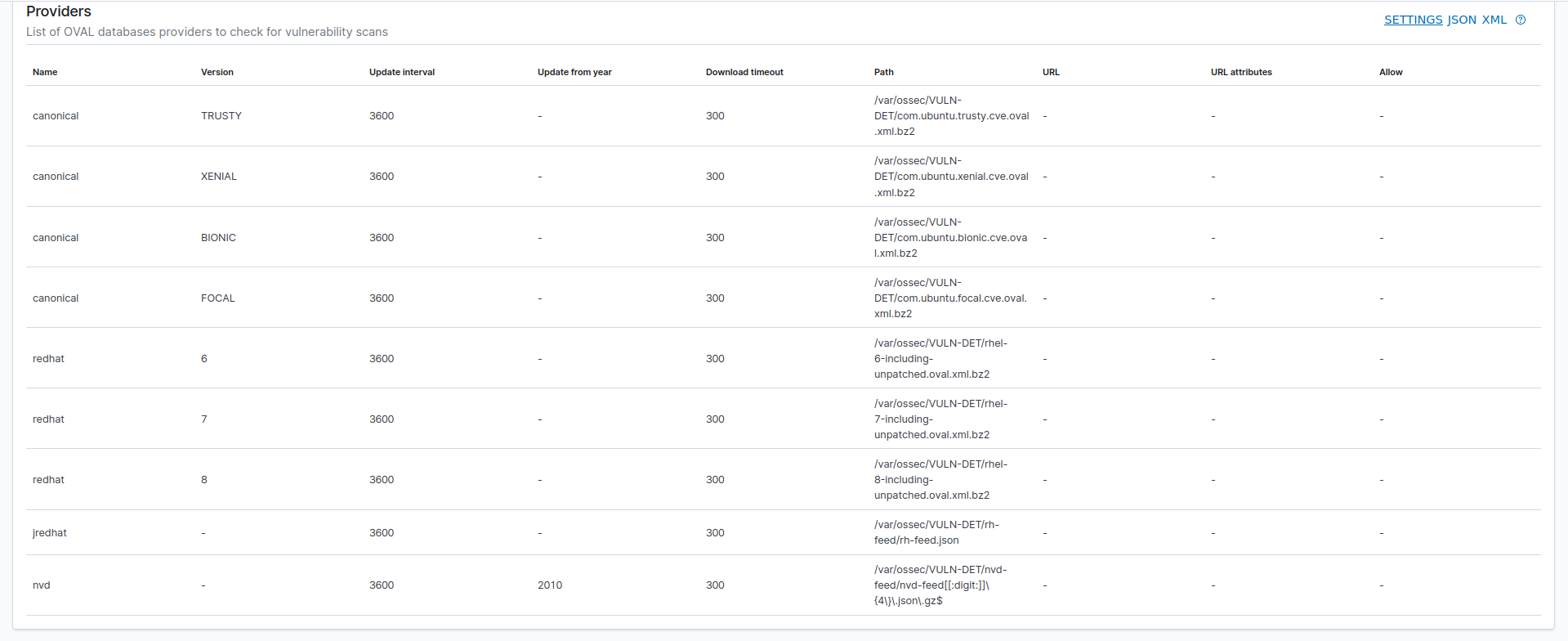
As you say, the Microsoft feed is trying to update every 3600 seconds:
2022/09/30 09:01:53 wazuh-modulesd:download[164515] wm_download.c:234 at wm_download_dispatch(): DEBUG: Cannot download file 'tmp/req-1194832711' from URL: 'https://feed.wazuh.com/vulnerability-detector/windows/msu-updates.json.gz'
2022/09/30 09:01:57 wazuh-modulesd:download[164515] wm_download.c:230 at wm_download_dispatch(): DEBUG: Downloading 'https://feed.wazuh.com/vulnerability-detector/windows/msu-updates.json.gz' to 'tmp/req-267157764'
2022/09/30 09:06:35 wazuh-modulesd:download[164515] wm_download.c:234 at wm_download_dispatch(): DEBUG: Cannot download file 'tmp/req-267157764' from URL: 'https://feed.wazuh.com/vulnerability-detector/windows/msu-updates.json.gz'
2022/09/30 09:06:35 wazuh-modulesd:vulnerability-detector[164515] wm_vuln_detector.c:4549 at wm_vuldet_fetch_feed(): WARNING: (5500): The 'Microsoft Security Update' database could not be fetched.
2022/09/30 09:06:35 wazuh-modulesd:vulnerability-detector[164515] wm_vuln_detector.c:4569 at wm_vuldet_check_feed(): DEBUG: (5521): Failed when updating 'msu provider' database. Retrying in '3600' seconds.
2022/09/30 09:06:35 wazuh-modulesd:vulnerability-detector[164515] wm_vuln_detector.c:5191 at wm_vuldet_main(): ERROR: (5513): CVE database could not be updated.
Since everything seems fine I decided to download the nvd-feed2018.json.gz feed to check the content of the CVE CVE-2018-2814 which we know affects the package you have installed jdk:1.8.0:update162. Inside this feed, I find the following:
"operator" : "OR",
"children" : [ ],
"cpe_match" : [ {
  "vulnerable" : true,
  "cpe23Uri" : "cpe:2.3:a:oracle:jre:1.10.0:*:*:*:*:*:*:*",
  "cpe_name" : [ ]
}, {
  "vulnerable" : true,
  "cpe23Uri" : "cpe:2.3:a:oracle:jdk:1.10.0:*:*:*:*:*:*:*",
  "cpe_name" : [ ]
}, {
  "vulnerable" : true,
  "cpe23Uri" : "cpe:2.3:a:oracle:jdk:1.8.0:update162:*:*:*:*:*:*",
  "cpe_name" : [ ]
}, {
  "vulnerable" : true,
  "cpe23Uri" : "cpe:2.3:a:oracle:jdk:1.7.0:update171:*:*:*:*:*:*",
  "cpe_name" : [ ]
}, {
  "vulnerable" : true,
  "cpe23Uri" : "cpe:2.3:a:oracle:jdk:1.6.0:update181:*:*:*:*:*:*",
  "cpe_name" : [ ]
}, {
  "vulnerable" : true,
  "cpe23Uri" : "cpe:2.3:a:oracle:jre:1.6.0:update181:*:*:*:*:*:*",
  "cpe_name" : [ ]
}, {
  "vulnerable" : true,
  "cpe23Uri" : "cpe:2.3:a:oracle:jre:1.8.0:update162:*:*:*:*:*:*",
  "cpe_name" : [ ]
}, {
  "vulnerable" : true,
  "cpe23Uri" : "cpe:2.3:a:oracle:jre:1.7.0:update171:*:*:*:*:*:*",
  "cpe_name" : [ ]
}
As you can see they name the package jdk:1.8.0:update162:*:*:*:*:*:*:*:*:*:* but in our case the version of it is named as 2000:1.8.0_162-fcs which does not match the cpe23Uri key. It is possible that this is due to the installation method of the package, in any case I need to investigate more if this is the real issue. I will check with the team this information to see if this is the real issue, since in the logs we can’t see anything unusual.
As soon as I get an answer, I will contact you.
Regards,
Adrián Peña
swapnils
Thank you again Adrian!
I am glad to know that there are no configuration errors.
One small query here-
While scanning through Tenable/Qualys, I have seen in their VA reports that it detects unzipped tar/uncompressed files of Java/Tomcat/Redis etc. Here in this case, JDK FCS is an rpm install; but I could see another java binaries residing too on this box. Here are the details -
# /opt/tomcat/bin/version.sh
Using CATALINA_BASE:   /opt/tomcat
Using CATALINA_HOME:   /opt/tomcat
Using CATALINA_TMPDIR: /opt/tomcat/temp
Using JRE_HOME:        /
Using CLASSPATH:       /opt/tomcat/bin/bootstrap.jar:/opt/tomcat/bin/tomcat-juli.jar
Server version: Company Web
Server built:   Apr 21 2017 14:14:48 IST
Server number:  1.1
OS Name:        Linux
OS Version:     3.10.0-1160.71.1.el7.x86_64
Architecture:   amd64
JVM Version:    1.8.0_162-b12
JVM Vendor:     Oracle Corporation

# /opt/jdk/java/bin/java -version
java version "1.8.0_121"
Java(TM) SE Runtime Environment (build 1.8.0_121-b13)
Java HotSpot(TM) 64-Bit Server VM (build 25.121-b13, mixed mode)
Does Wazuh detects such vulnerable binaries?
Regards, swapnils
Adrián Jesús Peña Rodríguez
I have been consulting with the team about your problem. There are two reasons possible reasons, both of which are known, and we are working to solve them.
The first reason is that the packages installed by sources if the RPM or DEB database (depending on the distribution) are not aware of their existence, then syscollector will not include those packages in the inventory. In your case this is not the problem because JDK is in the inventory as you can see in the screenshots you have shared with us. Likewise, this issue can occur with other packages installed in this way and is expected to be fixed here: https://github.com/wazuh/wazuh/issues/11316 and https://github.com/wazuh/wazuh/issues/8750.
The second reason, which fits with the issue with JDK is the one described in the following issue https://github.com/wazuh/wazuh/issues/11582, as you can see here we have a problem, and it is that Oracle has not unified the versioning of its packages, resulting in vulnerability-detector not being able to detect the vulnerability because as I said before the string that specifies the version does not match with `cpe23Uri`.
The team is aware of this issue and as I mentioned this can happen with the installation of packages through sources or cases like JDK. It is in the product roadmap to fix this issue and add new logic to normalize the version names of the different packages to avoid this error.
Unfortunately this error is currently present and there is no workaround that can help us, we will have to wait for the release of the new version of Wazuh, which will be ready as soon as possible.
If you have any other questions, remember that you can contact us through Slack or Google Groups.
Regards,
Adrián Peña
Swapnil Shembekar
To view this discussion on the web visit https://groups.google.com/d/msgid/wazuh/8ab7b9be-2ed8-45e5-8f20-5432f121f80bn%40googlegroups.com.