
Re: [ukelele-users] help! dead keys
535 views
Skip to first unread message
Message has been deleted

Sorin Paliga
Jun 29, 2021, 10:34:38 AM6/29/21
to ukelel...@googlegroups.com
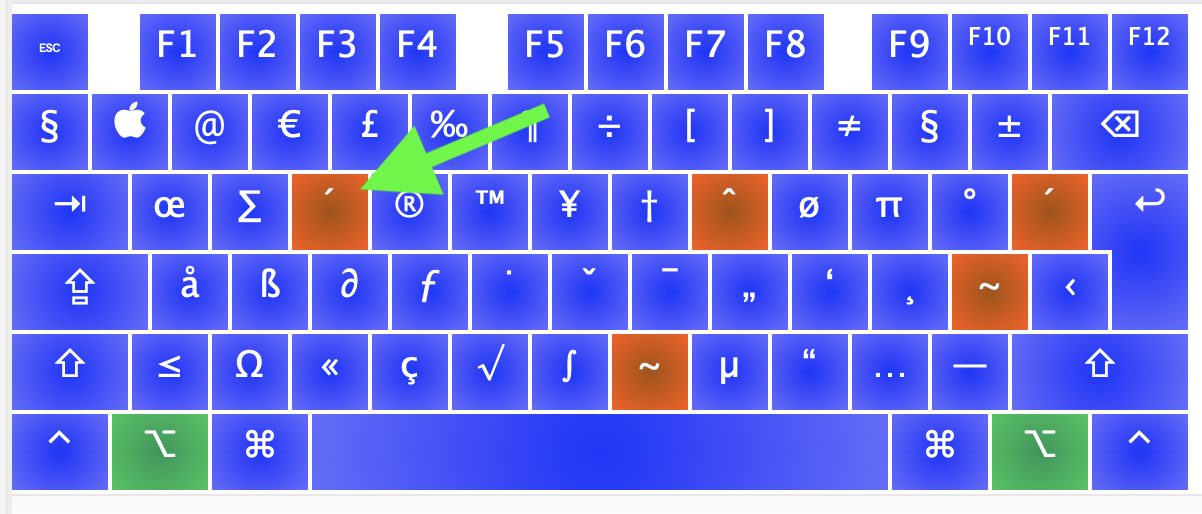
You mean (1) a physical keyboard for Portuguese or (2) any physical keyboard with Portuguese keyboard layout (active in the upper right corner) or (both). As I see if activating the Portuguese keyboard layout, for this language the dead keys are not on the same location, but on the right side of the keyboard. Activate Keyboard viewer and you˜ll see. I attach a screen shot. The keys with an orange margin are the dead keys for Portuguese, which is radically different from U.S. or other languages.
On 29 Jun 2021, at 17:20, Paulo Weidebach <pau...@videoimagem.com> wrote:Hello fellows. I´m sure that my question is stupid, but I´m suffering days with this.I have a Portuguese keyboard, and I´m trying to add the UsInternational modifiers (áéíóú) from option-e.
I don´t know what is wrong that the e letter doesn´t work. So the actual result for me is: ´e and not é. With the other letters, it works fine. Can you help me, please!Best regards,--
You received this message because you are subscribed to the Google Groups "Ukelele Users" group.
To unsubscribe from this group and stop receiving emails from it, send an email to ukelele-user...@googlegroups.com.
To view this discussion on the web visit https://groups.google.com/d/msgid/ukelele-users/7cc69714-cedb-41b1-ad52-eb5b9860a6fbn%40googlegroups.com.

Paulo Weidebach
Jun 29, 2021, 10:44:04 AM6/29/21
to ukelel...@googlegroups.com
Thanks Sorin,
Yes, I´m using the same deadkey at different positions
All works fine, less the e key that is not correct. I want é and get ´e
best regards
You received this message because you are subscribed to a topic in the Google Groups "Ukelele Users" group.
To unsubscribe from this topic, visit https://groups.google.com/d/topic/ukelele-users/Ps4GuApIgf0/unsubscribe.
To unsubscribe from this group and all its topics, send an email to ukelele-user...@googlegroups.com.
To view this discussion on the web visit https://groups.google.com/d/msgid/ukelele-users/9D3AC88F-F8D4-4E86-A0E4-86CC3684E09C%40gmail.com.

Paulo Weidebach · criaçãoVideoimagem - Comunicação Criativapau...@videoimagem.com5511 38142877Cônego Eugênio Leite 1089www.videoimagem.com
Message has been deleted
Sorin Paliga
Jun 29, 2021, 1:29:03 PM6/29/21
to ukelel...@googlegroups.com
Hm… This seems a bug within the keyboard layout! If the displayed dead key is ´ and you type option-e, then type e and do not get é there is something wrong with the keylayout. But can you get other instances, e.g. ó or í or ý or ń or ś etc..?

Gé van Gasteren
Jun 29, 2021, 2:25:48 PM6/29/21
to ukelel...@googlegroups.com
Hi Paolo,
Your description is good, but still I can’t figure out what might be wrong with your layout.
If you like, you can upload it here as an attachment.
Or, if you prefer to delve in a bit yourself, see if this makes sense:
I conclude that you have started from the Portuguese layout which comes with MacOS (not one of the Brazilian keyboard layouts) and that you have been able to add a dead key on Option-e. Have you created a new dead-key state for that, or is your new dead key using the existing "state 1"?
The latter seems the easiest way.
You can right-click on that dead key, choose Change Next State, then choose the first state in the list, the one simply called "1".

Hope that helps, somehow …
On Tue, Jun 29, 2021 at 4:20 PM Paulo Weidebach <pau...@videoimagem.com> wrote:
Hello fellows. I´m sure that my question is stupid, but I´m suffering days with this.
I have a Portuguese keyboard, and I´m trying to add the Us International modifiers (áéíóú) from option-e.
I don´t know what is wrong that the e letter doesn´t work. So the actual result for me is: ´e and not é. With the other letters, it works fine. Can you help me, please!
Gé van Gasteren
Jul 2, 2021, 5:36:17 AM7/2/21
to ukelel...@googlegroups.com
Congratulations!
If you like, please describe what the problem was, now that you see it more clearly.
I mean, maybe you have any suggestions for the manual …
On Fri, Jul 2, 2021 at 8:00 AM Paulo Weidebach <pau...@videoimagem.com> wrote:
SOLVED - TKS A LOT
To view this discussion on the web visit https://groups.google.com/d/msgid/ukelele-users/8734b483-3af0-45b2-b74e-5b83a531a552n%40googlegroups.com.
Reply all
Reply to author
Forward
0 new messages