
Tasker Idle Timer
1,211 views
Skip to first unread message

basixs
Aug 7, 2014, 2:23:17 PM8/7/14
to tas...@googlegroups.com
Hello,
After searching and searching and finding nothing but others needing it, I have created a low-consumption Tasker profile to determine the seconds that have passed since the screen was last touched. It uses Secure Settings to run a getevent command to listen for screen interaction.
A few caveats exist:
- Because root is required it's recommended that a SU app (ie. superSU) be utilized that can hide toast commands on a per-app basis.
- Screen presses can be missed due to a 'race' condition that exists because the Secure Settings command is running on a separate thread.
- Dependent on Tasker wait command for timing which is can be pushed into background state by Android causing inaccuracy.
- Dependent on Secure Settings which can be pushed into background state by Android causing screen presses to not be detected.
Make sure you have Secure Settings installed, free version is fine. Although I use it only while the device is plugged in the CPU and power usage should be extremely low.
If there is much desire for this functionality I may create an app/plugin that will handle the job instead of Tasker, so please chime in and tell me what you think. I am fairly confident that I can solve most (if not all) of the caveats in a dedicated app/plugin...
Note: The profile will beep once per second while idling, a higher pitch beep will sound when a screen press has been detected. These beeps are for debugging purposes and can safely be disabled/removed. Once the script has been tested in the wild I will come back and edit this post to remove them.
Text Description:
Profile: Idle Timer (36)
State: Power [ Source:Any ]
Enter: Anon (25)
A1: Variable Set [ Name:%SCREEN_EVENT To:0 Do Maths:Off Append:Off ]
A2: If [ %PACTIVE !~ *Idle Timer* ]
A3: Variable Clear [ Name:%IDLE_TIME Pattern Matching:Off ]
A4: Return [ Value:-1 Stop:On ]
A5: End If
A6: If [ %SCREEN_EVENT Set ]
A7: Beep [ Frequency:8000 Duration:501 Amplitude:50 Stream:3 ]
A8: Variable Set [ Name:%IDLE_TIME To:0 Do Maths:Off Append:Off ]
A9: Else
A10: Beep [ Frequency:4944 Duration:201 Amplitude:50 Stream:3 ]
A11: Variable Set [ Name:%IDLE_TIME To:%IDLE_TIME + 1 Do Maths:On Append:Off ]
A12: Variable Set [ Name:%event_timeout To:%event_timeout + 1 Do Maths:On Append:Off ]
A13: End If
A14: If [ %SCREEN_EVENT Set | %event_timeout > 10 ]
A15: If [ %SCREEN_EVENT Set & %IDLE_TIME > 0 ]
A16: Goto [ Type:Action Number Number:1 Label: ]
A17: End If
A18: Variable Clear [ Name:%SCREEN_EVENT Pattern Matching:Off ]
A19: Secure Settings [ Configuration:Get touch event (Root) Package:com.intangibleobject.securesettings.plugin Name:Secure Settings Timeout (Seconds):0 ]
A20: Variable Set [ Name:%event_timeout To:0 Do Maths:Off Append:Off ]
A21: End If
A22: Wait [ MS:999 Seconds:0 Minutes:0 Hours:0 Days:0 ]
A23: Goto [ Type:Action Number Number:2 Label: ]
XML:
<TaskerData sr="" dvi="1" tv="4.4u2m">
<Profile sr="prof36" ve="2">
<cdate>1407341016578</cdate>
<edate>1407432887713</edate>
<id>36</id>
<mid0>25</mid0>
<nme>Idle Timer</nme>
<State sr="con0" ve="2">
<code>10</code>
<Int sr="arg0" val="0"/>
</State>
</Profile>
<Task sr="task25">
<cdate>1407432884278</cdate>
<edate>1407432887713</edate>
<id>25</id>
<Action sr="act0" ve="6">
<code>547</code>
<Str sr="arg0" ve="3">%SCREEN_EVENT</Str>
<Str sr="arg1" ve="3">0</Str>
<Int sr="arg2" val="0"/>
<Int sr="arg3" val="0"/>
</Action>
<Action sr="act1" ve="6">
<code>37</code>
<ConditionList sr="if">
<Condition sr="c0" ve="3">
<lhs>%PACTIVE</lhs>
<op>3</op>
<rhs>*Idle Timer*</rhs>
</Condition>
</ConditionList>
</Action>
<Action sr="act10" ve="6">
<code>547</code>
<Str sr="arg0" ve="3">%IDLE_TIME</Str>
<Str sr="arg1" ve="3">%IDLE_TIME + 1</Str>
<Int sr="arg2" val="1"/>
<Int sr="arg3" val="0"/>
</Action>
<Action sr="act11" ve="6">
<code>547</code>
<Str sr="arg0" ve="3">%event_timeout</Str>
<Str sr="arg1" ve="3">%event_timeout + 1</Str>
<Int sr="arg2" val="1"/>
<Int sr="arg3" val="0"/>
</Action>
<Action sr="act12" ve="6">
<code>38</code>
</Action>
<Action sr="act13" ve="6">
<code>37</code>
<ConditionList sr="if">
<bool0>Or</bool0>
<Condition sr="c0" ve="3">
<lhs>%SCREEN_EVENT</lhs>
<op>12</op>
<rhs></rhs>
</Condition>
<Condition sr="c1" ve="3">
<lhs>%event_timeout</lhs>
<op>7</op>
<rhs>10</rhs>
</Condition>
</ConditionList>
</Action>
<Action sr="act14" ve="6">
<code>37</code>
<ConditionList sr="if">
<bool0>And</bool0>
<Condition sr="c0" ve="3">
<lhs>%SCREEN_EVENT</lhs>
<op>12</op>
<rhs></rhs>
</Condition>
<Condition sr="c1" ve="3">
<lhs>%IDLE_TIME</lhs>
<op>7</op>
<rhs>0</rhs>
</Condition>
</ConditionList>
</Action>
<Action sr="act15" ve="6">
<code>135</code>
<Int sr="arg0" val="0"/>
<Int sr="arg1" val="1"/>
<Str sr="arg2" ve="3"/>
</Action>
<Action sr="act16" ve="6">
<code>38</code>
</Action>
<Action sr="act17" ve="6">
<code>549</code>
<Str sr="arg0" ve="3">%SCREEN_EVENT</Str>
<Int sr="arg1" val="0"/>
</Action>
<Action sr="act18" ve="6">
<code>11820</code>
<Bundle sr="arg0">
<Vals sr="val">
<com.intangibleobject.securesettings.plugin.extra.BLURB>Get touch event (Root)</com.intangibleobject.securesettings.plugin.extra.BLURB>
<com.intangibleobject.securesettings.plugin.extra.BLURB-type>java.lang.String</com.intangibleobject.securesettings.plugin.extra.BLURB-type>
<com.intangibleobject.securesettings.plugin.extra.BOOLEAN_VALUE>true</com.intangibleobject.securesettings.plugin.extra.BOOLEAN_VALUE>
<com.intangibleobject.securesettings.plugin.extra.BOOLEAN_VALUE-type>java.lang.Boolean</com.intangibleobject.securesettings.plugin.extra.BOOLEAN_VALUE-type>
<com.intangibleobject.securesettings.plugin.extra.CMD_DISPLAY_OUTPUT>false</com.intangibleobject.securesettings.plugin.extra.CMD_DISPLAY_OUTPUT>
<com.intangibleobject.securesettings.plugin.extra.CMD_DISPLAY_OUTPUT-type>java.lang.Boolean</com.intangibleobject.securesettings.plugin.extra.CMD_DISPLAY_OUTPUT-type>
<com.intangibleobject.securesettings.plugin.extra.CMD_DISPLAY_TOAST>false</com.intangibleobject.securesettings.plugin.extra.CMD_DISPLAY_TOAST>
<com.intangibleobject.securesettings.plugin.extra.CMD_DISPLAY_TOAST-type>java.lang.Boolean</com.intangibleobject.securesettings.plugin.extra.CMD_DISPLAY_TOAST-type>
<com.intangibleobject.securesettings.plugin.extra.CMD_NAME>Get touch event</com.intangibleobject.securesettings.plugin.extra.CMD_NAME>
<com.intangibleobject.securesettings.plugin.extra.CMD_NAME-type>java.lang.String</com.intangibleobject.securesettings.plugin.extra.CMD_NAME-type>
<com.intangibleobject.securesettings.plugin.extra.CMD_REPLACE_VARS>false</com.intangibleobject.securesettings.plugin.extra.CMD_REPLACE_VARS>
<com.intangibleobject.securesettings.plugin.extra.CMD_REPLACE_VARS-type>java.lang.Boolean</com.intangibleobject.securesettings.plugin.extra.CMD_REPLACE_VARS-type>
<com.intangibleobject.securesettings.plugin.extra.CMD_STDOUT>%SCREEN_EVENT</com.intangibleobject.securesettings.plugin.extra.CMD_STDOUT>
<com.intangibleobject.securesettings.plugin.extra.CMD_STDOUT-type>java.lang.String</com.intangibleobject.securesettings.plugin.extra.CMD_STDOUT-type>
<com.intangibleobject.securesettings.plugin.extra.CMD_TO_RUN>getevent -c 1 /dev/input/event1</com.intangibleobject.securesettings.plugin.extra.CMD_TO_RUN>
<com.intangibleobject.securesettings.plugin.extra.CMD_TO_RUN-type>java.lang.String</com.intangibleobject.securesettings.plugin.extra.CMD_TO_RUN-type>
<com.intangibleobject.securesettings.plugin.extra.CMD_USES_ROOT>true</com.intangibleobject.securesettings.plugin.extra.CMD_USES_ROOT>
<com.intangibleobject.securesettings.plugin.extra.CMD_USES_ROOT-type>java.lang.Boolean</com.intangibleobject.securesettings.plugin.extra.CMD_USES_ROOT-type>
<com.intangibleobject.securesettings.plugin.extra.KEEP_DEVICE_AWAKE>true</com.intangibleobject.securesettings.plugin.extra.KEEP_DEVICE_AWAKE>
<com.intangibleobject.securesettings.plugin.extra.KEEP_DEVICE_AWAKE-type>java.lang.Boolean</com.intangibleobject.securesettings.plugin.extra.KEEP_DEVICE_AWAKE-type>
<com.intangibleobject.securesettings.plugin.extra.SETTING>run_cmd</com.intangibleobject.securesettings.plugin.extra.SETTING>
<com.intangibleobject.securesettings.plugin.extra.SETTING-type>java.lang.String</com.intangibleobject.securesettings.plugin.extra.SETTING-type>
<com.twofortyfouram.locale.intent.extra.BLURB>Get touch event (Root)</com.twofortyfouram.locale.intent.extra.BLURB>
<com.twofortyfouram.locale.intent.extra.BLURB-type>java.lang.String</com.twofortyfouram.locale.intent.extra.BLURB-type>
<net.dinglisch.android.tasker.subbundled>true</net.dinglisch.android.tasker.subbundled>
<net.dinglisch.android.tasker.subbundled-type>java.lang.Boolean</net.dinglisch.android.tasker.subbundled-type>
</Vals>
</Bundle>
<Str sr="arg1" ve="3">com.intangibleobject.securesettings.plugin</Str>
<Str sr="arg2" ve="3">Secure Settings</Str>
<Int sr="arg3" val="0"/>
</Action>
<Action sr="act19" ve="6">
<code>547</code>
<Str sr="arg0" ve="3">%event_timeout</Str>
<Str sr="arg1" ve="3">0</Str>
<Int sr="arg2" val="0"/>
<Int sr="arg3" val="0"/>
</Action>
<Action sr="act2" ve="6">
<code>549</code>
<Str sr="arg0" ve="3">%IDLE_TIME</Str>
<Int sr="arg1" val="0"/>
</Action>
<Action sr="act20" ve="6">
<code>38</code>
</Action>
<Action sr="act21" ve="6">
<code>30</code>
<Int sr="arg0" val="999"/>
<Int sr="arg1" val="0"/>
<Int sr="arg2" val="0"/>
<Int sr="arg3" val="0"/>
<Int sr="arg4" val="0"/>
</Action>
<Action sr="act22" ve="6">
<code>135</code>
<Int sr="arg0" val="0"/>
<Int sr="arg1" val="2"/>
<Str sr="arg2" ve="3"/>
</Action>
<Action sr="act3" ve="6">
<code>126</code>
<Str sr="arg0" ve="3">-1</Str>
<Int sr="arg1" val="1"/>
</Action>
<Action sr="act4" ve="6">
<code>38</code>
</Action>
<Action sr="act5" ve="6">
<code>37</code>
<ConditionList sr="if">
<Condition sr="c0" ve="3">
<lhs>%SCREEN_EVENT</lhs>
<op>12</op>
<rhs></rhs>
</Condition>
</ConditionList>
</Action>
<Action sr="act6" ve="6">
<code>171</code>
<Int sr="arg0" val="8000"/>
<Int sr="arg1" val="501"/>
<Int sr="arg2" val="50"/>
<Int sr="arg3" val="3"/>
</Action>
<Action sr="act7" ve="6">
<code>547</code>
<Str sr="arg0" ve="3">%IDLE_TIME</Str>
<Str sr="arg1" ve="3">0</Str>
<Int sr="arg2" val="0"/>
<Int sr="arg3" val="0"/>
</Action>
<Action sr="act8" ve="6">
<code>43</code>
</Action>
<Action sr="act9" ve="6">
<code>171</code>
<Int sr="arg0" val="4944"/>
<Int sr="arg1" val="201"/>
<Int sr="arg2" val="50"/>
<Int sr="arg3" val="3"/>
</Action>
</Task></TaskerData>

Alan Johnson
Oct 27, 2014, 4:10:12 PM10/27/14
to tas...@googlegroups.com
Is the Get touch event still available in secure settings. Have not been able to locate that critical piece of the code.
Josh Ellen
Oct 27, 2014, 5:07:41 PM10/27/14
to tas...@googlegroups.com, Alan Johnson
Sorry about that, it's just a
shell command. You may have to update the event number but I'd give
it a try and see what happens.
On October 27, 2014 2:10:27 PM Alan Johnson <johnso...@gmail.com> wrote:
Is the Get touch event still available in secure settings. Have not been able to locate that critical piece of the code.
--
You received this message because you are subscribed to a topic in the Google Groups "Tasker" group.
To unsubscribe from this topic, visit https://groups.google.com/d/topic/tasker/jfAIBwuO-gw/unsubscribe.
To unsubscribe from this group and all its topics, send an email to tasker+un...@googlegroups.com.
Visit this group at http://groups.google.com/group/tasker.
For more options, visit https://groups.google.com/d/optout.
basixs
Oct 27, 2014, 5:11:09 PM10/27/14
to tas...@googlegroups.com
Sorry about that, it's just a shell command. You may have to update the event number but I'd give it a try and see what happens. Here's a screenshot of the setting.

Alan Johnson
Oct 27, 2014, 6:01:54 PM10/27/14
to tas...@googlegroups.com
This works pretty well, thanks!


Klaus Rickenbaugh
Jul 25, 2015, 11:33:35 AM7/25/15
to Tasker
Sorry to bring up an old thread, but I'm struggling to get this to work- I am admittedly not a tasker power user. The XML import doesn't seem to have pulled everything into the profile, the task cuts after A3. I'm also not sure how to actually use this functionally, I'm looking for the ability to have this take me back to the home screen after 15 minutes of inactivity. I'm curious if you ever made an app for this as it would be really useful for home automation!
Message has been deleted
basixs
Jul 28, 2015, 2:19:02 PM7/28/15
to Tasker, joshua....@gmail.com
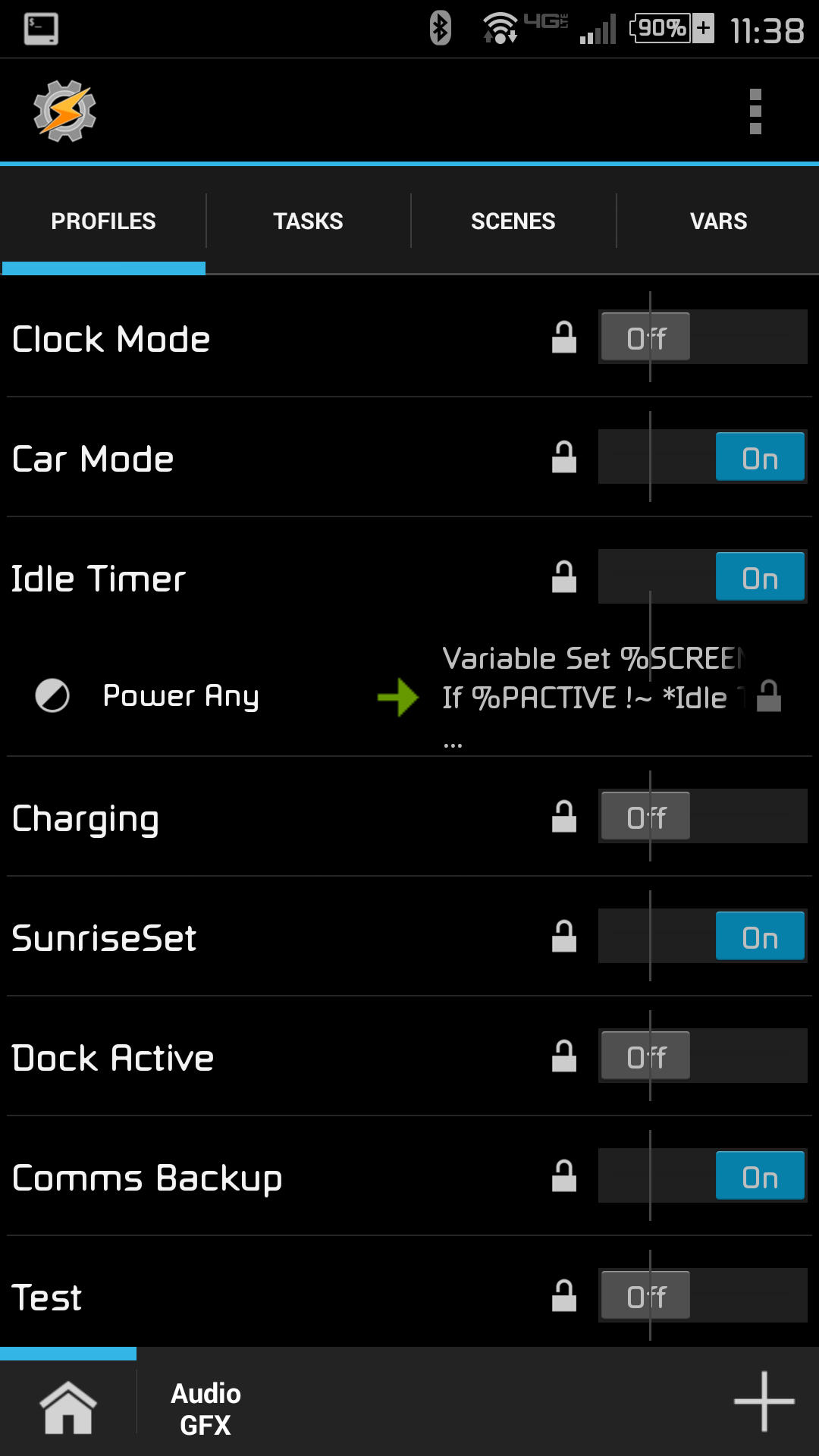
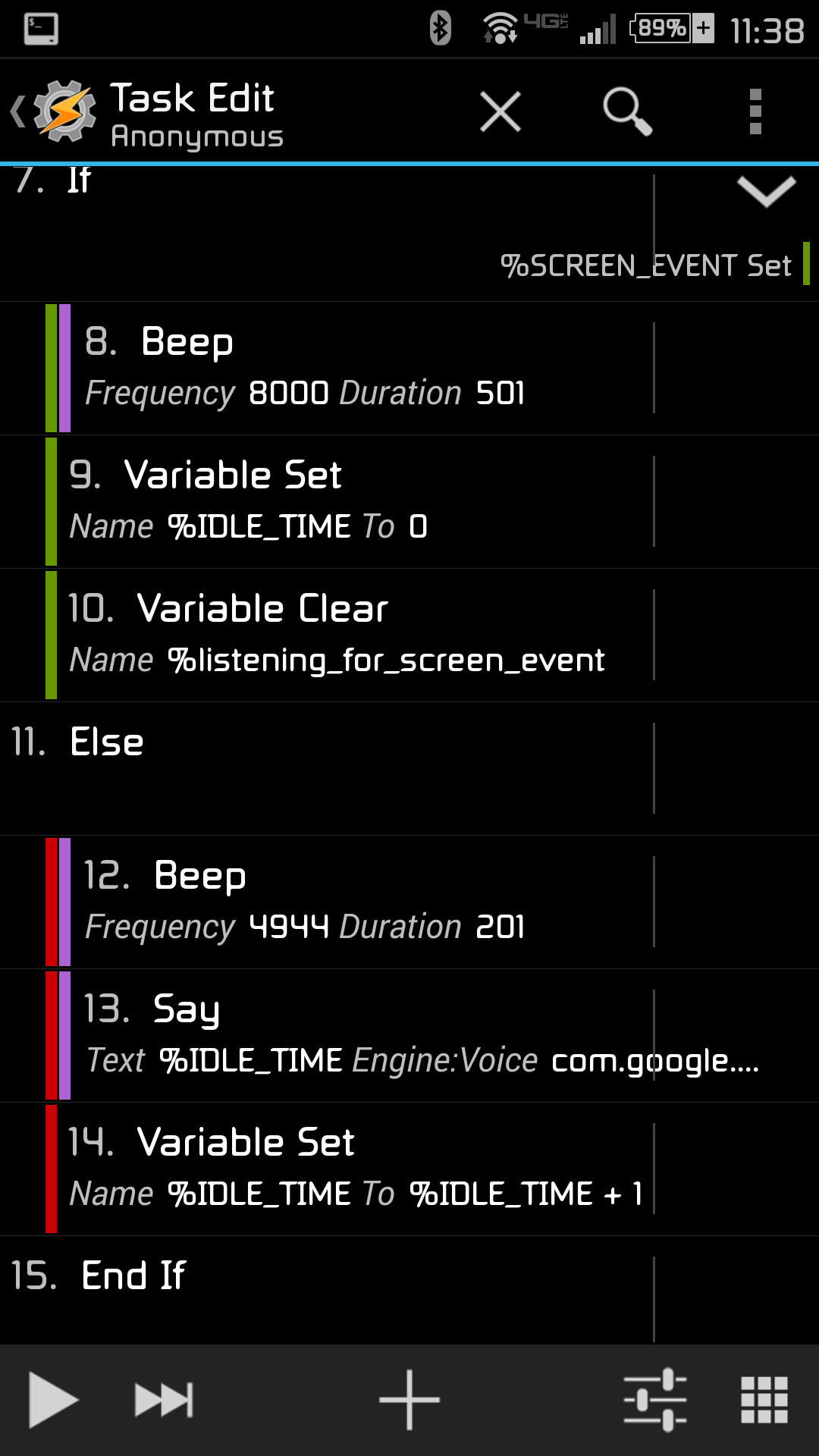
Here is the most recent version of the Tasker Idle Timer.
Please be aware that the GetEvent command is dependent on your phone. In order to find the correct /dev/input/event you will need to run this command 'su getevent' in a Terminal shell. This will give you a list of all of the events that your phone is set to listen for. (My old phone used event1 for touch events, my new one uses event0).



basixs
Jul 28, 2015, 2:27:07 PM7/28/15
to Tasker, joshua....@gmail.com
Make sure to use the most recent attachments. Do NOT XML use the text from the original post.
...
Reply all
Reply to author
Forward
Message has been deleted
0 new messages