
Printing via SD card on an RepRap Discount GLCD panel
230 views
Skip to first unread message

Howie Wong
May 16, 2017, 4:02:14 PM5/16/17
to Smoothieware Support
Hey guys,

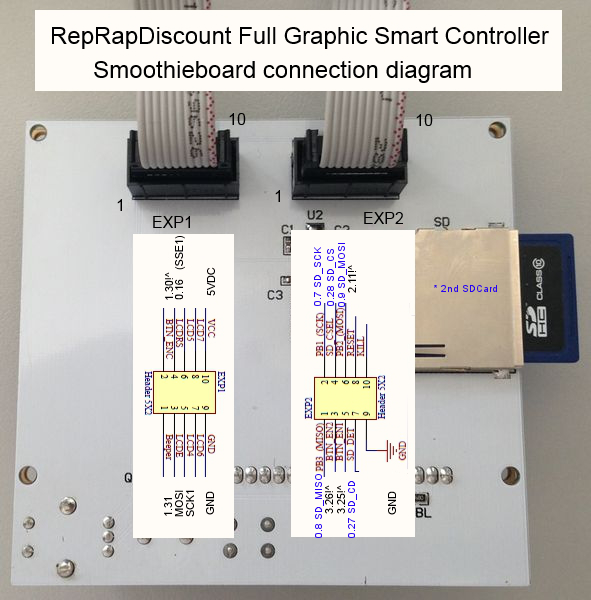
I'm currently connecting the smoothieboard to a RepRap Discount GLCD panel. What confuses me is that the panel does not read the external SD card on the panel.
I looked through the instructions and used an RRDGLCD adapter along with a 2GB FAT32 formatted SD card, but the panel cannot detect the SD card.
The first thing I'm thinking is that the two pins 0.27 and 0.28 are not connected to the adapter. (They don't seem to be part of the adapter.)
However, from this diagram, pins 0.27 and 0.28 are included in EXP 2. So I'm wondering where they are actually connected to.
Can I get any suggestions about solving this issue? If I'm printing via the external (2nd) SD card, do I have to connect the two pins manually besides using the adapter?
Thanks a lot,
Howie
Message has been deleted

wolfmanjm
May 16, 2017, 5:08:09 PM5/16/17
to Smoothieware Support
External SDcard are not supported and highly regarded as bad. Although there is a way to configure them the noise is not worth the trouble. Use the internal sdcard for safe and reliable sdcard printing.
It is also recommended to NOT even wire up the external sdcard as the long wires will act as an antenna and create noise for the internal sdcard.
It is also recommended to NOT even wire up the external sdcard as the long wires will act as an antenna and create noise for the internal sdcard.

Mark Rehorst
May 16, 2017, 5:16:34 PM5/16/17
to Smoothieware Support
I understand that you don't want to support it, but I've been printing extremely reliably (and almost daily) from the external SD card slot on one machine for about 3 years and recently put it on a second machine and it has likewise been very reliable for the short time I've used it that way. If you don't want to support it, don't, by why delete my post showing how to configure it?

Arthur Wolf
May 16, 2017, 5:19:08 PM5/16/17
to Smoothieware Support
We have many users having trouble with it. And for some others it's fine. If we say "we support it", we'll get *many* many more users complaining it doesn't work, and that takes *a lot* of *our* time ( and energy and good will )
On Tue, May 16, 2017 at 11:16 PM, Mark Rehorst <mark.r...@gmail.com> wrote:
I understand that you don't want to support it, but I've been printing extremely reliably (and almost daily) from the external SD card slot on one machine for about 3 years and recently put it on a second machine and it has likewise been very reliable for the short time I've used it that way. If you don't want to support it, don't, by why delete my post showing how to configure it?
--
You received this message because you are subscribed to the Google Groups "Smoothieware Support" group.
To unsubscribe from this group and stop receiving emails from it, send an email to smoothieware-support+unsub...@googlegroups.com.
For more options, visit https://groups.google.com/d/optout.
--
Courage et bonne humeur.
wolfmanjm
May 16, 2017, 7:07:17 PM5/16/17
to Smoothieware Support
I have not deleted anything we do not have the ability to delete messages here.
Mark Rehorst
May 16, 2017, 10:00:38 PM5/16/17
to Smoothieware Support
That's weird. The message I posted with config file section disappeared. Maybe I somehow deleted it. Nevermind. Sorry.
Arthur Wolf
May 17, 2017, 6:27:35 AM5/17/17
to Smoothieware Support
We really really don't have any habit or and willingness to censor anything, we strongly believe people should be able to say whatever they want as long as it's polite, related to Smoothie, and it's not Spam.
So if anyone else thinks we've deleted their message, *please* contact me instead of silently thinking we did something bad to you ( we didn't )--
You received this message because you are subscribed to the Google Groups "Smoothieware Support" group.
To unsubscribe from this group and stop receiving emails from it, send an email to smoothieware-support+unsub...@googlegroups.com.
For more options, visit https://groups.google.com/d/optout.
Mark Rehorst
May 17, 2017, 7:19:03 AM5/17/17
to Smoothieware Support
Here's what I posted and then inadvertently deleted- it's the section of the config file I am using to run the GLCD module including the SD card slot. Here's a tip: the beeper on the GLCD is extremely annoying (at least to my ears) and sounds a lot better with a small piece of paper or cotton stuffed into the hole on the top of the part.
# Panel
panel.enable true # set to true to enable the panel code
# on glcd EXP1 is to left and EXP2 is to right, pin 1 is bottom left, pin 2 is top left etc.
# +5v is EXP1 pin 10, Gnd is EXP1 pin 9
panel.lcd reprap_discount_glcd #
panel.spi_channel 0 # spi channel to use ; GLCD EXP1 Pins 3,5 (MOSI, SCLK)
panel.spi_cs_pin 0.16 # spi chip select ; GLCD EXP1 Pin 4
panel.encoder_a_pin 3.25!^ # encoder pin ; GLCD EXP2 Pin 3
panel.encoder_b_pin 3.26!^ # encoder pin ; GLCD EXP2 Pin 5
panel.click_button_pin 1.30!^ # click button ; GLCD EXP1 Pin 2
panel.buzz_pin 1.31 # pin for buzzer ; GLCD EXP1 Pin 1
#panel.back_button_pin 2.11!^ # back button ; GLCD EXP2 Pin 8
panel.menu_offset 0 # some panels will need 1 here
panel.alpha_jog_feedrate 3000 # x jogging feedrate in mm/min
panel.beta_jog_feedrate 3000 # y jogging feedrate in mm/min
panel.gamma_jog_feedrate 1200 # z jogging feedrate in mm/min
panel.hotend_temperature 235 # temp to set hotend when preheat is selected
panel.bed_temperature 70 # temp to set bed when preheat is selected
# setup for external sd card on the GLCD which uses the onboard sdcard SPI port
panel.external_sd true # set to true if there is an extrernal sdcard on the panel
panel.external_sd.spi_channel 1 # set spi channel the sdcard is on
panel.external_sd.spi_cs_pin 0.28 # set spi chip select for the sdcard (or any spare pin)
panel.external_sd.sdcd_pin 0.27!^ # sd detect signal (set to nc if no sdcard detect) (or any spare pin)
# Custom menu entry, which will show up in the Custom entry.
# NOTE _ gets converted to space in the menu and commands, | is used to separate multiple commands

John
May 17, 2017, 11:41:50 AM5/17/17
to Smoothieware Support
I read somewhere that there is a workaround to disable the beeper but I don't recall where. Might try a Google?
Mark Rehorst
May 17, 2017, 4:41:59 PM5/17/17
to Smoothieware Support
No need. Just disable the config that assigns a pin to it. Or clip it off the board to disable it permanently.
Howie Wong
May 18, 2017, 3:31:27 PM5/18/17
to smoothiewa...@googlegroups.com
Thank you so much Mark. Now I think that I set up the config file correctly and I soldered the cables to pins 0.27 and 0.28. On my LCD panel, I can see the ext/ path when it starts up (and there seems to be a delay showing that the system is trying to read the SD card). However, I still cannot see the files in the SD card. Are there any further suggestions? Thanks again for your help!
--
You received this message because you are subscribed to a topic in the Google Groups "Smoothieware Support" group.
To unsubscribe from this topic, visit https://groups.google.com/d/topic/smoothieware-support/nU17CN1Mna8/unsubscribe.
To unsubscribe from this group and all its topics, send an email to smoothieware-support+unsub...@googlegroups.com.
Message has been deleted
Mark Rehorst
May 18, 2017, 9:21:48 PM5/18/17
to Smoothieware Support
I think it will only display .gcode files. Aren't you using one of the adapter boards?
Howie Wong
May 19, 2017, 3:38:54 PM5/19/17
to Smoothieware Support
Yes, I am using an adapter. But the panel doesn't recognize any flles or directories on the SD card. I tried naming my test codes both *.g and *.gcode. They don't seem to show up on the display.
Mark Rehorst
May 19, 2017, 4:34:55 PM5/19/17
to Smoothieware Support
How long are the cables you're using?
What is the capacity of the card? I have only used cards up to 8 GB and most of the time I use 256 MB cards. Don't use a uSD card with an adapter. It doesn't seem to work.
Try formatting the card, and copying a fresh gcode file to it. Be sure to eject it from the computer before pulling it out or the file system may get corrupted.

Dakota Pahel-Short
May 27, 2017, 12:38:03 PM5/27/17
to Smoothieware Support
Would shielded wiring prevent this from happening at all?
wolfmanjm
May 27, 2017, 4:51:40 PM5/27/17
to Smoothieware Support
not really. SPI is not designed to travel over any length of cable.
Reply all
Reply to author
Forward
0 new messages