
Primesense Carmine 1.09

James Allan

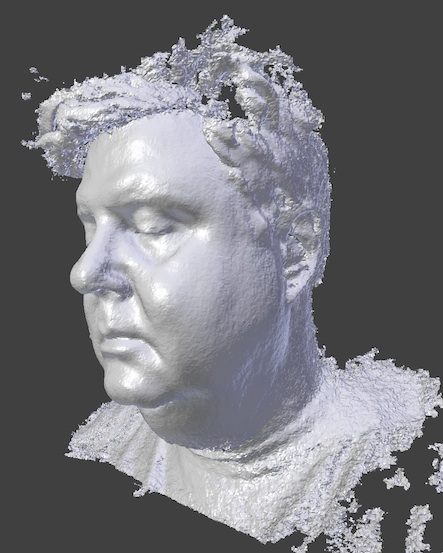
I do have to go on a diet.
That aside, we had our business partners over yesterday and decide it was time for a demo and a scan of everyone so we could all be "in print". Noticed a lot of borking with the geometry and it took several attempts to get something decent. We had a lot of trouble compared to scanning with the Kinect and I put this down mostly to the larger texture capture that is occurring As the day went on it got worse. The Skanect would have to be relaunched after every scan as the info coming from the scanner would freeze. And then it started to happen while we were setting up for the scan.
Now, I hadn't installed the latest OpenNI drives at that point and after I did, it seemed to make some difference but there was still the need to relaunch Skanect after each scan. The framerate I think is the biggest issue and depending on how Skanect writes the image files to disk, I think some if not all of the hiccups are due to a fragmented disc.
So next steps are to optimize the PC laptop (any tips because I'm actually a Mac guy?) and perhaps use the medium GPU build for the preview, doing a high rez version in "post".
James Allan
James Allan

Nicolas Burrus
--
You received this message because you are subscribed to the Google Groups "Skanect" group.
To unsubscribe from this group and stop receiving emails from it, send an email to skanect+u...@googlegroups.com.
For more options, visit https://groups.google.com/groups/opt_out.
James Allan
James Allan

Harsh Chopra
Thanks,
vadasent...@gmail.com
James Allan

Andrew Sartori
James Allan

Jan Krummrey
I've seen someone selling theirs for $500 on ebay. Pretty steep markup. ;)
I'd be interested in buying one. Not for that price though...

eyebee
Have got my hands on a Carmine 1.0.9 but the results aren't as good as expected - they seem 'blocky'. Perhaps my expectations are too much? Can you define something like fingers without the hand becoming 'webbed' without going down the glasses mod route and being limited to a 30 odd cm capture depth?
Trying to nail it down but going round in circles.
So here are some question and any help would be greatly appreciated!
1.I'm on a mac (10.8.5 using the 1.6.3 beta) - do I need to download the OpenNI2 drivers and therefore also the freenect driver that seems to be necessary? (according to this post: http://www.theworldneedsmoredreamers.net/using-openni-2-2-beta-on-os-x/) or not?
2. Is there any way to see which drivers are being used by Skanect?
3. Is there any way to verify the firmware version on the Primesense (this was apparently updated on a windows machine)
4. The images are at 640x480, is this the limit? Other answers on the forum suggest this is the case. I's it possible to change from VGA mode in the config files? (an echo of James' question "Can anyone offer suggestions on how to get the higher texture maps from the scanner? I'm sure I'm missing something simple here but I'm not seeing it :P")
5. Does the manual gain control work for others with mac/carmine 1.0.9? The fact that is doesn't for me suggests it could be driver related this end...
Any answers from people who've used these consistently on a mac would be great!
Many thanks for any clues,
Eyebee
James Allan
James Allan
Hope this helps you figure things out.
eyebee
Thanks for taking the time to reply and post the scans. Great to know what I should be expecting at least!
Attached a couple of shots of my hand taken from about 60cm, then a shot of it after watertighting at 'very low' setting, which shows the weird webbing.
Will keep investigating and welcome any other insights on the drivers front.
Out of interest James, did you need to do any calibration on your Primesense?
All the best,
Eyebee
eyebee
it seems (after looking in the Skanect package contents) that here is the requisite dylib libraries there, which as far as I can tell should take care of the OpenNI2 drivers.
The log is here and will bold bits of interest:
INFO: Starting Skanect 1.6.0beta3 (64 bits)
INFO: Configuration file: /Users/MacPro/Library/Preferences/com.manctl.Skanect.plist
INFO: License configuration file: /Users/MacPro/Library/Preferences/com.manctl.SkanectLicense.plist
INFO: Number of CUDA devices: 1
INFO: Device 0: "GeForce GTX 570" 2054Mb / 2560Mb
INFO: Device 0: sm_20, 480 cores
INFO: Device 0: Driver/Runtime ver.5.50/5.50
INFO: CUDA major: 2
INFO: CUDA GeForce GTX 570, global memory: 2559M
INFO: CUDA device specs seem ok.
INFO: Could instanciate a GPU fusion successfully.
WARNING: Could not remove directory `/Users/MacPro/Documents/Scans/open_studios/2014-01-28_12_43_55.skn/images', could not remove all files.
WARNING: Could not remove directory `/Users/MacPro/Documents/Scans/open_studios/2014-01-28_12_43_55.skn/images', could not remove all files.
WARNING: Could not remove directory `/Users/MacPro/Documents/Scans/open_studios/2014-01-28_12_43_55.skn/images', could not remove all files.
INFO: No support for Kinect for Windows SDK.
INFO: OpenNI2: Device "1d27/0609@253/4" present.
INFO: OpenNI2: Device info: [PS1080] [7463] [1545].
INFO: OpenNI2: Number of devices: 1
INFO: No support for softkinetic, skipping.
WARNING: Warning: sensor calibration data is missing.
INFO: OpenNI2: Opening: 1d27/0609@253/4
INFO: OpenNI2: Number of devices: 1
INFO: Depth Intrinsics: fx/fy/cx/cy [540.994 | 540.994 | 320.000 | 240.000]
INFO: Color Intrinsics: fx/fy/cx/cy [540.994 | 540.994 | 320.000 | 240.000]
WARNING: Could not read device serial number.
INFO: OpenNI2 Status:
WARNING: Could not remove directory `/Users/MacPro/Documents/Scans/open_studios/2014-01-28_12_43_55.skn/images', could not remove all files.
WARNING: Could not remove directory `/Users/MacPro/Documents/Scans/open_studios/2014-01-28_12_43_55.skn/images', could not remove all files.
WARNING: Could not remove directory `/Users/MacPro/Documents/Scans/open_studios/2014-01-28_12_43_55.skn/images', could not remove all files.
WARNING: Could not remove directory `/Users/MacPro/Documents/Scans/open_studios/2014-01-28_12_43_55.skn/images', could not remove all files.
INFO: Image processing framerate: 29.880478
INFO: Live reconstruction framerate: 30.126337
INFO: Write on disk frame rate: 29.870033
INFO: Task `Pausing: synchronizing frames' started
INFO: CUDA free memory: 1914M / 2559M
INFO: Task `Pausing: synchronizing frames' terminated
Now according to Cuda information, my current version is 5.5.25 as recommended elsewhere on the forums, but the runtime in the logs says 5.50 which I'll investigate. There is also the option to update to 5.5.28 but I think that is mainly for Mavericks users.
More interesting perhaps is the warning that calibration data is missing and 'cannot read serial number'.
tbc....
James Allan
Nicolas Burrus
You log file seems ok, these warning should be harmless. To get a good
quality, you need to capture different viewpoints of the hand by
moving around it. A single frame from a Carmine is pretty noisy, it is
the fusion over time that makes the model more precise and good
looking.
eyebee
Thanks for your reply. We seemed to be getting similar results using the Primesense on our rig regarding the webbing on the fingers. Will try to alter the scanning speed, run some more tests and post some more images.
Thanks guys for helping narrow things down.
Regarding my other questions, for the record this is where I am:
1.I'm on a mac (10.8.5 using the 1.6.3 beta) - do I need to download the OpenNI2 drivers and therefore also the freenect driver that seems to be necessary? (according to this post: http://www.theworldneedsmoredreamers.net/using-openni-2-2-beta-on-os-x/
---> The freenect driver seems to only be necessary for OpenNI2 if you want to use it with an xbox KINECT, OpenNI2 drivers are packaged with this version of Skanect (1.6.3)
2. Is there any way to see which drivers are being used by Skanect?
3. Is there any way to verify the firmware version on the Primesense (this was apparently updated on a windows machine)
4. The images are at 640x480, is this the limit? Other answers on the forum suggest this is the case. I's it possible to change from VGA mode in the config files? (an echo of James' question "Can anyone offer suggestions on how to get the higher texture maps from the scanner? I'm sure I'm missing something simple here but I'm not seeing it :P")
5. Does the manual gain control work for others with mac/carmine 1.0.9? The fact that is doesn't for me suggests it could be driver related this end...
tbc...
Nicolas Burrus
Skanect is using.
4. VGA is the maximal current resolution supported by Skanect. Kinect
itself can give higher resolution color images, but they are still
pretty low quality ayway.
5. How do you test if automatic gain works? In automatic mode you
would see the gain adjust itself as you move towards a bright/dark
area, and then you can lock it to its current gain value using manual
mode. In that case it should not adapt anymore.

Ian Byrne
Been stuck into hardware again but will take a look as soon as I get the chance.
3Dify Ltd is a company registered in England and Wales. Registered number: 08679706. Registered office: 3dify Ltd, The Fusebox Level 4 North, New England House, New England Street, Brighton, BN1 4GH, England
Ian Byrne
Nicolas Burrus
initial intent was to put a slider, which you would get with a Kinect
for Windows, but Carmine firmware wasn't handling a slider correctly
at this stage.
Ian Byrne
You received this message because you are subscribed to a topic in the Google Groups "Skanect" group.
To unsubscribe from this topic, visit https://groups.google.com/d/topic/skanect/agVZN_iDZhI/unsubscribe.
To unsubscribe from this group and all its topics, send an email to skanect+u...@googlegroups.com.
For more options, visit https://groups.google.com/groups/opt_out.


Anna K.
I have a new Carmine 1.09 boxed including specs, freshest firmware & driver,...
but decided to use other scan method for my project. So...
OFFERING A BRAND NEW PRIMESENSE CARMINE 1.09 BOXED
380 USD / 280 EUR including shipping & tax. (optionally paypal).
Or anyone may send me a private message - thanks!