
Executing job steps on different nodes
1,854 views
Skip to first unread message

Pavel Chernikov
Nov 5, 2014, 4:15:49 PM11/5/14
to rundeck...@googlegroups.com
Hi all -
Is it possible to execute each job step on a different node?
For example, I need to do the following done, sequentially:
Run script1 on server1
Run script2 on server2
Run script3 on server3
Run script4 on server1
Would I be able to do this with Rundeck?
Thank you in advance for any info / suggestions,
-Pavel
Pavel Chernikov
Nov 5, 2014, 6:14:42 PM11/5/14
to rundeck...@googlegroups.com
Or alternatively, is it possible to execute different jobs chained together on different nodes?
I.e.
Run job1 on server1
Run job2 on server2
Run job3 on server3
Run job4 on server1

Greg Schueler
Nov 5, 2014, 6:53:00 PM11/5/14
to Pavel Chernikov, rundeck...@googlegroups.com
Hi Pavel,
it's not possible to use different nodes for different steps of a single workflow. However, you could create multiple Jobs, each job targetting a single node (or multiple nodes via filters), and then chain them together with the top level workflow, using Job reference steps.
--
Greg Schueler
Greg Schueler
--
You received this message because you are subscribed to the Google Groups "rundeck-discuss" group.
To unsubscribe from this group and stop receiving emails from it, send an email to rundeck-discu...@googlegroups.com.
For more options, visit https://groups.google.com/d/optout.
Pavel Chernikov
Nov 6, 2014, 9:46:21 AM11/6/14
to rundeck...@googlegroups.com, pche...@gmail.com
Hi Greg,
Thank you for the reply!
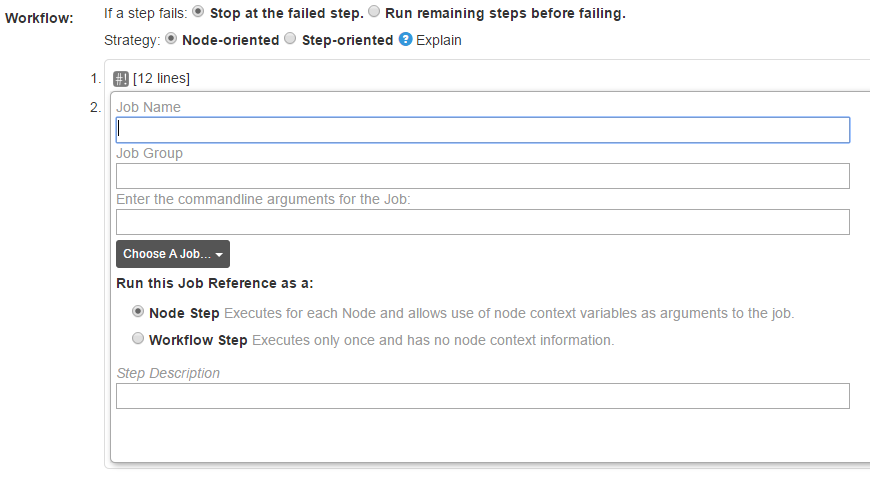
I don't see where I can tell Rundeck what nodes to use for the job reference.
Pavel Chernikov
Nov 6, 2014, 10:27:46 AM11/6/14
to rundeck...@googlegroups.com, pche...@gmail.com
Hi Greg -
I think I see what you are saying.. I can only specify the node(s) at the time of job creation, rather than at the time of job execution when doing job reference.
What I need to do is specify what node to run the job against dynamically, based on an option from the main workflow. I don't think that's possible to do with Rundeck?
Thanks,
-Pavel

Alex Honor
Nov 6, 2014, 10:30:39 AM11/6/14
to rundeck...@googlegroups.com
Hi Pavel,
You could use the `run` command from a script step to calculate the nodes and then use that result as the nodefilter argument.
Thanks
--
You received this message because you are subscribed to the Google Groups "rundeck-discuss" group.
To unsubscribe from this group and stop receiving emails from it, send an email to rundeck-discu...@googlegroups.com.
For more options, visit https://groups.google.com/d/optout.
Alex Honor
[SimplifyOps, Inc | a...@simplifyops.com ]
Be sure to comment and vote on Rundeck Feature Development!
Pavel Chernikov
Nov 6, 2014, 11:09:22 AM11/6/14
to rundeck...@googlegroups.com
Hi Alex -
I see, that makes sense. Thanks!
-Pavel
--
You received this message because you are subscribed to a topic in the Google Groups "rundeck-discuss" group.
To unsubscribe from this topic, visit https://groups.google.com/d/topic/rundeck-discuss/xZNh-qnLcYs/unsubscribe.
To unsubscribe from this group and all its topics, send an email to rundeck-discu...@googlegroups.com.
Pavel Chernikov
Nov 6, 2014, 4:46:19 PM11/6/14
to rundeck...@googlegroups.com
Hi Alex -
Just to confirm - when you say "use that result as the nodefilter argument" - is that argument also for another "run" command?
Or can I somehow pass in nodefilter argument to the job reference in the next step somehow?
I.e. do I have to do this, in the next step, or is there a better way:
tools/bin/run -f -F "name: ${option.Node}" -p TEST -j test1
Thanks,
-Pavel
Alex Honor
Nov 6, 2014, 4:51:10 PM11/6/14
to rundeck...@googlegroups.com
Hi Pavel,
Yes, you could have a command step that references an option value like you show there.
If there is more involved to figure out the nodes, you can use a script step.
Note, this is all just a work around until this request is impelemeneted: https://github.com/rundeck/rundeck/issues/131
Thanks
--
You received this message because you are subscribed to the Google Groups "rundeck-discuss" group.
To unsubscribe from this group and stop receiving emails from it, send an email to rundeck-discu...@googlegroups.com.
For more options, visit https://groups.google.com/d/optout.
Pavel Chernikov
Nov 6, 2014, 5:59:59 PM11/6/14
to rundeck...@googlegroups.com
Hi Alex. Thank you for the info and for pointing me to the request.
-Pavel
Alex Honor
Reply all
Reply to author
Forward
0 new messages