
do you want to help with programming?
438 views
Skip to first unread message

Hesky Fisher
Mar 7, 2014, 12:57:34 PM3/7/14
to plove...@googlegroups.com
Hi everybody,
It looks like there are programmers looking to help on Plover but aren't necessarily sure about what to work on.
Here is a task that would be very nice to have done:
A while ago, user garipeti added a dictionary manager to Plover. Unfortunately, there were some incompatible changes to Plover at the same time and now some work needs to be done to integrate the manager into plover.
garipeti's work is here: https://github.com/garipeti/plover
If you'd like to volunteer for this task then please speak up so we're not all doing it at once. Also, I'd like to talk to you about how to do the merge since some things are getter in the main line of Plover and some in garipeti's branch and I'd like to make sure we keep the better parts of both.
Thanks,
Hesky

Mike Neale
Mar 18, 2014, 10:33:11 AM3/18/14
to plove...@googlegroups.com
I have tinkered with this a little bit last week but now I'm making some real headway, so I officially volunteer myself for this.
At the moment I've got the dialog opening and displaying all entries for the currently loaded dictionaries.
Hesky Fisher
Mar 18, 2014, 11:10:42 AM3/18/14
to plove...@googlegroups.com
Hi Mike,
That's great! Thanks for volunteering.
One important point is that the Plover main branch and the branch with the dictionary manager have very different code for loading and saving the json and rtf dictionaries. I want to make sure to keep the newer version, i.e. the one that is in the Plover main branch.
Thanks!
Hesky
--
You received this message because you are subscribed to the Google Groups "Plover" group.
To unsubscribe from this group and stop receiving emails from it, send an email to ploversteno...@googlegroups.com.
For more options, visit https://groups.google.com/d/optout.
Mike Neale
Mar 18, 2014, 11:22:34 AM3/18/14
to plove...@googlegroups.com
No probs. :)
Ah ok. I noticed there are two files for loading json and rtf. I will make sure it uses the current way.
Mike Neale
Mar 21, 2014, 1:34:53 PM3/21/14
to plove...@googlegroups.com
I'm making some good progress with this now. I've got it to load entries for the current dictionaries using the already built-in Plover way of doing so. You can filter the columns based on stroke or translation. You can sort the columns and of course, make edits to any entries. The UI is quite responsive which I'm surprised about as i'm using a dictionary of over 300,000 entries.
You can add a new record but I need to iron that out, as well as the deleting. None of the saving is done yet. You can make these changes but none of them get written back to your dictionary yet.
I'm hoping to have this finished next week ready for a Plover mega-release :D
Mike Neale
Mar 24, 2014, 8:19:24 AM3/24/14
to plove...@googlegroups.com
Hi Hesky.
With regards to this bug:
This also seems to affect my dictionary editor. I'm looking into it now. Do you have any ideas about which object the threads are getting locked on?
Hesky (Yechezkia) Fisher
Mar 24, 2014, 1:13:29 PM3/24/14
to plove...@googlegroups.com
Hi Mike,
I fixed this bug in the main line release of Plover on Feb 16. Is your branch based on a branch made after this date?
However, it might have been recreated when adding the dictionary manger.
The key issue is that it's not safe for two threads to be manipulating (read or writing) the dictionary at the same time.
The two threads involved are the machine thread (which handles the steno machine communications) and the gui thread.
Hesky
Mike Neale
Mar 24, 2014, 3:11:47 PM3/24/14
to plove...@googlegroups.com
Hi Hesky.
My branch includes that change but I am still able to make the "Add translation" dialog hang by mashing the keyboard when focusing on the "translation" box.
I've been researching this all day and it seems other people are having problems when using pythoncom.PumpMessages as well as using pyhook.
If I comment out the PumpMessages, no crash occurs but of course, then the key logging doesn't work.
Not sure if this helps identify it but: I have a filter textbox on my dictionary editor and a filter button. If i type the filter and click the filter button, it works every time. I setup an enter keypress event binding on the textbox that calls the same function that is bound to the button, but when I press enter in the textbox, it never works. It freezes in the same way as mashing the keyboard.
--
You received this message because you are subscribed to a topic in the Google Groups "Plover" group.
To unsubscribe from this topic, visit https://groups.google.com/d/topic/ploversteno/0f3LXC9lAyw/unsubscribe.
To unsubscribe from this group and all its topics, send an email to ploversteno...@googlegroups.com.
Hesky Fisher
Mar 26, 2014, 5:11:30 PM3/26/14
to plove...@googlegroups.com
Hi Mike,
Thanks for researching this. Unfortunately, I don't have an answer right now.
Let me know if you come up with anything.
Hesky
Mike Neale
Mar 27, 2014, 5:47:56 AM3/27/14
to plove...@googlegroups.com
I've spent quite a bit of time looking at this recently and I've created a script that recreates the problem. (see attached)
It seems the problem occurs when you create the keyboard hook and call PumpMessages from a thread other than MainThread. In the case of Plover (and my script), it creates a thread "Thread-6" which hooks the keyboard and calls PumpMessages. If you change the boolean in the script, it will hook the keyboard and call PumpMessages on the Main Thread. This must be done as the last thing in the script as the call to PumpMessages doesn't return. This effectively makes PumpMessages your "MainLoop".
I have tried this with Plover and it fixes the problem. No more locking no matter how much you spam the keyboard. However, this then stops the app from closing. I also haven't looked into how it will work if the user switches their machine. I'm sure I could get it working though.
You can try and modify my script to cure the problem but I haven't had any luck. I've tried creating different threads to keep the UI responsive. I've tried using threading.Lock and multiprocessing.Lock. Still no luck. I don't think this is a traditional kind of deadlocking, it seems to be more deeply rooted than that. Perhaps a bug in pyHook??
Mike Neale
Apr 4, 2014, 11:22:19 AM4/4/14
to plove...@googlegroups.com
Hi Hesky.
I've just sent a pull request to the main Plover branch with the completed dictionary editor changes :)
I'm going to look into solving the lock-ups now.
Thanks
Mike
On Friday, 7 March 2014 17:57:34 UTC, Hesky Fisher wrote:
Mike Neale
Aug 6, 2014, 5:48:53 PM8/6/14
to plove...@googlegroups.com
Better late than never! I've just solved the lock-up problems :D So happy right now!

Mirabai Knight
Aug 7, 2014, 1:04:58 PM8/7/14
to ploversteno
Wow, fantastic! Just tested out your plover-retro version, and it
looks great. Thanks so much for doing this. Any chance of including
integration with the steno-tray-style autolookup as well, or would
that be pressing our luck? (';
looks great. Thanks so much for doing this. Any chance of including
integration with the steno-tray-style autolookup as well, or would
that be pressing our luck? (';
Mike Neale
Aug 7, 2014, 1:35:09 PM8/7/14
to plove...@googlegroups.com
Hi Mirabai!
Thanks for that! I wasn't sure if I was treading on any toes by just "getting stuck in" and making these changes, but I figure that's what open source is all about :D
The steno-tray lookup stuff was done by Brent. The version I gave you is the current main branch of Plover plus my retro stuff. If the steno tray stuff isn't in there then it hasn't yet been merged in. If you want I can probably get Brent's code included in a branch of my own and do another build for you. Would that work for you?
By the way, Brent has added about 3 new features to Plover which are really useful. I'm sure he will enlighten us about them but when I last gave them a try to help him test them, they were really cool :)
Mirabai Knight
Aug 7, 2014, 1:41:09 PM8/7/14
to ploversteno
Amen! That's absolutely what open source is all about! I'm incredibly
grateful to you for all the incredible work you've done on Plover, and
on free steno pedagogy in general! You're a giant. (Actually, do you
want to be on the People Behind The Open Steno Project page along with
me, Hesky, Josh, and Emanuele? You're certainly more than welcome!
Brent too! Both of you have done so much for open steno, it's
staggering.)
Ooh, I wanna know about Brent's three new features. Do tell! And I
think the stenotray integration is pretty crucial to help flatten the
learning curve for steno newbies, so I'd be over the moon if it were
folded into Plover. From what I understood, the only thing keeping the
dictionary editor and stenotray features from being released in a new
version was that lockup error, but since it sounds like you've
resolved it, hopefully there are no further stumbling blocks?
Thanks so much to everyone on this list who writes code, does user
support, and keeps the steno flame alive. It makes me happier and more
grateful than I could ever possibly express.
StenoKnight CART Services
917 576 4989
m...@stenoknight.com
http://stenoknight.com
grateful to you for all the incredible work you've done on Plover, and
on free steno pedagogy in general! You're a giant. (Actually, do you
want to be on the People Behind The Open Steno Project page along with
me, Hesky, Josh, and Emanuele? You're certainly more than welcome!
Brent too! Both of you have done so much for open steno, it's
staggering.)
Ooh, I wanna know about Brent's three new features. Do tell! And I
think the stenotray integration is pretty crucial to help flatten the
learning curve for steno newbies, so I'd be over the moon if it were
folded into Plover. From what I understood, the only thing keeping the
dictionary editor and stenotray features from being released in a new
version was that lockup error, but since it sounds like you've
resolved it, hopefully there are no further stumbling blocks?
Thanks so much to everyone on this list who writes code, does user
support, and keeps the steno flame alive. It makes me happier and more
grateful than I could ever possibly express.
> --
> You received this message because you are subscribed to the Google Groups
> "Plover" group.
> To unsubscribe from this group and stop receiving emails from it, send an
> email to ploversteno...@googlegroups.com.
> For more options, visit https://groups.google.com/d/optout.
--
Mirabai Knight, CCP, RDR
> You received this message because you are subscribed to the Google Groups
> "Plover" group.
> To unsubscribe from this group and stop receiving emails from it, send an
> email to ploversteno...@googlegroups.com.
> For more options, visit https://groups.google.com/d/optout.
--
StenoKnight CART Services
917 576 4989
m...@stenoknight.com
http://stenoknight.com
Mike Neale
Aug 7, 2014, 5:55:05 PM8/7/14
to plove...@googlegroups.com
Wow, you flatter me :D Thanks Mirabai! I love steno so it's great to be part of the Plover movement :)
I would LOVE to be on the "People Behind The Open Steno Project" page. That would be amazing :) I'll ask my fiancée to find a picture where I don't look too bad!
I had a look at Brent's code but I'm not sure which branch is his active one and what state it is currently in. I tried to use the master branch but some of the windows don't open. I guess I got the wrong branch.
The features added are:
Typing speed - Current, Average, Maximum, Strokes per word.
Stroke trainer - Hints about words that begin with what was already typed
Brief trainer - I think this is steno tray. When you write something that could've been written with less strokes, it shows you.
Pretty useful to make the learner curve easier as you said.
I think one of the things that drives me and Brent is our own experience learning steno. Everything we come up with seems to be born out of wanting it for our own learning. Hopefully passing this on to the community will make life easier for everyone.

Brent
Aug 7, 2014, 10:05:52 PM8/7/14
to plove...@googlegroups.com
Yeah Mirabai, that's a great complement!
And Mike has it exactly right, we're both writing tools that are helping us in our own steno journey - so hopefully others can benefit as well.
Mike, as far as my changes go, I *thought* everything was good to go with my pull request, but I don't think it's been merged yet. If you want to look at my repository, feel free (https://github.com/brentn/plover).
I'm not sure how difficult it is for Hesky to merge the various pull requests, but I suspect he just hasn't had the time.
And Mike has it exactly right, we're both writing tools that are helping us in our own steno journey - so hopefully others can benefit as well.
Mike, as far as my changes go, I *thought* everything was good to go with my pull request, but I don't think it's been merged yet. If you want to look at my repository, feel free (https://github.com/brentn/plover).
I'm not sure how difficult it is for Hesky to merge the various pull requests, but I suspect he just hasn't had the time.
Mike Neale
Aug 10, 2014, 1:38:08 PM8/10/14
to plove...@googlegroups.com
Well you asked for it! I have manually merged Brent's training features into my "retro" version of Plover and also included the fix for the lockups.
On Thursday, 7 August 2014 18:41:09 UTC+1, Mirabai Knight wrote:

Ted Morin
Aug 10, 2014, 4:52:10 PM8/10/14
to plove...@googlegroups.com
Wow, this is pretty cool. The first thing that I noticed though, is that Plover doesn't remove my meta command to toggle it. This is with spaces both before and after.
Otherwise, I find the after space placement thing very cool. It's nice because if I move to a new input field, the output comes out how it normally would with a regular keyboard.
Another neat feature would be the ability to dock all these windows together! But overall, pretty neat update.

robb
Aug 10, 2014, 5:17:22 PM8/10/14
to plove...@googlegroups.com
Thanks Mike and Brent,
Woke up to this and immediately downloaded. I'm impressed. Have to go to work so I'll spend some more time with it there. (Being able to run the whole lot from a USB is just fantastic).
Rob
Rob
robb
Aug 11, 2014, 5:45:13 AM8/11/14
to plove...@googlegroups.com
Hi Mike,
Spending some time with the plover-retro-and-training version this evening and have just noticed the retro commands seem to have stopped working. Reloaded plover-retro and they started working again. Don't know if you're aware of this or not.
loving these updates
Rob
Mirabai Knight
Aug 11, 2014, 9:44:00 AM8/11/14
to ploversteno
Heya. I'm getting an error with Plover-retro-and-training. I turned on
the stroke helper and brief helper function, and this is what I got on
startup.
m...@stenoknight.com
http://stenoknight.com
the stroke helper and brief helper function, and this is what I got on
startup.
m...@stenoknight.com
http://stenoknight.com
Mike Neale
Aug 11, 2014, 11:22:48 AM8/11/14
to plove...@googlegroups.com
Hi Mirabai.
Please download again, I've just updated it to fix this bug.
Brent, I have a few little tweaks that need to be made to your pull request to solve these issues.
Glen, I've included in this build the changes to make the strokes list window scrollable.
Ted Morin
Aug 11, 2014, 12:54:02 PM8/11/14
to plove...@googlegroups.com
Hi Mike, not sure if you saw my post. I just downloaded this new version and the meta command still doesn't erase while enabling Plover.
In my case, I use T-LG and when I switch, there is leftover text like "WOL".
robb
Aug 11, 2014, 3:44:30 PM8/11/14
to plove...@googlegroups.com
hi Mike
All good with the retro commands, thanks.
Looking forward to the training stuff coming back on line.
Big thank you for all your work.
Rob
Mike Neale
Aug 12, 2014, 5:17:24 AM8/12/14
to plove...@googlegroups.com
Hi Ted.
Thanks for reporting that. I have just fixed and updated my build.
Ted Morin
Aug 12, 2014, 10:30:57 AM8/12/14
to plove...@googlegroups.com
Very cool stuff, Mike. Now I have some comments on the helper tools, for Brent.
I've been playing with the Brief Trainer and the Stroke Helper.
I guess the functionality of StenoTray is kind of replaced by these two tools. I don't find Stroke Helper too useful unless I'm trying to sound out a word, but the brief trainer (and its history) is fantastic.
I have noticed, though, that they both seem to die out if I toggle Plover with the meta commands a couple times, and often the Brief Trainer gets stuck on "Initializing...". The solution is to close and restart Plover.
I've noticed that Brief Trainer doesn't respond to fingerspelling consistently. In certain cases, it picks up short words when I fingerspell them, but usually it won't. It also doesn't always show when there is a way to stroke a word with less strokes. Let me demonstrate, I typed the word "spectacle" with the strokes "SPEK/TAK/-L" and then this is what Brief Trainer, Stroke Helper, and StenoTray displayed:
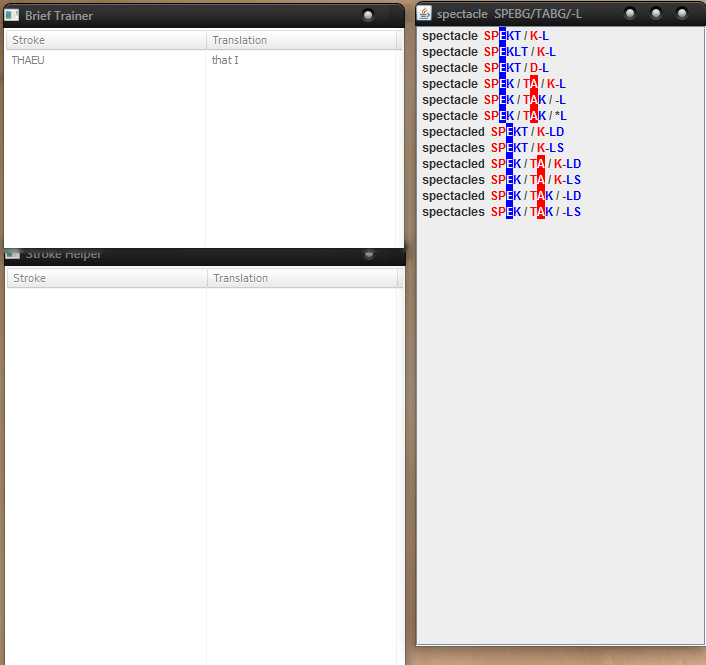
Does it not show because briefs are only 1 stroke?
Hope this can be helpful,
Ted

Erika
Aug 20, 2014, 8:48:24 PM8/20/14
to plove...@googlegroups.com
Hi all,
I want to help with programming. It's been a while since this thread started. What are the highest priorities now? Or, alternately, what are some low priority things I could take care of to get my feet wet? I see some modules call for unit tests. Would that be useful to do?
Oh and I am very much enjoying the new words per minute feature.
--Erika.
Mirabai Knight
Aug 21, 2014, 2:37:38 PM8/21/14
to ploversteno
I think learning tools are definitely a priority at this point, since
the bulk of the software itself is now pretty solid. So whether that
means building learning modules into Plover or working on external
drilling/tutorial software, I'd say it's our number one need at the
moment. Seems like StenoTutor and Fly have sort of fallen by the
wayside. Maybe something building off of those? Either porting them to
more platforms and sprucing them up, or building something new that
sort of follows in their footsteps? What do the rest of you think?
It's so tough trying to figure out how best to flatten the learning
curve when steno is already as easy as breathing to me, so newbies are
our most vital resource here. If we could come up with a list of
common sticking points and ways to combat them, that would be ideal.
the bulk of the software itself is now pretty solid. So whether that
means building learning modules into Plover or working on external
drilling/tutorial software, I'd say it's our number one need at the
moment. Seems like StenoTutor and Fly have sort of fallen by the
wayside. Maybe something building off of those? Either porting them to
more platforms and sprucing them up, or building something new that
sort of follows in their footsteps? What do the rest of you think?
It's so tough trying to figure out how best to flatten the learning
curve when steno is already as easy as breathing to me, so newbies are
our most vital resource here. If we could come up with a list of
common sticking points and ways to combat them, that would be ideal.


Breanne Petre
Aug 21, 2014, 5:05:55 PM8/21/14
to plove...@googlegroups.com
MIKE! This is fantastic!!!~ OMG
Man, why didn't I check this thread sooner? I've been manually editing my .json all year because of the Add Translation hang. And now all the Learning Tools features! You guys are all amazing and especially Mike! I am just so thrilled, you have no idea.
Man, why didn't I check this thread sooner? I've been manually editing my .json all year because of the Add Translation hang. And now all the Learning Tools features! You guys are all amazing and especially Mike! I am just so thrilled, you have no idea.
Erika
Aug 21, 2014, 8:44:30 PM8/21/14
to plove...@googlegroups.com
All these new features for learning are great. I would like to add a feature to import text to transcribe so you can get hints for the word you are trying to type and get accuracy stats. Where is the latest code? I take it it's not in https://github.com/openstenoproject/plover?
Mike Neale
Aug 22, 2014, 4:16:29 AM8/22/14
to plove...@googlegroups.com
Hi Erika.
Yes that is the master branch. Fork from that and then make a pull request when you want your changes to be merged.
Breanne. Wow thanks for the great words! I'm glad it's fixed the problem. :) If you have any problems with the dictionary editor let me know.
Thanks
Mike
robb
Aug 22, 2014, 8:38:57 PM8/22/14
to plove...@googlegroups.com
The inbuilt learning tools would be great to get working properly. I don't know if Mike's still working on these, they appeared in an earlier build he made but seemed to have been removed in his latest build due to a problem. I think they were originally written by Brent.
To me these inbuilt tools would be the most useful to beginners and more advanced users because they can be used as you write. And keeps Plover compact. I'm running Plover from a USB drive at home, then just take the USB to work and run it there, there's only one copy of all my dictionaries etc.
Rob
Mike Neale
Aug 23, 2014, 6:02:27 AM8/23/14
to plove...@googlegroups.com
This is the build that includes all my retro changes, dictionary editor, lockup fix and Brent's training tools:
The other version I gave was to demonstrate the "repeat last stroke" request by Ted. This version did not include all the other changes just for the sake of simplicity really.
If you want the version that contains the training tools, use the link above. They should be working fine. I know there was a bug report about them but as they were written by Brent, I haven't looked into it.
Brent Nesbitt
Aug 23, 2014, 10:41:12 AM8/23/14
to plove...@googlegroups.com
Sorry, I haven't had time to look into it yet either.
robb
Aug 23, 2014, 8:14:22 PM8/23/14
to plove...@googlegroups.com
Aha! Thanks Mike, I don't know how I got that mixed up. I was downloading them as fast as you were building them and thought I had the final build. Working now.
No problem Brent, wasn't complaining, I appreciate all the work you guys are putting in, It's improving my quantity of life, seriously! )
I wish I could code.
Thanks again,
Rob
Reply all
Reply to author
Forward
Message has been deleted
0 new messages