
First progress with pi3d on windows
361 views
Skip to first unread message

Patrick Gaunt
Apr 25, 2015, 10:33:53 AM4/25/15
to pi...@googlegroups.com


Peter Farrell
Apr 26, 2015, 11:07:41 PM4/26/15
to pi...@googlegroups.com
Sounds great! I wish you success.
Patrick Gaunt
Apr 28, 2015, 9:05:55 AM4/28/15
to pi...@googlegroups.com
This is now officially working! I have moved to v2.0 and pushed latest to github and pypi.org so if anyone has any time or interest it would be good to get feedback on a) how it works on your windows setup b) whether it's broken something else
http://pi3d.github.io/html/ReadMe.html#windows
http://pi3d.github.io/html/ReadMe.html#windows

Utthawut Bootdee
May 18, 2015, 12:52:19 AM5/18/15
to pi...@googlegroups.com
Thank you for making it to be run on windows :).
I will test it with python3.
Patrick Gaunt
May 18, 2015, 3:11:07 AM5/18/15
to pi...@googlegroups.com, b.utt...@gmail.com
Hi, it would be great to get some feedback on the windows installation process. I just have this one laptop with W8.1 and it seems to be fine but I've recently had a drawn out PM conversation (different timezones) with someone who failed to get an egl display intialized, despite everything else seeming to be ok.
Utthawut Bootdee
May 18, 2015, 8:22:59 AM5/18/15
to pi...@googlegroups.com
Hi Patrick,
I've tried to run pi3d on windos7 64-bit with the following conditions,
- Python version 3.3.2
- Pygame from https://bitbucket.org/pygame/pygame/downloads (pygame-1.9.2a0-hg_56e0eadfc267.win32-py3.3.msi)
- Numpy-1.9.0-py3.3
- Pillow-2.0.0.win32-py3.3.exe
- pi3d from https://github.com/tipam/pi3d (download zip file) and install with cmd python setup.py install, it install to C:\python33\Lib\site-packages and then I modifed pi3d/constants/__init__.py line:87,88
And the error shown as below.

Patrick Gaunt
May 18, 2015, 9:25:35 AM5/18/15
to pi...@googlegroups.com, b.utt...@gmail.com
Hmm, that could be the same eglInitialize() failing issue. How many different locations did you find libegl.dll files? I will attach a testing application that I've been playing with. Hopefully it will give a bit more info that we can use to help diagnose the issue. You will have to manually change the ANGLE files to test by changing the subscripts in line 55 then re-running it each time I'm afraid. Do you know what make of gpu is in your computer?
Peter Farrell
May 18, 2015, 11:09:36 AM5/18/15
to pi...@googlegroups.com
Hi, Paddy,
I'm following your directions on my Windows 8 laptop. I have Python 2.7.6 and 3.3 installed, both with pygame and numpy. I used the powershell to install setuptools and it ran successfully. But whenever I try to "easy_install Pillow" I get the message that "easy_install is not recognized as the name of a ... operable program."
I know this is a really basic problem, but I'm sure it's going to pop up when other non-experts try to use pi3d, too. I'm excited to get pi3d on Windows, though. Let me know if you have any ideas.
Peter
On Mon, May 18, 2015 at 6:25 AM, Patrick Gaunt <pat...@eldwick.org.uk> wrote:
Hmm, that could be the same eglInitialize() failing issue. How many different locations did you find libegl.dll files? I will attach a testing application that I've been playing with. Hopefully it will give a bit more info that we can use to help diagnose the issue. You will have to manually change the ANGLE files to test by changing the subscripts in line 55 then re-running it each time I'm afraid. Do you know what make of gpu is in your computer?
--
You received this message because you are subscribed to a topic in the Google Groups "pi3d" group.
To unsubscribe from this topic, visit https://groups.google.com/d/topic/pi3d/26I1m_BvVk8/unsubscribe.
To unsubscribe from this group and all its topics, send an email to pi3d+uns...@googlegroups.com.
For more options, visit https://groups.google.com/d/optout.
Patrick Gaunt
May 18, 2015, 11:54:29 AM5/18/15
to pi...@googlegroups.com, peterfa...@gmail.com
To start with I also had two versions of python (one via Anaconda) and ran into various problems simply getting python+numpy+pygame+Pillow installed. In the end I decided the simplest thing would be to return to zero by un-installing everything, then record what seemed to work. However that's not useful if you're already got things installed and working.
As part of my attempt to get Pillow working I tried various downloads from here
But I think I had to have pip installed to install the wheel file http://stackoverflow.com/questions/27885397/how-do-i-install-a-python-package-with-a-whl-file
I think that part of the problem is what applications get put in the registry so you can 'just' type them at the command line. There is a potential for conflict with different pythons and I suspect you then need to explicitly enter the path. On my setup it's at C:\Python27\Scripts\easy_install.exe (and there's what appears to be a duplicate easy_install-2.7.exe)
Let me know what problems (and solutions!) you encounter.
Paddy
Paddy
May 18, 2015, 12:04:37 PM5/18/15
to pi...@googlegroups.com, pat...@eldwick.org.uk, peterfa...@gmail.com
apparently pip "comes with" python >= 3.4 or >= 2.7.9 but there is a script to bootstrap it https://bootstrap.pypa.io/get-pip.py which I might or might not have used at some stage in the past!
Peter Farrell
May 18, 2015, 12:21:19 PM5/18/15
to pi...@googlegroups.com
Hi, Paddy,
Yes, I've used the "get-pip" method but I'm currently going the "unofficial package" route. The Pillow file unzipped (using 7-Zip) fine.
What's next after that? None of the Linux install commands work in the windows powershell of course.
On Mon, May 18, 2015 at 9:04 AM, Paddy <pat...@eldwick.org.uk> wrote:
apparently pip "comes with" python >= 3.4 or >= 2.7.9 but there is a script to bootstrap it https://bootstrap.pypa.io/get-pip.py which I might or might not have used at some stage in the past!
--
Paddy
May 18, 2015, 12:55:53 PM5/18/15
to pi...@googlegroups.com, peterfa...@gmail.com
Well, I'm not sure if this is the right thing for your setup - Pillow's already installed on this laptop but if I rename or delete anything PIL or Pillow related from c:\python27\lib\site-packages\ then do this I don't get any errors and pi3d manages to load Image
1. Download Pillow-2.8.1-cp27-none-win32.whl from the http://www.lfd.uci.edu/ site
2. In terminal cd to Downloads
3. C:\...\Downloads> c:\python27\scripts\pip.exe install Pillow-2.8.1-cp27-none-win32.whl
Utthawut Bootdee
May 19, 2015, 12:22:56 AM5/19/15
to pi...@googlegroups.com, b.utt...@gmail.com
Hi Paddy,
How many different locations did you find libegl.dll files? (question from paddy)
4 folder as the followings,
- C:\Program Files (x86)\Google\Chrome\Application\42.0.2311.135 (libegl.dll and libglesv2.dll) << eglInitialize() failing issue as the previous reply
- C:\Program Files (x86)\Google\Chrome\Application\42.0.2311.152 (libegl.dll and libglesv2.dll) << eglInitialize() failing issue as the previous reply
- C:\Program Files (x86)\Mozilla Firefox (libEGL.dll and libGLESv2.dll) << FAILED as the picture below

- C:\ti\ccsv5\eclipse\xulrunner (libGLESv2.dll) TI is Texus Intrument (It has only one file, so I've not tested it yet)
My GPU is GeForce210
And I've already tested "test_elg.py" (line#53, you missed ended parenthesis, just reporter for you)
The result of #line 55 (for path in results_list[0:1]:), I changed it to [1:2] and [2:3], any way the result is the same as below.

Paddy
May 19, 2015, 5:27:36 AM5/19/15
to pi...@googlegroups.com, b.utt...@gmail.com
Annoyingly the find routine didn't work - probably because of those infuriating differences between python2 and python3. Rather than try to figure it out it's probably easier to hard code in the known paths, i.e. construct the results_list around line 54
print("found {} paths".format(len(results_list)))
results_list = ["C:\\Program Files (x86)\\Google\\Chrome\\Application\\42.0.2311.135",
 "C:\\Program Files (x86)\\Google\\Chrome\\Application\\42.0.2311.152"]
for path in results_list[0:1]: ### and run it again with [1:2]
 ######### NB I've found this only works properly #####################
I'm less confident that the printout will provide any useful info but please give it a go!
I've not been able to find why the firefox dlls don't work. I think they're reliant on symbols being loaded by other libraries or in the main exe but if I add the path to the dll directory (or put the test_egl.py in that directory and run from there) the dlls load ok but python crashes!!
It's frustrating that it works fine on this computer but I don't know if it works on any other!
Utthawut Bootdee
May 19, 2015, 6:51:46 AM5/19/15
to pi...@googlegroups.com, b.utt...@gmail.com
Hi Paddy,
After hard code to google chrome path the results for path in results_list[0:1]: ### and run it again with [1:2]

What's next? It didn't work because of python3 or .dll or my hardware?
Paddy
May 19, 2015, 8:10:22 AM5/19/15
to pi...@googlegroups.com, b.utt...@gmail.com
Hi, I doubt it's python3 and it's hard to say if it's hardware or dll but it seems unlikely. If you can run WebGL applications from chrome then these are probably in the clear. (try a search for "webgl demos" on google) On the assumption the hardware and software are ok then I'm at a bit of a loss, but it points to something running in windows that pi3d isn't taking into account that somehow prevents the eglInitialize() from working, threading? or the way windows does multiprocessing?. Maybe calling eglTerminate() first might release the display?
Utthawut Bootdee
May 19, 2015, 8:46:41 AM5/19/15
to pi...@googlegroups.com, b.utt...@gmail.com
Hi Paddy,
I can run WebGL (http://neuroid.co.uk/lab/cub/). Maybe tomorrow I should try to install pi3d with python2 on this PC to confirm that my PC can run pi3d on windows7. And the next action, I will try python3 with other PC.
Paddy
May 19, 2015, 11:29:43 AM5/19/15
to pi...@googlegroups.com, b.utt...@gmail.com
It's not likely to be related to python2v3 but I suppose there might be something to do with 32 bit v 64 bit applications. I can't really see why though. You could try putting a line above the initialization:
eglTerminate(display)
r = eglInitialize(display, None, None)
on my machine this didn't stop it working, but I can't tell if it did any good either.
Another thing I've noticed is that there seem to be different extensions included in ANGLE specific to windows phones. It might be worth comparing the output of egl2info.exe but it doesn't seem to be included on my system.
I am in the process of compiling the two libraries for myself and will see what they look like (though it's hard to see why these would work if the chrome ones didn't)
Ok done that. There was an option to get it to not try the D3D11 first but to try D3D9, the latter being more generally available (older). There's also an oddity with dll dependencies (or something) which causes a failure when loading from a different directory but works if the dlls are copied into the same directory as the python script!
Paddy
May 19, 2015, 11:42:14 AM5/19/15
to pi...@googlegroups.com, pat...@eldwick.org.uk, b.utt...@gmail.com
These are the dlls I've just compiled, they seem to work fine on my computer, though they're a fair bit bigger than the chrome or firefox ones. Try copying them into the pi3d_demo folder and changing the lines in pi3d/constants/__init__.py to
  opengles = _load_library("libGLESv2.dll", "Win")
  openegl = _load_library("libegl.dll", "Win")
Utthawut Bootdee
May 19, 2015, 11:54:59 PM5/19/15
to pi...@googlegroups.com, b.utt...@gmail.com
Hi Paddy,
After trying your advice

I will try python2 to make sure all of installation is correct
Utthawut Bootdee
May 20, 2015, 9:03:38 AM5/20/15
to pi...@googlegroups.com
After trying with python 2.7.9, windows7 64bit
with .dll from google, Moliza firefox and your compiled dll. It's all failed as below.

Paddy
May 20, 2015, 5:53:09 PM5/20/15
to pi...@googlegroups.com, b.utt...@gmail.com
Oh well, I thought that python2 wouldn't make the difference, but at least that's clarified it. Your first test of the dll files I had compiled showed that they weren't being found at all - presumably you fixed that for the second tests. A pity they didn't work as that would have narrowed the problem down - it looks like I will have to wade through the source code for WebGL and figure out how it manages to use the ANGLE files.
Paddy
May 21, 2015, 9:00:56 AM5/21/15
to pi...@googlegroups.com, pat...@eldwick.org.uk, b.utt...@gmail.com
If you're not completely bored with the whole thing by now, I've found out a little bit more relating to use of the ANGLE dlls, especially to various changes over the past 12 months to do with different windows surface and windows 8.0 hacks and alterations cooked up between google and ms! Again I'm not sure if they're relevant to this issue but probably worth trying.
I've also managed to get the Mozilla Firefox dlls to load by copying them into the same directory as the python (pi3d_demos for instance) BUT ALSO with mozglue.dll which obviously supplies some of the common symbols.
Attached is a modified test_egl.py If it still doesn't come up with any info then there's just one more thing I can think of which is to try to pick up a an egl surface using eglGetCurrentSurface() (which is what pi3d does on Android) as pygame might have already created one using SDL
Utthawut Bootdee
May 21, 2015, 10:55:35 AM5/21/15
to pi...@googlegroups.com, b.utt...@gmail.com
Hi Paddy,
I'm still going to test (nor boring). I tested your test_egl.py with python3.4.2.

Utthawut Bootdee
May 21, 2015, 11:39:23 AM5/21/15
to pi...@googlegroups.com
And testing result of the your latest test_egl.py with python 2.7.9 (installing numpy is very long time, I have to install http://www.microsoft.com/en-us/download/details.aspx?id=44266 before typing easy_install numpy. Firstly, I think installing numpy might be failed, but it eventually pass and I can import numpy)
When I set path in the file C:\Python27\Lib\site-packages\pi3d\constants\__init_.py to my google chrome.
opengles = _load_library("C:/Program Files/Google/Chrome/Application/42.0.2311.135/libglesv2.dll", "Win")
openegl = _load_library("C:/Program Files/Google/Chrome/Application/42.0.2311.135/libegl.dll", "Win")
the result is as below

And when the path is set to your compiled egl file
opengles = _load_library("libGLESv2.dll", "Win")
openegl = _load_library("libegl.dll", "Win")
The result is as below

Paddy
May 21, 2015, 1:14:17 PM5/21/15
to pi...@googlegroups.com, b.utt...@gmail.com
Obviously at a later stage you would need numpy and Pillow but they're not needed by the test_egl.py program. You shouldn't really need to change the __init__.py file either as openegl and opengles are reloaded by test_egl using the path you set in lines 51-53. However I have found that there are some odd effects if you load a different dll in __init__ from the one loaded in test_egl. As __init__ is loaded automatically by the first few imports the only way to test it properly is to change the two lines in __init__.py to
I had a look at getting the pygame surface using eglGetCurrentSurface() but it didn't seem to work.
  opengles = None #_load_library("C:/Program Files (x86)...
  openegl = None #_load_library("C:/Program Fi...
Then just change the path in test_egl. Did you try copying the dll files from /Program Files (x86)/Mozilla Firefox/ ?
Anyway there does seem to have been some change, although it's hard to see why. Previously the eglInitialize() failed but now, although the six attempts at getting a display using eglGetPlatformDisplayEXT() all fail and it has to use eglGetDisplay() as previously, it seems to be able to initialize it!!!! However it doesn't return any configs available. There might be a clue why if you print the returned value r
print("eglGetConfigs returned code={} with {} configs".format(r, numconfig.value)) # shouldn't be more than 60, surely!Utthawut Bootdee
May 22, 2015, 4:22:38 AM5/22/15
to pi...@googlegroups.com, b.utt...@gmail.com
Hi Paddy,
Today I test with another PC, with python 3.3.2.
After modifying constant/__init__.py to
opengles = None
openegl = None
And Test "test_egl.py" as the following conditions,
First case, copying .dll from C:\Program Files (x86)\Mozilla Firefox to pi3d_demos-master folder

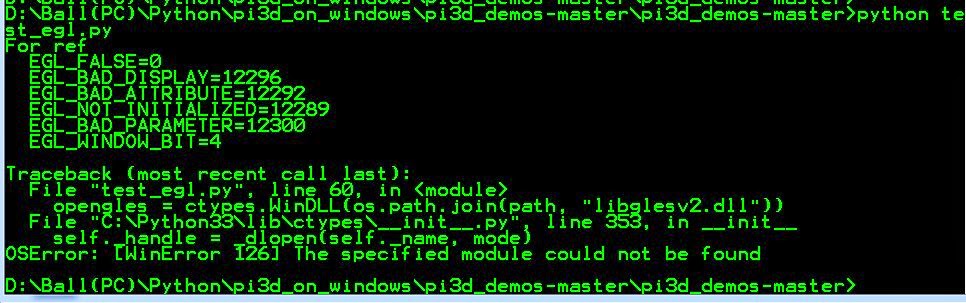
Second case, Use your compiled dll file

Paddy
May 22, 2015, 10:26:31 AM5/22/15
to pi...@googlegroups.com, b.utt...@gmail.com
Hi, that first error looks like a missing visual studio cpp redistributable. It might be on the computer somewhere but not accessible on using the Path list. That was a similar issue to the thing I could only solve by copying everything into the starting directory of the application. Don't you love windows. I suppose having extra copies of these libraries is why windows apps tend to be large and take ages to start!!!
The second screen looks similar to the issues on the other computer - it is initializing the egl display but not returning any configs.
I have found a couple of references on line to the need (with certainly operating systems and or gpus) to load the d3dcompile_xx.dll library before calling eglInitialize() I'm not on the windows computer at the moment but will have a look later (I think there is a copy of the file in chrome, and I seem to remember seeing one as a byproduct of my compile of Angle, I will post a modified zip and test_egl.py)
Paddy
May 22, 2015, 11:13:41 AM5/22/15
to pi...@googlegroups.com, pat...@eldwick.org.uk, b.utt...@gmail.com
I've added d3dcompiler_47.dll to the zip file here - but it looks to be exactly the same size as the ones included in chrome and firefox so I assume you could just copy one of those into pi3d_demos-master directory (I've not recompiled so the other two dlls are the same). I can't see any reason why this should make any difference but there's not much else to try at the moment! Attached is a slightly revised test_egl.py which loads the dll and reports why eglGetConfigs() failed.
Paddy
May 22, 2015, 6:37:08 PM5/22/15
to pi...@googlegroups.com, pat...@eldwick.org.uk, b.utt...@gmail.com
I'm not sure if this is relevant but it might be a possibility: that ANGLE will use OpenGL drivers if they are available, and so not depend on translating to DirectX, so on my computer the dlls worked without having the d3dcompiler there. But on your computers it couldn't find any OpenGL functionality so ran into problems without d3dcompiler. Here's a utility that allow you to see what graphics card and driver systems you have http://www.realtech-vr.com/glview/
Utthawut Bootdee
May 22, 2015, 8:51:46 PM5/22/15
to pi...@googlegroups.com, b.utt...@gmail.com
Hi Paddy,

Utthawut Bootdee
May 22, 2015, 8:57:54 PM5/22/15
to pi...@googlegroups.com
Hi paddy,
The result of testing your new d3dcompiler_47.dll and test_egl.py
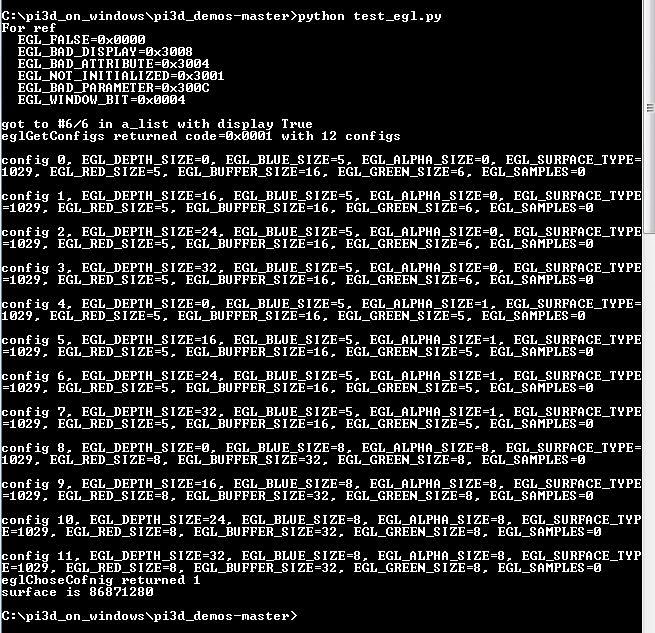
Utthawut Bootdee
May 22, 2015, 9:52:21 PM5/22/15
to pi...@googlegroups.com
Hi Paddy,
Excellent! Now I can run pi3d demos for both version python2 and python3. It's faster than running on ubuntu vmware on my PC :).
I have a question, my program has code to detect insert, delete, page up, page down, up, down ,left ,right keys on keyboard.
On ubuntu vmware, it can detect these keys (all of keys that used in my program).
But on windows, it cannot detect these keys, but it can detect keys such as w, a ,s ,d, m, n for example.
Paddy
May 23, 2015, 4:56:52 AM5/23/15
to pi...@googlegroups.com, b.utt...@gmail.com
At last! Thanks for all your help getting this sorted out.
It's surprising that there's so little info on this requirement on the internet generally, I will add the info in the documentation... what exactly did you do in the end? Was is sufficient to just copy the d3dcompiler dll to the pi3d_demos-master directory (as well as the other two (or three for mozilla)) or did you have to load them? Or could you leave them where they were if you loaded them?
It might be faster still if you can get it to work without the d3dcompiler as I would have thought using OpenGL directly would be faster (I think it's faster than DirectX for many things anyway) Possibly update the drivers.
I will sort out the slight differences between pygame key input and curses, well spotted.
Thanks again
Paddy
Utthawut Bootdee
May 23, 2015, 7:21:56 AM5/23/15
to pi...@googlegroups.com, b.utt...@gmail.com
Hi Paddy,
If my pi3d demo folder has d3dcompiler_47.dll, it can use libEGL.dll and libGLESv2.dll from google chrome or your compiled dll file.
***Note
my constant\__init__.py is set path to
opengles = _load_library("libGLESv2.dll", "Win")
openegl = _load_library("libegl.dll", "Win")
So my testing is to copy .dll file to pi3d demo folder.
Utthawut Bootdee
May 23, 2015, 7:26:15 AM5/23/15
to pi...@googlegroups.com
For future information, I still cannot use .dll file from Moliza Firefox. It might be as you said that missing visual studio cpp redistributable.
Paddy
May 23, 2015, 8:46:06 PM5/23/15
to pi...@googlegroups.com, b.utt...@gmail.com
Hopefully wrapped up! I have updated the installation instructions here http://pi3d.github.io/html/ReadMe.html#windows and pushed up a new version (2.2) to https://github.com/tipam/pi3d and https://pypi.python.org/pypi/pi3d/2.2
The Keyboard should return approximately the same codes as for X11 (It's not a very rigorous, multinational keyboard system anyway)
If anyone else has a go at setting pi3d up on windows, and runs into problems let me know!
The Keyboard should return approximately the same codes as for X11 (It's not a very rigorous, multinational keyboard system anyway)
If anyone else has a go at setting pi3d up on windows, and runs into problems let me know!
Peter Farrell
May 23, 2015, 8:53:49 PM5/23/15
to pi...@googlegroups.com
Thanks, Paddy. That was a lot of work! Hopefully I'll get some dedicated time to get further with mine.
--
You received this message because you are subscribed to a topic in the Google Groups "pi3d" group.
To unsubscribe from this topic, visit https://groups.google.com/d/topic/pi3d/26I1m_BvVk8/unsubscribe.
To unsubscribe from this group and all its topics, send an email to pi3d+uns...@googlegroups.com.
For more options, visit https://groups.google.com/d/optout.
Utthawut Bootdee
May 23, 2015, 10:39:07 PM5/23/15
to pi...@googlegroups.com, b.utt...@gmail.com
Hi Paddy,
After Installing pi3d version 2.2, keyboard is work.
And I tested almost all of pi3d demos, remained Issues are pi3d.inuputEvents when running Gui.py and EGL_NO_CONTEXT when running ProceduralTerrain.py as below.

Peter Farrell
Jun 28, 2015, 2:38:57 PM6/28/15
to pi...@googlegroups.com
Hi, Paddy,
Today I followed your instructions on my 64-bit Win 7 laptop which can "pip". I downloaded your 64-bit dlls and since the 32-bit Pygame gave me an error I uninstalled it and replaced it with the 64-bit version. I can run Geany but when I run a pi3d file it tells me "python is not recognized as an internal or external command."
But from IDLE it works fine! I've run Amazing, Buckminster, Orbit and IceGrow so far (and my "Tetramerge" gasket), with no problems. Dogfight gave me this error:
Traceback (most recent call last):
File "C:\Python27\pi3d_demos-master\DogFight.py", line 445
inputs = pi3d.InputEvents()
AttributeError: 'module' object has no attribute 'InputEvents'
Congratulations and great work, Paddy!
Peter
On Saturday, April 25, 2015 at 7:33:53 AM UTC-7, Paddy wrote:
Had another look at this after seeing how python for android piggy-backed the mulitplatform work of pygame using SDL. Quite a way to go with keyboard and mouse input but this is significant progress. I'm getting libegl.dll and libglesv2.dll from chrome, but mozilla also use ANGLE (as do many others, I think i found four or five different places with these libraries on my machine, all different from each other!!) and just passing eglCreateWindowSurface() the value of pygame.display.get_wm_info()["window"]
Reply all
Reply to author
Forward
0 new messages