
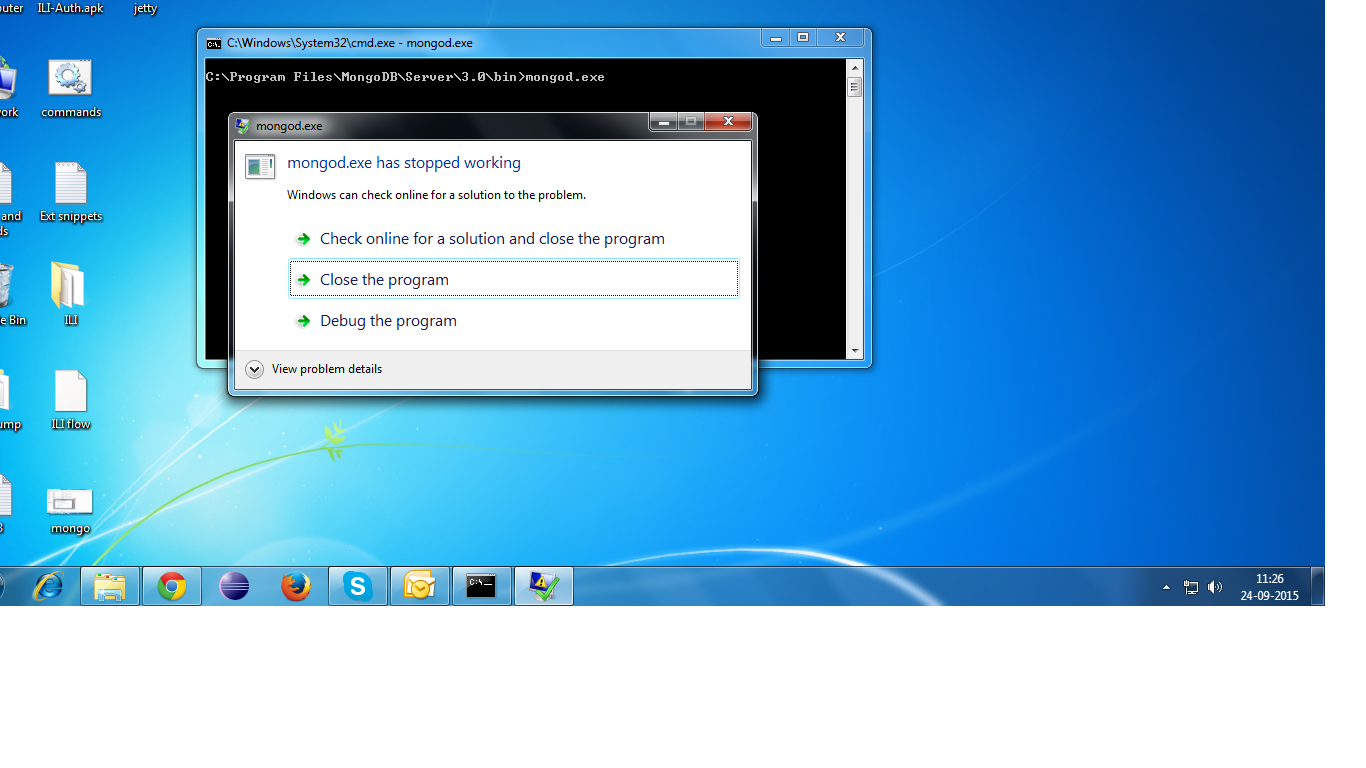
Error: mongod.exe has stopped working

rajplayster
I downloaded and installed the latest exe file: mongodb-win32-x86_64-enterprise-windows-64-3.0.6-signed on Windows 7 Professional edition.
I also installed the Windows hotfix: 451413_intl_x64_zip.exe.
When I double clicked mongod.exe it gave the error.
Image attached.
Please help.

Wan Bachtiar
Hi Rajplayster,
I’ve tested this by downloading and installing mongodb-win32-x86_64-enterprise-windows-64-3.0.6-signed.msi on Windows 10 Professional edition.
Then I followed the instruction to Run MongoDB for Windows to start mongod.exe, and it ran successfully.
If you double-clicked the mongod.exe right away after the installation, you may not have the \data\db\ directory yet. You can confirm this by running mongodb on PowerShell which would show you an error message :
PS C:\Program Files\MongoDB\Server\3.0\bin> .\mongod.exe
2015-09-23T17:00:19.535-0700 I STORAGE  [initandlisten] exception in initAndListen: 29 Data directory C:\data\db\ not found., terminating
2015-09-23T17:00:19.537-0700 I CONTROL  [initandlisten] dbexit:  rc: 100
As stated in the installation steps, you can solve this by creating MongoDB directory first. Then you would be able to start mongod either through PowerShell or double-click mongod.exe.
However instead of starting up manually each time, you may want to set up MongoDB as a Windows Service to start MongoDB at boot time.
Kind Regards,
Wan.
rajplayster
Thank you, Wan but it did not help me.

A. Jalil @AJ
Why would anyone run mongo on Windows ? you are not taking full advantage of mongo on windows, it doesn't matter if you are using the latest version of Windows..
Wan Bachtiar
Hi Rajplayster,
Can you click on the “View Problem Details” and post back the details please ?
It may provide us a better understanding of the problem.
I noticed you are installing the Enterprise edition, which is part of a commercial support subscription or trial agreement.
For more information see: https://www.mongodb.com/products/mongodb-enterprise-advanced.
You can download the Community Edition from: https://www.mongodb.org/downloads#production.
Thanks.
Regards,
Wan.

Stephen Steneker
Why would anyone run mongo on Windows ? you are not taking full advantage of mongo on windows, it doesn't matter if you are using the latest version of Windows..You can create Linux VM on top of your windows and you will be in a better position to learn and do lots of cools stuff with mongo and not to mention that you will not come across these issues on Linux.
MongoDB is cross-platform. Supported operating systems for the MongoDB server currently include x86 flavours of Linux, Windows, OS X, and Solaris: http://docs.mongodb.org/manual/installation/.
rajplayster
Stephen Steneker
I was able to download and run MongoDB ver. 2.6.11 on Windows7 without a problem.So I guess ver. 3.x is incompatible with Win7.

kchellap

Emerson Siega
Wan Bachtiar
Hi Emerson,
I have just tested an installation of MongoDB v3.0.8 .msi Windows 64-bit 2008 R2+ install file: mongodb-win32-x86_64-2008plus-3.0.8-signed.msi for Windows 7 64-bit. mongod.exe executed as expected without an issue. See MongoDB v3.0.x Windows Install for the detailed steps of installation.
Although you may be seeing a similar error message to the previous post, it may be a different issue that is causing the problem for you. If you still having a problem with mongod.exe, can you please start a new discussion with relevant details of:
- Specific error messages when you execute
mongod.exefrom the command prompt. - Installation type, whether it was through the
.msior thezipbundle. The installer file name would be helpful as well.
Also it would be helpful to include in the new discussion the specific OS (i.e. Windows 7 x64) and MongoDB version as you have done here for completeness.
Kind regards,
Wan.

Sasikala Karthi
Wan Bachtiar
Hi Sasikala,
In order to help you better, please start a new discussion with relevant details of :
- MongoDB version.
- Specific version of Windows 7. i.e. is it 32-bit or 64-bit.
- Installation type, whether it was through the
.msior the zip bundle. The installer file name would be helpful as well.
- Specific description of the problem that you are seeing and error message.
- Are you running Windows through a platform virtualisation ? i.e. XenServer, VMWare.
You may also find these useful:
- Determine which MongoDB build you need
- Install MongoDB Community Edition on Windows.
- Run MongoDB Community Edition
Kind regards,
Wan.

Kiran Wayal
Wan Bachtiar
Hi Kiran,
Although you may share similar error message of mongod.exe has stopped working, it may be a different issue that is causing it.
In order for others to help you faster and better, please start a new discussion with relevant details of :
- MongoDB version.
- Specific version of Windows 7. i.e. is it 32-bit or 64-bit.
- Installation type, whether it was through the
.msior the zip bundle. The installer file name would be helpful as well.
- Specific description of the problem that you are seeing and error message. If you see a dialog box, please click on
View problem detailsand post the content of it.
- Are you running Windows through a platform virtualisation ? i.e. XenServer, VMWare.
You may also find these useful:
- Determine which MongoDB build you need
- Install MongoDB Community Edition on Windows.
- Run MongoDB Community Edition
Best regards,
Wan.
Sasikala Karthi
--
You received this message because you are subscribed to the Google Groups "mongodb-user"
group.
For other MongoDB technical support options, see: http://www.mongodb.org/about/support/.
---
You received this message because you are subscribed to a topic in the Google Groups "mongodb-user" group.
To unsubscribe from this topic, visit https://groups.google.com/d/topic/mongodb-user/zmDhscBVK9Y/unsubscribe.
To unsubscribe from this group and all its topics, send an email to mongodb-user...@googlegroups.com.
To post to this group, send email to mongod...@googlegroups.com.
Visit this group at https://groups.google.com/group/mongodb-user.
To view this discussion on the web visit https://groups.google.com/d/msgid/mongodb-user/695d6f5e-fe18-4c67-9b53-17d34322da19%40googlegroups.com.
For more options, visit https://groups.google.com/d/optout.
Wan Bachtiar
I have tested an installation of MongoDB v3.2 using .msi for Windows 64-bit 2008 R2+ running on Windows 7 64-bits Professional. The installation file name is : mongodb-win32-x86_64-2008plus-ssl-3.2.1-signed.msi. In my environment test, I am able to execute mongod.exe without any issues.
Also, I have tested the installation using the zip install file: mongodb-win32-x86_64-2008plus-3.2.3.zip which works without any issues as well.
If you have any issues running MongoDB on Windows please open a new discussion thread. In order for others to help you better and faster please include:
MongoDB version. There are a number of available MongoDB versions. For example, v3.0.9 or v.3.2.3, etc.
Specific version of Windows. There are many Windows versions. For example, Windows 7 64-bits Professional edition, etc. See Which Windows OS am I running?
Installation file type and name. At the moment, there are four MongoDB builds for different Windows. For example:
Windows 64-bit 2008 R2+file:msiorWindows 64-bit legacyfile:zip. See Determine which MongoDB build you need to know which builds for which Windows version.If you see a pop-up dialog
mongod.exe has stopped working, please click on theView problem detailsbutton and post the content. The content would help others to help you find out the reason why it has stopped working.If you are running from the command prompt, please post any error messages.
Whether you running Windows through a platform virtualisation such as XenServer, or VMWare.
All of the above information could be used to replicate your environment and the problem you are having. The more information you provide, the faster others would be able to help you.
See also Install MongoDB Community Edition on Windows for steps by steps installation and setup.
Best regards,
Wan.

kirann...@gmail.com

Vinu S
Wan Bachtiar
I think no need to open new discussion thread for the same problem discussing in this thread.
Hi Vinu,
In this case, opening a new discussion thread helps others to provide an answer to your question. Although users may share a similar error message, it may be a different issue that is causing it.
There could be many combinations of MongoDB builds and versions, Windows builds and versions, installer types, processors etc. For an example, the original post of this thread uses Windows 7 Professional which differs to your O/S of Windows 7 Ultimate. Detailing specific environment setup may help to identify new problems and reduce miscommunication.
Below are the error specifications from my system.
Based on your environment details, you may be encountering a problem described in MongoDB tracker ticket SERVER-21732 related to Windows on older processors (before 2011) or running in a XenServer not supporting AVX instruction set for MongoDB v3.0.3+. You may find more information on the ticket.
Please note that this issue should be resolved in the current development version of MongoDB v3.3+.
Regards,
Wan.
MoroccoIT
And if you are running mongo on AWS, you can create an AMI box (linux of course) which has already mongo installed & configured and you don't have to deal with OS issues. Actually, I setup a Mongo environment with 9 EC2 servers: 3 MongoS, 3 MongoC and 3 Sharded DB cluster. I did not have to deal with mongo installation on each server for all 9 servers; but rather, I put most of my effort more on configuring the sharding and the cluster DB..
The moral of story, stay away from windows when you can especially when you are dealing with critical databases such as Mongo, Oracle, MySQL, Cassandra etc.. These databases are better managed with Linux, UNIX than windows.. On a side note, believe it or not, we had to recycle one of our Oracle/Windows box every weekend - was very painful.. But after we migrated it to a Linux box we don't ever touch it unless we are performing a major maintenance..
Cheers,
-AJ
--
You received this message because you are subscribed to the Google Groups "mongodb-user"
group.
For other MongoDB technical support options, see: https://docs.mongodb.com/manual/support/
---
You received this message because you are subscribed to a topic in the Google Groups "mongodb-user" group.
To unsubscribe from this topic, visit https://groups.google.com/d/topic/mongodb-user/zmDhscBVK9Y/unsubscribe.
To unsubscribe from this group and all its topics, send an email to mongodb-user...@googlegroups.com.
To post to this group, send email to mongod...@googlegroups.com.
Visit this group at https://groups.google.com/group/mongodb-user.
To view this discussion on the web visit https://groups.google.com/d/msgid/mongodb-user/5e5897d5-ddab-4c41-be0e-4de1cc31bc21%40googlegroups.com.
~Jack Kornfield~
Vinu S



Tushar Patil
I am getting link to download development version 3.3.10( Or I am redirected to 3.2.9 link)
Could you please help.
Wan Bachtiar
I am getting link to download development version 3.3.10( Or I am redirected to 3.2.9 link)
Hi Thushar,
You can visit MongoDB Community download-center to find MongoDB Community .msi installer for Windows. Follow the ‘Development Releases’ link on the page to find the latest MongoDB development version.
If you have further questions, please open a new discussion thread. This thread was about mongod.exe issue in Windows related to AVX instruction set.
Regards,
Wan.