
Replicator 2X and 0.1mm layer height no go

Jetguy
we need to share some knowledge here. There are many, many changes
between the 2X and all previous bots. This means that no, you can't
take what Johny says works on a Replicator 2 (which is a PLA only bot)
and apply that to your 2X, which according to many folks does not work
well with PLA.
With that said, that leaves the 2X in ABS mostly printing.
No, you cannot print ABS at 0.1mm layer height. The reason is, ABS has
too high of a viscosity when melted. Some have asked about running at
higher temps to compensate. Higher temps do NOT make it any more
fluid. In fact, you should never run higher than 230C and even then,
that's too high.
Just understand, there are limits to the hardware and this is one of
them. ABS should not really be run below 0.2mm unless you really want
to go into experimental land. Increasing the heat is the sure way to
get burned ABS jammed in the nozzle and an air print. Then it's a real
pain to clear the nozzle
So fine, we cannot use ABS to print at 0.1 layer height because it's
too thick and then causes the extruder to skip. Again, if we have a
0.4 nozzle and smash that to 0.1mm layer, there is just no way for the
thick plastic to flow out.
So that leaves us with PLA if we want ultra low layer heights.
It's known that PLA does not extrude well in the 2X due the fact the
thermal barrier tube (where the filament goes into the hot end after
the pinch wheel and motor) and mounting changed reducing the amount of
heat conducted away. It's common sense that if one side of a metal
tube is at 230C and the other side is not being cooled well, in time,
the entire tube will reach nearly 230C. PLA melts as low as 170C and
gets soft at even cooler temps. So the PLA begins to melt and soften
nearly at the entrance to the extruder hot end. This means the force
of the filament being pushed downward is transfered to pressure along
the inner wall of the tube and not into forcing the plastic out the
nozzle. Since we are also restricting the layer height to less than
nozzle diameter, it's the same as pinching off the nozzle.In short, a
garanteed mess.
So what can you do?
You can keep messing with settings, but I doubt you will ever find you
can make up for the hardware via software.
That means you can design a fan mod, which blows a stream of cool air
between the heater block and nozzle and the mounting bar above it. You
must activily cool the tube. The other option is to replace both
thermal barrier tubes and the mounting bar with stock Replicator 1
parts. In doing so, you'll have to change the filament pusher as well,
or use washers to shim back the motor from the mounting block so the
filament path lines up with the hotend.
Sorry, I'm being honest and trying to point you to a helpful solution,
but also need to warn you that settings that work for Replicator 2s
don't work because the 2X is so different.
I would like for someone to prove this wrong, publish the settings or
mods you did to make it work. At the same time, the point of this post
is to explain to new users WHY they can't get what should still be
considered experimental in other bots too, to work on the brand new
2X.
Again, all I'm saying here is that 0.1mm layer height is going to be
extremely experimental. Don't expect it to work. IF it does work, be
happy and share your settings.

Jay
For example. I trammed several times until I got the center 1/3rd perfect. Then tried it at .27 MQ (which worked fairly good)...and yes, I know if you select "HQ" you are using a different slicer...I tried it at .1 HQ and had...not so good results. I was basically printing a cylinder with a thin lip. At .1 it actually started squishing the lip and making it spread out on the build plate. Something that wasn't as noticeable in .27 layers. I also had to drastically slow to get rid of some of the artifacts (zippers corner doubles..etc)....but still can't get rid of all. Yesterday I printed some very small (1" x 1") parts that looked like a barrel chair. At .27 they were great at .1 they had surface artifacts that weren't in the other prints.
I also have a Rep 2 at home now (yeah..I know)....Was going to give some finer printing a go this weekend...
Jay

PhGeis
What Jetguy writes makes totally sense and I do 100% agree that the theory of PLA printing in the factory setup of the rep2x is already keeping me away from trying.
maybe I will start modding at least on of the two sides for PLA printing... We will see.
Buy the way: what do I need the white isolation stuff around the extruder for? Keeping the heat from melting the carriage?
Ordered Carl's alu carriage, and think I saw pictures of his rep2 without the isolation. Do i have to replace it once it is damaged, if I have the alu carriage installed?
Jetguy
you were talking about the 2X or maybe a 2 pulling the off a good 0.1
layer print.
Ok, so the Insulation around the heater block. You need it, even with
the aluminum carriage. The idea is to keep certain parts hot and
certain parts cool. Removing it allows both convection and radiant
heating of other parts we intend to keep cool. If I'm already
suggesting the 2X has less than ideal thermals (keeping hot part hots
and cool parts cool) just because the carriage can take the heat
doesn't mean it's a good idea and further, pretty much hurts the other
aspects of the machine. For example, if printing really small towers
like the points on a roof of a church or something, then the radiant
heat and the convection are both bad in a sitaution liek that that
requires cooling of the print. Further, if you add a print cooling
fan, now it cools the uncovered heater and spreads the heat to
everything else even more.
PhGeis
My 0.1 print was an organic free form model ( scan of an dental plaster model). So maybe you dont see the errors so much like in geometries! And I am new to 3 d printing. I might not see errors you will spot right on.
The upper part from the hot end, the part you see when the extruder is removed is not having full surface contact to the aluminium block. Thermal thinking This is an no go since surface contact is needed for heat transition. Cooling. Could I just fill the gap with heat conducting paste, the stuff I use for my CPU? I will post some pictures as soon as I am back to my machine beginning next week.

Rob Griesbeck

Bottleworks
Jetguy
can do it right?
Or put another way, PhGeis was having issues and was using whpthomas
0.1 layer height Replicator 2 profiles that were meant for PLA.
It was previously a highly tested subject what was consider proper
layer height to nozzle width ratios. There was a limit and it is
different for PLA and ABS
Combine that previous testing and knowledge with the facts of:
New user:
New machine:
Different extruder than ever before:
Issue with PLA such that most users would be using ABS since that's
what ships with the machine.
All I'm saying is that the new user probably should consider 0.1 layer
height a miracle if they get it to work with their limited experience.
Couple that with what is known to be different about the 2x from the
hundred of discussions on the Rep-2.
The final answer and lesson for the day is, a 2X is not just a souped
up 2. Therefore, profiles settings, and some discussion/problem fixes
should be 2X centric and don't take it that just because someone said
it works great on a Replicator 2, does it mean you can then carry that
info over to a 2X.
And then we roll into the PLA VS ABS debates.
SO lets twist this, what are the setting you use to get ABS to print
reliably at 0.1mm layer height?
Slicer used?
Feedrate?
Alterations to settings?
Any mods to the bot?
Example file used? (thingiverse link or whatever)
Again the point of the thread IS NOT to say it cannot be done, but
rather, it is dificult and because several folks seem to imply it's so
easy, we have relatively new members trying this right off the bat.

Dan Newman
On 10 May 2013 , at 1:43 PM, PhGeis wrote:
> Okay! makes sense.
As others pointed out, 0.1 mm layer heights are problematic
with ABS. At that thin of layer heights, the extruder is
trying to put out very small "bursts" and then spread it out
like butter. Unfortunately, ABS plastic doesn't spread that
thin very well and behaves more like chunky peanut butter.
The finish appearance will not be very good.
As to wingcommander's profiles, those are indeed for PLA
on a Rep 2. ABS is a whole different beast. And the 2X
appears to have differences as well. If you really want
to experiment more with wingcommander's profiles, the
first thing you may need to do is go into the Dimension
plugin and change that filament packing density to 0.85
(the ballpark figure for ABS).
Dan
Jetguy
stuff I use for my CPU"
2X hot end mounting bar. With the heat, it would just run out
everywhere. Thermal epoxy is not a good idea as then how coould you
later adjust the hot end heights if you had to if you ever changes
nozzles or something. Basically, it requires a different block, but if
that's the case, the older Rep1 actually was ideal in thermal
respects. The threaded thermal barrier tubes provide maximum surface
area inteface and contact between the tube and the block which results
in maximum cooling effect on the top of the tube. Threads are a ton
more surface area than the smooth outer bore of the 2X stock thermal
barrier tube. However, the only person I know who knows the dimensions
of both the Rep1 dual mounting bar and the Rep- 2X mounting bar is
Carl becuase he designed the aluminum carriage upgrade to fit both and
is the most qualified person (besides the folks at MakerBot) about the
hole spacing and what lines up and what doesn't. I do know this, the
Rep1 bar is also not as wide, and the filament path is closer to the
motor. That change was made to prevent the issue where the pinch drive
wheel on the motor had the setscrew not on the flat of the shaft. In
other words, a known problem on the Rep-2 was changed in the 2X and
that's also why for Rep-2 owners, Makerbot doesn't just sell a kit or
retrofit the 2X plastic extruder parts.
It' one of those things where so many changed, you have to change the
entire parts group as one.
Again, to kind of answer Rob and Bottlework's questions, at least can
we agree on these items?
0.1 layer height is not easy and therefore not the first thing a
novice should try with no previous 3D printing experience.
0.1 layer height requires that everything is perfect. First layer
height, bed tramming, flat surface, surface prep (cleaning etc),
temperatures, settings, the STL must be good, on, and on.
Generally, ABS is considered hard due to it's nature to curl and also
not stick to the platform
ABS is thicker and doesn't flow as well so ultra low layer height, bad
first layer height or tramming, and high feedrates could easily result
in prints that fail.
And while a hot topic, has anyone with a 2X had success with PLA?
If so, what layer height, speeds, software, settings, and specific stl
were used?
Any mods?
I don't think I am characterizing something unrealistic here even
though there are other members who want to argue my every word.

Darrell jan
Jetguy
printing in ABS at 0.1mm layer height is certainly on topic to show
that it's not a specific fault of the 2X. In other words, I'm trying
to just be factual about this in that because of the current lack of
success some folks are having with PLA, it forces them into using ABS.
I mean the machine does ship with ABS right? Therefore, if there is
some historical evidence that ABS is difficult to print with,
especially at 0.1 layer height, even on other machines, then it's not
out of line to say that a new user, getting a 2X to print with ABS at
0.1mm could be highly problematic. Further, that likely, there is not
an easy fix or setting they could just use to make it work.
Bottleworks
Jetguy, what brand of ABS plastic are you seeing your issues with? It might change based on brand.

Carl

TinyBot
In summary i think what you are trying to say is 0.1 CAN be done but it isn't recommended as the properties of the material (ABS) have a higher rate of failure being used this way.
Bradley Pearce
Sent from my iPhone
--
You received this message because you are subscribed to a topic in the Google Groups "MakerBot Operators" group.
To unsubscribe from this topic, visit https://groups.google.com/d/topic/makerbot/33kWvb3AXNY/unsubscribe?hl=en-US.
To unsubscribe from this group and all its topics, send an email to makerbot+u...@googlegroups.com.
For more options, visit https://groups.google.com/groups/opt_out.
Bottleworks

Joseph Chiu
Just a sanity check - people are leaving their 2x door open and removing the top hood while printing with PLA, right? If anything, I would blow air with a box fan into the bot, too.
On May 10, 2013 9:28 PM, "Bottleworks" <bottlew...@gmail.com> wrote:
>
> Of course, I don't have a 2X, so maybe the 2X doesn't print ABS as well as the replicator 1 & 2. I don't mean to imply anything about the 2X, due to having never touched a 2X.
>
> --
> You received this message because you are subscribed to the Google Groups "MakerBot Operators" group.
> To unsubscribe from this group and stop receiving emails from it, send an email to makerbot+u...@googlegroups.com.

PattyChuck
- I'm using MakerWare to slice at .1mm
- I'm using the stock build plate, heated to 115°C
- Nozzle height set with feeler gauge at .1mm then fine-tuned during printing
- Filament sometimes needs to be "pushed" into the extruder during the first layer of printing.
Jay

Enginwiz
I printed some small items in ABS with 0,15 mm layer height on my Replicator 2.
Wingcommanders extruder upgrade came out as nice prints. You might have
seen the pictures in the thread about printing ABS on a Replicator 2.
I printed a bunch of calibration cubes to tune in the settings for ABS.
The surface of the printed part looks smoother when printing with PLA at the same layer height.
My Makerware slicer profiles for ABS are on Thingiverse.


Count Spatula
Jetguy
On May 11, 8:52 pm, Count Spatula <countspat...@gmail.com> wrote:
> Forgot to add it was using the MakerWare with skeinforge
>
>
>
> On Saturday, May 11, 2013 8:46:47 PM UTC-4, Count Spatula wrote:
>
> > it would.
>
> > ABS, .15mm - 3 shells - 10% fill - 50mm/s - 100 travel - 230
>
> > The messy part at the top is from assembly not printing.
>
Darrell jan
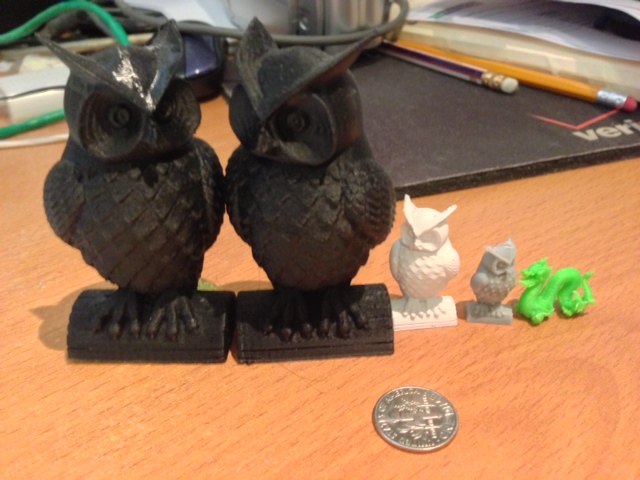
I am wasting bandwidth by posting the same picture that I put in a similar discussion under Jetty Firmware. Shame, shame. :-p
The left owl, with the shiny head, is black Makerware ABS, 0.05 mm. Shininess due to some acetone I was trying out.
The right owl is black ABS, 0.1 mm.
The little white owl is white ABS from Joseph, 0.1 mm.
The gray owl is PLA. I think it's 0.05mm, actually don't remember for sure.
The dragon is green ABS, again I forget, but I think it was 0.05mm. If not then it was 0.1mm.

Eighty
By my calculations, it took you approximately 6.2 years to print these. Am I far off?
Darrell jan
Darrell jan
Bradley Pearce
great. Shows the details of the modeled "skin" quite well. The only
issues I had were with some artifacts from the supports. I printed
this at a 45deg angle with only the the guy's back heels on the HBP
and full supports enabled on a replicator 1.
> You received this message because you are subscribed to a topic in the
> https://groups.google.com/d/topic/makerbot/33kWvb3AXNY/unsubscribe?hl=en-US.
> To unsubscribe from this group and all its topics, send an email to

Wingcommander whpthomas
I understand what you are talking about with the ABS....what's your take on PLA?

kyo
Jetguy
box" and the last paragraph is "All I had to do..."
Here's the gripe, you clearly read this forum. You clearly read
information outside of the directions. This then makes you no longer a
"Newby" status.
The poor soul who gets one and follows the directions and the bed
level script fails and hit in the center, do the directions then say,
"Contact MakerBot support, some machines are shipped with faulty
beds" ?
Did MakerBot "officially" say anything anywhere else other than this
group and only after repeated requests that beds may not be flat?
Do you think someone who only followed the directions provide could
get the same result with Makerware witha real "out of the box"
experience?
You admit to taking settings from Makerware and then changing those in
Replicator-G, is that in the directions?
My point is NOT to say it cannot be done. You and others took that as
a challenge and great, pat yourself on the back, you are now an
experienced operator.
What it doesn't solve is the true "out of the box" experience, the
knowledge and documentation required to get there for someone who has
not read or joined the forum.
I don't think the directions say, "Read the MakerBot Operators's
forum" before attempting to print.
Carl
The first time you get your machine to print you feel so impressed that it can actually print... a few hundred hours later and you laugh at how bad that initial print actually was!:-)
The forum is the only reason 90+% of people are able to make their machines work some of the time as oppose to never...
Jetguy
On May 13, 7:55 am, Damian Gto <damian...@gmail.com> wrote:
> Im sure that is not true.
> I have done zero hardware change in my rep 2x. I only use other software
> then makeware and I have printed at 0.05.
> Even with makerware and skeinforge I could print at 0.1mm.
> Sure I have read a lot, but I do that on all stuff I get, just to learn
> more about the thing I did/wanted to buy.
> If you think you can print without know things about it, then you will fail.
> Like if you drive a car you know how to drive, for you have learnt about it.
> Even with a 2d printer you learn how it works. So why should a 3D printer
> be any different?
> I also feel that some members of this group think without reading here you
> can not print any good.
> Wake up and understand this group is very small % of the users that own a
> makerbot printer and you can look all around the internet and see how other
> can print as good then anybody do here.
> Even at 0.1mm is common and just to write you can not do it and then change
> the statement when proof is posted many time, is just funny.
> The drawback to print at 0.1mm and better is the time it take, but it do
> look better.
> But I would not recommend to start with that. You should start with 0.3mm
> and work your way down to what ever you want to print.
> In the same time you learn the hardware and you also learn how the software
> do work and what you shall change to get as much out of the printer you
> can. You could easy do that without even read a single post here. Most of
> the time you can find youtube videos that is very help full and show a lot
> more in much less time then you have to spend here to read about it.
>
> In the end its up to you to learn all you need to make stuff that look
> good, like all other areas that you need to learn what you are doing to get
> a good result.
>
> So keep learning and make good 3D prints...

Lloyd Park
It seems like some things will never work as well at .1mm with ABS. Bridging, for example, always results in at least a few broken strands, even over surprisingly short distances of <5mm. I will keep trying though.
Joseph Chiu
--
You received this message because you are subscribed to the Google Groups "MakerBot Operators" group.
To unsubscribe from this group and stop receiving emails from it, send an email to makerbot+u...@googlegroups.com.
kyo
too high of a viscosity when melted. Some have asked about running at
higher temps to compensate. Higher temps do NOT make it any more
fluid. In fact, you should never run higher than 230C and even then,
that's too high."
Jetguy
amazing beginner's luck?"
spent 8-12 weeks waiting to get your machine and want to reply to
anything I say, good or bad.
Anyway, if i'm just so out of line, is Dan Newman wrong too?
"As others pointed out, 0.1 mm layer heights are problematic
with ABS. At that thin of layer heights, the extruder is
trying to put out very small "bursts" and then spread it out
like butter. Unfortunately, ABS plastic doesn't spread that
thin very well and behaves more like chunky peanut butter.
The finish appearance will not be very good."
Is Jay wrong too?
"Close enough to what I have found by trial and error. "
Is TinyBot also wrong?
You didn't insult me, bu your fellow owners certainly should be upset
as they are having trouble and NOTHING you have typed helps them print
at 0.10mm layer height.
> Sorry, but that's *-exactly-* what you said.. pretty clearly in fact. Let
Dan Newman
On 13 May 2013 , at 2:58 PM, Jetguy wrote:
> "I guess the rest of us 'newbies' just have some
> amazing beginner's luck?"
>
> No, you guys are just a bunch of folks who spent $2800 or more, and
> spent 8-12 weeks waiting to get your machine and want to reply to
> anything I say, good or bad.
>
> Anyway, if i'm just so out of line, is Dan Newman wrong too?
>
> "As others pointed out, 0.1 mm layer heights are problematic
> with ABS. At that thin of layer heights, the extruder is
> trying to put out very small "bursts" and then spread it out
> like butter. Unfortunately, ABS plastic doesn't spread that
> thin very well and behaves more like chunky peanut butter.
> The finish appearance will not be very good."
with ABS. I've printed 0.10 and 0.05 mm with ABS. I've seen ABS prints
at 0.01 mm layer heights. In general, the surface finish is not as good
as doing the same with PLA. So, personally, I use PLA below 0.15 mm
layer heights.
Put differently, after getting past plate flatness, plate tramming,
temperature control, and extruder skipping issues you can definitely
print ABS at 0.10 mm layer heights and lower. Question is, is the
surface finish acceptable to you? It's generally not to me but I
have printers which can do both PLA and ABS and so I can easily see
for myself the improvement to be had by using PLA for layer heights
below 0.15 mm.
And if you need to do a 0.1 mm layer height print spanning a large
region of your build plate, you really, really need a flat plate
and good tramming. Doing small, tiny prints at 0.10 mm layer
heights is not that difficult once you have the plate-to-extruder
gap set correctly.
But hey, I also prefer macs to pcs. And I'd like to see a
US Constitutional Ammendment which states that legislators cannot
pass a new law without first abolishing two old laws.
Dan
Lloyd Park
You can see that I'm still having some issues with bridges and overhangs, but overall I think it looks pretty good. I believe the waviness is directly caused by the stepper in the extruder and I'm not sure how to fix it. The parts that came out well kind of amaze me.


Dan Newman
On 13 May 2013 , at 5:10 PM, Lloyd Park wrote:
> You can see that I'm still having some issues with bridges and overhangs, but overall I think it looks pretty good. I believe the waviness is directly caused by the stepper in the extruder and I'm not sure how to fix it. The parts that came out well kind of amaze me.
same locations on each layer. Since steppers are all relative motion, what's the odds that
some problem like that lines up on each layer instead of precessing?
You should look at the gcode in a gcode viewer. My guess is that those are the edges of
polygonal facets in the STL. With accelerated printing, artifacts can show up at the
facet edges making them pronounced. That's one of the things that the advanced algorithms
attempt to deal with.
Some things you can try is using Altshell to run unaccelerated on the outermost layer.
Or use the Speed plugin's "perimeter slowdown" and set to a very low value (e.g., 0.33).
Some of the jitter in the names on the back of the bot looks a lot like corner ringing.
You may need to decrease the max accelerations a bit. I don't think it's corner ringing
on the back side of the legs since I don't see it damping. More likely to be facet edges
in the STL. (However, why the STL has polygon edges there is not clear: would seem like
fewer triangles would be needed.)
Dan
Lloyd Park
Also, my pictures keep ending up inside the quoted part of the message..


Dan Newman
On 16 May 2013 , at 1:11 AM, Alchemate wrote:
> dnewman, I'm the out of the box noob that Jetguy has been speaking about.
I don't own a Rep 2X and so don't have good suggestions on 2X starting
settings to offer.
Dan
Darrell jan
On Thursday, May 16, 2013 12:50:43 AM UTC-7, Alchemate wrote:
Darrell, This looks great. Is there anywhere we could see some of the settings used for....any of them?
Joseph Chiu
--

Alchemate

CornGolem
New users can do some mechanical calibration (bed and belts) but I think they won't make mechanical upgrades (add/replace parts) before they have become familiar with the machine.
So the best way to help them would be to provide a profile that can make successful 0,1mm ABS prints on a Replicator 2X with a particular material (polylac PA-747 or 757 or others).
All of you who succeeded, why don't you share your data so we can see the common points and establish the final profile !
Le vendredi 10 mai 2013 23:28:27 UTC+2, Jetguy a écrit :
Like I said, post the settings used, If it's so succesfull than anyone
can do it right?
Or put another way, PhGeis was having issues and was using whpthomas
0.1 layer height Replicator 2 profiles that were meant for PLA.
It was previously a highly tested subject what was consider proper
layer height to nozzle width ratios. There was a limit and it is
different for PLA and ABS
Combine that previous testing and knowledge with the facts of:
New user:
New machine:
Different extruder than ever before:
Issue with PLA such that most users would be using ABS since that's
what ships with the machine.
All I'm saying is that the new user probably should consider 0.1 layer
height a miracle if they get it to work with their limited experience.
Couple that with what is known to be different about the 2x from the
hundred of discussions on the Rep-2.
The final answer and lesson for the day is, a 2X is not just a souped
up 2. Therefore, profiles settings, and some discussion/problem fixes
should be 2X centric and don't take it that just because someone said
it works great on a Replicator 2, does it mean you can then carry that
info over to a 2X.
And then we roll into the PLA VS ABS debates.
SO lets twist this, what are the setting you use to get ABS to print
reliably at 0.1mm layer height?
Slicer used?
Feedrate?
Alterations to settings?
Any mods to the bot?
Example file used? (thingiverse link or whatever)
Again the point of the thread IS NOT to say it cannot be done, but
rather, it is dificult and because several folks seem to imply it's so
easy, we have relatively new members trying this right off the bat.
On May 10, 5:08 pm, Bottleworks <bottleworks...@gmail.com> wrote:
> I'm also wondering why Jetguy feels it can't be done. It's not the ABS
> because I've also done it several times.
>
>
>
> On Friday, May 10, 2013 5:03:45 PM UTC-4, Rob Griesbeck wrote:
>
> > I've done a few things at .1 on my Rep2X, no issues. Can you expand on why
> > it shouldn't work?

Damian Gto

TaErog
extremely experimental. Don't expect it to work. IF it does work, be
happy and share your settings."
Also, I think people must remember these “printers” are not text/2D printers (I think people still do not FULLY separate the two) With a 2d text printer the printer is built to print at maximum resolution and simulate lower res, normally for speed.
3D printers are an ENRIELY different beast! And this resolution relationship is inversed. Low res ~.3mm should be no problem, .2mm the workhorse, and .1mm a workable max that should be attainable BUT not practical or used for every print with out tuning.
Also, I think people must remember these “printers” are not text/2D printers (I think people still do not FULLY separate the two) With a 2d text printer the printer is built to print at maximum resolution and simulate lower res, normally for speed. 3D printers are an ENRIELY different beast! And this resolution relationship is inversed. Low res ~.3mm should be no problem, .2mm the workhorse, and .1mm the workable max that should be attainable BUT not practical or used for every print. .2mm seems to be the best balance.
You have the physical max resolution of the steppers, and limitations of the apparatus like various tolerances and backlash etc. But also the materials you use have different physical properties, they have different properties at different temperatures, can be effected by moisture, filler (color) and ambient temperatures. On top of that the object you print can exacerbate the basic limitations of this style of 3D printing and the materials that are used. And on top of all of that the settings you use can radically change the outcome of the print.
That is ALLOT of variables! And they ALL have to be spot on or dealt with for YOUR printer to print at .1mm.
Surprisingly my printer was quite close and my 3-4th print was at .1mm and perfect, but If I need to print at .1mm again I need to do a few test prints as I changed quite a few variables (as I changed FW and slicers).
Damian Gto
Jetguy
on the 2X, then come back with a post of the settings or mods and a
picture of the quality you got at 0.1mm in PLA.
Dan Newman
> I have hard time to understand why not any rep2x can not print at 0.1mm.
a full build plate of them at the same time at 0.1 mm is an entirely different
matter. It certainly can be done. But it's by no means easy out of the box.
Dan
Damian Gto
TaErog
Damian Gto
Dan Newman
On 27 May 2013 , at 9:21 AM, Damian Gto wrote:
> True, but printing on the whole build plate is more difficult on most
> resolution.
> But the true fact is that few will print stuff on the whole build plate.
> Most of the time they print stuff that is max 1/3 of the build plate.
entire build plate. Therefore, it is expected to work full volume at the
marketed resolution.
> And you can do that with 0.1mm on a stock rep2x, if its calibrated.
> Right now I do try to print stuff at 0.03mm. I did try with 0.01mm but the
> plastic start to blob after 10 layers or so.
(Other people have done even thinner; I've only gone down to 0.01 mm
myself.) So, I would certainly hope that on a Replicator 1, 2, or 2X the
same can be achieved. And, in point of fact, I know that it can be as
I've done 0.01 mm on my Rep 1 Dual. I've not tried that on my Rep 2.
Dan
Damian Gto
On Monday, May 27, 2013 7:13:55 PM UTC+2, dnewman wrote:
On 27 May 2013 , at 9:21 AM, Damian Gto wrote:
> True, but printing on the whole build plate is more difficult on most
> resolution.
> But the true fact is that few will print stuff on the whole build plate.
> Most of the time they print stuff that is max 1/3 of the build plate.
The bot is marketed as having a working build volume roughly the size of the
entire build plate. Therefore, it is expected to work full volume at the
marketed resolution.
TaErog
Jetguy
fellow 2X owner who was having trouble?
http://groups.google.com/group/makerbot/browse_thread/thread/bcd4d3ecb5464e10
Quit worrying about what I think or say and move on and help your
fellow owners. SHOUTING you can print at up to 0.05mm layer heights
repeatedly doesn't help anyone but does show you have a problem with
me.
TaErog
Dan Newman
> I stopped using RepG for all the bugs that kept messing up prints. But
> when I did the WORST thing I did was to DL whpthomas's Rep2 and others
> profiles . I am sure they work fine on there Rep2 or Rep1's but they where
> much worse then default on my system so unusable . . one reason I think
> sharing profiles may not be the best thing to do.
the same machines + plastics actually works pretty well. You've even
implicitly agreed with that if you think about it for a moment,
> Also, my profiles are only slightly tweaked from default (probably more
> to accommodate differences in hardware per unit)
the people sharing them is MBI. But they are, nonetheless, shared profiles.
Aljosa at MBI does a lot of work tuning them and then his and others results
become a shared profile which form the defaults.
However, people have to keep in mind that PLA behaves very differently than
ABS in some regards. And it also looks like the Rep 2X extruder behaves differently
than the Rep 2 extruder. That's another significant difference. So, expecting
Rep 2 PLA profiles to work on a 2X with ABS (or even PLA) is not a reasonable
expectation IMO. Obviously, you didn't realize that or if you did you were willing
to give them a go anyway figuring you could tweak them. But just because that
didn't work well for you doesn't disprove the concept of sharing profiles
for like machines + plastics.
Dan

JohnD
Alchemate
Alchemate
Alchemate
No the most exciting parts out there but good for one starting out.


TaErog


Brandon Schoonover
On Friday, May 10, 2013 12:24:30 PM UTC-7, Jetguy wrote:
Folks, Im not trying to be the guy that bashes the 2X but it's CLEAR
we need to share some knowledge here. There are many, many changes
between the 2X and all previous bots. This means that no, you can't
take what Johny says works on a Replicator 2 (which is a PLA only bot)
and apply that to your 2X, which according to many folks does not work
well with PLA.
With that said, that leaves the 2X in ABS mostly printing.
No, you cannot print ABS at 0.1mm layer height. The reason is, ABS has
too high of a viscosity when melted. Some have asked about running at
higher temps to compensate. Higher temps do NOT make it any more
fluid. In fact, you should never run higher than 230C and even then,
that's too high.
Just understand, there are limits to the hardware and this is one of
them. ABS should not really be run below 0.2mm unless you really want
to go into experimental land. Increasing the heat is the sure way to
get burned ABS jammed in the nozzle and an air print. Then it's a real
pain to clear the nozzle
So fine, we cannot use ABS to print at 0.1 layer height because it's
too thick and then causes the extruder to skip. Again, if we have a
0.4 nozzle and smash that to 0.1mm layer, there is just no way for the
thick plastic to flow out.
So that leaves us with PLA if we want ultra low layer heights.
It's known that PLA does not extrude well in the 2X due the fact the
thermal barrier tube (where the filament goes into the hot end after
the pinch wheel and motor) and mounting changed reducing the amount of
heat conducted away. It's common sense that if one side of a metal
tube is at 230C and the other side is not being cooled well, in time,
the entire tube will reach nearly 230C. PLA melts as low as 170C and
gets soft at even cooler temps. So the PLA begins to melt and soften
nearly at the entrance to the extruder hot end. This means the force
of the filament being pushed downward is transfered to pressure along
the inner wall of the tube and not into forcing the plastic out the
nozzle. Since we are also restricting the layer height to less than
nozzle diameter, it's the same as pinching off the nozzle.In short, a
garanteed mess.
So what can you do?
You can keep messing with settings, but I doubt you will ever find you
can make up for the hardware via software.
That means you can design a fan mod, which blows a stream of cool air
between the heater block and nozzle and the mounting bar above it. You
must activily cool the tube. The other option is to replace both
thermal barrier tubes and the mounting bar with stock Replicator 1
parts. In doing so, you'll have to change the filament pusher as well,
or use washers to shim back the motor from the mounting block so the
filament path lines up with the hotend.
Sorry, I'm being honest and trying to point you to a helpful solution,
but also need to warn you that settings that work for Replicator 2s
don't work because the 2X is so different.
I would like for someone to prove this wrong, publish the settings or
mods you did to make it work. At the same time, the point of this post
is to explain to new users WHY they can't get what should still be
considered experimental in other bots too, to work on the brand new
2X.