
No Display Default Welcome intent in first
1,619 views
Skip to first unread message

Jérôme Verlyndes
Jun 1, 2021, 4:49:28 AM6/1/21
to Dialogflow Essentials Edition users
Hello,
Is it possible to display the default welcome message only when clicking on the chat button and not before.
In the df-messenger settings, I deleted the "WELCOME" event (screenshot1). But the user must start the conversation with a "hello" for example to have default welcome intent (screenshot2).
I would like to display a notification for the user to open this conversation window and for the default welcome intent to appear at this time.
Is there a solution?
Thank you


Jeff Williams
Jun 4, 2021, 3:46:41 AM6/4/21
to Dialogflow Essentials Edition users
Hi, yes, you can use the wait-open option to delay the welcome intent.
Add this:
wait-open="true"
Example:
<script src="https://www.gstatic.com/dialogflow-console/fast/messenger/bootstrap.js?v=1"></script>
<df-messenger intent="WELCOME"
chat-title="Support Agent"
wait-open="true"
agent-id="######################"
language-code="en" >
</df-messenger>
Add this:
wait-open="true"
Example:
<script src="https://www.gstatic.com/dialogflow-console/fast/messenger/bootstrap.js?v=1"></script>
<df-messenger intent="WELCOME"
chat-title="Support Agent"
wait-open="true"
agent-id="######################"
language-code="en" >
</df-messenger>
Jérôme Verlyndes
Jun 4, 2021, 3:58:59 AM6/4/21
to Dialogflow Essentials Edition users
Hi,
Tanks for your feedback !
But you not really understand my question.
I don't want INTENT WELCOME DEFAULT start first like that :
I don't want INTENT WELCOME DEFAULT start first like that :

So I deleted the intent WELCOME in the DF-MESSENGER parameters. Now it's ok :

But when I click on the bubble I get nothing :
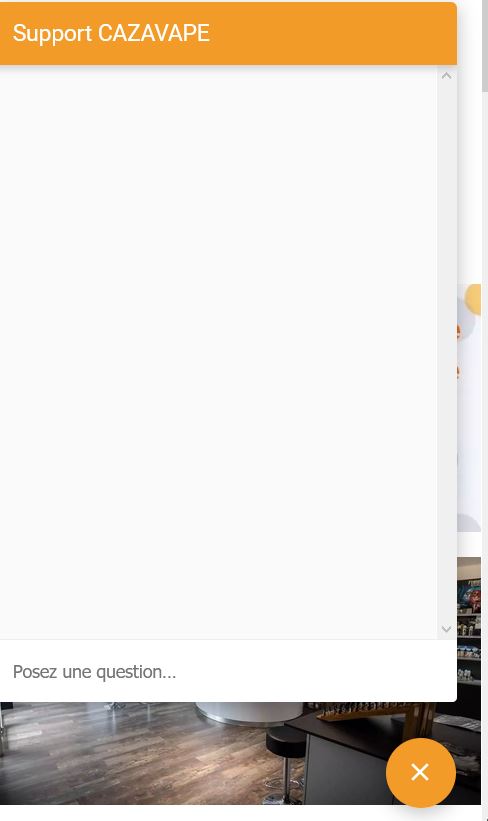
Now I want the WELCOME DEFAULT message, but the bot waits the user to write something like "Hello" (in green font) before starting :

I would like the bot to start only when the user opens the conversation and without them writing anything
Thanks à lot for your support
Jeff Williams
Jun 4, 2021, 5:25:39 AM6/4/21
to Jérôme Verlyndes, Dialogflow Essentials Edition users
Looks like you want a welcome intent to open, but not right away. As an experiment, try to put back the welcome intent you deleted and add wait-open="true" and share what happens.
--
© 2020 Google Inc. 1600 Amphitheatre Parkway, Mountain View, CA 94043
Email preferences: You received this email because you signed up for the Dialogflow Essentials (f.k.a. Enterprise) Edition Discussion Google Group (dialogflow-essent...@googlegroups.com; former email: dialogflow-enterp...@googlegroups.com) to participate in discussions with other members of the Dialogflow community and the Dialogflow Team.
---
You received this message because you are subscribed to a topic in the Google Groups "Dialogflow Essentials Edition users" group.
To unsubscribe from this topic, visit https://groups.google.com/d/topic/dialogflow-essentials-edition-users/gEAYnB6dpEo/unsubscribe.
To unsubscribe from this group and all its topics, send an email to dialogflow-essentials-e...@googlegroups.com.
To view this discussion on the web visit https://groups.google.com/d/msgid/dialogflow-essentials-edition-users/a83d15d0-db78-4164-95b3-989d9c1e0b15n%40googlegroups.com.
Jérôme Verlyndes
Jun 4, 2021, 5:46:06 AM6/4/21
to Dialogflow Essentials Edition users
Hi JTW !!
Thanks for your feedback !
It's exactly that !!! (wait-open="true")
On the other hand, when I conversed with the bot, then I continued my navigation of the site, and come back to the bot, it lost the conversation (or rather, it reset).
How do I keep the discussion in mind while browsing, then come back to it and continue the conversation ?
Thx a lot
Jeff Williams
Jun 5, 2021, 12:48:46 AM6/5/21
to Dialogflow Essentials Edition users
Hi Jerome, Thanks for the reply! 

In a conversation the lifespan is 20 minutes and there are limits on the number of conversational turns for context to be preserved, and you can configure those in Intents --> Contexts by clicking on the number:
and change the number:
Hope this helps,
-Jeff Williams
Jeff Williams
Jun 5, 2021, 12:53:13 AM6/5/21
to Dialogflow Essentials Edition users
Also, you can use fulfilment to store information to a database and retrieve it later to maintain a sense of the state of the conversation, however that is outside of Dialogflow and requires some development effort.
Jérôme Verlyndes
Jun 7, 2021, 1:43:40 AM6/7/21
to Dialogflow Essentials Edition users
Hi ! Thx for reply !
All my lifespan are 5, but I have the same problem...see screenshots.
For your information, to converse with the bot, I only use suggestions chips buttons with custom payload

suggestion chips buttons

All lifespan are 5
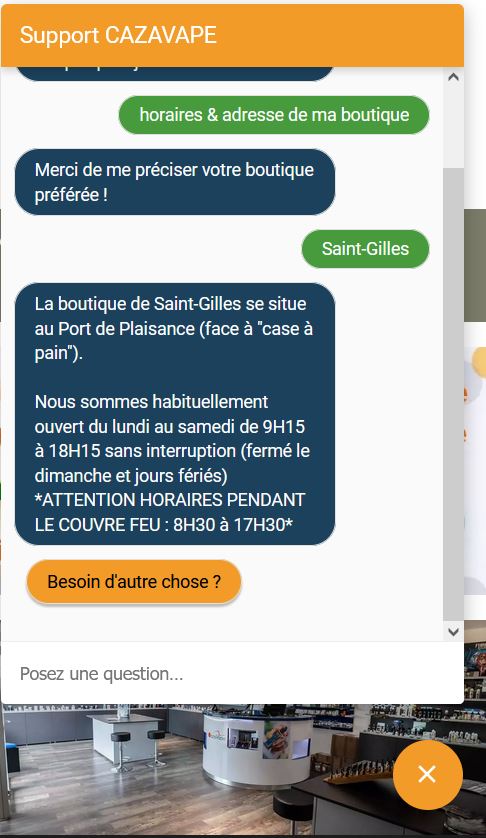
I use the chatbot with suggestion chips buttons (green = user, blue & orange = chatbot)

I change web page, and the whole conversation is reset...
So I don't think it's lifespan related. What do you think ?
Thks a lot :)
Jeff Williams
Jun 7, 2021, 2:04:11 AM6/7/21
to Dialogflow Essentials Edition users
Within one page it can be lifespan, between pages though you'll need to store information outside of Dialogflow and read that when the bot opens on the next page because it normally starts fresh on each new page.
I have seen Google Workspace Support use the idea of having their chat open in a new small window which stays open when the other tab changes.
I have seen Google Workspace Support use the idea of having their chat open in a new small window which stays open when the other tab changes.
Jérôme Verlyndes
Jun 7, 2021, 2:56:50 AM6/7/21
to Dialogflow Essentials Edition users
So is it "normal" for the conversation to reset? It seems strange to me anyway ...
So if the only solution is to open the conversation to a pop-up type window, is there a technique for that?
Reply all
Reply to author
Forward
0 new messages