
Using KISSlicer with CubeX

Bill Dempsey
http://kisslicer.com/forum/index.php?topic=689.0
I haven't had time to try it, yet. Let us all know if any of you try it.

Scott@BSI

dsl...@gmail.com
Scott@BSI

Bill Dempsey
Thanks for the pics, Scott!
-Bill

Peter Gregory
Scott@BSI

bikejunky98
bikejunky98
Here is the finished print, 1hr 2 min to print, no seams, with supports. The supports come of much easier than the cubify ones, and much cleaner without becoming part of the printed piece. This is a 200% improvement over the cubify slicer, and it does work with Win7.

thebras...@gmail.com

Treemagnet
Scott@BSI

bikejunky98
bikejunky98
Treemagnet
bikejunky98
Treemagnet
bikejunky98

CubeX 3D Printman
Bill Dempsey
As far as adhesion, I abandoned the glue because it dries out and flakes off here in the desert. Instead, I switched to blue tape with a light coat of aqua net hairspray on it for a while before trying it straight on the stock build plate. The Aqua Net works great directly on the build plate and prints come out with a smooth shiny bottom surface. That's what I've been using for the past month or so and every part has stuck perfectly with no warping. (I use PLA. I'm not sure how the results would be for ABS, but the PLA sticks so hard it's often pretty difficult to remove.) I'm loving the hairspray directly on the build platform.

WarrenE
bikejunky98
Bill Dempsey
By the way, I tried the KISSlicer on a couple of parts that the CubeX software kept slicing wrong. It worked great! The quality is more consistent, too. Big thanks to evanevery for his work! I wish I could figure out a way to get his post processor to work with Cura (my favorite slicer because it's insanely fast now.)
-Bill

Russell Anderson
www.artplusdesign.com.au
Bill Dempsey

enc...@gmail.com
I retrofit my CubeX with a RAMBo board and use KISSlicer and RepiterHost. Youcan get RAMBo boards from UltiMachine.
bikejunky98
I retrofit my CubeX with a RAMBo board and use KISSlicer and RepiterHost. Youcan get RAMBo boards from UltiMachine.</quote>
I'm currently doing the same with Ramps1.4. Any advice for me on firmware? Thinking marlin, but still trying to figure out the double y stepper setup in the firmware. Also are you using the stock hot end? If so how did you set up the thermistor?
Thanks
Treemagnet

Tom Nuessen
To the guys who have posted about the RAMBo replacement, how easy is it? Swap the wires/plugs to the new board and flash it, or is it more involved? Is there a thread or post somewhere that goes over the replacement, or did you guys just figure it out? And are you talking about this board? https://ultimachine.com/content/rambo-12
bikejunky98

Grimm Redemption
Anyway. I've followed the instructions, got the CubeX settings in Kisslicer. Sliced up my test print, saved it and ran the CubeIt.exe (one that was updated 12/15/13). It created the .bfb and backup one. Popped the .bfb into the CubeX and it says that it is unable to print the file. It's running the 1.07 firmware. I am a total newbie at this, so I'm sure it is something I'm doing wrong.
Also when I run the CubeIt.exe, I do not get the option of choosing the filament material. I just wanna print something other then a mass of failures.

bsmith...@gmail.com
Just replied to your post on KS forum.

forema...@gmail.com
Read the kisslicer forum well before installing cubeit, the latest cubeit v0.4 is on page 27 of the kisslicer forum.
Don't mix earlier cubeits with kisslicer because cubeit has been updated to work with cubex firmware 1.07
Watch the cubeit kisslicer on YouTube for more info after you installed kisslicer and cubeit v0.4

Laurence Pearl
I've tried contacting the kisslicer forum, but its been down for two days - can anyone point me at an alternative source of the CubeX settings and a (ideally Mac-compatible) copy of the CubeIt post-processor ?
I have also got close to just dumping my CubeX Trio with frustration, but you guys have given me fresh hope !!
CubeX 3D Printman

Jetguy


Laurence Pearl
Laurence Pearl
On Tuesday, January 21, 2014 8:37:07 PM UTC, CubeX 3D Printman wrote:
CubeX 3D Printman

Steven
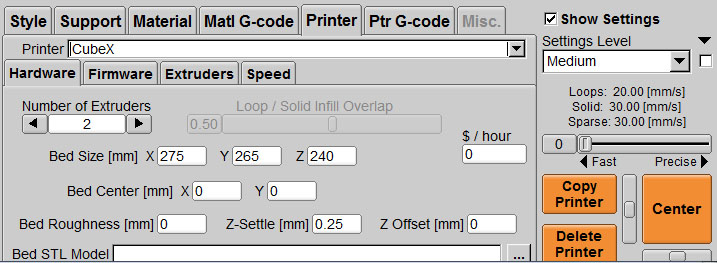
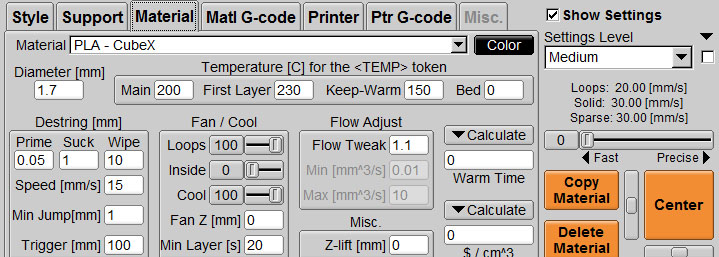
Copy and paste the following into the Ptr G-Code Tabs (see the attached pictures frame1.jpg through frame5.jpg).
PREFIX
^Firmware:V1.07
^Checksum: NO
; [mm] mode
G21
; absolute mode
G90
SELECT EXTRUDER
# Select Extruder <EXT+1>
M<EXT+1>04 S<TEMP>
M542
M55<EXT+1> P600 S80
M543
DESELECT EXTRUDER
; Guaranteed same extruder, cooling down
; BfB-style
# Deselect Extruder <EXT+1>
M<EXT+1>04 S<TEMP>
POSTFIX
; All used extruders are already 'Cooled' to 0
M103
M104 S0
M204 S0
M304 S0
Or you can use the attached _printers.ini file. Copy your current _printers.ini to _printers.old. Copy the attached file into your Kisslicer directory. You will need to change your "Bed Center" , "Bed STL Model" reference, and check the machine settings.
These settings will work very reliably. The line "M55<EXT+1> P600 S80", the P600 is the amount of purge over the waste bin, the S80 is the speed. Adjust to your liking.
Set Prime and Suck in the materials to what you want. I use 0.05 for both.
Lastly, you need to print a skirt with each print (see skirt.jpg). The Cubex will want to print a small puddle at the beginning of the print. The skirt moves the puddle away from the part.
Laurence Pearl
Thanks for the help.
Laurence H. Pearl PhD FRS FMedSci
Professor of Structural Biology and Head of School of Life Sciences
University of Sussex, Brighton, BN1 9RH, UK
Phone +44-(0)1273 876 544: PA+44-(0)1273 872 699
--------------------------------------------------------------------------------
"Live Modestly and do Serious Things .. "
- Dorothy Crowfoot Hodgkin
--
You received this message because you are subscribed to a topic in the Google Groups "CubeX 3D Printing" group.
To unsubscribe from this topic, visit https://groups.google.com/d/topic/cubex-3d-printing/GNVpDc_LRdg/unsubscribe.
To unsubscribe from this group and all its topics, send an email to cubex-3d-print...@googlegroups.com.
Visit this group at http://groups.google.com/group/cubex-3d-printing.
For more options, visit https://groups.google.com/groups/opt_out.
<_printers.ini>
<frame1.jpg>
<frame2.jpg>
<frame3.jpg>
<frame4.jpg>
<frame5.jpg>
<skirt.jpg>
Treemagnet
CubeX 3D Printman
Laurence Pearl
Anybody know how to make it use different extruders for different parts of the model so I can have a 2-colour build ?
CubeX 3D Printman

steven....@dominican.edu
Do you know the whereabouts of the software that enables kisslicer to play nice with Cubex? I know it used to be on the forum but that seems to be gone now.
Thanks in advance.

Hugues
Good news ! My cubex is printing in 0.05 layer height and it's rock ! You cannot see the layer on the print and it's really smooth.
I tried 0.04 but the cubex was too speed for the layer height.
I will send picture monday !
Treemagnet
On Wednesday, 4 September 2013 11:37:59 UTC-4, Bill Dempsey wrote:
A few CubeX owners on the KISSlicer forums have figured out a method for using KISSlicer instead of the CubeX software. They say it drastically improves the print quality. Check out the thread here:
http://kisslicer.com/forum/index.php?topic=689.0
Hugues
Le lundi 10 février 2014 07:00:50 UTC+1, ayd...@gmail.com a écrit :
72 hours of print time. Almost successfully
Kisslicer
resolution 0.25
high precision
with raft and support
Pla white
It took a new cartridge. At the end there was an filament error. The filament ended.
https://drive.google.com/file/d/0B_1eqLgrjX6LWWQyampwMEpWZkk/edit?usp=sharing
https://drive.google.com/file/d/0B_1eqLgrjX6LZGVzR1hJbkgyVTQ/edit?usp=sharing
воскресенье, 9 февраля 2014 г., 20:21:58 UTC+7 пользователь Treemagnet написал:

dan.para...@gmail.com
I'm about to try and use Kisslicer with my CubeX, but the forums are down!
I am hoping that I can find the latest Cubeit by some other forum...
Anyhow, I popped a magnet off too - They are only held on with cheap epoxy, on to glass! Not the best solution...
Fixed the problem forever by using a piece of polystyrene to hold the print platform snugly by the edges and bottom of the glass, but with the middle of the polystyrene scooped or cut out so the magnet and the other metal knob bit are just suspended in mid air. This way, you can really put energy into getting your part off, and you are translating that force into a large area of polystyrene, across all 4 edges. It's a fantastic solution to a weird magnet design (why not leave the magnet attached to the build platform jig on the cubex?!)
So far on wide footprint parts, you risk the spatula bending before you risk damaging the bed or magnet!
(on to spatula #2 already...)
On Thursday, September 12, 2013 1:35:39 AM UTC+10, Bill Dempsey wrote:
> Be careful striking parts to remove them. I've popped the magnet off the bottom of my build platform three times doing that.

arturo...@gmail.com
thks in advance
Arturo

mlrog...@gmail.com
> A few CubeX owners on the KISSlicer forums have figured out a method for using KISSlicer instead of the CubeX software. They say it drastically improves the print quality. Check out the thread here:
> http://kisslicer.com/forum/index.php?topic=689.0
>
> I haven't had time to try it, yet. Let us all know if any of you try it.
I have been reading about the KISSLICER and it working with firmware 1.7 . Haven't done a complete print yet and now my cartridge bays are bad. Bought it in October for my classroom and Cubex says too bad...out of warranty. Tried to get to KISSLICER forum and all I get is "Under Maintenance". How can I get what I need to bypass the cartridge bays?
Any info is appreciated by me and my high school students.
Marie
mlrog...@gmail.com
> For PLA, I've had good success using painters tape on the unheated white glass plate. However, I found that if I lightly sand the tape with 100 grit sandpaper, the part will stuck much better. Sometimes it sticks so well that it becomes difficult to remove. This works better for me than using the glue. I've recently started printing PLA on a heated plate, and I find that printing directly on the glass surface at 65-70 C works really well. I first clean the plate with window cleaner. The part sticks very well, and then just pops off when the plate cools to room temperature. I find it almost impossible to remove the part when the plate is still warm. My experience with ABS is limited to using the Cubex plate and the glue, but it seems to work well with the glue if you apply two light layers and then let the glue dry for about 1/2 an hour.
>
> On Tuesday, September 10, 2013 10:40:25 PM UTC-6, CubeX 3D Printman wrote:
>
> Treemagnet,
> ~ 65 deg is usually a good temperature for PLA, but depends on part footprint. Does your part have a small or large footprint?
> Before printing PLA, I wipe down the kapton tape with alcohol to have it clean. Also, you can try a little smaller z-gap.
>
>
> On Tuesday, September 10, 2013 5:53:29 PM UTC-7, Treemagnet wrote:
> interesting I have the heated plate and Kapton but having a little problem with the Gray PLA sticking going to try it again with the plate cold
>
> On Tuesday, 10 September 2013 20:20:11 UTC-4, bikejunky98 wrote:I peeled the white plate off the glass print plate, covered it with kapton tape and a layer of aqua net. This allowed me to get a much more precise level on the bed, but it's not heated. I am printing white pla
Can you post A pic on how you used the painters tape? I have very funds for my classroom and I need always have painters tape on hand. Thanks
Marie

Matt Dub
Marie,
Matt Dub
Sorry these are the files for the CubeIt post process that works with Kisslicer. I downloaded Kisslicer directly from they're website, I'll try to attach it here.
mlrog...@gmail.com
> Sorry these are the files for the CubeIt post process that works with Kisslicer. I downloaded Kisslicer directly from they're website, I'll try to attach it here.
> The Kisslicer Refugee Camp forum posted a new version of Kisslicer, but I haven't tried that yet so not sure how that's going to work, but check it out they have versions for most OS's.
>
>
mlrog...@gmail.com
On Thursday, February 20, 2014 9:57:05 AM UTC-5, Matt Dub wrote:
Matt Dub

Gary Muir (GRM Products)

golanc...@gmail.com
OK I FINALLY GOT KL WORKING WELL FOR ME!!!!! Yay!!!
Today I switched out filament from abs to pla and my nozzle jammed. I pulled out the nozzle. Cleaned it out. Replaced it.......and now my cubex won't turn on. The red light is on on my display but when I hit the power button to turn it on nothing happens. I checked all connections. Please help!

Richard V Arena
On Friday, September 6, 2013 2:01:24 PM UTC-4, Scott@BSI wrote:
I've attached a pic of duplicate parts - 1 output from CubeX and 1 output from KISSlicer. I apologize in advance as the pic is poor and I had already sanded on the CubeX part (to remove the nastiness that I get between the build platform and the first 1/16" or so). i didn't make any adjustment whatsoever to the machine before running the KISSlicer part. I just plugged in the USB and hit print.The build settings were as similar as I could make them on both builds and they are both white PLA. The pic really doesn't illustrate how much cleaner the KISSlicer part is. There are none of the witness lines I get from CubeX where the inner structure meets the outer wall of the part and none of the nasty business at the base of the part. Just seems to be a nicer part overall and much closer to what I was expecting from this machine.I'm not affiliated with KISSlicer and hadn't even heard of it until Bill posted about it. It gives you a lot more control over how the part is built via wall thickness, infill density and shape, speed, temp and a lot more...I'm sure the CubeX software will get better with time. My CubeX Duo runs pretty much all day every day. I'm in a corporate setting here and I really need great results now, so for me this is just another step along that road...
Scott@BSI
Yes, it will use the wiper.
Here is the new home of the KISSlicer group. You will need to request to join the group...

yus...@gmail.com
Did you manage to solve the "Unable to print file" error? If so, how? I have the same issue on V1.07
Regards,
Yusuf
On Saturday, January 4, 2014 9:14:32 PM UTC+2, Grimm Redemption wrote:
> I didn't realize that the KIssSlicer forum had been overtaken by SPAM. So I'm just going to copy and paste my forum reply here.
>
>
> I've been pulling my hair out with my new CubeX Duo. I downloaded Kisslicer, (waiting on my Pro key because this program blows the CubeX Software right out of the water). I've been having a problem with all my prints being offset after the first layer, so I was thinking perhaps it was a software issue since I've done everything Cubify Support has suggest fixing hasn't fix it (just short of replacing the unit).
>
> Anyway. I've followed the instructions, got the CubeX settings in Kisslicer. Sliced up my test print, saved it and ran the CubeIt.exe (one that was updated 12/15/13). It created the .bfb and backup one. Popped the .bfb into the CubeX and it says that it is unable to print the file. It's running the 1.07 firmware. I am a total newbie at this, so I'm sure it is something I'm doing wrong.
>
> Also when I run the CubeIt.exe, I do not get the option of choosing the filament material. I just wanna print something other then a mass of failures.

giovanni...@gmail.com
I've V1.07 and it works.
When you save use a simple file name without blanks like Print1.bfb and don't close the black window, wait until you have the message of end of process.
If CubeIt is still open close it by clicking on "exit" on icon on the right low corner of the screen and run it again.
Giovanni
Dan Paraschivoiu
I get a strange error message when I slice with Kisslicer;
It is set up to run Cubeit.exe for the post process on a slice,
and the message pops up:
" Cubeit.exe failed, returning the following: 0 "
But the file seems OK, doesn't check for cartridge (I'm running an external spool) and the print seems to progress OK. The print quality isn't great, but that's probably nothing to do with this.
Just to debug, if I then take the generated gcode and run Cubeit.exe by double clicking it, and run my file through it, no error messages comes up.
So something is weird when Cubeit and Kisslicer are interacting.
I've downloaded a new version of Kisslicer, from the posts and attachments on this thread (so it probably also included an updated Cubeit.exe) and when I opened that up, it had kept my settings there (even though I didn't overwrite the old version, but rather made a new folder for it) and that was when I first started getting this message pop up.
Should I delete previous versions of Kisslicer and Cubeit from my system?
Is there a special thing to watch out for (like a registry key i should delete)?
Should I even worry about this message popping up, since the printer is printing the files?
I'm hoping someone else has seen this message popup I'm talking about
Cheers
Dan
giovanni...@gmail.com
when you use CubeIt from Kisslcer, do you close the black windows or it closes itself ?
Do you use blanks into the file name ?
To improve the print quality use CubeItMod V3.7 instead of CubeIt.
Giovanni
CubeX 3D Printman

736nv...@gmail.com
Hi Giovanni, the install proceedure scared me away for now!
I have the mod, and will try it out soon.
It isn't broken, so I'm not fixing it just yet!
giovanni...@gmail.com
https://docs.google.com/file/d/0B8LUzFLYFtW3Znh4d0xHX3oydUE/edit?pli=1
https://docs.google.com/file/d/0B8LUzFLYFtW3VTVkLUphMGd6WjQ/edit?pli=1
https://docs.google.com/file/d/0B8LUzFLYFtW3bmxzRHdnMThfT3M/edit?pli=1
https://docs.google.com/file/d/0B8LUzFLYFtW3RHR1VGhEZk1Tdjg/edit?pli=1
You're still free to fix it or not !

niki.p...@gmail.com
> I was pretty close to throwing my CubeX Trio on eBay, too. Between using KISSlicer + CubeIt and downgrading to v 1.4 of the firmware so I can use regular filament spools, I'm feeling a lot better about the machine now. If I could swap out the 3DSystems electronics for Marlin based open source boards that allow me to use Cura with the machine, I'd be in heaven.
can you tell me where to find firmware 1.4 / old software ?
thanks in advance
niki
>
> On Sunday, October 27, 2013 11:00:29 PM UTC-7, Russell Anderson wrote:
> kisslicer is brilliant, i almost wanted to junk my cubex before using it. now it prints at least equal to my UP
> www.artplusdesign.com.au
Peter Gregory
There is a thread called: Cura - Looking for Bits from Bytes users
There you will find links and instructions to get a version of Cura that works with Cubex.
giovanni...@gmail.com
if your purpose is print without original cartridges, don't downgrade, just use Kisslicer + CubeItMod V3.7.
Not only you can print without original cartridges but you'll improve the quality of your printings.
Giovanni

hawk...@gmail.com
Has anyone else encountered an issue where the Cubex Duo doesnt print for a few mm when moving either to the loops or infill? IF you have how do you fix this. I tried to read up on it but the Kisslicer forum is still down.
hawk...@gmail.com
> Hi
> Has anyone else encountered an issue where the Cubex Duo doesnt print for a few mm when moving either to the loops or infill? IF you have how do you fix this. I tried to read up on it but the Kisslicer forum is still down.
Sorry forgot to add that I am using the Cubex Natural PLA material
giovanni...@gmail.com
https://groups.google.com/forum/?hl=fr#!forum/kisslicer-refugee-camp
What are your values for M227 S & P and M228 S & P ?
coppe...@shambhalamusicfestival.com
nichola...@uconn.edu
I was curious if you could provide details where download everything necessary (settings.zip + cubelt.zip ) to run a cubex with kisslicer. I think Bill had posted is unavailable saying the site is down for maintenance. If you could possibly help me out it would be greatly appreciated!
Thanks, Nick
Giovanni

dian...@gmail.com
> OK - I downloaded the KISSlicer + settings.zip + CubeIt.zip from the last 2 posts int the link Bill was kind enough to post.
>
>
> I installed everything, loaded an STL into KISSlicer and sliced it up (make sure to set Printer to CubeX and material to CubeX) and saved the file.
>
>
> Then I ran the CubeIt executable. It spat out a BFB file that I loaded onto a USB.
>
>
> Plugged in the USB to the CubeX Duo and selected the BFB file.
>
>
> It's printing right now... I'll report back later today on results - but the first 1/8" of the build is the cleanest output I have seen from this machine to date!
>
>
> Thanks for the heads-up Bill
On Wednesday, September 4, 2013 12:40:39 PM UTC-6, Scott@BSI wrote:
> OK - I downloaded the KISSlicer + settings.zip + CubeIt.zip from the last 2 posts int the link Bill was kind enough to post.
>
>
> I installed everything, loaded an STL into KISSlicer and sliced it up (make sure to set Printer to CubeX and material to CubeX) and saved the file.
>
>
> Then I ran the CubeIt executable. It spat out a BFB file that I loaded onto a USB.
>
>
> Plugged in the USB to the CubeX Duo and selected the BFB file.
>
>
> It's printing right now... I'll report back later today on results - but the first 1/8" of the build is the cleanest output I have seen from this machine to date!
>
>
> Thanks for the heads-up Bill
dian...@gmail.com
> all I can say is AWESOME I just printed my first part using KISSlicer and I can't beleave the difference in quality it's 100 times better
> On Wednesday, 4 September 2013 11:37:59 UTC-4, Bill Dempsey wrote:
> A few CubeX owners on the KISSlicer forums have figured out a method for using KISSlicer instead of the CubeX software. They say it drastically improves the print quality. Check out the thread here:
> http://kisslicer.com/forum/index.php?topic=689.0
>
> I haven't had time to try it, yet. Let us all know if any of you try it.

Bob Ash
dian...@gmail.com
> I peeled the white plate off the glass print plate, covered it with kapton tape and a layer of aqua net. This allowed me to get a much more precise level on the bed, but it's not heated. I am printing white pla
how did you remove the white plate? you mean the cubex plate? if so plz tell me how. mine is so scratched up, and have pit holes all over....had for a while thanks
bikejunky98
To remove I heated up the glass with a hair dryer to warm the glue and then slid a putty knife under a corner and worked it off. You will need a razor blade to clear the surface of remaining glue deposits. Then clean it with soapy warm water.
Apply the kapton with water and then squeegee out the air bubbles to get a nice flat surface. DO NOT allow the head to contact the surface as it is much harder than the white plate and is certain to damage the head if it collides with any force. Also be sure to get the bed very level before resetting the z gap again to avoid collision.
I have also found that the cube glue works very well on the kapton and can be reactivated with a light spray of water from a clean spray bottle, allowing you to save on glue over multiple prints. Don't spray the plate with water while it's mounted in the printer though.
You will also want to determine the best bed roughness setting through some experimentation to get a good clean base layer print.

agarg...@gmail.com
Is there a way to use KISSlicer to modify the extrusion RPM throughout a print? I have an issue where the RPM is set 0.4, and this causes the extruded material to come out very spotty and patchy. I can fix this manually during the print from the CubeX's screen, but my prints would be of much better quality. I'm also open to other ideas on how to correct this issue! thanks
Amit
Giovanni


Lie Fecund
I've plan to update my cubex firmware from 1.07 to 1.08.
Should i ?
Hugues
Lie Fecund
By the way, i heard that you build some site that selling stuff for cubex customize, may i know it ?
Thank you hugues.
Gary
From what I understand the security bug that allows the use of third party filament was fixed in firmware version 1.08.
So DON'T update the firmware, 1.07 is the highest you can use.
Gary Muir
GRM Products
Hudson NH (USA)
Heated Bed Install Video link http://youtu.be/O54pmUfaIvk
--
You received this message because you are subscribed to a topic in the Google
Groups "CubeX 3D Printing" group.
To unsubscribe from this topic, visit https://groups.google.com/d/topic/cubex-3d-printing/GNVpDc_LRdg/unsubscribe.
To unsubscribe from this group and all its topics, send an email to cubex-3d-print...@googlegroups.com.
Visit this group at http://groups.google.com/group/cubex-3d-printing.
For more options, visit https://groups.google.com/d/optout.
Hugues
The shop will be open to other seller, I want it as an alternative resource center for Cubex.
I hope open it at the end of the month, now I'm a little busy with my newborn baby :-).
Lie Fecund
Okay, ill keep using this firmware.
thanks for your kindly reply :D
Lie Fecund
Thanks a lot Hugues :D
agarg...@gmail.com
You were right. My issue was that the filament I have is brittle and broken in multiple places along the length inside the printer's tubing, and thus was fully coming through the print jet.
Amit
Da...@majormorgan.co.uk
> A few CubeX owners on the KISSlicer forums have figured out a method for using KISSlicer instead of the CubeX software. They say it drastically improves the print quality. Check out the thread here:
> http://kisslicer.com/forum/index.php?topic=689.0
>
> I haven't had time to try it, yet. Let us all know if any of you try it.
Hi, I have a cube x with a heated bed. I am using the latest Kisslicer and cubeit(4.8) What settings do people use for the best possible prints? Bed temp and nozzle temp for PLA and or ABS? Does anyone have the ini files I could download? PLEASE HELP!