
How to set the Billboard to some height marking with line.
888 views
Skip to first unread message

Premkumar Jayaseelan
Jul 28, 2015, 9:55:49 AM7/28/15
to cesium-dev
Hi,
I'm trying to show the billboard for the 3D models which I've loaded in the cesium. It is working fine. But, I'm having 3D models on stack. So the the billboard is getting inside the other model.
I try to set some height using eyeOffset. Now the billboard is in some height. I want to mark the model with billboard (i.e. I'll load the model and the billboard in the same geo-coordinate).
I got this demo, if you view the billboard it will be in some height with the line mark from the ground.
Can any help help me, how to achieve that in my case. Appreciate if you could try it in the sandcastle example and provide the snippet.
Thank you,
Premkumar

Hannah Pinkos
Jul 28, 2015, 12:30:02 PM7/28/15
to cesium-dev, vlrp...@gmail.com
Hello Premkumar,
From looking at your demo, the billboards look good to me. Could you attach a screenshot of one that isn't correct?
Thanks,
Hannah

Mati O
Jul 29, 2015, 5:08:39 AM7/29/15
to cesium-dev, vlrp...@gmail.com
You can set the Billboard's 'eyeOffset' to closer Z, however it might clip the model. If it looks bad, maybe you can shift the billboard relative to the center, but in screen coordinates - using 'pixelOffset' on the billboard.
 var entity = viewer.entities.add({        name : <NAME>,        position : position,        orientation : orientation,        model : {            <YOUR MODEL>        },        billboard : {            image : 'YOUR IMAGE',            eyeOffset : new Cesium.Cartesian3(0.0,0.0,-100.0), // Negative Z will make it closer to the camera
            pixelOffset : new Cesium.Cartesian2(0.0,-32.0) // Optional offset in pixels relative to center        }    });
Premkumar Jayaseelan
Jul 30, 2015, 12:47:42 AM7/30/15
to cesium-dev, mat...@outlook.com
Thank you Mati. Let me give a try and let you know.
Premkumar Jayaseelan
Jul 30, 2015, 1:53:33 AM7/30/15
to cesium-dev, mat...@outlook.com
Hi Mati,
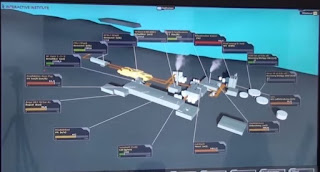
Thank you for your post. It is working fine. I'm trying to achieve little user friendly popup which is similar to this video. The sample screenshot below.

Having line reference to the model. Any suggestions or clue to achieve this.
Appreciate your support.
On Wednesday, 29 July 2015 14:38:39 UTC+5:30, Mati O wrote:
Mati O
Jul 30, 2015, 2:17:25 AM7/30/15
to cesium-dev, vlrp...@gmail.com
There was a post explaining how to add a line from a billboard to the ground, maybe it can help.
This is what I would do, with my current knowledge of Cesium, and I'm just a beginner :) :
1. Each model of a building is an entity
1. Each model of a building is an entity
2. Each billboard with a line is also an entity defined by a billboard and a polyline (just like in the link above).
In the video, the line is attached to a corner of the billboard, Cesium is not capable of this as far as I know.
If you want to draw dynamic complex graphics in the billboard, you can use a canvas to draw or use SVG
Premkumar Jayaseelan
Jul 30, 2015, 9:42:02 AM7/30/15
to cesium-dev, mat...@outlook.com
As you said, I could able to draw a poly-line from ground to the some position. But with angle. I'm not sure, how far SVG will help me draw a line from the corner.
If there is any better solution for this. Please do let me know.
Mati O
Jul 30, 2015, 9:50:47 AM7/30/15
to cesium-dev, vlrp...@gmail.com
Sorry if I have confused you a little, the remark about SVG was about the billboard's image, not it's relationship with the entity. It is meant to draw the billboard item but not the line connecting to center.
Premkumar Jayaseelan
Jul 30, 2015, 10:38:35 AM7/30/15
to cesium-dev, mat...@outlook.com
oh.. okay.. I understood. I mean it wrongly.
Thanks for the explanation.
I could able to render 2D canvas. But I wanted to change the content dynamically. similar to this demo. The speed is dynamically changing on the marker or billboard. How it is working? Any idea!

Mati Ostrovsky
Jul 30, 2015, 12:01:11 PM7/30/15
to cesiu...@googlegroups.com
If moving stuff and changing properties dynamically over time is what you are looking for, then that's pretty easy with cesium!
Almost each property you assign to an entity can be dynamic - instead of assigning a position or color, for example, you can set them as
SampledProperty in which you define the keyframes of time and value, and Cesium will interpolate the value in each frame for you.
--
You received this message because you are subscribed to a topic in the Google Groups "cesium-dev" group.
To unsubscribe from this topic, visit https://groups.google.com/d/topic/cesium-dev/lEn-GGE7jKo/unsubscribe.
To unsubscribe from this group and all its topics, send an email to cesium-dev+...@googlegroups.com.
For more options, visit https://groups.google.com/d/optout.
Premkumar Jayaseelan
Aug 1, 2015, 4:04:41 AM8/1/15
to cesium-dev
Thank you Mati.
As you mentioned, I can change the position or color dynamically using the mentioned APIs. But I want to change the billboard data. I posted it in separate thread. Let me know you comment on the thread.
Thank you!
Reply all
Reply to author
Forward
0 new messages