Changing the color of a GLTF Model

2,248 views
Skip to first unread message

Hans Schevers

unread,
Apr 7, 2015, 4:30:07 AM4/7/15
to cesiu...@googlegroups.com
Dear all,

I guess I do know how change the color of a loaded GLTF model (for highlighting purposes)

 Currently I'm loading the GLTF models and via the ID of the GLTF entities I can find the the GLTF Models in the Cesium.Viewer.scene.primitives. 

There I can browse through the nodes and meshes of a GLTF model. I see that the meshes have a material property however I 'm not sure how to set a color or even if this is the correct way to go? All help is appreciated.


cheers,
Hans


Patrick Cozzi

unread,
Apr 7, 2015, 8:31:57 PM4/7/15
to cesiu...@googlegroups.com
Hi Hans,

See Model.getMaterial and ModelMaterial.selValue.  Also see issue #2387.

Patrick

Hans Schevers

unread,
Apr 9, 2015, 3:57:38 AM4/9/15
to cesiu...@googlegroups.com
Hi Patrick,

Thanks for that and looking forward to new releases!

cheers,
Hans

Kanishk Chaturvedi

unread,
Apr 29, 2015, 3:29:29 AM4/29/15
to cesiu...@googlegroups.com
Hi,

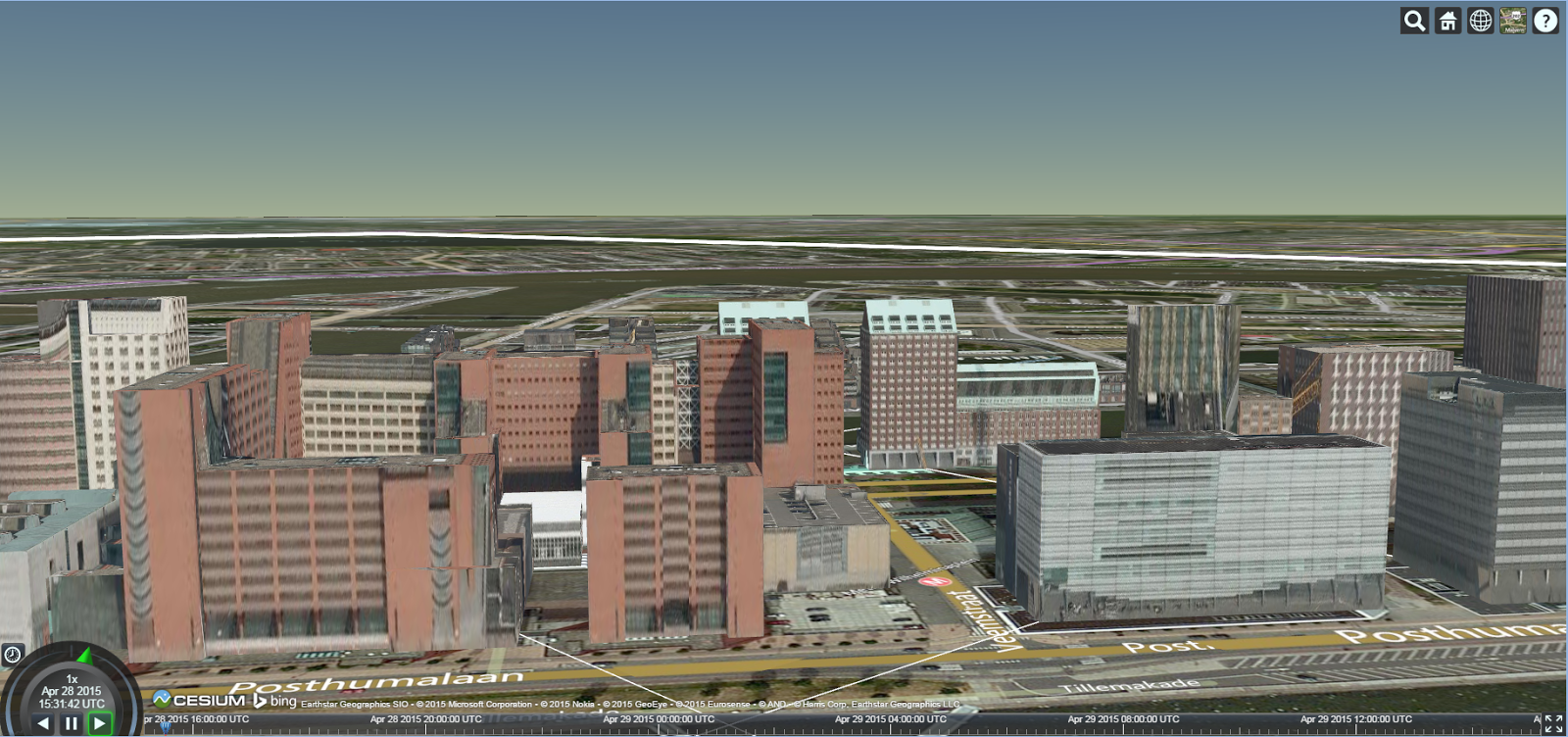
I have a similar issue related to the changing of the model material value. I am using the glTF model having texture images (and not cartesian color values). I have attached the screenshot for your review. In order to provide highlighting effect, I am willing to either change the brightness of the model (e.g. make the model more or less bright) or provide a highlighting color on top of that. If the glTF model contains the color values, I can easily change its color using model.getMaterial and then modelMaterial.setValue. But I am not sure how would I change the material values in case of texture images. Any help would be appreciated.


Best regards,
Kanishk

Matthew Amato

unread,
May 5, 2015, 9:18:33 AM5/5/15
to cesiu...@googlegroups.com
We recently announced 3D building works being done in Cesium, here's the forum thread about it: https://groups.google.com/d/msg/cesium-dev/IArj5ju4cI8/JjuND35APT8J  As far as I know (I could be wrong) there's no easy way to do what you want right now, but we will be exploring such capabilities in the near future.

--
You received this message because you are subscribed to the Google Groups "cesium-dev" group.
To unsubscribe from this group and stop receiving emails from it, send an email to cesium-dev+...@googlegroups.com.
For more options, visit https://groups.google.com/d/optout.

Patrick Cozzi

unread,
May 5, 2015, 6:39:04 PM5/5/15
to cesiu...@googlegroups.com
Hi Kanishk,

> I can easily change its color using model.getMaterial and then modelMaterial.setValue. But I am not sure how would I change the material values in case of texture images. Any help would be appreciated.

When textures are used, the glTF material might still have a diffuse property that is multiplied with each texel read from the texture.  If so, just set it as before.  If not, you could post-process the glTF to use a custom material and fragment shader so you can set any value you want.

Patrick


--
You received this message because you are subscribed to a topic in the Google Groups "cesium-dev" group.
To unsubscribe from this topic, visit https://groups.google.com/d/topic/cesium-dev/4CA1UHae2vQ/unsubscribe.
To unsubscribe from this group and all its topics, send an email to cesium-dev+...@googlegroups.com.

For more options, visit https://groups.google.com/d/optout.
Message has been deleted

Mike LP

unread,
Jul 9, 2015, 4:08:14 PM7/9/15
to cesiu...@googlegroups.com, 2434...@qq.com, 2434...@qq.com
I'm taking a look at this today.  I'll get back you in a bit.

On Tuesday, July 7, 2015 at 5:42:35 AM UTC-4, 2434...@qq.com wrote:
Hi
  Patrick:  
 I am using the glTF model having texture images.I changed the texture use Cesium.Color,but it not Show  that I specified color. It looks like the use of the ground texture.  There is an error in my code? alse,Some material does not contain 'diffuse' value.

http://xiangce.baidu.com/picture/detail/0b5f7c9bb03a8068bd20eb5c6200623b6937f370?from=dialog
----------------------------------------------------------------------------------
       handler.setInputAction(function (movement) {
            var primitive;
            var pickedObject = viewer.scene.pick(movement.endPosition);
            if (pickedObject) {
                primitive = pickedObject.primitive;
                if (pickedObject !== lastPick && primitive instanceof Cesium.Model) {
                    var entity = primitive.id;


                    var maters = allPrpos(pickedObject.primitive.gltf["materials"]);
                    if (primitive.olddiff == undefined) {
                        primitive.olddiff = [];
                    }
                    for (var i = 0; i < maters.length; i++) {
                        var material = primitive.getMaterial(pickedObject.primitive.gltf["materials"][maters[i]].name);
                        if (material.getValue('diffuse') == undefined) {
                            continue;
                        }
                        if (primitive.olddiff[i] == undefined) {
                            if (material.getValue('diffuse').clone == undefined) {
                                primitive.olddiff[i] = material.getValue('diffuse');
                            } else {
                                primitive.olddiff[i] = material.getValue('diffuse').clone();
                            };
                        }
                        material.setValue('diffuse', Cesium.Cartesian4.fromColor(Cesium.Color.RED));
                    }

                    lastPick = pickedObject;
                }
            } else if (lastPick) {
                primitive = lastPick.primitive;
                var maters = allPrpos(primitive.gltf["materials"]);  
                for (var i = 0; i < maters.length; i++) {
                    var material = primitive.getMaterial(primitive.gltf["materials"][maters[i]].name);
                    if (material.getValue('diffuse') == undefined) {
                        continue;
                    }
                    material.setValue('diffuse', primitive.olddiff[i]);
                }
                lastPick = undefined;
            }
        }, Cesium.ScreenSpaceEventType.MOUSE_MOVE);

Sai Asuka

unread,
Jul 10, 2015, 12:15:10 AM7/10/15
to cesiu...@googlegroups.com
Can you change the image itself that is used on the building? (say if the building shape is the same, just want to put texture image) 

--

Sai Asuka

unread,
Jul 10, 2015, 12:15:31 AM7/10/15
to cesiu...@googlegroups.com
change texture image* programatically

Patrick Cozzi

unread,
Jul 12, 2015, 2:34:38 PM7/12/15
to cesiu...@googlegroups.com, asuka...@gmail.com
Hi,

> Can you change the image itself that is used on the building? (say if the building shape is the same, just want to put texture image) 

No.  Cesium's Texture object is not part of the public API, and we would have to add some interop for glTF/Cesium textures.

Cesium will support this at some point; in the meantime, you could use two different models.

Patrick

dar...@amnex.com

unread,
Sep 11, 2019, 8:25:04 AM9/11/19
to cesium-dev
what is allProps method, what it will return?
Reply all
Reply to author
Forward
Message has been deleted
0 new messages