
Error while running the calabash : 0 scenarios 0 steps 0m0.000s
433 views
Skip to first unread message

muneer muhammed
Feb 24, 2016, 6:02:23 AM2/24/16
to calabash-android
HI ,
I am new to calabash and while I am running test file using the command calabash-android run myapp-release-unsigned.apk I am getting the response like,
0 scenarios
0 steps
0m0.000s
And my_first.feature file is like ,
Feature: Running a test

Scenario: Register
  Given I am on the Welcome Screen
  Then I touch "SKIP"
  Then I wait
  Then I should see Registration Screen
I have not modified any file apart from my_first.feature fileCan any one help me fix the issue, Thanks in advance.

Jani Jegoroff
Feb 25, 2016, 4:51:10 AM2/25/16
to calabash-android
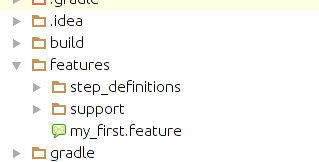
How's your folder structure looks like? Feature files has to be under features folder.
muneer muhammed
Feb 25, 2016, 5:10:54 AM2/25/16
to calabash...@googlegroups.com
Hi, Jani,
Thank you for the help, And my folder structure is like this. The features folder is generated outside the app.
--
You received this message because you are subscribed to a topic in the Google Groups "calabash-android" group.
To unsubscribe from this topic, visit https://groups.google.com/d/topic/calabash-android/7uPSOyikBEw/unsubscribe.
To unsubscribe from this group and all its topics, send an email to calabash-andro...@googlegroups.com.
For more options, visit https://groups.google.com/d/optout.
MUNEER MUHAMMED
Software Engineer
Sayone Technologies.
Jani Jegoroff
Feb 25, 2016, 6:45:29 AM2/25/16
to calabash-android
Where do you execute calabash-android run command?
muneer muhammed
Feb 25, 2016, 6:50:00 AM2/25/16
to calabash...@googlegroups.com
I am executing the command from the features directory it self . By following the doc https://www.built.io/blog/2014/12/automate-android-apps-using-cucumber/
muneer muhammed
Feb 25, 2016, 6:53:21 AM2/25/16
to calabash...@googlegroups.com
And I am giving the apk path following the run command . Just like the below example,
:~/android/Android/SampleAppforAndroid/features$ calabash-android run /home/Git_project/android/Android/SampleAppforAndroid/Twnel/build/outputs/apk/myapp-release-unsigned.apk
0 scenarios
0 steps
0m0.000s

tobias....@xamarin.com
Feb 25, 2016, 9:58:04 AM2/25/16
to calabash-android
Your working directory should not be the features folder. Your working directory should be the one immediately above the features folder.
To unsubscribe from this group and all its topics, send an email to calabash-android+unsubscribe@googlegroups.com.
--MUNEER MUHAMMEDSoftware EngineerSayone Technologies.
muneer muhammed
Feb 26, 2016, 3:19:58 AM2/26/16
to calabash...@googlegroups.com
Thanks toblas, It is working .
Reply all
Reply to author
Forward
0 new messages