
How an awl works?
366 views
Skip to first unread message

Anish Antony
Dec 20, 2013, 2:02:46 AM12/20/13
to arib...@googlegroups.com
Hi
I have tried an attempt to dig into ariba source for finding how an ariba awl file works. I have some queries from it and here it follows
1. Inside the awl file i found some ' \ ' on there, is it have any ariba specific use?
for example here follows few lines of BasicPageWrapper.awl file

Here i underlined the '\' with Red Mark
2. In the case of widget i found that every widget have a corresponding awl and java file and at last the widget components are ends with a core component but i cant find out any awl file for core component then how the core component convert its code to corresponding html code for that component
For example if i inspect an ariba page in browser, at first it shows some javascript import which looks like follows
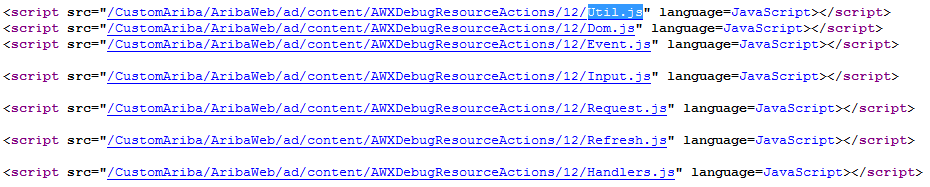
and i found the corresponding ariba code in AWXBasicScriptFunctions.awl file here follows the code inside the awl file

But i cant find out any awl corresponding to ClientSideScript (i mean ClientSideScript.awl). Then where it convert that ClientSideScript core component to html script
3. Can you tell me brief idea about how aribaweb manages or convert the core components to corresponding html code
4. Also i found some special components in ariba's awl files (which are declared without namespace) and what those components means? . Here follows one of such component i found from BasicPagerWrapper.awl

My aim is to create some extendable and reusable ariba custom components

Frantisek Kolar
Dec 20, 2013, 5:06:28 AM12/20/13
to arib...@googlegroups.com
Hi.,
Let me see if I can answer to some of your questions:
#1: It has no special meaning for open-source community. These are just some markers used internally that are removed when the AWL template is parsed to memory anyway.
#2: This has several answers.
AWL - is just a template that takes bindings so you do not have to do all in JAVA and concat string you want to render to the UI
Look at for example at examples/Demo/components/RatingBar.
-You can either have all the HTML code in the AWL and not in the Java file here,
-Or you can have all in java as well check out the AWString where you override renderResponse.
- Or you can combine which is the best. You leave HTML to AWL and logic to java
- Depending on the situation and complexity. But if you define for each of your AWL component java file even if this java is empty you are OK.
do not forget to prefix your defined component with <x:
- If you can not find that element than try to prefix with AW like AWClientSideScript the AW is removed when using namespaces.
#3. Check out the renderPhase(). (AWComponentActionRequestHandler.handleRequest() => requestContext.generateResponse(); )Once this phase is called each corresponding component is called and content is rendered.
Its like a tree and it traverse down and ask each component to render its piece.
#4. yes you can combine HTML and AWL. AWL is just HTML
- AribaBasicPageWrapper is special case cuz this one defines the core layout you use in ariba web and since its defined as BrandingComponent, you can place your version AribaBasicPageWrapper.html into your resources /docroot/config/branding
and the system will pickup your version where you can define completely new layout
-> In this case to not mix AWL and html extensions in this branding folder this component is called .html - you can see there is overridden method shortTemplateName() that return custom name.
You can create as many components as you want ;-) There are no limits.
-FK
--
You received this message because you are subscribed to the Google Groups "AribaWeb (aribaweb.org)" group.
To unsubscribe from this group and stop receiving emails from it, send an email to aribaweb+u...@googlegroups.com.
To post to this group, send email to arib...@googlegroups.com.
Visit this group at http://groups.google.com/group/aribaweb.
For more options, visit https://groups.google.com/groups/opt_out.

Dave Finlay
Dec 20, 2013, 12:14:35 PM12/20/13
to arib...@googlegroups.com
Hi Anish
On (1) -- the trailing backslash is used as a marker to strip whitespace from the line following when the HTML is emitted. Use of the backslash allows you to use newlines and indent to create readable templates and get the efficiency win in terms of whitespace in terms of bytes generated. See AWHtmlTemplateParser.stripFormattingWhitespace() for further details if you're curious.
-dave
--
Anish Antony
Dec 29, 2013, 11:07:43 PM12/29/13
to arib...@googlegroups.com
Thanks Frantisek and dave
--
You received this message because you are subscribed to a topic in the Google Groups "AribaWeb (aribaweb.org)" group.
To unsubscribe from this topic, visit https://groups.google.com/d/topic/aribaweb/QzaiZjjXo8o/unsubscribe.
To unsubscribe from this group and all its topics, send an email to aribaweb+u...@googlegroups.com.
To post to this group, send email to arib...@googlegroups.com.
Visit this group at http://groups.google.com/group/aribaweb.
For more options, visit https://groups.google.com/groups/opt_out.
Regards
Anish Antony
Reply all
Reply to author
Forward
0 new messages