
How to set alsa_amixer during boot and how to get the camera to work?

B.Jay
So I installed Android-x86 2.3rc1 on a EeePC 701, by using the "eeepc"
ISO, and having two problems:
1. Sound output is very low though the mixer (in Android -> Settings -
> Sound -> Volume) is already maxed out.
However, I discovered that I can resolve the problem by switching to
the console (ALT+F1) and issuing "alsa_amixer sset master 100". That
improves things greatly and is exactly the result I wanted.
The question is: How do I execute the command during boot so I won't
have to type it anew after each boot?
2. The camera does not work. The camera app as well as any other app I
tried fails to get a picture from the camera.
Is there any solution to this problem?
I'm using 2.3rc1 because even the "stock" apps in Honeycomb 3.2rc2
keep on force closing like wild, and ICS is stuck on the console (I
already read up on the workaround).
The two issues are the only show-stoppers for me ... otherwise 2.3rc1
is working very nicely, and I even managed to sideload the gapps
(Market et al).
Thank you for any helpful responses,
B.Jay

Chih-Wei Huang
> So I installed Android-x86 2.3rc1 on a EeePC 701, by using the "eeepc"
> ISO, and having two problems:
>
> 1. Sound output is very low though the mixer (in Android -> Settings -
>> Sound -> Volume) is already maxed out.
>
> However, I discovered that I can resolve the problem by switching to
> the console (ALT+F1) and issuing "alsa_amixer sset master 100". That
> improves things greatly and is exactly the result I wanted.
>
> The question is: How do I execute the command during boot so I won't
> have to type it anew after each boot?
The cmd will be default in ics-x86.
No plan to back port to older branch. sorry.
> 2. The camera does not work. The camera app as well as any other app I
> tried fails to get a picture from the camera.
>
> Is there any solution to this problem?
No, unless you're interested in hacking
the broken libcamera hal.
> I'm using 2.3rc1 because even the "stock" apps in Honeycomb 3.2rc2
> keep on force closing like wild, and ICS is stuck on the console (I
> already read up on the workaround).
>
> The two issues are the only show-stoppers for me ... otherwise 2.3rc1
> is working very nicely, and I even managed to sideload the gapps
> (Market et al).
--
Chih-Wei
Android-x86 project
http://www.android-x86.org
B.Jay
> The cmd will be default in ics-x86.
> No plan to back port to older branch. sorry.
the command anew after each boot or hope that the rumor about ICS not
running on non-Atom Netbooks anymore doesn't hold any substance (at
least I can't imagine why - I managed to boot the latest Testing ISO
you guys put up for download with HWACCEL=0 successfully on the
Celeron M of the EeePC 701 4G)
> No, unless you're interested in hacking
> the broken libcamera hal.
If we're talking about the Java parts of Android I'm afraid I won't be
of any help as I (please excuse me) hate Java from the depths of my
heart (to me that's not a programming language but the world's largest
security hole). Anyhow, I guess I take a look into the source repo to
see about what kind of code we're talking about.
Thank you for your kind reply though,
- B.Jay
P.S.: Looking forward to ICS (took a look at it in VirtualBox and am
impressed)!

Ikem Krueger
> Java [is] not a programming language but the world's largest security hole
How do you come to that conclusion?
Ikem Krueger
B.Jay
manner by using "GScript Lite".
Maybe it's of some value for someone else ...
On the console (ALT+F1) ...
alsa_amixer sset Master 100
* This will set the output volume of the master mixer to 100%
alsa_ctl store
* This stores the current Alsa mixer settings in /etc/asound.conf -
requires that /system got installed as read/write
Now install GScript Lite from the Market or from Google Code
(http://code.google.com/p/gscript-android/downloads/list)
After installation run GScript and add a new script.
Name: Restore ALSA Mixer
Command to execute: /system/bin/alsa_ctl restore
Check: Needs root
Back on the Home Screen create a new GScript Shortcut to the script
(tap the home screen -> Shortcuts -> Gscript shortcut -> select the
"Restore ALSA Mixer" script -> either keep the name or rename it as
you see fit). After a reboot/boot simply click/tap the shortcut of the
script to resolve the "Sound too low" issue ... make sure you reduced
the "Sound" settings down to ~50-60% or a notification sound will
blare at you.
On Jan 9, 1:30 am, Ikem Krueger <ikem.krue...@googlemail.com> wrote:
> > 2012/1/8 B.Jay <jochen.bla...@gmail.com>:
>
> How do you come to that conclusion?
workstations ... Looking at the dire security vulnerability track
record of the Java Runtime Environment (the full-blown Sunracle JRE
that is) should tell the whole story. Java and Flash - and to some
extend Adobe's PDF Reader - are the most troublesome pieces of
software one can install to put a system at risk of remote exploits.
I'm not saying that the DalvikVM of Android is a bad concept, I just
dislike Java as a programming language and its concept in general.
It's not type-safe, not sandboxed (read: the Runtime/Bytecode compile
does not perform sanity checks to minimize possible security exploits)
and, compared to C/C++ code, it's still a resource hog with a terrible
performance.

Leozeras
to 100 and u be happy fast.....

Alvin Wong
init.rc, but finally changed into using asound.conf. My port is
Gingerbread, but as I copied ALSA from Android-x86, it may work.
Search for ipaq214android on sourceforge and view Android Device Files
section you will find it.

mike r
Any help would be great, and alsamixer and all them playstore apps don't work..........
Thanks
Mike
mike r
Mike
Chih-Wei Huang
> Correction alsamixer works but it's easier to use gscript, does anyone know how to auto exec the script on boot-up?
There is a function (init_hal_audio) that initializes the mixer settings.
Try to change it to fit your need.
mike r
Mike
mike r
Mike
Chih-Wei Huang
> That Fixed it, Been Searching for 3 days for that tidbit, Thank you very much! 4.4.2 RC1 now works 100%, Great Work!
>
I'll see if it could be integrated into next release.
mike r
File "INIT.SH"
function init_hal_audio()
{
case "$PRODUCT" in
VirtualBox*|Bochs*)
[ -d /proc/asound/card0 ] || modprobe snd-sb16 isapnp=0 irq=5
;;
*)
;;
esac
[ -d /proc/asound/card0 ] || modprobe snd-dummy
for c in $(grep '\[.*\]' /proc/asound/cards | awk '{print $1}'); do
alsa_ctl init $c
alsa_amixer -c $c set Master on
alsa_amixer -c $c set Master 127 # Changed from 100 to 127
alsa_amixer -c $c set Headphone on
alsa_amixer -c $c set Headphone 100
alsa_amixer -c $c set Speaker 127 # Changed from 100 to 127
alsa_amixer -c $c set Capture 127 # Changed from 100 to 127 (Not meaning to, But didn't hurt nothing so left it)
alsa_amixer -c $c set Capture cap
alsa_amixer -c $c set PCM 100 unmute
alsa_amixer -c $c set 'Internal Mic Boost' 2 # Changed From 'Mic Boost' To 'Internal Mic Boost'
done
}

steve c
>you can also install from market Alsamixer app and set all parameters
>to 100 and u be happy fast.....
How did you get Alsa Mixer to work? It seems totally useless and doesn't have any parameters to set or do anything at all as far as I can tell.
mike r
Mike
steve c
On Wed, Jun 18, 2014 at 2:09 PM, mike r <mike...@gmail.com> wrote:
> ALSA Mixer doesn't work on all systems, Did you find the settings in INIT.SH in the root directory of your Android Install?
>
> Mike
>
> You received this message because you are subscribed to a topic in the Google Groups "Android-x86" group.
> To unsubscribe from this topic, visit https://groups.google.com/d/topic/android-x86/e79dAuB2ra4/unsubscribe.
> To unsubscribe from this group and all its topics, send an email to android-x86...@googlegroups.com.
> To post to this group, send email to andro...@googlegroups.com.
> Visit this group at http://groups.google.com/group/android-x86.
> For more options, visit https://groups.google.com/d/optout.
steve c
try to save it I get an error saying it's a Read Only File System.
mike r
Mike

Julichi Garcia
In terminal type
Mike Ross
In terminal type
su
Edit INIT.SH

Junior

Daniel Cheung
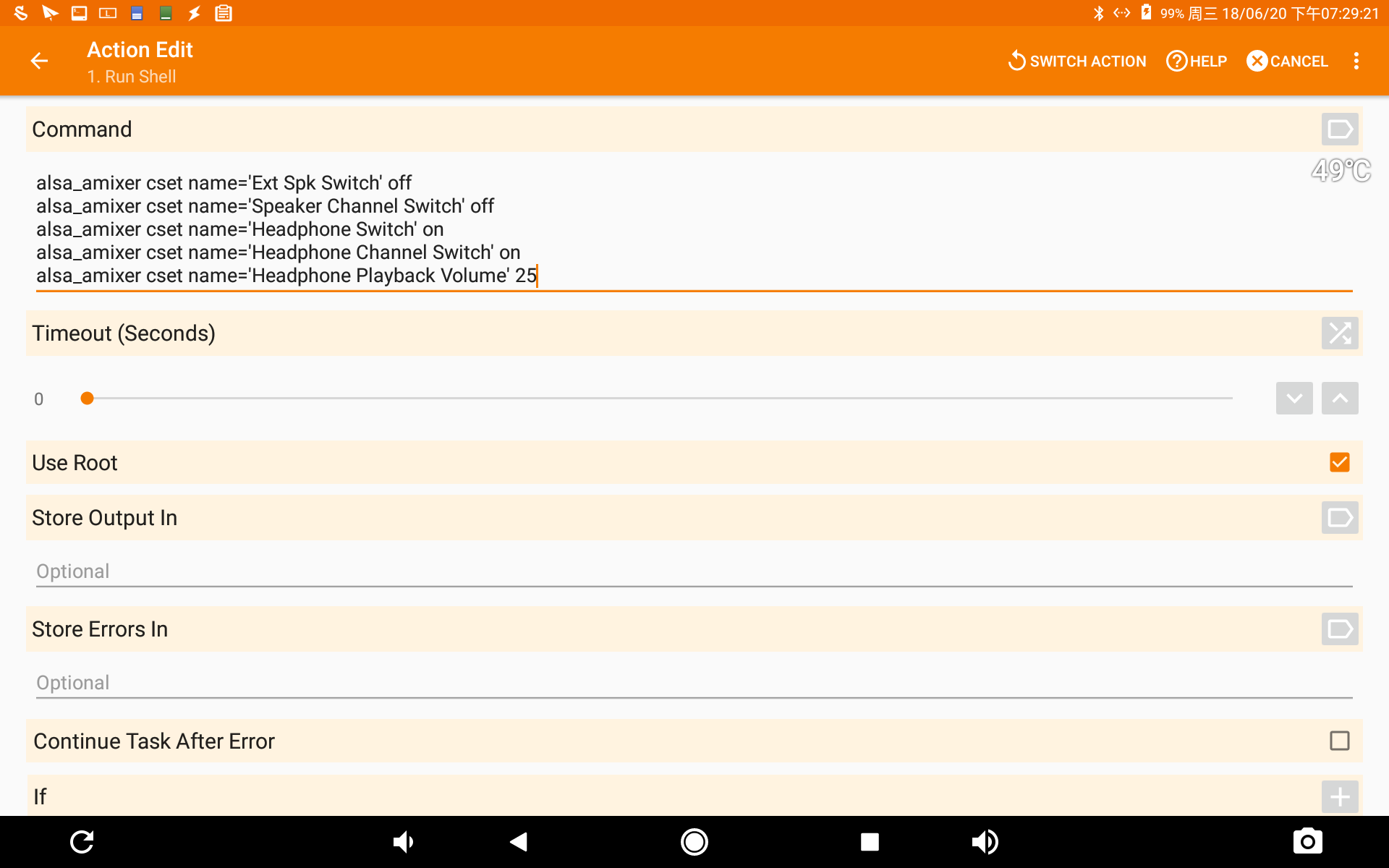
--
You received this message because you are subscribed to the Google Groups "Android-x86" group.
To unsubscribe from this group and stop receiving emails from it, send an email to android-x86...@googlegroups.com.
To post to this group, send email to andro...@googlegroups.com.
Visit this group at https://groups.google.com/group/android-x86.