
SageMath installation problem on macOS Catalina: _SSL module not fund
174 views
Skip to first unread message

Francesco Scolamiero
Mar 30, 2021, 4:53:05 AM3/30/21
to sage-support
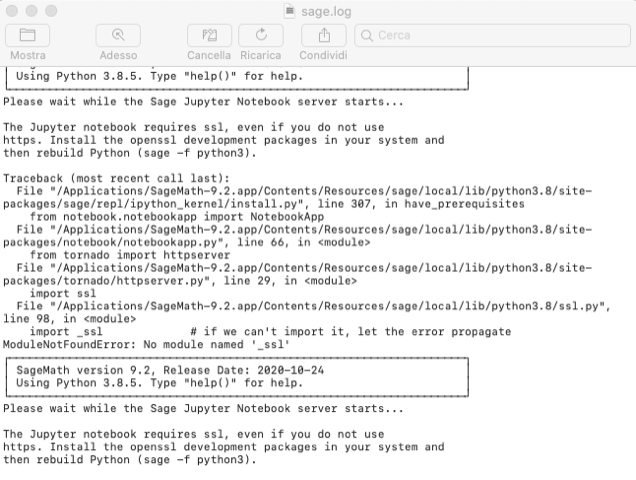
I have installed SAGEMath-9.2 on macOS Catalina and I see Sage App Icon among the applications. when I launch the SAGE APP it does not start because Jupyter notebook does not find the _SSL module file as in the following log: (see attach 134000)
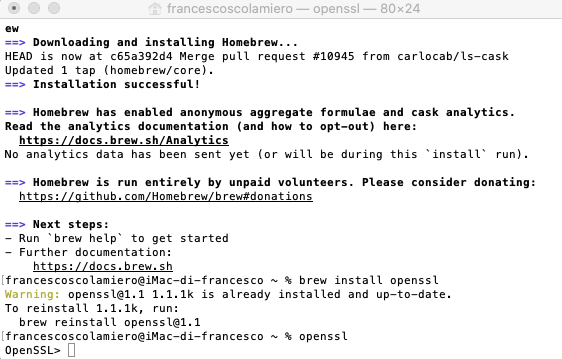
I verified that ope...@1.1.1k is already installed on my MAC but SAGE still can't find the _SSL file (see attach 51000)
Perhaps the problem is that SAGE is installed between Applications and _SSL in some other directory it doesn't see. I am not an expert user, how can I solve this problem? I would need SAGE only to run a Python program that requires mathematical functions that can be called up in the SAGE environment (for example: PolynomialRing (s) and euler_phi (r)). I really don't know if I need Jupiter notebook but just the SAGEmath functions. The program runs on the SAGEMATHcell server site but I would try to run it in the environment SAGEmath. Can you help me make _SSL visible to SAGE? or can I call the functions directly in some other way? Thanks for your help

Dima Pasechnik
Mar 30, 2021, 5:19:15 AM3/30/21
to sage-support
You might try https://github.com/3-manifolds/fix_mac_sage
and see if it fixes your problem.
> --
> You received this message because you are subscribed to the Google Groups "sage-support" group.
> To unsubscribe from this group and stop receiving emails from it, send an email to sage-support...@googlegroups.com.
> To view this discussion on the web visit https://groups.google.com/d/msgid/sage-support/82593156-8701-440e-8579-c50871d01e6bn%40googlegroups.com.
and see if it fixes your problem.
> You received this message because you are subscribed to the Google Groups "sage-support" group.
> To unsubscribe from this group and stop receiving emails from it, send an email to sage-support...@googlegroups.com.
> To view this discussion on the web visit https://groups.google.com/d/msgid/sage-support/82593156-8701-440e-8579-c50871d01e6bn%40googlegroups.com.

slelievre
Mar 30, 2021, 5:30:15 AM3/30/21
to sage-support
Or try the new app that ships OpenSSL and Tcl/Tk
out of the box. It is currently in beta-testing; please
test and report whether installation was successful.
Sage-macOS
Francesco Scolamiero
Mar 31, 2021, 3:19:03 AM3/31/21
to sage-support
I tried to install the beta version release on MAC OS CATALINA but nothing changed (file _SSL not found). I tried the same version on MAC BIG SUR. the app appear but seems to do nothing. may I give you some more details to try to fix the problem? Thanks
Dima Pasechnik
Mar 31, 2021, 3:27:23 AM3/31/21
to sage-support
On Wed, 31 Mar 2021, 08:19 Francesco Scolamiero, <francesco....@gmail.com> wrote:
I tried to install the beta version release on MAC OS CATALINA but nothing changed (file _SSL not found). I tried the same version on MAC BIG SUR. the app appear but seems to do nothing. may I give you some more details to try to fix the problem?
We suggested you two ways to try, did you try any of these?
What beta do you mean?
ThanksIl giorno martedì 30 marzo 2021 alle 11:30:15 UTC+2 slelievre ha scritto:Or try the new app that ships OpenSSL and Tcl/Tkout of the box. It is currently in beta-testing; pleasetest and report whether installation was successful.Sage-macOS
--
You received this message because you are subscribed to the Google Groups "sage-support" group.
To unsubscribe from this group and stop receiving emails from it, send an email to sage-support...@googlegroups.com.
To view this discussion on the web visit https://groups.google.com/d/msgid/sage-support/cf0d819b-7c97-473f-81f3-de00ed11bc96n%40googlegroups.com.
Francesco Scolamiero
Mar 31, 2021, 5:11:36 AM3/31/21
to sage-support
I tried the second suggestion: I installed SageMath-9.2.dmg and
SageMath-9.2_recommended.pkg called beta release from: https://github.com/3-manifolds/Sage_macOS/releases
SageMath-9.2_recommended.pkg called beta release from: https://github.com/3-manifolds/Sage_macOS/releases
on MAC CATALINA installing the recommended pkg has (after having installed SageMath-9.2) seems to work but Sage App still fails (_ssl not found). on BIG-SUR the recommended pkg get an error and the Sage App doesn't start at all. Thanks for your help
Dima Pasechnik
Mar 31, 2021, 5:20:27 AM3/31/21
to sage-support
For the 2nd suggestion I'd rather let the authors of that tool to help you:
https://github.com/3-manifolds/Sage_macOS/issues
Our standard recommendation for macOS users is Conda:
https://doc.sagemath.org/html/en/installation/conda.html
HTH
Dima
> To view this discussion on the web visit https://groups.google.com/d/msgid/sage-support/18506010-5719-4182-87e2-f8965b6049ebn%40googlegroups.com.
https://github.com/3-manifolds/Sage_macOS/issues
Our standard recommendation for macOS users is Conda:
https://doc.sagemath.org/html/en/installation/conda.html
HTH
Dima
Reply all
Reply to author
Forward
0 new messages