
Align to grid bug?
102 views
Skip to first unread message

Fredrik Andreasson
Apr 6, 2021, 2:33:35 PM4/6/21
to PTGui Support
I have 10 years of experience with PTGui but quite new in the Gigapixel area.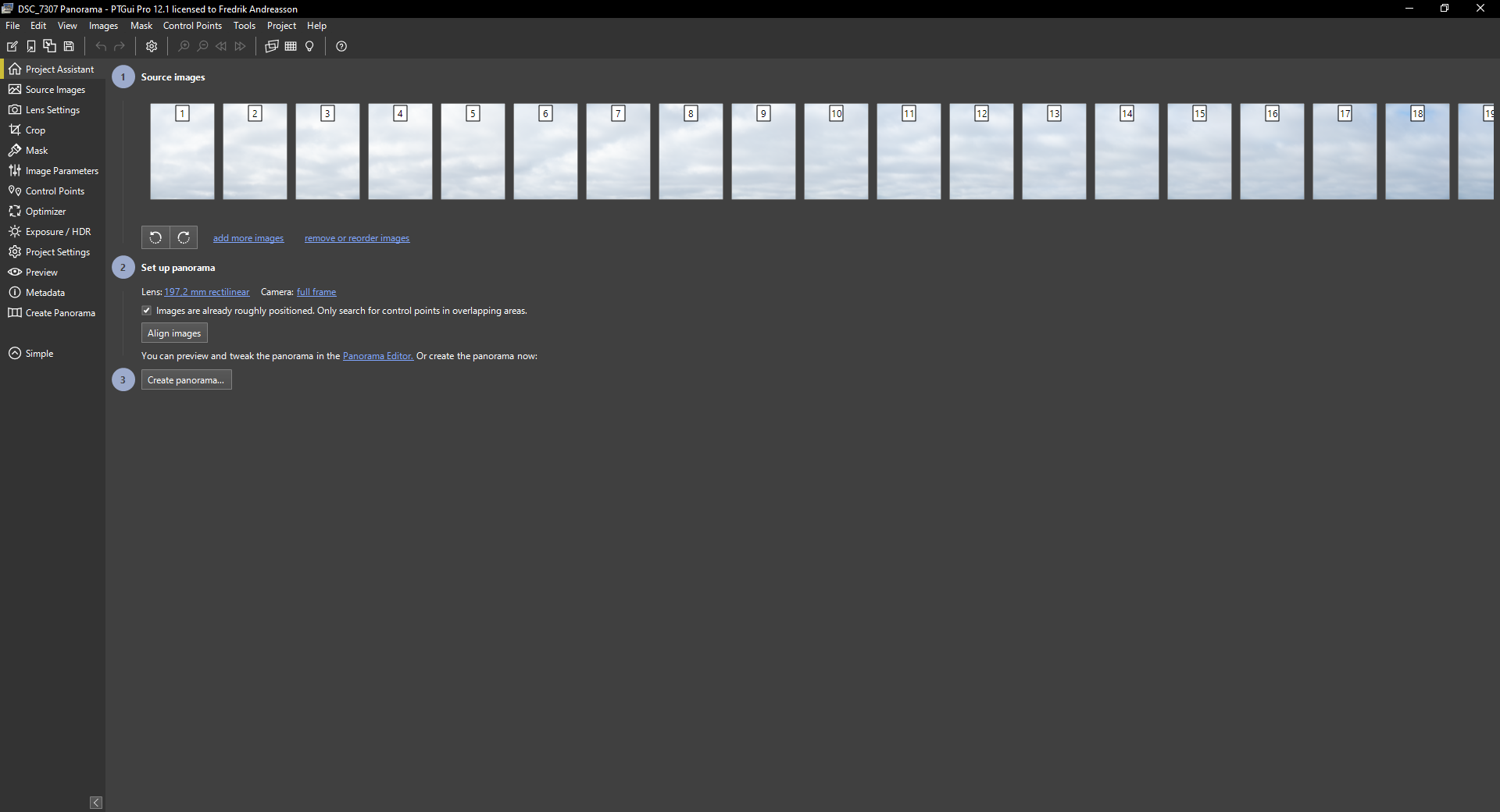

I have shot 210 images 3 rows X 70. I know the enrance pupil distance is correct or at least very close.
After importing im running Align to grid.
Its, almost already perfect seams, but to get it perfect I check the "images are already roughly positioned....." in the project assistant.
Then I press the button "Align images". The result is horrible:
Is there a bug or am I doing something wrong here?
I cant even get the tutorial to work: Creating gigapixel panoramas with a robotic panohead - PTGui Stitching Software
Fredrik Andreasson
Apr 6, 2021, 2:35:44 PM4/6/21
to PTGui Support
´Forgot to mension. I have tried both PTGui 12.1 and latest version 11.X

John Houghton
Apr 6, 2021, 4:07:54 PM4/6/21
to PTGui Support
Fredrik, I followed the tutorial with its sample images using PTGui Pro V11 and it worked perfectly for me. I tried to make it produce the sort of fragmented appearance shown in your screen shots (unconnected groups) but to no avail. I got good alignment every time, though the result needed levelling to position the horizon correctly across the centre of the Panorama Editor window. Perhaps you could make available for download a set of similarly reduced size jpeg images so that the fault(?) may be reproduced and investigated. A screenshot of your align-to-grid parameters would be useful too.
John

PTGui Support
Apr 7, 2021, 3:11:10 AM4/7/21
to pt...@googlegroups.com
Hi Fredrik,
It looks like PTGui is significantly changing the focal length during
optimization. In your second screenshot the panorama looks much narrower.
Could you try this:
- set up your panorama using Align to Grid
- don't use Align Images. Instead do Control Points -> Generate Control
Points
- switch to Advanced mode and go to Optimizer tab
- disable this checkbox: 'Optimize Lens Focal Length'
- run the Optmizer
I've also seen issues with moving clouds in these kind of panoramas.
Because the shooting duration is long, clouds will have move
significantly, while the ground is stationary. PTGui isn't smart enough
to understand clouds, you may need to remove all control points on the
clouds beforehand. You can use the 'use control points of..' list to
exclude the sky images. Do this before running the optimizer.
The same applies to the waves. This is a difficult scene.
Kind regards,
Joost Nieuwenhuijse
www.ptgui.com
On 06/04/2021 20:33, Fredrik Andreasson wrote:
> I have 10 years of experience with PTGui but quite new in the Gigapixel
> area.
> I have shot 210 images 3 rows X 70. I know the enrance pupil distance is
> correct or at least very close.
> After importing im running Align to grid.align_to_grid.PNG
>
> --
> You received this message because you are subscribed to the Google
> Groups "PTGui Support" group.
> To unsubscribe from this group and stop receiving emails from it, send
> an email to ptgui+un...@googlegroups.com
> <mailto:ptgui+un...@googlegroups.com>.
> To view this discussion on the web visit
> https://groups.google.com/d/msgid/ptgui/97e7c4d5-5b9e-4d78-93bd-34c2eae4d88fn%40googlegroups.com
> <https://groups.google.com/d/msgid/ptgui/97e7c4d5-5b9e-4d78-93bd-34c2eae4d88fn%40googlegroups.com?utm_medium=email&utm_source=footer>.
It looks like PTGui is significantly changing the focal length during
optimization. In your second screenshot the panorama looks much narrower.
Could you try this:
- set up your panorama using Align to Grid
- don't use Align Images. Instead do Control Points -> Generate Control
Points
- switch to Advanced mode and go to Optimizer tab
- disable this checkbox: 'Optimize Lens Focal Length'
- run the Optmizer
I've also seen issues with moving clouds in these kind of panoramas.
Because the shooting duration is long, clouds will have move
significantly, while the ground is stationary. PTGui isn't smart enough
to understand clouds, you may need to remove all control points on the
clouds beforehand. You can use the 'use control points of..' list to
exclude the sky images. Do this before running the optimizer.
The same applies to the waves. This is a difficult scene.
Kind regards,
Joost Nieuwenhuijse
www.ptgui.com
On 06/04/2021 20:33, Fredrik Andreasson wrote:
> I have 10 years of experience with PTGui but quite new in the Gigapixel
> area.
> I have shot 210 images 3 rows X 70. I know the enrance pupil distance is
> correct or at least very close.
> Its, almost already perfect seams, but to get it perfect I check the
> "images are already roughly positioned....." in the project assistant.
> "images are already roughly positioned....." in the project assistant.
> Project_assistant.PNG
> Then I press the button "Align images". The result is horrible:
> Then I press the button "Align images". The result is horrible:
> aligned_with_control_points.PNG
> Is there a bug or am I doing something wrong here?
> I cant even get the tutorial to work: Creating gigapixel panoramas with
> a robotic panohead - PTGui Stitching Software
> <https://www.ptgui.com/examples/creating_gigapixel_panoramas_with_a_robotic_panohead.html>
> Is there a bug or am I doing something wrong here?
> I cant even get the tutorial to work: Creating gigapixel panoramas with
> a robotic panohead - PTGui Stitching Software
>
> --
> You received this message because you are subscribed to the Google
> Groups "PTGui Support" group.
> To unsubscribe from this group and stop receiving emails from it, send
> an email to ptgui+un...@googlegroups.com
> <mailto:ptgui+un...@googlegroups.com>.
> To view this discussion on the web visit
> https://groups.google.com/d/msgid/ptgui/97e7c4d5-5b9e-4d78-93bd-34c2eae4d88fn%40googlegroups.com
> <https://groups.google.com/d/msgid/ptgui/97e7c4d5-5b9e-4d78-93bd-34c2eae4d88fn%40googlegroups.com?utm_medium=email&utm_source=footer>.
Fredrik Andreasson
Apr 7, 2021, 3:35:23 PM4/7/21
to PTGui Support
Thank you Joost for the support. With your suggestions it was better but not good enough.
Would be awesome with a funcion that tells PTGui to move the image ouside the grid with a maximum number of pixels or percent...When shooting with robotic heads, you are sure the grid is more or less correct.

PTGui Support
Apr 7, 2021, 3:42:53 PM4/7/21
to pt...@googlegroups.com
Hi Fredrik,
I'll add your request to the wish list.
> <https://groups.google.com/d/msgid/ptgui/97e7c4d5-5b9e-4d78-93bd-34c2eae4d88fn%40googlegroups.com?utm_medium=email&utm_source=footer
> <https://groups.google.com/d/msgid/ptgui/97e7c4d5-5b9e-4d78-93bd-34c2eae4d88fn%40googlegroups.com?utm_medium=email&utm_source=footer>>.
> <https://groups.google.com/d/msgid/ptgui/9bb8f954-699d-4742-a38d-dc8474985183n%40googlegroups.com?utm_medium=email&utm_source=footer>.
I'll add your request to the wish list.
On 07/04/2021 21:35, Fredrik Andreasson wrote:
> Thank you Joost for the support. With your suggestions it was better but
> not good enough.
> Would be awesome with a funcion that tells PTGui to move the image
> ouside the grid with a maximum number of pixels or percent...When
> shooting with robotic heads, you are sure the grid is more or less correct.
>
> Thank you Joost for the support. With your suggestions it was better but
> not good enough.
> Would be awesome with a funcion that tells PTGui to move the image
> ouside the grid with a maximum number of pixels or percent...When
> shooting with robotic heads, you are sure the grid is more or less correct.
>
> aligned_with_control_points_2.PNG
>
> onsdag 7 april 2021 kl. 09:11:10 UTC+2 skrev PTGui Support:
>
> Hi Fredrik,
>
> It looks like PTGui is significantly changing the focal length during
> optimization. In your second screenshot the panorama looks much
> narrower.
>
> Could you try this:
> - set up your panorama using Align to Grid
> - don't use Align Images. Instead do Control Points -> Generate Control
> Points
> - switch to Advanced mode and go to Optimizer tab
> - disable this checkbox: 'Optimize Lens Focal Length'
> - run the Optmizer
>
> I've also seen issues with moving clouds in these kind of panoramas.
> Because the shooting duration is long, clouds will have move
> significantly, while the ground is stationary. PTGui isn't smart enough
> to understand clouds, you may need to remove all control points on the
> clouds beforehand. You can use the 'use control points of..' list to
> exclude the sky images. Do this before running the optimizer.
>
> The same applies to the waves. This is a difficult scene.
>
> Kind regards,
>
> Joost Nieuwenhuijse
> www.ptgui.com <http://www.ptgui.com>
>
> onsdag 7 april 2021 kl. 09:11:10 UTC+2 skrev PTGui Support:
>
> Hi Fredrik,
>
> It looks like PTGui is significantly changing the focal length during
> optimization. In your second screenshot the panorama looks much
> narrower.
>
> Could you try this:
> - set up your panorama using Align to Grid
> - don't use Align Images. Instead do Control Points -> Generate Control
> Points
> - switch to Advanced mode and go to Optimizer tab
> - disable this checkbox: 'Optimize Lens Focal Length'
> - run the Optmizer
>
> I've also seen issues with moving clouds in these kind of panoramas.
> Because the shooting duration is long, clouds will have move
> significantly, while the ground is stationary. PTGui isn't smart enough
> to understand clouds, you may need to remove all control points on the
> clouds beforehand. You can use the 'use control points of..' list to
> exclude the sky images. Do this before running the optimizer.
>
> The same applies to the waves. This is a difficult scene.
>
> Kind regards,
>
> Joost Nieuwenhuijse
> <https://groups.google.com/d/msgid/ptgui/97e7c4d5-5b9e-4d78-93bd-34c2eae4d88fn%40googlegroups.com?utm_medium=email&utm_source=footer>>.
>
>
> --
> You received this message because you are subscribed to the Google
> Groups "PTGui Support" group.
> To unsubscribe from this group and stop receiving emails from it, send
> an email to ptgui+un...@googlegroups.com
> <mailto:ptgui+un...@googlegroups.com>.
> To view this discussion on the web visit
> https://groups.google.com/d/msgid/ptgui/9bb8f954-699d-4742-a38d-dc8474985183n%40googlegroups.com
>
> --
> You received this message because you are subscribed to the Google
> Groups "PTGui Support" group.
> To unsubscribe from this group and stop receiving emails from it, send
> an email to ptgui+un...@googlegroups.com
> <mailto:ptgui+un...@googlegroups.com>.
> To view this discussion on the web visit
> <https://groups.google.com/d/msgid/ptgui/9bb8f954-699d-4742-a38d-dc8474985183n%40googlegroups.com?utm_medium=email&utm_source=footer>.
John Houghton
Apr 7, 2021, 3:58:46 PM4/7/21
to PTGui Support
Fredrik, The idea I had on noticing the focal length differences was that you could measure what the horizontal and vertical angular increments were evaluated to in the main properly aligned land area (by reference to the Image Parameters tab) and then rerun Align-to-Grid specifying these increment values for the whole set. With control points already assigned, all you would need to do is run the optimizer to fine tune the alignment.
John
Reply all
Reply to author
Forward
Message has been deleted
0 new messages