
Fast Stimulus Presentations
263 views
Skip to first unread message

rosn...@gmail.com
Nov 30, 2015, 2:42:35 PM11/30/15
to psychopy-users
Hi there,
I am trying to show a stimulus for 50 ms for my experiment and am having a lot of issues.
I am using PsychoPy version 1.82, and have tried the code on various machines (specified below). My code is as follows:
primeStim.draw()
win.flip()
my_clock.reset()
for frameN in range(3):
primeStim.draw()
win.flip()
timing = my_clock.getTime()
timing=timing*1000
print(timing)
So what I want is for my stimulus to be shown for 3 frames; all the computers I've used have a refresh rate of 60 Hz (which I have checked), so this should be 50 ms. To ensure that my timing is right, I'm also resetting my clock immediately before the prime, and grabbing that time immediately after and printing it.
On a Dell XPS laptop, when I use this code, the time that's being printed is around 90 ms (but varies by about 4 ms in either direction.) I've also used the exact same code on a Lenovo Thinkpad laptop, and the time printed out is around 4 ms (and I can't even see the stimulus). I've also tried this on a computer with a CRT monitor, and there I'm getting timings of 46-49 ms.
A friend of mine is having similar issues; she is using a Mac laptop, and is specifying 3 frames for a 60 Hz refresh rates, and is getting stimulus times of around 4 ms (whether or not the laptop is hooked up to a CRT monitor.
I then changed my code to have the program wait for 50 ms, rather than display something for 3 frames (so in the above code, I replaced the for loop with "core.wait(.05)". On all of the specified machines, the timing of the stimulus was now being recorded as 50 ms.
Essentially, I know that frame rates are better for fast stimuli (such as 50 ms), but it seems that using frame rates is giving undesirable results, whereas the less accurate way of timing things (telling the program to wait 50 ms) is actually giving me what I'm looking for.
We both have implemented the code to detect dropped frames, though it's difficult to interpret as we are also asking for responses, and showing other stimuli for longer periods of time (e.g., until response). Additionally, we ran the built-in demo timeByFrames.py on multiple machines and got the following results (in brackets, I've also put how long stimuli were shown for that computer when 3 frames were specified in the program, just to compile the info in one place):
Dell XPS laptop: ms per frame was around 31 ms on average, with a standard deviation of .70 and 0 dropped frames. (90 ms when stimuli were presented for 3 frames.)
Lenovo Thinkpad: ms per frame was 2.7 on average; standard dev of .71 and 24 dropped frames. (4 ms when stimuli were presented for 3 frames.)
Mac laptop (with and without CRT): I don't have the exact results, but the ms per frame was between 0 and 29 ms, with a fair amount of dropped frames (4 ms when stimuli were presented for 3 frames.)
I'm completely stumped, and have no clue why the same (or similar) code is acting so differently on different machines, and also have no idea what to make of the timesByFrame results. Any help would be appreciated.
Thanks,
Tammy

Jonathan Peirce
Dec 1, 2015, 8:36:49 AM12/1/15
to psychop...@googlegroups.com
Hi there,
You're on the right track but the issues with good timing are also linked to operating systems, processing power and driver settings. In your case the two computers that are achieving 4ms frame times are probably not set to sync to the frame. I'm a bit surprised because you said one is a mac and OSX leaves this to the programmer (meaning we should always succeed!). Are you using the mac as a windows machine?
On windows you need to go to the display properties and in the advanced settings enable vsync (or something similar) so that your screen refresh will synchronise with the graphics card updates. Then you should be in business.
On the machine that has a refresh of 31ms my guess is that it's old and/or rubbish or with out-of-date drivers (sorry if I offend your prize laptop) and cant keep up with refreshing the window at the refresh rate of the monitor. The fact that PsychoPy is reporting no dropped frames is that it drops so consistently that psychopy thinks your frame rate is 30Hz
cheers
Jon
You're on the right track but the issues with good timing are also linked to operating systems, processing power and driver settings. In your case the two computers that are achieving 4ms frame times are probably not set to sync to the frame. I'm a bit surprised because you said one is a mac and OSX leaves this to the programmer (meaning we should always succeed!). Are you using the mac as a windows machine?
On windows you need to go to the display properties and in the advanced settings enable vsync (or something similar) so that your screen refresh will synchronise with the graphics card updates. Then you should be in business.
On the machine that has a refresh of 31ms my guess is that it's old and/or rubbish or with out-of-date drivers (sorry if I offend your prize laptop) and cant keep up with refreshing the window at the refresh rate of the monitor. The fact that PsychoPy is reporting no dropped frames is that it drops so consistently that psychopy thinks your frame rate is 30Hz
cheers
Jon
--
You received this message because you are subscribed to the Google Groups "psychopy-users" group.
To unsubscribe from this group and stop receiving emails from it, send an email to psychopy-user...@googlegroups.com.
To post to this group, send email to psychop...@googlegroups.com.
To view this discussion on the web visit https://groups.google.com/d/msgid/psychopy-users/84c5ef8f-f688-4562-8e38-99d8b1853797%40googlegroups.com.
For more options, visit https://groups.google.com/d/optout.
--
Jonathan Peirce
University of Nottingham

http://www.peirce.org.uk
This message and any attachment are intended solely for the addressee
and may contain confidential information. If you have received this
message in error, please send it back to me, and immediately delete it.

Please do not use, copy or disclose the information contained in this
message or in any attachment.  Any views or opinions expressed by the
author of this email do not necessarily reflect the views of the
University of Nottingham.

This message has been checked for viruses but the contents of an
attachment may still contain software viruses which could damage your
computer system, you are advised to perform your own checks. Email
communications with the University of Nottingham may be monitored as
permitted by UK legislation.
rosn...@gmail.com
Dec 1, 2015, 1:16:57 PM12/1/15
to psychopy-users
Hi Jon,
Thank you so much for your fast response.
First off, the Mac is not being run as a windows machine, and when it's hooked up to the CRT, it's also being told to use ONLY the CRT screen as a display. Not sure if that's important.
I enabled vsync on both the Dell laptop (which had the refresh of 31 ms), and with the Lenovo (refresh of 4 seconds) and ran the experiment again specifying 3 frames for the stimuli, and printing the timing to have a sense of how long things were displayed for. On the Dell, the vsync thing seemed to solve the issue at first (the program was printing 50 ms). I tried again after, to make sure, and it's back to 90 ms... so now I'm even more confused. I also re-ran the timyByFrame demo on the Dell, and got a very weird output (see attached) in which it's mostly refreshing at 30, but sometimes at 16.
I did the same think on the Lenovo, and nothing changed--the program is still printing 4-5 ms, and the timeByFrame demo looks the same.
At this point, I'm tempted to just specify 50 ms rather than 3 frames in the program, since it's giving me the results I want, even though I know frames is way better. Do you have any other suggestions, though? I'm especially confused as to why the Dell seemed to be fixed and then wasn't...
Thanks again for your help.
Tammy

Richard Höchenberger
Dec 1, 2015, 1:37:02 PM12/1/15
to psychop...@googlegroups.com
Hello Tammy,
what kind of graphics chips are built into the the XPS and the ThinkPad? What Mac are you using? Which version of OS X?
Thanks,
Richard

Arielle Levy
Dec 1, 2015, 4:32:51 PM12/1/15
to psychopy-users
Hi Richard and Jon,
Jon, if OS X leaves this up to the programmer, is there something fundamental that I might be missing in my code that could be causing this?
Thanks for helping us out. I'm the friend who is having similar issues on a Mac - Tammy and I have been trying to figure it out together.
My Mac is OX Yosemite, Version 10.10.5. The code I'm currently trying out (equivalent to what Tammy had posted above) is this:
fixationText.draw()
win.flip()
st=core.getTime()
for frameN in range(3):
fixationText.draw()
win.flip()
print core.getTime()-st
When I was running this just now, I was getting values around 103ms +/- 1ms, which isn't bad in terms of consistency, but that's around 6 frames when I specified only 3 frames. Additionally, one of the times I ran this just now, I got an output of 134ms, as well as a message saying "1.9241; WARNING; t of last frame was 6.55ms (=1/152)". I know that that warning message is coming from me having set "win.recordFrameIntervals" to true, but I'm having some difficulty interpreting that output.
Additionally: the core.wait() function is not precise for me like it is for Tammy. I know it's not expected to be as precise, so I wasn't hoping to use that method anyways, but I thought it was also worth mentioning, because it has been working relatively well for her on her machines - this is another source of confusion for me.
Jon, if OS X leaves this up to the programmer, is there something fundamental that I might be missing in my code that could be causing this?
I'm quite new to PsychoPy and Python, as I only started teaching myself Python at the end of the summer, and PsychoPy about a month after that, so I apologize if I'm missing something that should be clear. I appreciate any sort of help you can offer.
Best,
Arielle
rosn...@gmail.com
Dec 1, 2015, 5:26:48 PM12/1/15
to psychopy-users
Hi Richard,
To answer your questions, the graphics cards are:
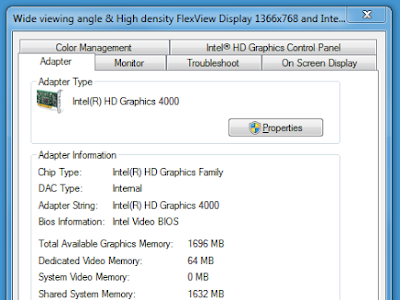
XPS: chip type is Intel HD Graphics Family; total memory is 1792MB, display mode is 1600 x 900 (32 bit) (60Hz)
ThinkPad: Same as above, except total memory is 1696
Let me know if that's the info you were asking for. I'm not too techie (if you haven't already noticed) so there may be more important info you needed. Thanks!
Tammy
Richard Höchenberger
Dec 2, 2015, 12:08:24 AM12/2/15
to psychop...@googlegroups.com
Hi Tammy,
this is quite a huge resolution, are you running your experiments at 1600x900 too? Have you tried to reduce the resolution (within PsychoPy)? Have you installed the latest Intel graphics drivers?
Richard
--
Sent from my cell phone.
Richard Höchenberger
Dec 2, 2015, 3:56:48 AM12/2/15
to psychop...@googlegroups.com
I just checked on my Lenovo laptop in the office, which has an Intel
HD Graphics 4000 chip built-in, with 1696 MB of RAM, and two monitors
attached, both set to 1920x1080 pixels. I let the timeByFrame.py demo
run on the primary display at its native resolution (i.e., 1920x1080).
Did not drop a single frame, and the mean frame duration was 16.7 ms,
with a 99% CI of [15.90, 17.44] ms.
Since I assume you have a similar graphics chip, I would almost bet
its your drivers that are the culprit. Try to update to the latest
vendor-provided graphics drivers on the two Windows computers. For the
Mac, I'm a bit at a loss, to be honest...
Good luck,
Richard
HD Graphics 4000 chip built-in, with 1696 MB of RAM, and two monitors
attached, both set to 1920x1080 pixels. I let the timeByFrame.py demo
run on the primary display at its native resolution (i.e., 1920x1080).
Did not drop a single frame, and the mean frame duration was 16.7 ms,
with a 99% CI of [15.90, 17.44] ms.
Since I assume you have a similar graphics chip, I would almost bet
its your drivers that are the culprit. Try to update to the latest
vendor-provided graphics drivers on the two Windows computers. For the
Mac, I'm a bit at a loss, to be honest...
Good luck,
Richard
Jonathan Peirce
Dec 2, 2015, 6:55:18 AM12/2/15
to psychop...@googlegroups.com
That timeByFrames plot indicates a computer that just can't keep up;
it's trying to sync at 60hz (16.7ms) but drops a frame most frames!
Having only 2gb of RAM isn't going to help. Make sure you shut down as
many applications as you possibly can before running, but these days
just the operating system will take up most of that memory.
On the windows machines there are many settings in the graphics card
drivers that slow things down. Try to set everything you can to be best
for performance rather than "quality". If it has options to perform
"filtering" or "multisampling" turn off (or turn down) as many of these
as you can.
On the mac I'm at a loss as well. I've not seen a mac dropping
substantial numbers of frames, even on my Macbook Air (which I imagine
to be less powerful than most other mac laptops).
Jon
it's trying to sync at 60hz (16.7ms) but drops a frame most frames!
Having only 2gb of RAM isn't going to help. Make sure you shut down as
many applications as you possibly can before running, but these days
just the operating system will take up most of that memory.
On the windows machines there are many settings in the graphics card
drivers that slow things down. Try to set everything you can to be best
for performance rather than "quality". If it has options to perform
"filtering" or "multisampling" turn off (or turn down) as many of these
as you can.
On the mac I'm at a loss as well. I've not seen a mac dropping
substantial numbers of frames, even on my Macbook Air (which I imagine
to be less powerful than most other mac laptops).
Jon
Richard Höchenberger
Dec 2, 2015, 7:07:11 AM12/2/15
to psychop...@googlegroups.com
On Wed, Dec 2, 2015 at 12:55 PM, Jonathan Peirce <jon.p...@gmail.com> wrote:
> Having only 2gb of RAM isn't going to help. Make sure you shut down as many
> applications as you possibly can before running, but these days just the
> operating system will take up most of that memory.
The RAM sizes he reported were graphics RAM only. These Intel graphics
> Having only 2gb of RAM isn't going to help. Make sure you shut down as many
> applications as you possibly can before running, but these days just the
> operating system will take up most of that memory.
chips are actually commonly integrated with the CPU, and share the
physical RAM with the rest of the system.
Cheers,
Richard
rosn...@gmail.com
Dec 2, 2015, 11:08:29 AM12/2/15
to psychopy-users
Okay, so I updated my drivers, and I'm still getting the same results...
Richard, I'm not quite sure what you mean by reducing the resolution within psychopy... could you please clarify? How would I go about doing that and what resolution do you recommend?
Also, based on the above comments, I take it my RAM may not be the issue (at least, because I have more than 2GB of it?)
If none of these suggestions work, what do you recommend for us? I know that psychopy is capable of showing fast stimuli, and it's strange that we're having similar problems on such vastly different machines. Especially for me, I find it very strange that when I first enabled vsync, my laptop was showing 3 frames of stimuli for 50 ms consistently the first time I tried it. Then after that, it went back to 90 ms for 3 frames. So I know it's capable of doing what I want it to do, but just won't. And once again, specifying 50 ms means things are shown for 50 ms, though I know this is not the most accurate way to show fast stimuli...
Tammy

Michael MacAskill
Dec 2, 2015, 3:36:19 PM12/2/15
to <psychopy-users@googlegroups.com>
> it's strange that we're having similar problems on such vastly different machines. Especially for me, I find it very strange that when I first enabled vsync, my laptop was showing 3 frames of stimuli for 50 ms consistently the first time I tried it. Then after that, it went back to 90 ms for 3 frames. So I know it's capable of doing what I want it to do, but just won't. And once again, specifying 50 ms means things are shown for 50 ms, though I know this is not the most accurate way to show fast stimuli…
Background processes? Do you have any aggressive anti-virus software running, backup software etc? Are you disconnected from the net?
Clutching at straws…
Michael
Richard Höchenberger
Dec 2, 2015, 5:04:53 PM12/2/15
to psychop...@googlegroups.com
Hi Tammy,
On Wed, Dec 2, 2015 at 5:08 PM, <rosn...@gmail.com> wrote:
> Richard, I'm not quite sure what you mean by reducing the resolution within
> psychopy... could you please clarify? How would I go about doing that and
> what resolution do you recommend?
In timeByFrames.py, line 19, the graphics window is created with a
resolution of 1280x1024 pixels:
----------
win = visual.Window([1280,1024], fullscr=True, allowGUI=False,
waitBlanking=True)
----------
What happens if you change that to a way smaller resolution, say,
[640, 480]? Do you observe any performance improvement?
Do you run PsychoPy as a privileged user (i.e., Administrator account)?
Could you add the following lines at the very top of your script:
----------
from psychopy.core import rush
rush()
----------
Does it have any effect?
And if you add them to timeByFrames.py? Does it change anything?
> Also, based on the above comments, I take it my RAM may not be the issue (at
> least, because I have more than 2GB of it?)
How much RAM does your computer have in total?
Regarding the Lenovo, I do remember that I had huge performance issues
with the graphics drivers supplied by Lenovo. I uninstalled them and
downloaded the drivers directly from intel.com.
Good luck,
Richard
On Wed, Dec 2, 2015 at 5:08 PM, <rosn...@gmail.com> wrote:
> Richard, I'm not quite sure what you mean by reducing the resolution within
> psychopy... could you please clarify? How would I go about doing that and
> what resolution do you recommend?
resolution of 1280x1024 pixels:
----------
win = visual.Window([1280,1024], fullscr=True, allowGUI=False,
waitBlanking=True)
----------
What happens if you change that to a way smaller resolution, say,
[640, 480]? Do you observe any performance improvement?
Do you run PsychoPy as a privileged user (i.e., Administrator account)?
Could you add the following lines at the very top of your script:
----------
from psychopy.core import rush
rush()
----------
Does it have any effect?
And if you add them to timeByFrames.py? Does it change anything?
> Also, based on the above comments, I take it my RAM may not be the issue (at
> least, because I have more than 2GB of it?)
Regarding the Lenovo, I do remember that I had huge performance issues
with the graphics drivers supplied by Lenovo. I uninstalled them and
downloaded the drivers directly from intel.com.
Good luck,
Richard
rosn...@gmail.com
Dec 2, 2015, 7:27:08 PM12/2/15
to psychopy-users
Hi everyone,
Thank you for all of your responses!
Michael: I am not disconnected from the net, but there's also no internet browsers open when I'm running the experiment. No aggressive anti-virus (just free AVG software). No other programs open--just psychopy.
Richard: I made those suggested changed in the timeByFrame.py demo, and no changes. Same as when I did it for my experiment code. My personal laptop has 8 GB of RAM. Not sure about the Lenovo... not currently in the lab. I'll try the driver suggestion some time tomorrow.
Thanks again,
Tammy
Jonathan Peirce
Dec 3, 2015, 8:24:41 AM12/3/15
to psychop...@googlegroups.com
I think you need to go through the different "3D" settings in the
graphics card driver (windows display properties > advanced)
cheers
Jon
cheers
Jon
--
You received this message because you are subscribed to the Google Groups "psychopy-users" group.
To unsubscribe from this group and stop receiving emails from it, send an email to psychopy-user...@googlegroups.com.
To post to this group, send email to psychop...@googlegroups.com.
To view this discussion on the web visit https://groups.google.com/d/msgid/psychopy-users/2d69421f-0d53-4c13-b37c-c4f41901a33e%40googlegroups.com.
For more options, visit https://groups.google.com/d/optout.
Richard Höchenberger
Dec 3, 2015, 4:36:20 PM12/3/15
to psychop...@googlegroups.com
On Thu, Dec 3, 2015 at 2:24 PM, Jonathan Peirce <jon.p...@gmail.com> wrote:
> I think you need to go through the different "3D" settings in the graphics
> card driver (windows display properties > advanced)
If you install the drivers from intel.com, I could send you
> I think you need to go through the different "3D" settings in the graphics
> card driver (windows display properties > advanced)
screenshots of the settings I use successfully on my Lenovo.
Richard
rosn...@gmail.com
Dec 3, 2015, 4:51:02 PM12/3/15
to psychopy-users
Hi everyone,
As an update, the person with the Mac recalibrated psychopy to her computer, which seems to have fixed the problem. I tried to do that on the Dell (by using the benchmark wizard) and then running timeByFrames. The refresh rate had gone down to 18ms/frame--not great, but not bad considering the average had previously been 31ms. However, when I tried again on the Dell to see if the timeByFrames results would replicate, it's jumped back up to 31ms.
When I tried doing this on the Lenovo, the benchmark wizard gave me a result telling me that the visual sync (refresh) is 2.83 ms/frame, with the comment "too fast? vicusal syncing with the monitor seems unlikely at 300+ Hz." I tried to find documentation online to fix this and came up dry. Additionally, trying to recalibrate did not change anything--timeByFrames still gives the result of about 2.8 ms/frame (consistent with the wizard). I did not get a similar warning for my Dell complaining about the visual sync rate.
I have also downloaded all of the drivers according to the Intel Driver Update Utility, as well as gone into the system to update the graphics driver specifically, and no changes. I've also altered all 3D settings to have the application optimal ode turned off, and changed the vsync to on, and still no changes. I also uninstalled and reinstalled psychopy as a last ditch attempt, with no results.
Richard, if you could send along those screen shots, that would be really appreciated. Otherwise, I really have zero idea what else I can do...
Richard Höchenberger
Dec 4, 2015, 2:07:22 PM12/4/15
to psychop...@googlegroups.com
Hi Tammy,
these are screenshots of the driver settings I successfully use with PsychoPy on my Lenovo. Hope that helps!
these are screenshots of the driver settings I successfully use with PsychoPy on my Lenovo. Hope that helps!
Richard

rosn...@gmail.com
Dec 4, 2015, 4:33:10 PM12/4/15
to psychopy-users
Thanks, Richard! I won't be in the lab for a bit, but I'll keep you posted.
If anyone else has any other pieces of advice, I'd really appreciate it.
Tammy

Richard Höchenberger
Dec 4, 2015, 4:38:11 PM12/4/15
to psychop...@googlegroups.com
On Fri, Dec 4, 2015 at 10:34 PM, <rosn...@gmail.com> wrote:
>
> Richard, I just tried to click to access the photos, and I got this message...
>
> Any chance you can send those pictures again?
Does the following address work?
>
> Richard, I just tried to click to access the photos, and I got this message...
>
> Any chance you can send those pictures again?
https://goo.gl/photos/cWJRAx6i49iYTxh37
Cheers,
Richard
rosn...@gmail.com
Dec 4, 2015, 4:46:14 PM12/4/15
to psychopy-users
Perfect, thanks! :)
Arielle Levy
Dec 26, 2015, 6:29:02 PM12/26/15
to psychopy-users
Hi all,
Tammy and I were having similar but separate problems initially, and I was eventually able to fix mine by simply re-configuring PsychoPy to my laptop. I had gotten a new laptop several months ago, and had initially downloaded PsychoPy on my previous laptop (which had a different screen size/resolution). When I transferred everything to my new laptop, I simply did a full backup and then restored the backup on the new laptop using Time Machine, meaning the output file from the initial PsychoPy installation was transferred and PsychoPy didn't prompt me to re-configure. I didn't realize this at the time of course, but a friend of mine helped me come to this realization, and we deleted the initial configuration report file so that PsychoPy would bring up the Configuration Wizard again, and voila. It was an easy fix once we finally realized that it was all happening simply because PsychoPy was trying to run on the current laptop using the dimensions of the old one.
I wanted to post a brief update just in case it helps someone else later. Unfortunately, Tammy's issue was different - and she had downloaded the application directly to the systems she was using - so the same thing didn't help her.
Thanks for the support and the assistance. I hope everyone is enjoying the holidays!
All the best,
Arielle
Reply all
Reply to author
Forward
0 new messages