
Error when compiling python file: ModuleNotFoundError:No module named 'hoomd'
360 views
Skip to first unread message

Soohee Bae
Feb 9, 2022, 4:09:20 PM2/9/22
to hoomd-users
Hello,
While I was happily using my hoomd blue for few months, problem arose when my Mac installed updated iOS(I think it install MacOS Moneterey).
I tried running my python package that uses hoomd blue package, I ran into import error like shown below

Thus, I decided to reinstall the hoomd blue package using curl -O method. Exact method is shown below.
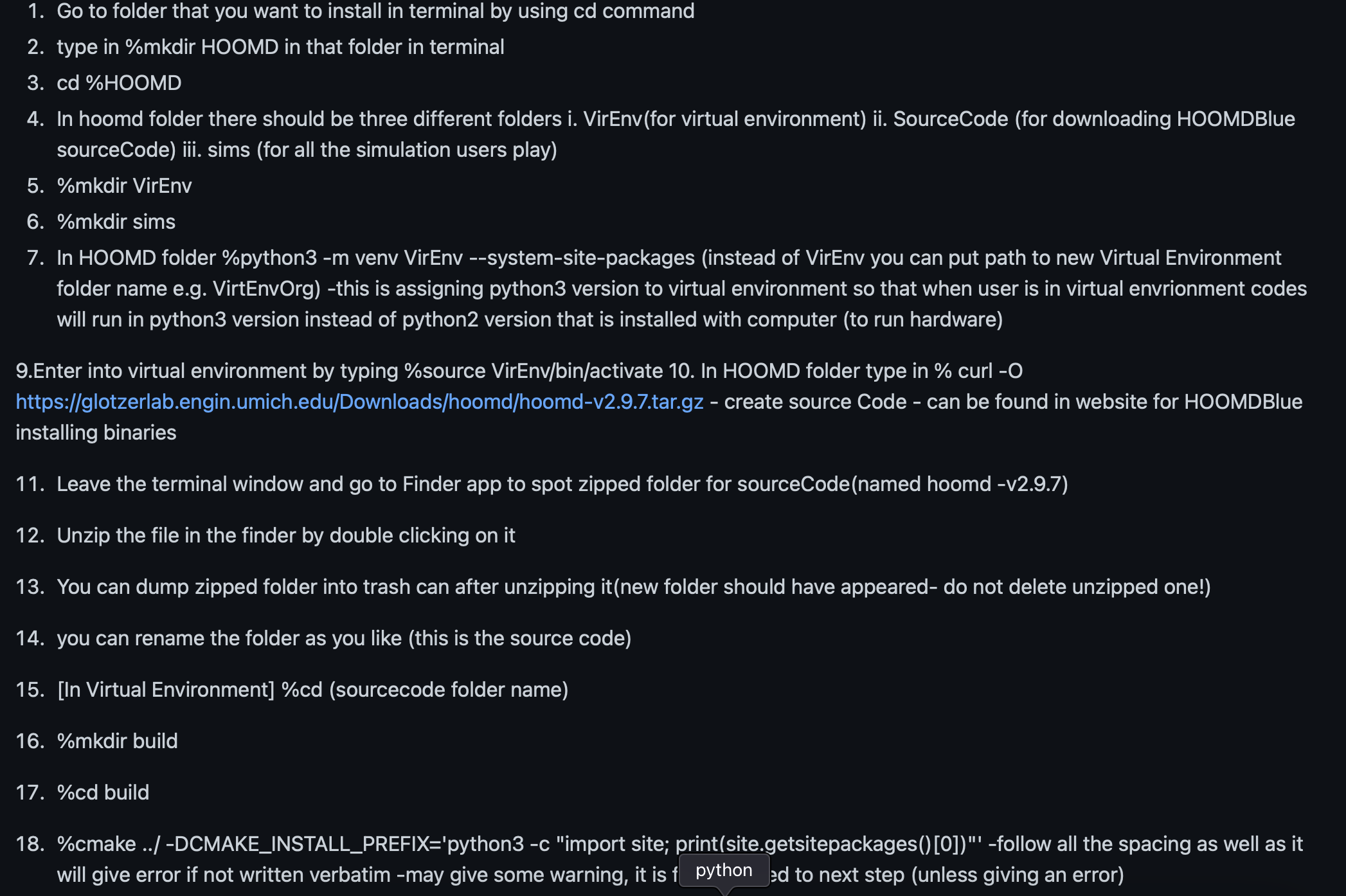
19. Compile in Virtual Environment
-in build folder
Type in make -j4
Type in make install
After this download, I write simple code to run (the exact file I ran is attached as a file)
When I run this file in the terminal, I get the following message.

Under hoomd blue folder I have 3 different folders: source code simulation folder virtual environment folder
(waterDPD.py file attached above is in simulation folder)
In source code, import hoomd works fine. However, import hoomd does not work in simulation folder or when I am outside the source code folder. (Namely, in hoomd blue folder itself.)
To check if my method to download hoomd was not right, I tried $git clone --recursive https://github.com/glotzerlab/hoomd-blue
Then make virtual environment using $python3 -m vent VirEnvBlue —system-site-packages
Make build directory using $ cmake ../ -DCMAKE_INSTALL_PREFIX='python3 -c "import site; print(site.getsitepackages()[0])”'
However, this method runs into another error

Thus, I want to ask for help. I would like to know what cause this error and ways to resolve this issue.
If there is any missing information you need or I am posting this on the wrong forum please let me know and I will do my best to act accordingly.
Thank you for reading long post.
Thanks,
Soohee

Joshua Anderson
Feb 10, 2022, 7:52:32 AM2/10/22
to hoomd...@googlegroups.com
Soohee,
`make install` should install HOOMD into your virtual environment so that it can be imported when your current working directory is outside the build directory. You can verify this by checking the output of:
$ python3 -c "import sys; print(sys.path)"
and ensure that the `site-packages` directory you installed HOOMD into is listed.
At step 19, I see your prompt includes `(VirEnvOrgN) (base)`. `(base)` indicates you may be using a conda environment. I suspect that you installed HOOMD into one of the environments but your current `python3`
Conda and venv virtual environments do not interoperate, use one or the other but not both.
When you cloned the source code repository with git, you downloaded the master branch which hold the v3 beta development version.
The v3 beta requires that you install pybind11 and other dependencies. I encourage you to upgrade from v2.9 to v3 as we will end support for v2.9 in March. See the latest documentation for details on how to install dependencies, compile, and migrate your scripts to v3:
https://hoomd-blue.readthedocs.io/en/latest/building.html
https://hoomd-blue.readthedocs.io/en/latest/migrating.html
https://hoomd-blue.readthedocs.io/en/latest/tutorial/00-Introducing-HOOMD-blue/00-index.html
Lastly, if you would allow me to make an observation. You are using a conda environment, I recommend installing the conda binary package instead taking the extra steps to build from source.
To install v2.9.7, run:
$ conda install -c conda-forge hoomd
To install the v3 beta, run:
$ conda install -c conda-forge/label/hoomd_dev -c conda-forge hoomd
------
Joshua A. Anderson, Ph.D.
Research Area Specialist, Chemical Engineering, University of Michigan
> On Feb 9, 2022, at 4:09 PM, Soohee Bae <clarab...@gmail.com> wrote:
>
> Hello,
>
> While I was happily using my hoomd blue for few months, problem arose when my Mac installed updated iOS(I think it install MacOS Moneterey).
> I tried running my python package that uses hoomd blue package, I ran into import error like shown below
> You received this message because you are subscribed to the Google Groups "hoomd-users" group.
> To unsubscribe from this group and stop receiving emails from it, send an email to hoomd-users...@googlegroups.com.
> To view this discussion on the web visit https://groups.google.com/d/msgid/hoomd-users/2dc16b65-1918-48a3-93a3-c8fd96cb7011n%40googlegroups.com.
> <Image 2-9-22 at 2.47 PM.jpg><waterDPD.py><Screen Shot 2022-02-07 at 10.35.54 PM.png><Screen Shot 2022-02-09 at 11.11.45 AM.png><Screen Shot 2022-02-09 at 2.31.42 PM.png>
`make install` should install HOOMD into your virtual environment so that it can be imported when your current working directory is outside the build directory. You can verify this by checking the output of:
$ python3 -c "import sys; print(sys.path)"
and ensure that the `site-packages` directory you installed HOOMD into is listed.
At step 19, I see your prompt includes `(VirEnvOrgN) (base)`. `(base)` indicates you may be using a conda environment. I suspect that you installed HOOMD into one of the environments but your current `python3`
Conda and venv virtual environments do not interoperate, use one or the other but not both.
When you cloned the source code repository with git, you downloaded the master branch which hold the v3 beta development version.
The v3 beta requires that you install pybind11 and other dependencies. I encourage you to upgrade from v2.9 to v3 as we will end support for v2.9 in March. See the latest documentation for details on how to install dependencies, compile, and migrate your scripts to v3:
https://hoomd-blue.readthedocs.io/en/latest/building.html
https://hoomd-blue.readthedocs.io/en/latest/migrating.html
https://hoomd-blue.readthedocs.io/en/latest/tutorial/00-Introducing-HOOMD-blue/00-index.html
Lastly, if you would allow me to make an observation. You are using a conda environment, I recommend installing the conda binary package instead taking the extra steps to build from source.
To install v2.9.7, run:
$ conda install -c conda-forge hoomd
To install the v3 beta, run:
$ conda install -c conda-forge/label/hoomd_dev -c conda-forge hoomd
------
Joshua A. Anderson, Ph.D.
Research Area Specialist, Chemical Engineering, University of Michigan
> On Feb 9, 2022, at 4:09 PM, Soohee Bae <clarab...@gmail.com> wrote:
>
> Hello,
>
> While I was happily using my hoomd blue for few months, problem arose when my Mac installed updated iOS(I think it install MacOS Moneterey).
> I tried running my python package that uses hoomd blue package, I ran into import error like shown below
> <Screen Shot 2022-02-07 at 10.35.54 PM.png>
> Thus, I decided to reinstall the hoomd blue package using curl -O method. Exact method is shown below.
> Thus, I decided to reinstall the hoomd blue package using curl -O method. Exact method is shown below.
> <Screen Shot 2022-02-09 at 2.31.42 PM.png>
> 19. Compile in Virtual Environment
> -in build folder
> Type in make -j4
> Type in make install
>
> After this download, I write simple code to run (the exact file I ran is attached as a file)
> When I run this file in the terminal, I get the following message.
> 19. Compile in Virtual Environment
> -in build folder
> Type in make -j4
> Type in make install
>
> After this download, I write simple code to run (the exact file I ran is attached as a file)
> When I run this file in the terminal, I get the following message.
> <Screen Shot 2022-02-09 at 11.11.45 AM.png>
> Under hoomd blue folder I have 3 different folders: source code simulation folder virtual environment folder
> (waterDPD.py file attached above is in simulation folder)
> In source code, import hoomd works fine. However, import hoomd does not work in simulation folder or when I am outside the source code folder. (Namely, in hoomd blue folder itself.)
>
> To check if my method to download hoomd was not right, I tried $git clone --recursive https://github.com/glotzerlab/hoomd-blue
> Then make virtual environment using $python3 -m vent VirEnvBlue —system-site-packages
> Make build directory using $ cmake ../ -DCMAKE_INSTALL_PREFIX='python3 -c "import site; print(site.getsitepackages()[0])”'
> However, this method runs into another error
>
> Under hoomd blue folder I have 3 different folders: source code simulation folder virtual environment folder
> (waterDPD.py file attached above is in simulation folder)
> In source code, import hoomd works fine. However, import hoomd does not work in simulation folder or when I am outside the source code folder. (Namely, in hoomd blue folder itself.)
>
> To check if my method to download hoomd was not right, I tried $git clone --recursive https://github.com/glotzerlab/hoomd-blue
> Then make virtual environment using $python3 -m vent VirEnvBlue —system-site-packages
> Make build directory using $ cmake ../ -DCMAKE_INSTALL_PREFIX='python3 -c "import site; print(site.getsitepackages()[0])”'
> However, this method runs into another error
>
> <Image 2-9-22 at 2.47 PM.jpg>
> Thus, I want to ask for help. I would like to know what cause this error and ways to resolve this issue.
> If there is any missing information you need or I am posting this on the wrong forum please let me know and I will do my best to act accordingly.
>
> Thank you for reading long post.
>
> Thanks,
> Soohee
>
> --
> Thus, I want to ask for help. I would like to know what cause this error and ways to resolve this issue.
> If there is any missing information you need or I am posting this on the wrong forum please let me know and I will do my best to act accordingly.
>
> Thank you for reading long post.
>
> Thanks,
> Soohee
>
> You received this message because you are subscribed to the Google Groups "hoomd-users" group.
> To unsubscribe from this group and stop receiving emails from it, send an email to hoomd-users...@googlegroups.com.
> To view this discussion on the web visit https://groups.google.com/d/msgid/hoomd-users/2dc16b65-1918-48a3-93a3-c8fd96cb7011n%40googlegroups.com.
> <Image 2-9-22 at 2.47 PM.jpg><waterDPD.py><Screen Shot 2022-02-07 at 10.35.54 PM.png><Screen Shot 2022-02-09 at 11.11.45 AM.png><Screen Shot 2022-02-09 at 2.31.42 PM.png>
Reply all
Reply to author
Forward
0 new messages