
VERSION 3.6 SEP 2020 DEVELOPMENT BUILD

Mark Liversedge

Ron George
Ron George
Mark Liversedge
Mark Liversedge
I cannot recreate this at all, be interesting to hear if anyone else has a problem.

José Luis García Pallero

Remco Boerwinkel
--
_______________________________________________
Golden-Cheetah-Users mailing list
golden-che...@googlegroups.com
http://groups.google.com/group/golden-cheetah-users?hl=en
---
You received this message because you are subscribed to the Google Groups "golden-cheetah-users" group.
To unsubscribe from this group and stop receiving emails from it, send an email to golden-cheetah-u...@googlegroups.com.
To view this discussion on the web visit https://groups.google.com/d/msgid/golden-cheetah-users/0eb3ce44-681e-450b-9731-2ab6e7d37eccn%40googlegroups.com.
Mark Liversedge
IIRC this tab has moved to details tab as an sub tab like Notes/Device etc.
José Luis García Pallero
El lun., 7 sept. 2020 a las 11:56, Mark Liversedge
(<liver...@gmail.com>) escribió:
> _______________________________________________
> Golden-Cheetah-Users mailing list
> golden-che...@googlegroups.com
> http://groups.google.com/group/golden-cheetah-users?hl=en
> ---
> You received this message because you are subscribed to the Google Groups "golden-cheetah-users" group.
> To unsubscribe from this group and stop receiving emails from it, send an email to golden-cheetah-u...@googlegroups.com.
--
*****************************************
(o<
/ / \
V_/_
Use Debian GNU/Linux and enjoy!
*****************************************

Tomaz Sustar
Hi there,
I have just installed the new build and I have noticed couple of things which might be helpful.
I have multi athlete setup and it looks like the athlete which is loaded by default cannot be closed. If I open another athlete I get close button available but not for the default user.
Under “activities “ – “details” – “Notes” – field is not clearly visible (although it works ok - you can enter/edit text).
I’m using GC under Windows10.
Thank you guys for your amazing work !!!
Regards,
Tomaz
--
_______________________________________________
Golden-Cheetah-Users mailing list
golden-che...@googlegroups.com
http://groups.google.com/group/golden-cheetah-users?hl=en
---
You received this message because you are subscribed to the Google Groups "golden-cheetah-users" group.
To unsubscribe from this group and stop receiving emails from it, send an email to golden-cheetah-u...@googlegroups.com.
To view this discussion on the web visit https://groups.google.com/d/msgid/golden-cheetah-users/ee2dafea-c1a5-4996-8e68-d4042065ab22o%40googlegroups.com.
Mark Liversedge
Hi there,
I have just installed the new build and I have noticed couple of things which might be helpful.
I have multi athlete setup and it looks like the athlete which is loaded by default cannot be closed. If I open another athlete I get close button available but not for the default user.
Under “activities “ – “details” – “Notes” – field is not clearly visible (although it works ok - you can enter/edit text).
Tomaz Sustar
Mark thank you for your explanation.
I performed a clean install on another computer (Win10 64bit) and the »Notes« filed has the same color as background. I think this is not expected behavior.
Regards,
Tomaz
--
_______________________________________________
Golden-Cheetah-Users mailing list
golden-che...@googlegroups.com
http://groups.google.com/group/golden-cheetah-users?hl=en
---
You received this message because you are subscribed to the Google Groups "golden-cheetah-users" group.
To unsubscribe from this group and stop receiving emails from it, send an email to golden-cheetah-u...@googlegroups.com.
To view this discussion on the web visit https://groups.google.com/d/msgid/golden-cheetah-users/844825d4-0072-4fa3-8c52-0745ee240649o%40googlegroups.com.

Kalle Arsch
Anything I could try to fix that?
D
Mark Liversedge
just tried out GC 3.6 on macOS 10.14.6, it is a lot slower than 3.5- scrolling and selecting tabs to the point were it's hardly usable.
Anything I could try to fix that?

JustinL
Mark Liversedge
macOS High Sierra (10.13). I really enjoy the new Overview chart, however, I get a black box covering the entire chart after clicking on another chart then back to Overview. This happens in both Activities and Trends. If I restart GC, the box disappears. I tried tabbed chart view, tiled chart view, a new athlete on a fresh install, and different themes but each ended up with the same result. I do not have this problem with the June 2020 development build.
Also, in a Trends Overview chart, when using the Bests tile for running "Pace", the ranking is reversed of what is expected, e.g. a 10 minute mile is ranked higher than a 9 minute mile.
Kalle Arsch

Casper Murtonen

Ale Martinez (Please don't email or cc me)
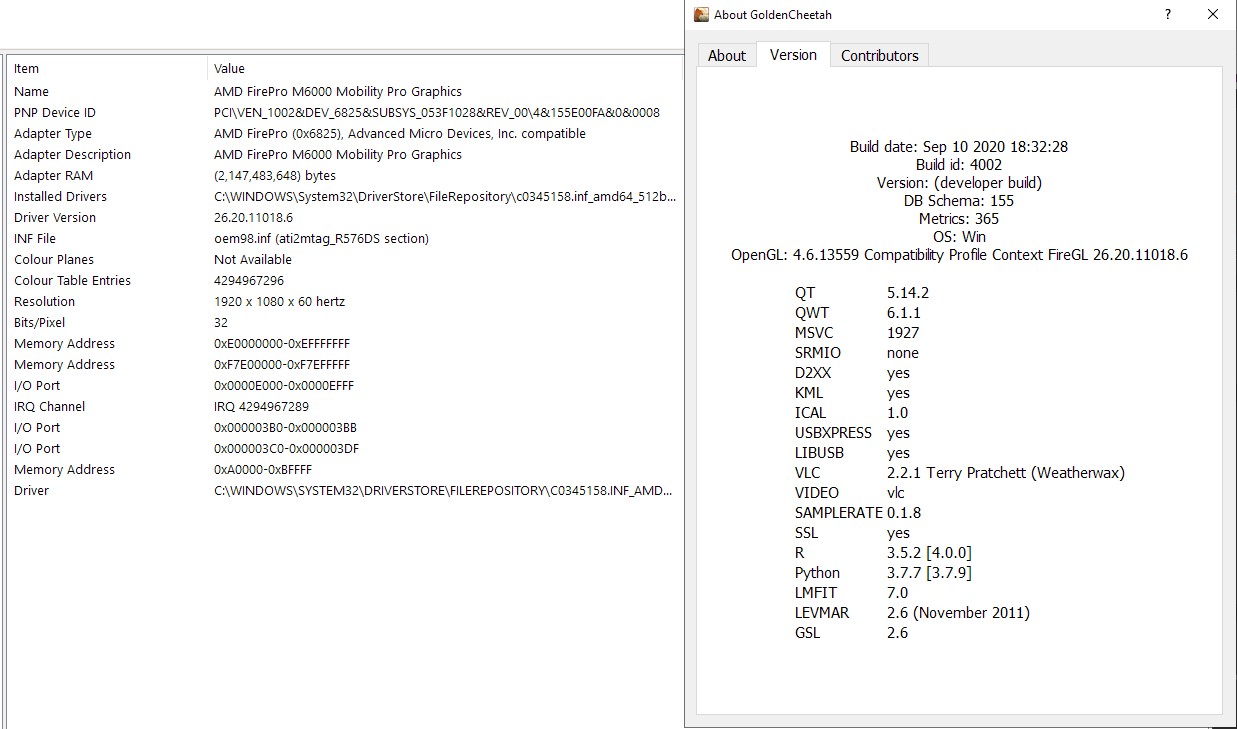
I have the same issues on Windows 10, both with GC 3.6 running very slowly (yet using almost no CPU or memory etc.)
Casper Murtonen
Mark Liversedge
The current build on appveyor (ci.3291) works. The earlier v3.6DEV2009 release with OpenGL disabled didn't. Thanks
Kalle Arsch
Casper Murtonen
Ale Martinez (Please don't email or cc me)
Just tried the latest snapshot build (SEP 05 2020 ID 4002) - still same behavior on macOS 10.14.6

Rui_B

Ale Martinez (Please don't email or cc me)
On Wednesday, 9 September 2020 04:06:30 UTC+1, JustinL wrote:macOS High Sierra (10.13). I really enjoy the new Overview chart, however, I get a black box covering the entire chart after clicking on another chart then back to Overview. This happens in both Activities and Trends. If I restart GC, the box disappears. I tried tabbed chart view, tiled chart view, a new athlete on a fresh install, and different themes but each ended up with the same result. I do not have this problem with the June 2020 development build.This has been fixed in the repo, it was related to using opengl which doesn't work well on MacOS.

Ale Martinez (Please don't email or cc me)
Ale Martinez (Please don't email or cc me)
I installed the snapshot build and entered a new activity. GC crashed upon closing.Crash report attached.
TJDunnigan
Rui_B
Ale Martinez (Please don't email or cc me)
my attempt crashed upon launch... same as before (see post on this thread from Sept 12)
Mark Liversedge
Ale Martinez (Please don't email or cc me)
El miércoles, 16 de septiembre de 2020, 14:16:05 (UTC-3), Rui_B escribió:
Rui_B
Rui_B
Mark Liversedge
I've subsequently tried Ale's link (below) and as you suggested, after a long first launch, it worked. Prob a software security analysis. process

mlt.m...@googlemail.com


Ale Martinez (Please don't email or cc me)
I have some problems with the Linux version.1. When I compare data with "compare date ranges" and then click on the bar to pull it up, it disappears. This is only when an R chart available and GC is restarted when the R chart is added for the first time. Without an R chart everything is normal.

2. If the trend charts created with bars and labels, the numbers disappear when you touch the y-axis with the mouse.3. If a new metric is created under options app and automatically restarted, the metrics are not available. After a manual restart of GC, the new metric is available.


4. When GC installed and started for the first time CP History and Vo2max chart have the wrong parameters.Ext to ext


5. User Chart are all functions already integrated? I wanted to test the WKO4 Power Duration chart and I get the error message "Function store not known" and " Function fetch not known".

TJDunnigan
Ale Martinez (Please don't email or cc me)
https://github.com/GoldenCheetah/GoldenCheetah/commit/0dfa8f0e0082d05bb1ed5d7fca34dbb8e0bca2b9
mlt.m...@googlemail.com
There are no other charts added for the new user.
How the error can be reproduced.
A. Create a new user
B. add a few workouts
C. check if the comparison works.
D. Add an R chart. The error is only on the R chart, but on all other types it is ok.
E. Restart GC.
F. Check the comparison again. Now it should not go anymore.
G. Delete the R chart
H. Restart GC
When creating a trend chart with bar and data labels.
e.g.
options → Data Fields → Colour Keywords → change the color of FTP → Save
Then comes the window.
 Answer with yes.
After the automatic restart the color should have changed but it didn't.
First when GC is closed and restarted the color is changed.
Ale Martinez (Please don't email or cc me)
1. I can see the behaviour also with a new created user.
There are no other charts added for the new user.
How the error can be reproduced.
A. Create a new user
B. add a few workouts
C. check if the comparison works.
D. Add an R chart. The error is only on the R chart, but on all other types it is ok.
E. Restart GC.
F. Check the comparison again. Now it should not go anymore.
G. Delete the R chart
H. Restart GCI. Now the comparison should go again.
2. normally, touching the vertical axis label hides the data.
When creating a trend chart with bar and data labels.A number above the bar when the vertical axis label is touched, the numbers will disappear, which it should. If the corser is moved to a different position the numbers above the bar should reappear but this does not happen. First after reloading the chart.Add a little movie that explains it better.
3. If a change is made in the athlete library, e.g. a new metric or a new colour keyword is created, the change is saved but not applied on restart.
e.g.
options → Data Fields → Colour Keywords → change the color of FTP → Save
Then comes the window.
mlt.m...@googlemail.com
Only with the bar it is not so, they do not appear automatically.
mlt.m...@googlemail.com
With GC 3.6 it's like this, I say yes to the windows and GC restarts automatically and doesn't apply the changes.
I close GC and restart GC and only then the changes are applied.
Has the location for metadata.xml and usermetrics.xml changed?
Ale Martinez (Please don't email or cc me)
was too big so the second post3. easier - in GC 3.5 I changed the Colour Keywords, saved them and when the window came I said yes and GC restarted automatically and the changes were applied.
With GC 3.6 it's like this, I say yes to the windows and GC restarts automatically and doesn't apply the changes.
I close GC and restart GC and only then the changes are applied.
Has the location for metadata.xml and usermetrics.xml changed?
mlt.m...@googlemail.com

Branden Meltingtallow

kub3r4
Branden Meltingtallow
Branden Meltingtallow
Ale Martinez
Another question. How do I create a new athlete in this build outside of the initial pop up box dialog if no default athlete is opened? I tried ctrl+N and there are no options under Athlete or that I can see in the Athlete module that displays all the athletes.
Branden Meltingtallow
Rui_B
TJDunnigan
Rui_B
Ale Martinez

c c
Ale Martinez
Hi in this version, i have a fresh install on pc , where is athlete setting? hr , cp, weight...
c c
Ale Martinez
ok thx in my pc it is not visible... and with mouse over all blu color

Scud Bee
Ale Martinez
Scud Bee
Ale Martinez
Thank you, I've installed the most recent snapshot (the one linked at the GC website's main page), and now it stays responsive, but still used most of the CPU resources for quite some time.
Scud Bee
Ale Martinez
Yes, that would be a workaround. I still fail to see a reason (maybe there is one) to recalculate all metrics when just one is added or modified. Why not recalculate just this one new metric? Also, there should be no problem to check if any other metric uses the changed one before recalculating it over all activities, and to not recalculate if it doesn't. This would be rather obvious approach, so there must be some specific reason for total recalculation. Do you happen to know what it is?
Scud Bee
{
relevant { Data contains "P"; }
value { sum(samples(POWER) * recIntSecs); }
count { count(samples(POWER)) * recIntSecs; }
}
As is it sends GC into a beachball freeze as soon as I click on Test. Without the "count" function it works all right.
Am I missing something?
Ale Martinez
I'm trying to rewrite some of my metrics using the samples() function, and it seems that there is a problem.Adding a new metric using the following example from the user's guide https://github.com/GoldenCheetah/GoldenCheetah/wiki/UG_Special-Topics_Creating-User-Metrics#poor-performance-using-the-sample-function (with capitalized POWER){
relevant { Data contains "P"; }
value { sum(samples(POWER) * recIntSecs); }
count { count(samples(POWER)) * recIntSecs; }
}
As is it sends GC into a beachball freeze as soon as I click on Test. Without the "count" function it works all right.
Am I missing something?
Scud Bee
Ale Martinez
Scud Bee

Ale Martinez

Scud Bee
Ale Martinez
What's the difference between count() and length() besides count returning 1 if the passed value is not a vector, and length returning 0 in that case?
Scud Bee
Ale Martinez
From the wiki:length(v) - since v3.6Will return the number of elements in a vector. If the passed value is not a vector then a value of 0 will be returned. See also count().count(v ..)Returns the number of elements in a variable or list of variables, if it is a vector a count of the elements in the vector, if it is a numeric value it will return 1. See also length.since samples() returns a vector, both functions should return the number of elements in that vector, i.e. give identical results.What's the difference?
TJDunnigan
The imperial conversion bug is fixed in last snapshot, previous values are no affected but the ones entered afterwards need to be fixed.https://github.com/GoldenCheetah/GoldenCheetah/commit/0dfa8f0e0082d05bb1ed5d7fca34dbb8e0bca2b9
Ale Martinez
Hi Ale,I tried to fix the weight by going to Activities>Details and entering the correct weight in pounds, but even after re-saving the activity the weight displays in converted Kg in the summary (and in charts).I have a weight in pounds in the Athlete profile.So I do not know where/how I can fix the weight in a stretch of about 6 weeks of activities.

raf...@tfrank.de
On Monday, 7 September 2020 10:29:12 UTC+1, RB wrote:IIRC this tab has moved to details tab as an sub tab like Notes/Device etc.Yes- the "Details" and "Editor" charts are combined into a "Data" chart that includes metadata like Notes as well as the raw sample data.Mark
raf...@tfrank.de

Ale Martinez
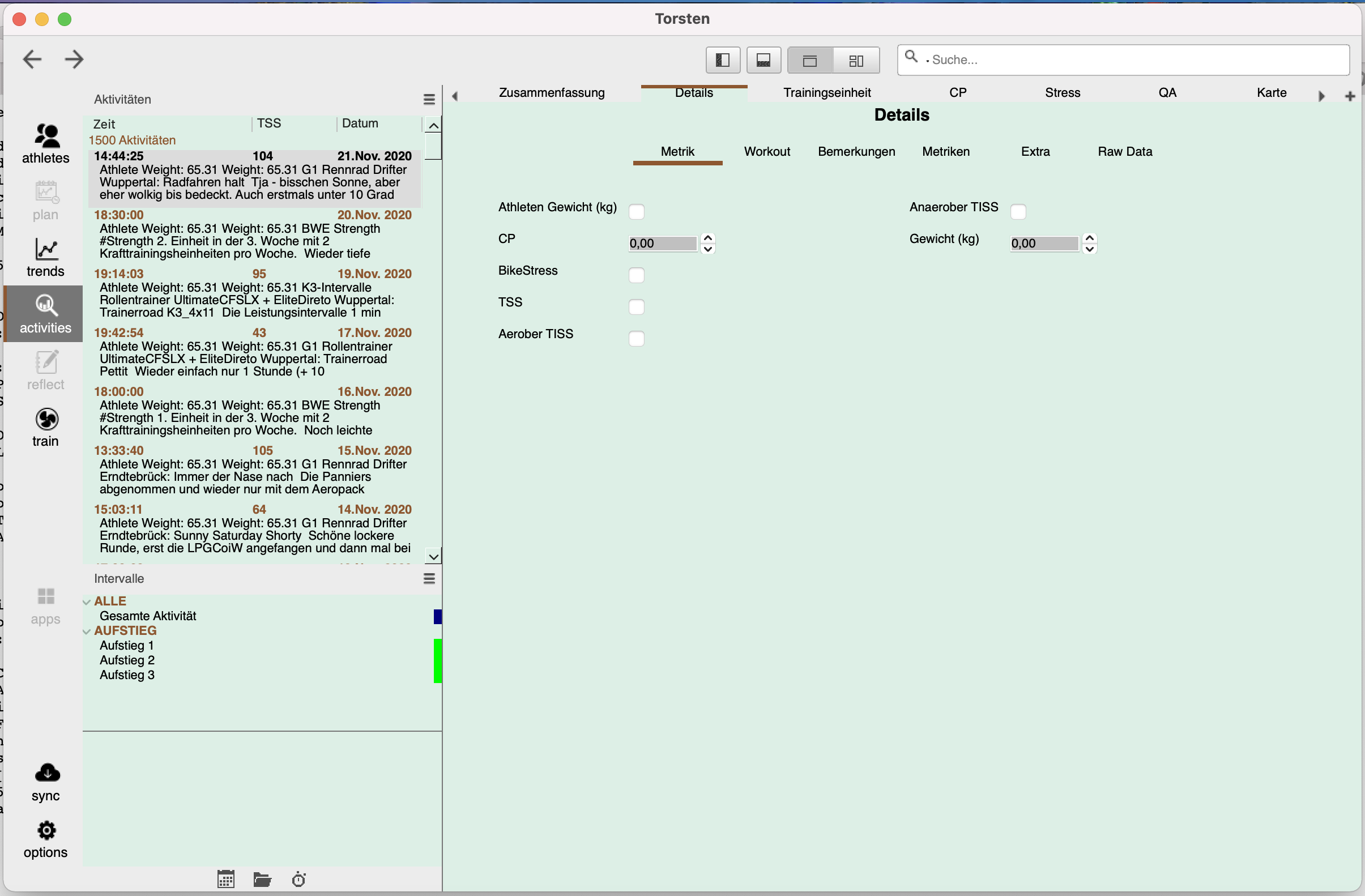
And I have my gripes with the new activities details page. Lots of clutter I don't need (change history, several long technical sensor ID, internal filenames, my own name) all stuff that distracts a self trained athlete as well as a trainer (sans the athlete name) supervising several atheletes from the real info on that page. That is date, RPE, and notes at the foremost.
raf...@tfrank.de

Mark Liversedge
Do you think that the following view is an enticing and convincing view for a new (or any) Golden Cheetah user?
Ale Martinez
b) the metadata setup is wrong.
Not sure how you got into that setup, I'm guessing its either a bug or downgrade without restoring a backup ?
Ale Martinez
- Download and install GC from http://goldencheetah-binaries.s3-website-us-east-1.amazonaws.com/
- Remove metadata.xml file from GC root folder, parallel to your athlete’s folder(s)
- Run the new version and a new default metadata.xml will be automatically generated

RoKA
raf...@tfrank.de



raf...@tfrank.de
raf...@tfrank.de


Available here:Report build issues here.ThanksMark
raf...@tfrank.de

Nigel Van de Velde

Ale Martinez
Hi,I've been reorganizing my setup a bit and have been playing with the new tiled Overview in the Trend tab.Could it be that there are still some issues with the bubble charts? When I add a bubble chart with Activity_Date as X-axis, then the X-axis doesn't show the beginning of the selected period/season. See screenshot below. Seelcted season should start on 1 January and it only shows data starting from respectively 10/02 - 16/02 - 06/02.

Martin Poettgen
Ale Martinez
Hi .I installed the (GoldenCheetah_v3.6-DEV2006_x64 as well as the GoldenCheetah_v3.6-DEV_x64.exe.Both versions don't start on my win10 notebook. I choose the athlet, than it counts to 100% - thats it - no program window appears.