
New Arduino Insteon Shield
1,023 views
Skip to first unread message

Alan Majer
Jan 26, 2014, 10:01:20 PM1/26/14
to arduino...@googlegroups.com
Hi all,
Sorry I have not kept the members of this list updated.
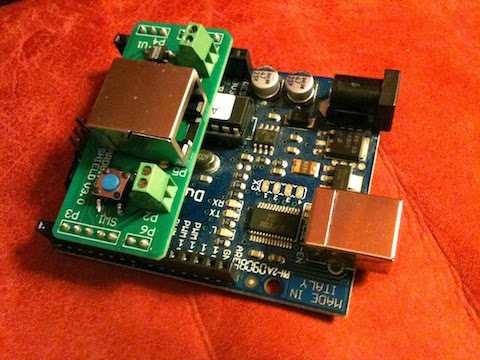
But I'm happy to announce some news - just released a new version of the Arduino Insteon Shield. This version is a lot more compact, but still has the key features of the last shield:
- Controls insteon devices (with connection to Insteon serial modem)
- Onboard relay (can act as dry contact output or switch low voltage devices)
- Sensing buttons or dry contacts
- Onboard button for user interface purposes.
I've added a bit more info on the shield here:
And posted some test/sample sketches here:
Here's a peek at what it looks like attached to the arduino:
All the best,
Alan

Russ Tooley
Jan 26, 2014, 10:35:58 PM1/26/14
to arduino...@googlegroups.com
Greetings...
Good to see you continue supporting this device. I have an early version which has run solid now for months and months. Today I added support for some of my remaining X10 devices to the Insteon sketch - nice.
Keep up the great work and thank you for keeping me on your distribution list.
Russ
--
You received this message because you are subscribed to the Google Groups "Arduino Insteon" group.
To unsubscribe from this group and stop receiving emails from it, send an email to arduino-inste...@googlegroups.com.
To post to this group, send email to arduino...@googlegroups.com.
To view this discussion on the web visit https://groups.google.com/d/msgid/arduino-insteon/5f69b747-4de3-403b-89d4-cd8dab958871%40googlegroups.com.
For more options, visit https://groups.google.com/groups/opt_out.

Kevin Mark
Jan 29, 2014, 12:10:04 AM1/29/14
to arduino...@googlegroups.com
Agreed. Awesome work. Haven't had the pleasure of doing much home automation recently but these shields are absolutely invaluable.
Thanks,
Kevin Mark
To view this discussion on the web visit https://groups.google.com/d/msgid/arduino-insteon/CABAFJ89reNtQ%2BPbzK9BkDaGzStrwOd_7nZ8NaLJEvEHvoos5bA%40mail.gmail.com.
Alan Majer
Jan 29, 2014, 8:16:41 AM1/29/14
to arduino...@googlegroups.com
Kevin and Russ, that's really great to hear! I'm glad you're finding these shields useful.
The new version of the shields seems a lot easier to make (and the smaller size means they're not as costly either), so I should be able to produce a lot more of them this way.
If larger numbers of people start using these boards, perhaps we can even start working on an insteon library at some point.
All the best, and if any of you have suggestions for improvements based on your experience (or even information that should go onto the wiki as documentation) please let me know. If I get the chance, it might be helpful to create some short videos demo'ing the shield's capabilities - if any of you have youtube clips or photos of your projects, I'd love to be able to point to them.
All the best,
Alan
416-825-7355
Date: Wed, 29 Jan 2014 00:10:04 -0500
Subject: Re: [BULK] New Arduino Insteon Shield
From: kmar...@gmail.com
To: arduino...@googlegroups.com
Date: Wed, 29 Jan 2014 00:10:04 -0500
Subject: Re: [BULK] New Arduino Insteon Shield
From: kmar...@gmail.com
To: arduino...@googlegroups.com
To view this discussion on the web visit https://groups.google.com/d/msgid/arduino-insteon/CAPXyNrGF%3DRK9g8Vh1_p1Tp1SOGuZ%2B2wfoSt9WjKiTSdDgiu%3DUw%40mail.gmail.com.

Bob D
Mar 23, 2014, 7:54:21 PM3/23/14
to arduino...@googlegroups.com
Alan ,
I am looking to do a Fritzing layout of the Mega with all the pins required for the Insteon shield + other devices I plan on using in my project. Is there a schematic for the Insteon shield available? This may be helpful to have on the wiki as well.
BobbyD
Alan Majer
Mar 24, 2014, 7:34:25 AM3/24/14
to arduino...@googlegroups.com
Hi Bob,
Good idea. I've attached the schematic for the shield here:
All the best,
To view this discussion on the web visit https://groups.google.com/d/msgid/arduino-insteon/5742eeaf-3b1e-46b9-996a-2ee3666b109b%40googlegroups.com.
For more options, visit https://groups.google.com/d/optout.
For more options, visit https://groups.google.com/d/optout.
Bob Durk
Mar 24, 2014, 1:20:19 PM3/24/14
to arduino...@googlegroups.com
Alan ,
That helps for sure ; I started looking at the sample code and figured out most of the pinouts last night. The analog pins left me scratching my head ...seeing the schematic cleared that up.
Bob
To view this discussion on the web visit https://groups.google.com/d/msgid/arduino-insteon/SNT150-W37CC8904FA3721C89DEE1CBC7A0%40phx.gbl.

Russ Tooley
Mar 31, 2014, 7:47:59 PM3/31/14
to arduino...@googlegroups.com
Greetings...
Ed, this is terrific! Thanks for your effort in putting all this information into one straightforward document. I'll try this shortly and let you know how it goes here. I currently use a TW523 with the x10 library, but it will be nice getting rid of the extra hardware and library.
Next up... anybody with suggestions on reading Insteon commands?
Russ
--
You received this message because you are subscribed to the Google Groups "Arduino Insteon" group.
To unsubscribe from this group and stop receiving emails from it, send an email to arduino-inste...@googlegroups.com.
To post to this group, send email to arduino...@googlegroups.com.
To view this discussion on the web visit https://groups.google.com/d/msgid/arduino-insteon/BLU174-W20898A18D9976D8FB865E992630%40phx.gbl.
Bob Durk
Mar 31, 2014, 8:17:47 PM3/31/14
to arduino...@googlegroups.com
Nice work ! I have quite a stock of X10 that I may consider using , especially for seasonal indoor lighting. I will be adding your tutorial to my Home Automation folder .
Bob
--
You received this message because you are subscribed to the Google Groups "Arduino Insteon" group.
To unsubscribe from this group and stop receiving emails from it, send an email to arduino-inste...@googlegroups.com.
To post to this group, send email to arduino...@googlegroups.com.
To view this discussion on the web visit https://groups.google.com/d/msgid/arduino-insteon/BLU174-W20898A18D9976D8FB865E992630%40phx.gbl.
Alan Majer
Mar 31, 2014, 9:52:23 PM3/31/14
to arduino...@googlegroups.com
Edward, that's amazing, what a great resource for X10!!
If you're open to it, I'd be happy to post it on the wiki.
Alan
From: kc2...@msn.com
To: arduino...@googlegroups.com; kc2...@msn.com
Subject: RE: New Arduino Insteon Shield and x10
Date: Mon, 31 Mar 2014 19:16:17 -0400
From: kc2...@msn.com
To: arduino...@googlegroups.com; kc2...@msn.com
Subject: RE: New Arduino Insteon Shield and x10
Date: Mon, 31 Mar 2014 19:16:17 -0400
--
You received this message because you are subscribed to the Google Groups "Arduino Insteon" group.
To unsubscribe from this group and stop receiving emails from it, send an email to arduino-inste...@googlegroups.com.
To post to this group, send email to arduino...@googlegroups.com.
You received this message because you are subscribed to the Google Groups "Arduino Insteon" group.
To unsubscribe from this group and stop receiving emails from it, send an email to arduino-inste...@googlegroups.com.
To post to this group, send email to arduino...@googlegroups.com.
To view this discussion on the web visit https://groups.google.com/d/msgid/arduino-insteon/BLU174-W20898A18D9976D8FB865E992630%40phx.gbl.
Edward
Apr 1, 2014, 8:37:15 AM4/1/14
to arduino...@googlegroups.com
Alan:
Ok with me.
Ed Watters
Sent from Windows 8
Sent from Windows 8
To view this discussion on the web visit https://groups.google.com/d/msgid/arduino-insteon/SNT150-W68EC31A2698F73B754F4BFBC620%40phx.gbl.
Alan Majer
Apr 3, 2014, 8:53:56 PM4/3/14
to arduino...@googlegroups.com
Hi All,
Sorry I haven't uploaded the x10 document to the wiki yet, it's on my to-do list.
In the meantime, I have pulled together some demo code to receive/read insteon commands. It's not pretty, but I think it works. If you have a chance to test, please let me know how it goes. For now I'm just going to paste it below (sorry if wrapping text messes things up):
// This sketch is designed to send and/or listen to Insteon protocol commands through
// arduino (and into Smarthome's serial modem).
//
// This sketch tries to parse and listen to commands. I have successfully got it to parse insteon standard messages only (based on length and
// sequencing). And this version of the sketch uses the detection of 0x02 (start message code) to determine whether
// a new message has begun, and then reads the second byte to set it's expectation of the message length.
int inByte[26]= {0,0,0,0,0,0,0,0,0,0,0,0,0,0,0,0,0,0,0,0,0,0,0,0,0,0}; // for storing incoming serial bytes
int zeroByte = 0x00; // I use this because if I do "Serial.write (0);" instead I get a compile error
int startMsg = 0x02; // Every insteon message begins with this
int msgLength = 30; // Used to assign an expected length for the message... starts out high so that we don't prematurely trigger an end-of-message
int i = 0; // Temporary looping variable
int count=0; // this is a counter that keeps track of what byte of the message we are reading
const int Table[11][2] = { //This table stores the codes for the different message types and what length to expect for each
{0x50, 11}, // 0x50 means its a standard insteon message, total length 11 (9 bytes plus the 0x02 0x50)
{0x51, 25}, // 0x51 means its an extended length insteon message, total length 25 (23 bytes plus the 0x02 0x50)
{0x62, 9}, // 0x62 means it's echoing back an insteon command that we sent, total length 9 (or would be 23 if it was an extended message, but we asume STANDARD ONLY for now)
{0x52, 4}, // 0x52 means an X10 message was received
{0x53, 10}, // 0x53 means ALL-linking Completed
{0x54, 3}, // 0x54 means Button Event was reported
{0x55, 2}, // 0x55 means a User Reset was detected
{0x56, 7}, // 0x56 means an ALL-Link Cleanup Failure was reported
{0x57, 10}, // 0x57 means an All-Link Record response
{0x58, 3} // 0x58 means an All-Link Cleanup status report
};
#include "SoftwareSerial.h"
SoftwareSerial insteonSerial(5, 4); // This is what we use to send/receive insteon commands
void setup()
{
// start serial port at 19200 bps:
insteonSerial.begin(19200); //for insteon commands
Serial.begin(19200); //serial output to arduino IDE so we can see what's going on
//Serial1.begin(19200); // This is for MEGA only (can use for sending insteon commands from mega without resorting to softserial)
delay(1000);
// Make sure we're not in monitor mode
//Serial1.write (0x02);
//Serial1.write (0x6B);
//Serial1.write (zeroByte); //set all flags to zero. Alternatively, setting this to 0x40 puts it into monitor mode (I think)
}
void loop()
{
// Read new bytes as long as there's something available to read
while (insteonSerial.available() > 0) {
// get incoming byte and print it
inByte[count] = insteonSerial.read();
Serial.print("Serial Print: ");
Serial.println(inByte[count]);
// check if this is the start of a new message
if (inByte[count] == startMsg) {
if (count == 0) {
Serial.println("Message started as expected"); // Our expected message length (msg
}
else
{
Serial.println("Start of new message is UNEXPECTED!");
}
count = 0; // since we see a new message we need to ensure that count is zero'd regardless
};
// if this is the second byte, then we set up an expected message length (we could use 0x02 start bit only, but this is a nice thing to double check)
if (count==1) { // Check if this is the second byte
for (i=0; i<10;i++){ // Loop through the table to find out what kind of message this is
if (inByte[count] == Table[i][0]){ // See if we can find a match with the byte we just read
msgLength = Table[i][1]-1; // If a match is found, then use the corresponding expected message length from our table (note: subract 1 since count starts at "0" while our lookup table uses numbers expected bytes starting at 1)
};
};
};
// After each byte we read we need to increment our counter
count = count +1;
// Check if we've gone beyond the expected message length
if (count > msgLength) { // Check if we have exceeded the expected length of our insteon message?
// Previously we used "if (count>10)" b/c we assumed a standard insteon message of length 11 bytes (note: arduino array numbering starts at 0 so we use "10")
count = 0; // If we have exceeded the expected message length, then lets reset the counter
// If the message we received was an Insteon Standard message, then lets print it out
if (inByte[1] == 0x50) {
Serial.println("");
Serial.print("Device: ");
Serial.print(inByte[2],HEX);
Serial.print(" ");
Serial.print(inByte[3],HEX);
Serial.print(" ");
Serial.print(inByte[4],HEX);
Serial.print(", Just gave an ");
if(inByte[9]==0x13) { //note: could also have used 19 (decimal) instead e.g.: if(inByte[9]==19) {
Serial.print("OFF");
}
else if(inByte[9]==0x11) { //this is 0x11 in hex or 17 in decimal
Serial.print("ON");
}
else {
Serial.print("?"); //this was something other than an ON/OFF message
}
Serial.print(" command: ");
Serial.print(inByte[9],HEX);
Serial.print(" ");
Serial.print(inByte[10],HEX);
Serial.print(", to this Device: ");
Serial.print(inByte[5],HEX);
Serial.print(" ");
Serial.print(inByte[6],HEX);
Serial.print(" ");
Serial.println(inByte[7],HEX);
};
};
};
};
Bob Durk
Apr 3, 2014, 10:49:49 PM4/3/14
to arduino...@googlegroups.com
Looks nice Alan ,
I did more reading and recognized some of the commands . I need to make some time to try to use this as I have only done some level setting code as proof of concept so far.
Bob D
--
You received this message because you are subscribed to the Google Groups "Arduino Insteon" group.
To unsubscribe from this group and stop receiving emails from it, send an email to arduino-inste...@googlegroups.com.
To post to this group, send email to arduino...@googlegroups.com.
To view this discussion on the web visit https://groups.google.com/d/msgid/arduino-insteon/SNT150-W6057C0BFD1ED79A14C19A4BC6F0%40phx.gbl.
Alan Majer
Apr 4, 2014, 5:02:21 AM4/4/14
to arduino...@googlegroups.com
Thanks Bob,
Just let me know if you get a chance to give this a whirl. It'd be great to hear confirmation that someone (besides me) is able to get the reading-insteon code working on their setup as well.
Alan
Date: Thu, 3 Apr 2014 22:49:49 -0400
Subject: Re: Reading insteon commands with the shield
From: bobdurk...@gmail.com
To: arduino...@googlegroups.com
Date: Thu, 3 Apr 2014 22:49:49 -0400
Subject: Re: Reading insteon commands with the shield
From: bobdurk...@gmail.com
To: arduino...@googlegroups.com
To view this discussion on the web visit https://groups.google.com/d/msgid/arduino-insteon/CA%2Bst%3DEw0Ty-oLiFtqeFdSArVaRBvc5rFWB3T85cZb7Fs6jERfQ%40mail.gmail.com.
Alan Majer
Apr 5, 2014, 7:41:04 AM4/5/14
to arduino...@googlegroups.com
Thanks again Ed! Your document is now posted to the following pages:
http://www.goodrobot.com/wiki/wiki:v2sketches (V2 sketch page)
Subject: RE: New Arduino Insteon Shield and x10
Date: Tue, 1 Apr 2014 12:37:15 +0000
To view this discussion on the web visit https://groups.google.com/d/msgid/arduino-insteon/BLU404-EAS267AF86935635F9ED9E99192620%40phx.gbl.
Bob D
Apr 10, 2014, 11:10:57 PM4/10/14
to arduino...@googlegroups.com
Hello all,
I just added the x10 code to the ReadInsteon_send_command_x10 sketch and the code works as expected . See Alan's "ReadInsteon" thread for more details . I now have an Insteon dimmer working one loop cycle and an x10 outlet powering a radio on a different cycle ...wife thinks I am crazy ! Looking at the serial monitor it is not expecting the results we are sending for the x10 , but that can be figured out I am sure .
That's it for today . I will see if I can do more testing this weekend . I will touch up the sketch and post it here as well .
Thanks for sharing the x10 code ! I have a several x10 pieces that I can now add into the home control system !
Bob D
Reply all
Reply to author
Forward
0 new messages