
Re: [selenium-users] Selenium WebDriver - FindElement By XPath but the Span and Link have visibility Hidden

Krishnan Mahadevan
Thanks & Regards
Krishnan Mahadevan
"All the desirable things in life are either illegal, expensive, fattening or in love with someone else!"
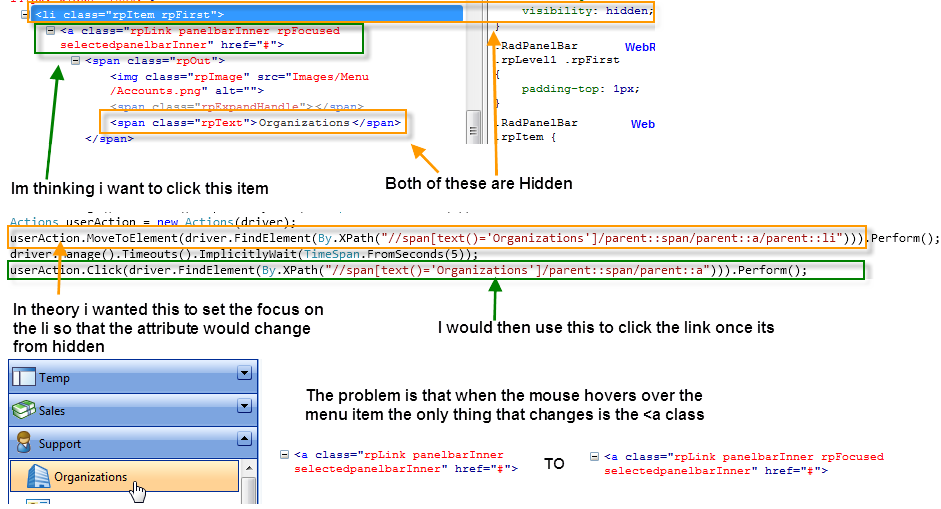
I am trying to create a test that clicks a menu item in an accordian, but selenium cannot find the element because it is hidden. I am not the developer for the app so i cannot change the code.I would like to click this item:
I am currently using this codedriver.FindElement(By.XPath("//span[contains(.,'Organization')]")).Click();
I have tried a slew of ways to get to this element but i always get the same error from NUnit: OpenQA.Selenium.ElementNotVisibleException : Element is not currently visible and so may not be interacted with.
Is there any way to click this link? Or will it have to be a css change?
--
You received this message because you are subscribed to the Google Groups "Selenium Users" group.
To post to this group, send email to seleniu...@googlegroups.com.
To unsubscribe from this group, send email to selenium-user...@googlegroups.com.
To view this discussion on the web visit https://groups.google.com/d/msg/selenium-users/-/TmeU9XrCmtwJ.
For more options, visit https://groups.google.com/groups/opt_out.


Aparna

Sandy
I am having same problem where I have to click on the hidden element.. and as Krishnan Said Selenium is not able to operate as the parent element are hidden..
So this command given by you will work well in selenium IDE but when you will try the same find.element in webdriver it will fail....
I am still wondering how selenium IDE can do these kind of things very well but web driver doesn't...:(

Peter Gale
Date: Fri, 27 Jul 2012 13:15:02 -0700
From: sandeepb...@gmail.com
To: seleniu...@googlegroups.com
Subject: [selenium-users] Re: Selenium WebDriver - FindElement By XPath but the Span and Link have visibility Hidden
You received this message because you are subscribed to the Google Groups "Selenium Users" group.
To post to this group, send email to seleniu...@googlegroups.com.
To unsubscribe from this group, send email to selenium-user...@googlegroups.com.

Stefan Teixeira
1 - use WebDriverBackedSelenium, which is an implementation of Selenium RC in WebDriver. Your code would look just like that:
Selenium selenium = new WebDriverBackedSelenium(driver, "http://urlHere");
selenium.click("id=elementId");
driver = ((WrapsDriver) selenium).getWrappedDriver();
(check this blog: http://selenium2advanced.blogspot.com.br/2012/01/advancetopics.html)
2 - use the JavascriptExecutor class, check the API: http://selenium.googlecode.com/svn/trunk/docs/api/java/org/openqa/selenium/JavascriptExecutor.html
Regards,
Stefan.
I am trying to create a test that clicks a menu item in an accordian, but selenium cannot find the element because it is hidden. I am not the developer for the app so i cannot change the code.I would like to click this item:
I am currently using this codedriver.FindElement(By.XPath("//span[contains(.,'Organization')]")).Click();
I have tried a slew of ways to get to this element but i always get the same error from NUnit: OpenQA.Selenium.ElementNotVisibleException : Element is not currently visible and so may not be interacted with.
Is there any way to click this link? Or will it have to be a css change?
--
You received this message because you are subscribed to the Google Groups "Selenium Users" group.
To post to this group, send email to seleniu...@googlegroups.com.
To unsubscribe from this group, send email to selenium-user...@googlegroups.com.
To view this discussion on the web visit https://groups.google.com/d/msg/selenium-users/-/TmeU9XrCmtwJ.

Mark Collin
I would suggest you make it visible the way a user of the site would make it visible.
Interacting with disabled elements is not a true emulation of what the end user is doing and as a result not a realistic test…
From: seleniu...@googlegroups.com [mailto:seleniu...@googlegroups.com] On Behalf Of Stefan Teixeira
Sent: 31 July 2012 00:09
To: seleniu...@googlegroups.com
Subject: Re: [selenium-users] Selenium WebDriver - FindElement By XPath but the Span and Link have visibility Hidden
Nathan, when the element isn't visible, you can't interact with it in Selenium WebDriver. I suggest you two options:
1 - use WebDriverBackedSelenium, which is an implementation of Selenium RC in WebDriver. Your code would look just like that:
Selenium selenium = new WebDriverBackedSelenium(driver, "http://urlHere");
selenium.click("id=elementId");
driver = ((WrapsDriver) selenium).getWrappedDriver();
(check this blog: http://selenium2advanced.blogspot.com.br/2012/01/advancetopics.html)
2 - use the JavascriptExecutor class, check the API: http://selenium.googlecode.com/svn/trunk/docs/api/java/org/openqa/selenium/JavascriptExecutor.html
Regards,
Stefan.
2012/7/26 Nathan T <nathan...@gmail.com>
I am trying to create a test that clicks a menu item in an accordian, but selenium cannot find the element because it is hidden. I am not the developer for the app so i cannot change the code.
I would like to click this item:
Stefan Teixeira
Regards,
Stefan.

Nathan T
Actions userAction = new Actions(driver);
userAction.MoveToElement(driver.FindElement(By.XPath("//span[text()='Organizations']/../.."))).Perform();
driver.Manage().Timeouts().ImplicitlyWait(TimeSpan.FromSeconds(5));
userAction.Click(driver.FindElement(By.XPath("//span[text()='Organizations']/../.."))).Perform();
the /../.. at the end is to get up to the anchor parent so that i can give it focus. But it seems that MoveToElement is not placing the appropriate focus, or that because of the anchors hidden parent it still cannot find the item.
On Friday, July 27, 2012 12:19:00 AM UTC-4, Krishnan wrote:
I dont think the issue is with Selenium not being able to find the element. I think the issue is with selenium not being able to operate on the element in question because it is not visible. Perhaps one of its parents is hidden.
Thanks & Regards
Krishnan Mahadevan
"All the desirable things in life are either illegal, expensive, fattening or in love with someone else!"
On Thu, Jul 26, 2012 at 10:38 PM, Nathan T <nathan...@gmail.com> wrote:
I am trying to create a test that clicks a menu item in an accordian, but selenium cannot find the element because it is hidden. I am not the developer for the app so i cannot change the code.I would like to click this item:
I am currently using this codedriver.FindElement(By.XPath("//span[contains(.,'Organization')]")).Click();
I have tried a slew of ways to get to this element but i always get the same error from NUnit: OpenQA.Selenium.ElementNotVisibleException : Element is not currently visible and so may not be interacted with.
Is there any way to click this link? Or will it have to be a css change?
--
You received this message because you are subscribed to the Google Groups "Selenium Users" group.
To post to this group, send email to selenium-users@googlegroups.com.
To unsubscribe from this group, send email to selenium-users+unsubscribe@googlegroups.com.
Nathan T

Darrell Grainger
Sandy
Yes Its right that webdriver behaves in very much similar way as a human do... But while making things visible to able be worked is not easy.
Yes click method is one and there are also actions method but if we are not putting an external wait like thread.sleep the focus used to be lost....
I already had suffered the same with JSF menus. When it comes to selenium IDE it can click the hidden elements directly!!! So either we need to file a bug regarding
lost focus using builder (actions). (Added :- same can not also be achieved using the external wait also...)
I haven't filed any bug till now but if more people will counter the similar problems then will need to file it as generalized bug.
Nathan T
Darrell Grainger
Nathan T
"//div[@id='ctl00_menu2_radPanel']/ul/li[3]/div/ul/li/a/span/span[text()='Organizations']"for (int second = 0;; second++) {
if (second >= 60) Assert.Fail("timeout");
try
{
if (IsElementPresent(By.XPath("//div[@id='ctl00_menu2_radPanel']/ul/li[3]/div/ul/li/a/span/span[text()='Organizations']"))) break ;
}
catch (Exception)
{}
Thread.Sleep(1000);
}
driver.FindElement(By.XPath("//div[@id='ctl00_menu2_radPanel']/ul/li[3]/div/ul/li/a/span/span[text()='Organizations']")).Click();