
Problems with raft becoming unstuck on Replicator

Bill Pugh

Zip Zap
From: Bill Pugh <bill...@gmail.com>
To: make...@googlegroups.com
Sent: Friday, April 6, 2012 11:43 AM
Subject: [MakerBot] Problems with raft becoming unstuck on Replicator
You received this message because you are subscribed to the Google Groups "MakerBot Operators" group.
To view this discussion on the web visit https://groups.google.com/d/msg/makerbot/-/QDvU4ccEfnsJ.
To post to this group, send email to make...@googlegroups.com.
To unsubscribe from this group, send email to makerbot+u...@googlegroups.com.
For more options, visit this group at http://groups.google.com/group/makerbot?hl=en.

Dan Newman
On 6 Apr 2012 , at 3:04 PM, Zip Zap wrote:
> The platform has to be hot enough for ABS to stick. As I remember, 120C should be the minimum.
110 C works fine for me with my ToM. 120 C is actually a bit high from my experience. I believe
the MBI default is 100 C.
Dan

Chris

Greg Thorstad
Thorstad Computer/Thor3d.ca/Canadian Makerbot Distributor
Box 268
Outlook, SK
S0L 2N0
306 867-9596
----- Original Message -----From: Bill PughSent: Friday, April 06, 2012 12:43 PMSubject: [MakerBot] Problems with raft becoming unstuck on Replicator
--
Bill Pugh

akr...@yahoo.com
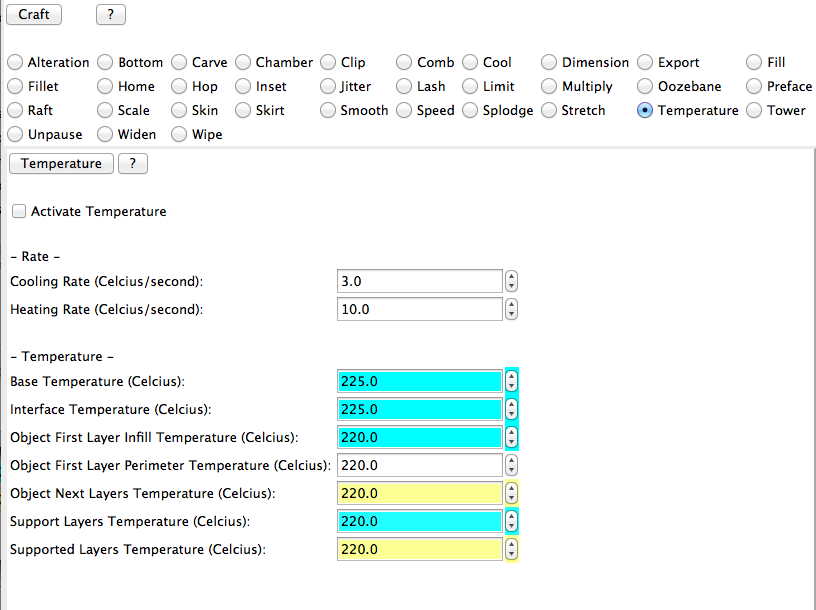
Edit. When Skeinforge pops up choose Temperature.
Bill Pugh
OK, I'm now sure where in this dialog I'm supposed to set the build platform temperature. See picture below. There is an entry for Base Temperature, but that is initialized to 225C. Am I supposed to check the temperature setting if I want to control the temperature?
The entire edit profile is a bit of a mess and insanely complicated. Is there a guide as to the common things you'd want to tweak.
Bill

bigjosh
trick finally solved this problem for me. Thanks!
-josh
On Apr 6, 6:04 pm, Zip Zap <zzap...@yahoo.com> wrote:
> The platform has to be hot enough for ABS to stick. As I remember, 120C should be the minimum. Maybe try using some blue painters tape or buff sand the surface of your Kapton tape to allow more adhesion.
>
> ________________________________
> Sent: Friday, April 6, 2012 11:43 AM
> Subject: [MakerBot] Problems with raft becoming unstuck on Replicator
>
> I just got my replicator, and I've been having problems with my initial prints. A few times, I had problems with my raft not initially sticking to the build platform. But after re-leveling the build platform very carefully, that doesn't seem to be a problem.
>
> But now the problem I seem to keep on hitting is that after getting about 1/4" of build height, the raft (and the entire piece) become unstuck from the build platform, and I just wind up building a hair ball.
>
> Any suggestions? I've been cleaning the platform with rubbing alcohol between builds. I could try leveling it again and reducing the clearence between the platform and the extruder heads even further.
>
> Another issues I've noticed is that sometimes the extruder doesn't start early enough, and I get a loose or uneven thread at the beginning of my raft. That almost always leads to the raft becoming unstuck. It seems like the best builds are when the extruder starts nice and early, and starts with a thread dangling off the platform that lead to the raft. Is this what works for people?
>
> If it matters, I have a dual extruder model, but so far I've just been trying to build single extruder models. I get the problem with both extruders.
>
> Bill
> --
> You received this message because you are subscribed to the Google Groups "MakerBot Operators" group.

Threeethan
If you're using the Replicator with the default settings (Skeinforge
47 and "Replicator slicing defaults") you actually don't want to go
into the Skeinforge settings and edit there.
You really want to click over to the gcode tab in ReplicatorG and find
this line:
M109 S100 T0 (set HBP temperature)
It should be in the first screen of data. To change the temperature,
edit the number after the S -- I'd start off moving it up to 110.
I think this is actually a lot easier than dealing with Skeinforge.
Btw, getting temperature into Print-O-Matic is a feature request that
I keep bugging the devs about, but they tell me that's trickier than
it seems.
-Ethan
Dan Newman
On 9 Apr 2012 , at 11:36 AM, Threeethan wrote:
> Ethan here from MakerBot Support.
>
> If you're using the Replicator with the default settings (Skeinforge
> 47 and "Replicator slicing defaults") you actually don't want to go
> into the Skeinforge settings and edit there.
>
> You really want to click over to the gcode tab in ReplicatorG and find
> this line:
>
> M109 S100 T0 (set HBP temperature)
>
> It should be in the first screen of data. To change the temperature,
> edit the number after the S -- I'd start off moving it up to 110.
And presumably once/if you find a magic temp. that makes things work better,
then you can edit the underlying start.gcode file to have the magic temp in
it so that you don't need to manually edit every gcode file you generate.
(That line of gcode which Ethan pointed you at is coming from the start.gcode
file.)
Dan
Dan Newman
> Any suggestions? I've been cleaning the platform with rubbing alcohol
> between builds.
You'll get better results if you use acetone. Note that nail polish
remover may not have acetone. And the ones which do have it quite
diluted. But even the diluted ones are better than using isopropyl
alcohol. (Or are you using scotch? ;)
As Greg mentioned, increasing your Z offset may help. The raft needs
to be slightly squished into the platform for good adhesion. So, first
try at a temp of 110 C. If that doesn't do the job, try increasing the
Z offset by 0.05 mm. See if that helps. You may need to increase it
several times. Just don't go so far as to put the platform into the
nozzle.
Another cause of poor adhesion is drafts. I once had poor adhesion on
one side of my ToM when building a 8 cm x 8 cm object. Then I noticed
that my wife had opened a window just 5 feet away from that side of the
bot and a gentle breeze was coming in….
And, in colder weather many folks have found they need to enclose the
sides of their bot. Even alumninum foil held up with masking tape
helps in that situation.
Dan
Zip Zap
From: Dan Newman <dan.n...@mtbaldy.us>
To: make...@googlegroups.com
Sent: Monday, April 9, 2012 11:41 AM
Subject: Re: [MakerBot] Re: Problems with raft becoming unstuck on Replicator
You received this message because you are subscribed to the Google Groups "MakerBot Operators" group.
Dan Newman
On 9 Apr 2012 , at 11:52 AM, Zip Zap wrote:
> Are there two temp settings for the HBP as for the extruder? The extruder for example has a temp setting in the start code. Then there are temp options in the edit profile screen for various parameters during printing.
I believe you're referring to SF profiles? First, as Ethan suggested, leave those alone.
And second, SF knows nothing about heated build platforms. The temp setting which shows
up in your gcode for the HBP comes from the static start.gcode file which was provided
with RepG, not with SF.
Dan

Aaron Double
M104 S#<baseTemperature> T0 (set extruder temperature)
M109 S#<bedTemperature> T0 (set heated-build-platform temperature)
to set the temps, the gecode will reflect what is set in tempurature for the hot end and will reflect the bed temp in the chamber plugin in skeinforge. Change skeinforge and they will change for you.
Aaron
> --
> You received this message because you are subscribed to the Google Groups "MakerBot Operators" group.
> To post to this group, send email to make...@googlegroups.com.
> To unsubscribe from this group, send email to makerbot+u...@googlegroups.com.

Aljosa
I did a lot of testing before I landed on 100C as it worked for pretty much everything except really large objects. That being said there is some diligence that is probably required at this temp. Acetoning the surface well, and insuring that there is no oily residue is definitely one. The other problem is Z height. I'm willing to bet that 99% of people that are having a problem at 100C, and using a raft just don't have the Z height correct so that the raft is actually being extruded higher then it should be. When this happens the plastic just doesn't stick as well and you get the peeling people are seeing.
My logic for 100 degrees was that it was enough heat for probably 80% of things. Problem is that too much heat can adversely affect your print. This is especially true when it comes to smaller more delicate object's. If you start pumping more heat into the print, you can start to see sagging, curling or drooping of your layers. However when you start getting into larger prints (and I mean generally 70% or more build volume) you will need more heat. Especially when your objects get larger and the forces of ABS shrinking are pretty big.
Here are two examples that show this very clearly that Nick took awhile ago, they show how too much heat can negatively affect your print.
http://www.flickr.com/photos/nickstarno/5530216311/in/photostream
http://www.flickr.com/photos/nickstarno/5530215845/in/photostream
That being said pumping more heat into the plate can overcome some of the above problems but at the expense of print quality. All in all I have looked at the situation, and with some of the plate problems (which are being rectified new ones are being tested) one of the solutions is to increase the temp to 110C. For a future release of RepG I will consider increasing the temperature slightly.
However before going and increasing your temperature I would recommend loosening the leveling thumb screws just a bit more. The beauty of the system is that you can actually adjust leveling while the first layer or raft is happening, and see how it actually affects the layer. What you want to aim for is a slightly squished appearance. If the raft looks more circular there is a good chance it wont stick. Also like mentioned above if you have acetone (nail polish remover is a quick substitute) insuring that the build plate is nice and clean definitely helps a lot, and please make sure the build plate is cool when cleaning it with any solvent!
Zip Zap
From: Aljosa <anom...@gmail.com>
To: make...@googlegroups.com
Sent: Monday, April 9, 2012 8:50 PM
Subject: [MakerBot] Re: Problems with raft becoming unstuck on Replicator

PrettySmallThings
I'm currently running a print with my (replicator's) bed at 100c.
When I first got my thingomatic in the fall, turning the temp up to
110c (and printing a bed leveling system) was the turning point in
transition from multitudes of failed prints to success. Reading
through this forum, the topic comes up over and over. So today, I
resisted the urge to up the bed temp to 110 on my new machine, and
what do you know, it works just fine. But the Kapton is new, freshly
cleaned, I have a really good understanding of what a good Z height
looks like, and that spending time leveling is crucial. I will
consider using 100c more often now.
But I wonder if many new users would have a more successful out-of-the-
box experience if the default bed temp on the test prints were turned
up. In the online guide, the assumption at the end of the "First Run
Experience" is that the print was successful. Mine wasn't, and I feel
that I sort of know what I'm doing. The topic of failed prints is
covered in the troubleshooting section, but it really needs a whole
page dedicated to it, prominently linked at the end of the FRE. A
Step by step of how to get a first successful print - re-leveling,
decreasing the distance between extruder and platform, and increasing
temp. Maybe followed by a short discussion of temp, and why 100c is a
good goal as a user's printing finesse grows.
My 2 cents :)
Aljosa

Joseph Chiu
acrylic bed just prior to printing, to get the first layers to stick
and settle in; and that higher layers do not care much about the bed
temperature. Perhaps changing the temperature setting so that it
starts at 110, but once the job starts, to set it to 100 would work to
get that initial stick, but lessen sagging?
> --
> You received this message because you are subscribed to the Google Groups
> "MakerBot Operators" group.
> To view this discussion on the web visit
> https://groups.google.com/d/msg/makerbot/-/EqUcdXzWtfcJ.

Achilles Boiser
awhile back seeing a youtube vid on a heated bed platform that had an
orange acryclic plate on top of a metal heated bed. In other words,
the acrylic plate would be directly heated while an object was printed
on top. I thought to myself that the heat should melt the acrylic
plate. However, it didn't.

Herón Ordóñez Guillén

Gary Crowell
You'll get better results if you use acetone. Note that nail polish
> Any suggestions? I've been cleaning the platform with rubbing alcohol
> between builds.
remover may not have acetone. And the ones which do have it quite
diluted. But even the diluted ones are better than using isopropyl
alcohol. (Or are you using scotch? ;)
...
Dan
----------------------------------------------
Gary A. Crowell Sr., P.E., CID+


W. Craig Trader
Gary Crowell
Gary Crowell

Rob Giseburt
Keep the stuff away from your kids. I understand it can be fatal if swallowed...

Peter Leppik
Gary Crowell
Your local hardware/home improvement store will also carry acetone by the gallon.