Replicator 2 - First Impressions

4,251 views
Skip to first unread message

Bartholomew

unread,
Oct 25, 2012, 12:24:07 PM10/25/12
to make...@googlegroups.com
I received my Rep 2 on Tuesday, and have spent several hours working with it so far. My first impressions:

Rep 2:
Beautiful, quiet, seems well put together. 
Functions extremely well with only a couple issues.
-- keeps telling me one of its heaters is unplugged at end of print. 
-- Curl up is a problem, even with painter tape and aquanet
Printing out the samples on the SD blew my mind with how delicate and accurate you can make things.
The on-board display and menu work well, although the messages are a bit cutesy.
Having spent 6 months printing with my my ToM, this is a quantum  leap in capability.

Makerware:
While the ability to pull in multiple models is nice, this sw seems less capable than ReplicatorG.
Controls are very basic, hopefully later versions will give more fine-tuning ability.
Loading stl models that work in ReplicatorG sometimes don't load into Makerware, with no indication of why.
Some models only show up on the plate by saving the file and reopening. 
Some models I made in Sketchup, which show up and print fine in ReplicatorG. don't print with Makerware, or only some parts of the model print.
Can't switch dimensions from metric to English.
Definitely feels like a beta program.


Bartholomew

unread,
Oct 25, 2012, 6:59:59 PM10/25/12
to make...@googlegroups.com
I printed the samples that were on the SD card, which I think are high-res. I have't tried to print anything I generated as Hi. The Makerware keeps freezing up randomly. Very disappointing.


On Thursday, October 25, 2012 3:17:37 PM UTC-7, Mark wrote:
Have you been able to do any high resolution prints?  Mine just sits there at 0% when I tell it to print at high resolution.
 
Thanks,
 
Mark

Clinton Hoines

unread,
Oct 25, 2012, 7:14:06 PM10/25/12
to make...@googlegroups.com
Sounds like a nice machine and the hardware is up to your expectatoins? I found Makerware very lacking as well (from my small amount of experience) like RepG far better.
 
Any pics of the prints? Are the pieces up on Thingiverse? Like to try the Rep (on sailfish) see if the prints are compareable. :)
 
Clinton

Justin Ribeiro

unread,
Oct 25, 2012, 7:27:59 PM10/25/12
to make...@googlegroups.com
We had the same 0% hang Mark. We ended up pulling the latest SF profile for the Rep2 out of the ReplicatorG repo. That resolved our 0% hang issue.

We tried Makerware, but had limited success (with either the Rep2 or Rep1). It just seems to make our machines angry.

We have our Rep1 running Sailfish Clinton and we love it (significant improvement over FW 6.0, night and day really). We've only had the Rep2 a day and once we iron out the kinks, we'll compare the two.

Clinton Hoines

unread,
Oct 25, 2012, 7:46:42 PM10/25/12
to make...@googlegroups.com
Cool look forward to the head to head. :) Yep I've been running Sailfish from the day it came out. It is leaps and bounds better than 5.5 and 6.0 was not even usable for me. It's like a whole new machine, Jetty and Dan are wizards. lol :)
 
Clinton

Big-E

unread,
Oct 25, 2012, 9:13:13 PM10/25/12
to make...@googlegroups.com
Are you running the most recent version of MakerWare and the makerbot replicator / replicator 2 firmware? they literally just released it. it's mentioned in another thread on here. MakerWare Ver. 1.0.1 and Firmware 6.1 was just released. Supposedly, for the new revision of MakerWare to work correctly, you need the new firmware installed as well.

I just discovered this today.
 

Bartholomew

unread,
Oct 25, 2012, 9:15:51 PM10/25/12
to make...@googlegroups.com
I'm running both. It doesn't help.

Big-E

unread,
Oct 25, 2012, 10:04:17 PM10/25/12
to make...@googlegroups.com
Wow, that's pretty disheartening to hear. I seriously hope everyone can iron out the bugs. Preferably before my printer shows up. :(

mbsteed

unread,
Oct 25, 2012, 10:10:54 PM10/25/12
to make...@googlegroups.com
I just got my Rep 2 yesterday. leveling the plate seemed straightforward but couldn't quite get it fine tuned like I would hope - I think the plastic parts underneath the plate are a bit flimsy and are prone to give - just the weight of my fingers seem to influence the levelling process.  Still it seems like it is straightforward and despite the levelling issues the test print seemed good.  Oh the other other thing is that the extruder seems to be shifted to left on mine - the leveling process literally is a mm from the left edge of the build plate.  Is there any way of shifting the build area to the right?

I have done numerous tests bringing in models from my 3D program (Modo) into Makerware and I noticed that it takes forever for the file to slice (convert to S3G format). Perhaps that is the delays you folks are experiencing.  My model has been working away for a 30 minutes and finally it is now 7% - it sat at 0% for a long time.  I have never used a 3D printer before so I am not sure what to expect but the progression bar doesn't seem to move very fast.  Perhaps giving the user some indication as to estimated time and a better progression bar would help.

However the test print was high quality so I am very excited to see how far I can go with this.

Here is sample of the kind of model I want to try, see the attached image.  Will this printout as is or will I need supports?

Bartholomew

unread,
Oct 25, 2012, 10:46:18 PM10/25/12
to make...@googlegroups.com
Based on what I've printed so far, I don't think you will need support. I agree Makerware needs to give an indication whether it is still crunching or stalled, particularly since (in my experience) it just quits part way through now and again.

John Biehler

unread,
Oct 25, 2012, 11:15:18 PM10/25/12
to make...@googlegroups.com
Just got mine today.

First print was the stretchlet that came on the sd card...turned out awesome:

My first time using the natural PLA (normally use various other colors)...love it so far.

My thoughts so far:

  • unboxing was pretty much just like the video MakerBot posted....although instead of what looks like masking tape in the video to secure all the motors for shipping was actually the beefiest zip ties I've ever seen...which were quite a pain to remove due to their closeness to the parts they were protecting...actually scratched the frame (minor) cutting them loose.
  • levelling was easier than my Prusa but not quite as simple as it was implied....surprised they didn't have better thumbwheels on the screws underneath the platform...and the levelling script seems to be a little off on the left side during the final verification pass...the nozzle is just a little off the platform (horizontally) 
  • viewing angle of the LCD could be better as the contrast looks off when standing over the bot...and the menus seem a little slow to refresh
  • wondering about the durability of the acrylic build platform...mine came with a blob/scratch on the smooth side on one end and my first levelling attempt seems to have been too low so there is shadows of previous print outlines on it...I guess that's why they include the sheets of blue tape
  • haven't upgraded the firmware yet and am in the middle of long print so it'll be awhile before that happens, just upgraded MakerWare. Didn't see a changelog though which would be nice.
So far I'm happy with it despite the above notes....it's rock solid and fast while being pretty quiet, although still louder than my Prusa.

Here's a quick iPhone video of the stretchlet printing. I'll be adding more photos/videos to this Flickr set as well.

John

Mark

unread,
Oct 26, 2012, 10:29:28 AM10/26/12
to make...@googlegroups.com
Okay, looks like the high resolution processing on the computer is just amazingly slow.  I just processed a tiny model, and it did work.
 
Mark

On Thursday, October 25, 2012 3:17:37 PM UTC-7, Mark wrote:
Have you been able to do any high resolution prints?  Mine just sits there at 0% when I tell it to print at high resolution.
 
Thanks,
 
Mark

On Thursday, October 25, 2012 9:24:07 AM UTC-7, Bartholomew wrote:

Gian Pablo

unread,
Oct 26, 2012, 12:51:24 PM10/26/12
to make...@googlegroups.com
Medium quality uses Miracle Grue, a C based slicer that is very fast. High quality still uses Skeinforge, the older Python based slicer that has been shipping with ReplicatorG since forever.

...
As far as software, Makerware 1.0.1 has worked well, although like the others, using the High Quality (0.1mm layer height) setting results in an absurdly long slicing and g-code generation time. It is worth it, since the prints at this height are stunning. However, I am usually tempted to use Medium quality for the faster solution time. It's orders of magnitude different; there's something wrong with the code.

...

SteedMaker

unread,
Oct 26, 2012, 10:14:59 PM10/26/12
to make...@googlegroups.com
Okay it took all day to slice the model shown above but the printout didn't work at all it started lifting off the build plate.  I then tried the bracelot model and it printed out skewed to one side:


I then tried printing the comb - but I had to leave it unattended and resulted in a gummed up extruder, see the image below:


Any thoughts on cleaning this? 

c f

unread,
Oct 26, 2012, 10:22:17 PM10/26/12
to make...@googlegroups.com
Regarding the extra long slicing times - it may be that your model just has a large number of surfaces, and skeinforge (the underlying software generating the toolpath in 'fine' mode) is having a difficult time with it. Your 3D software may have options for reducing the polygon count when you export it, or you can use a free program like meshlab to do so (http://www.shapeways.com/tutorials/polygon_reduction_with_meshlab).

--
You received this message because you are subscribed to the Google Groups "MakerBot Operators" group.
To view this discussion on the web visit https://groups.google.com/d/msg/makerbot/-/eUFRq2ULz40J.

To post to this group, send email to make...@googlegroups.com.
To unsubscribe from this group, send email to makerbot+u...@googlegroups.com.
For more options, visit this group at http://groups.google.com/group/makerbot?hl=en.

Doogiekr

unread,
Oct 26, 2012, 10:44:07 PM10/26/12
to make...@googlegroups.com
Skewing is almost always from a loose grub screw on one of the axes gears. check them all to make sure they are tight..

for cleaning... i dont use PLA, but for ABS i knock off as much as I can by hand, and then preheat the nozzle and use a 20mm calibration cube and slowly press it onto the nozzle. after it cools i pull it off and it takes the extra gunk off with it.

Doogiekr

unread,
Oct 26, 2012, 11:02:10 PM10/26/12
to make...@googlegroups.com
If it is a loose grub screw... kinda sad that even the Rep2 is having this issue (a little Loctite goes a long way)...

Mark

unread,
Oct 27, 2012, 11:42:01 AM10/27/12
to make...@googlegroups.com
Mine printed fine right out of the box, once I leveled the build plate.  I have noticed that preheating the extruder is required, otherwise the initial laydown of plastic doesn't stick.  I might even move to using the load utility to make sure the print head is really ready to print prior to starting a print.
 
Mark

Dan Newman

unread,
Oct 27, 2012, 11:49:16 AM10/27/12
to make...@googlegroups.com

On 27 Oct 2012 , at 8:42 AM, Mark wrote:

> Mine printed fine right out of the box, once I leveled the build plate. I
> have noticed that preheating the extruder is required, otherwise the
> initial laydown of plastic doesn't stick.

You mean preheating the extruder before leveling / adjusting the height of
the build surface, correct?

> I might even move to using the
> load utility to make sure the print head is really ready to print prior to
> starting a print.

Or are you saying that the bot starts printing before the extruder is fully up
to temp? You could add an M71 to the start gcode after the M6 "wait for tool temp",

M71 (Press the "M" when ready")

or for automatic operation, add a pause

G04 P5000 (Wait 5000 ms = 5 seconds)

I have noticed that the software PID used for the extruder temp. control does
initially cutoff the heating power early, expecting an overshoot and as such
things can start printing a few degrees C below the target temp. Is that what
you're seeing? From looking at the firmware sources, I can also see that MBI
now has two different sets of thermocouple handling routines: one for the Rep1
and one for the Rep2. As such, my experiences with the Rep 1 and earlier, may
not translate to the Rep2.


SteedMaker

unread,
Oct 27, 2012, 4:02:35 PM10/27/12
to make...@googlegroups.com
From my brief experience, once it is done it parks the extruder head at the top and the build plate moves to the bottom and the system seems to turn off the heat automatically (because when I try another print it has to heat up again).  I would say don't leave it unattended until you are sure it is printing properly and even then I would check in on it from time to time.  I don't think you want my experience.  I haven't heard back from Makerbot support on the gummed up extruder so I guess I will start playing with heating up the extruder and trying approaches to degumming it.  I also suspect I don't have a perfectly level build plate based on my problems levelling - which would also account for the gummed up extruder.  I will try a straight edge on the build plate to verify that.

On Saturday, October 27, 2012 12:20:52 PM UTC-6, Steve wrote:


Can you leave the machine un-attended during long prints, and when it is finished with a print does it turn off the heat to the extruder nozzle?

Steve

SteedMaker

unread,
Oct 27, 2012, 4:40:06 PM10/27/12
to make...@googlegroups.com
Okay the gummed up extruder was easy to fix - just preheated the extruder and and got a sharp object and the gum ball popped right off.  I just did yet another levelling procedure and it is printing out the comb test model as I type and as so far so good.

Steve

unread,
Oct 27, 2012, 5:48:19 PM10/27/12
to make...@googlegroups.com
  

How long was it from the time you ordered until the Replicator 2 was shipped?


Are you printing directly on the build plate or are you using the blue painters tape?

SteedMaker

unread,
Oct 27, 2012, 6:15:50 PM10/27/12
to make...@googlegroups.com
The comb turned out like all distorted.  However, Makerbot Support got back to me and suggested using Makerware to rest to factory settings and that seemed to help.  ...and that got the prints back into registration properly so no it wasn't a grub screw but a firmware problem.  I printed the comb again and this time it worked fine but it did curl up on the edges - so I stopped the print and set the build plate higher so that the extruder was closer to the build plate and started he comb job again and finally got a successful print although it still lifted slightly.  I went in and raised the build plate again - hopefully that will do it. 
Here is the results so far in the image below with the distorted comb on top and the final version on the bottom:


 I am now trying a more complex model with rafts and support.


SteedMaker

unread,
Oct 29, 2012, 11:02:50 AM10/29/12
to make...@googlegroups.com
Okay one step forward two steps back.

I have tried numerous times to print out a self created object.  I start in Modo (triple the quads) export to stl - use the free version of netfab to make any correction - bring it into the latest version of Makerware and then export to s3G format and then try to print (highest quality).  I haven't been successful it tends to put down a thin layer and then quit printing.  The test objects print fine and I am very impressed with those.

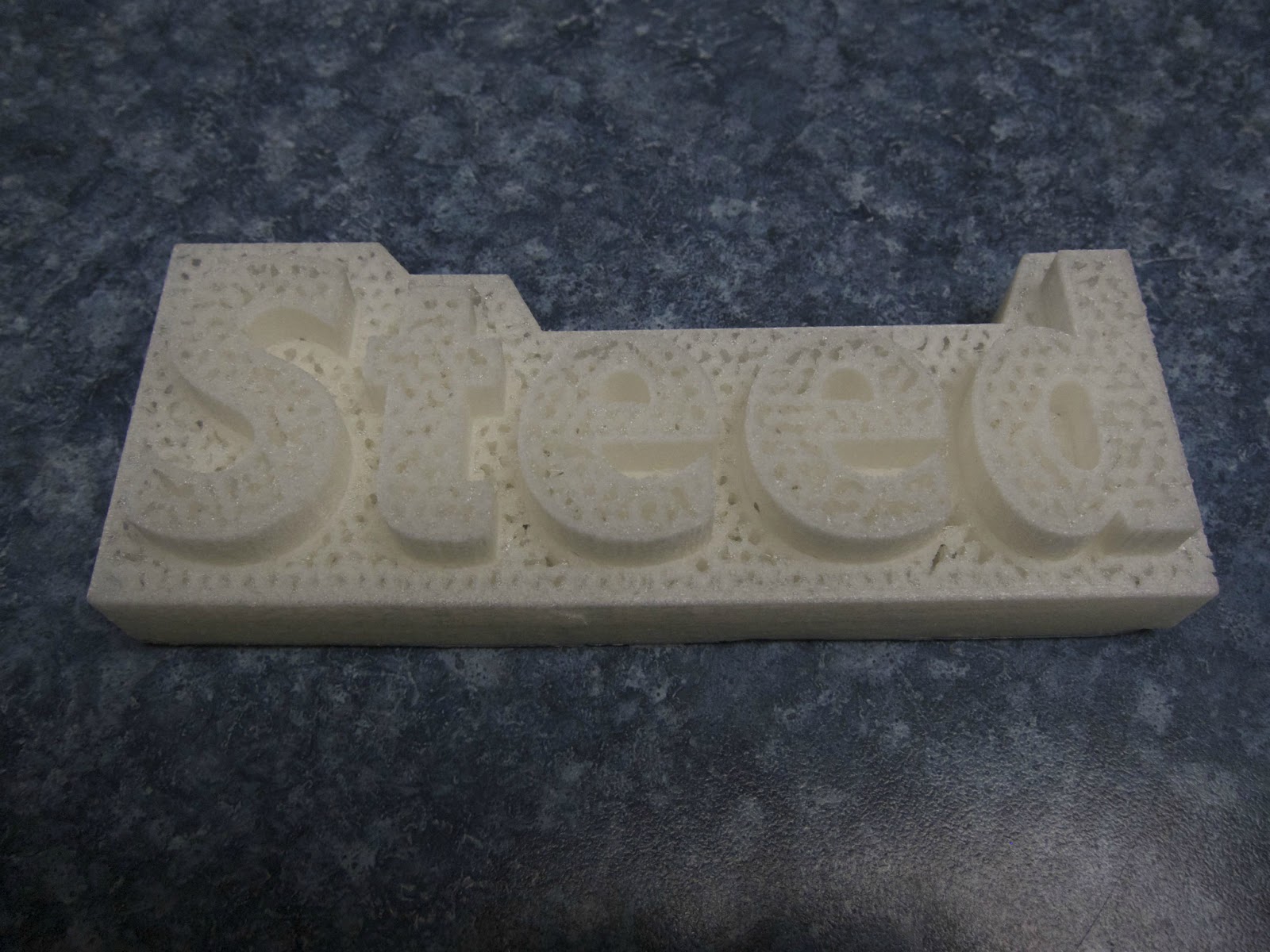
Fortunately I was finally able to get one of my own creations to print which was telling in terms of why I was having so much trouble.  The print was not hard plastic but was the consistency of styrofoam.  See the print image below.  The sides are rough and have the feel of paper rather than plastic.  Also note that the top layer was not printed at all - I was observing the printer during this final layer and nothing was extruding but it did try to print the final layer over the infill.  It is programmed to print at 230 degrees - the same as the test object.  Any suggestions?


Ian Lougheed

unread,
Oct 29, 2012, 12:55:04 PM10/29/12
to make...@googlegroups.com
Your print was done using very little in-fill.

When you generate your S3G file with Makerware, make sure you click the "advanced settings" button. The in-fill parameter is likely defaulting to 10%. Set it higher for more solid internal structure in your model. You can also configure the number of outer layers on the same dialog, which will make the walls of your semi-hollow print thicker.

You could also just set 100% in-fill for a completely solid part. Keep in mind, this will use more plastic (obviously) and will take longer to print.

Ian

Ian Lougheed

unread,
Oct 29, 2012, 1:27:35 PM10/29/12
to make...@googlegroups.com
In my case, grub screws were tight, left and right gantry belts were out of sync. Loosened a grub screw, straightened the gantry, tightened it, and that fixed the issue.

SteedMaker

unread,
Oct 29, 2012, 6:49:29 PM10/29/12
to make...@googlegroups.com
The large yellow house that the Makerbot team demos (the large print) had an infill of 6% so I thought 10% should be fine.  In my case the plastic that is being extruded is not anything like the test prints - it has a different quality (look and feel) - I suspect that the extruder is not being set an appropriate temperature.  I don't think the amount of in-fill is the issue.

John Biehler

unread,
Oct 29, 2012, 6:54:21 PM10/29/12
to make...@googlegroups.com
What speed are you using to print with? I tried printing a 0.1mm Yoda on the weekend at the default high quality settings and it was too thin and probably moving too fast for the layer height. The faster you go, the higher the temp needs to be for extrusion.

Clinton Hoines

unread,
Oct 29, 2012, 8:43:35 PM10/29/12
to make...@googlegroups.com
Are you using the default temp settings in MakerWare? Since getting my Rep1 only a few months ago I have printed 99% in PLA and found right about 190-195 is the sweet spot. This is without a heated bed and on Sailfish now printing at 120mm feed, so should be close to your Rep2.

SteedMaker

unread,
Oct 30, 2012, 9:30:46 AM10/30/12
to make...@googlegroups.com
I am using the default settings in Makerware;

MakeALot

unread,
Oct 30, 2012, 9:44:37 AM10/30/12
to make...@googlegroups.com
You may find that tightening the extruder feed Delrin plunger grub screw will help.
I have the same issue, extruder failing at various layers and this adjustment fixed it for 95% of prints.

SteedMaker

unread,
Oct 31, 2012, 9:37:35 AM10/31/12
to make...@googlegroups.com
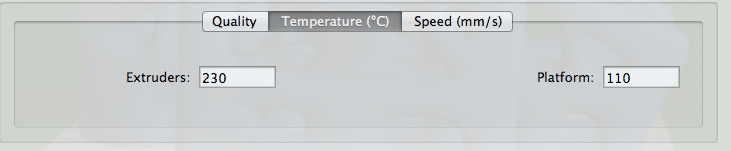
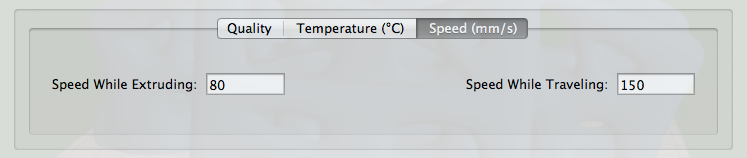
Could you suggest a print speed?  ...or temperature?  The current default temp is 230 and the default speed is 80 extruding and 100 when traveling.

SteedMaker

unread,
Oct 31, 2012, 9:59:09 AM10/31/12
to make...@googlegroups.com
Can you show me with a picture where this would be on the Rep 2?

SteedMaker

unread,
Nov 2, 2012, 8:13:46 PM11/2/12
to make...@googlegroups.com
Okay I tried increasing the temperature by 2, 4, and 6 degrees from the default - no happiness with Makerware.  The prints are all like styrofoam (using the high quality settings).  

However, I tried the same model with ReplicatorG and generated the code from there and it worked fine .  ...so the problem seems to be in the Makerware code.


Bartholomew

unread,
Nov 2, 2012, 9:27:14 PM11/2/12
to make...@googlegroups.com
I'd liketo trythis. What machine profile did you tell ReplicatorG to use. Replicator w/ single extruder?
Thanks,
Bart

Steve

unread,
Nov 3, 2012, 12:57:33 AM11/3/12
to make...@googlegroups.com


I am confused about the default temperature setting in MakerWare when using that software with the Replicator 2. 
In MakerWare the default is set to 230, but I have heard that is too high and may cause problems with PLA. Is that true?
What is the best temperature setting in MakerWare to use with the Replicator 2? Should I be changing any of the other defaults?


If I use ReplicatorG instead of MakerWare what settings should I  be using for printing? Are the default print settings, and the start and stop codes, in ReplicatorG version 0039 appropriate for the Replicator 2 or should they be changed? Do I need to change any of the defaults in the version of Skeinforge that comes with ReplicatorG version 0039?


Thanks, I would greatly appreciate hearing from those making successful prints with Replicator 2.


Steve

itzalak2

unread,
Nov 3, 2012, 3:53:27 PM11/3/12
to make...@googlegroups.com
I have been trying to improve the high quality of the smallest part. Firstly I verified the difference printing from the mac and the SD card. You can see the clearly better result of the printing form SD card.
It looks like the problem is with high quality settings only, it makes the finish of the piece like styrofoam and lost the upper layer (closing the piece as the original, see picture blue). I tried to use the medium quality but modifying the layer to 0.1 (as in the high quality settings) and the result is better (the lower piece of the photo with multiple pieces). It looks still like styrofoam but I achieved to print the upper layer of the piece.

I printed the shark form sd card at it looks great but I'm not sure if the print quality was set as high or medium. Any one knows if the examples of the sd are in high quality? and someone has printed the "bolt and nut" and can screw them? I achieve it but it was very very very hard and now I can't unscrew!!! :)


El sábado, 3 de noviembre de 2012 13:01:00 UTC+1, itzalak2 escribió:
Hi everybody,

I have the new rep 2 since yesterday and I made some test prints.

the first one was "bolt & nut" form the SD card and the result looks great but it was "impossible" to screw one each other.
The second was an own piece that curls a lot (medium quality). I tried using the raft and works great.
The third was a small piece with high quality first but the result was very bad. Then I tried again with medium quality with a lot better result. The only problem was that the small hole (5 mm) was 0,4 mm smaller.
la foto-4.JPG
Sin título.tiff

Andrew Plumb

unread,
Nov 3, 2012, 4:02:59 PM11/3/12
to make...@googlegroups.com
I'm not familiar with the Replicator 2 specifics, but if "high quality" makes the XY gantry move more slowly then you likely need to drop the extruder temperature by a good 10C so the PLA immediately under the nozzle doesn't sag too readily.

Andrew.

--
You received this message because you are subscribed to the Google Groups "MakerBot Operators" group.
To view this discussion on the web visit https://groups.google.com/d/msg/makerbot/-/a5uzMumxOEAJ.

To post to this group, send email to make...@googlegroups.com.
To unsubscribe from this group, send email to makerbot+u...@googlegroups.com.
For more options, visit this group at http://groups.google.com/group/makerbot?hl=en.
<la foto-4.JPG><Sin título.tiff>

--

"The future is already here.  It's just not very evenly distributed" -- William Gibson

Me: http://clothbot.com/wiki/


itzalak2

unread,
Nov 4, 2012, 6:11:48 AM11/4/12
to make...@googlegroups.com

Makerware default settings for 3 quality levels are:

LQ

Layer height: 0.34 mm
Temperature: 230 ºC
Extruding speed: 80 mm/s
Traveling speed: 150 mm/s

MQ

Layer height: 0.27 mm
Temperature: 230 ºC
Extruding speed: 80 mm/s
Traveling speed: 100 mm/s

HQ

Layer height: 0.1 mm
Temperature: 230 ºC
Extruding speed: 80 mm/s
Traveling speed: 150 mm/s

As you can see, the layer height is different obviously but the extruder speed is the same for the 3 levels. Only the travel speed of the MEDIUM LEVEL is slower. I have not clear why.

Any idea?

tunell

unread,
Nov 5, 2012, 12:22:01 AM11/5/12
to make...@googlegroups.com
So do you think it's really all it's cracked up to be? Or will it require lots of patience like the previous bots?

Dan Newman

unread,
Nov 5, 2012, 12:42:00 AM11/5/12
to make...@googlegroups.com
>> Makerware:
>> While the ability to pull in multiple models is nice, this sw seems less
>> capable than ReplicatorG.

I suppose you can "plate" in MW, save to STL, and then open the STL
in RepG and slice and print from RepG. (If you're really adventuresome,
you can speed up SF from RepG by a factor of around 5 by getting a copy
of PyPy for your platform and then pointing RepG at it as the Python
to use. That's done via the Preferences panel. The advanced section,
I believe. I've done that myself, but often fall back to normal Python
to ensure that I'm testing Sailfish using the same tools most other
users are using.)

Dan

big_red_frog

unread,
Nov 5, 2012, 7:07:18 PM11/5/12
to make...@googlegroups.com
Nut and bolt printed straight and true.
 
Does up nicely with no unwanted friction.
 
Onto my own piece... 

Darrell jan

unread,
Nov 5, 2012, 7:20:26 PM11/5/12
to make...@googlegroups.com
Dan,

Is there more to that than what you said? I downloaded PyPy for Mac and then set RepG preferences to use it. But it said that something was missing (a message that I guess I lost when I reset the preferences.)

Darrell

Dan Newman

unread,
Nov 5, 2012, 7:21:02 PM11/5/12
to make...@googlegroups.com

On 5 Nov 2012 , at 4:07 PM, big_red_frog wrote:

> Nut and bolt printed straight and true.
>
> Does up nicely with no unwanted friction.
>
> Onto my own piece…

Note that Makerbot's blog shows as of this afternoon a release
of a new version of MakerWare and a new firmware release for
the Replicator 2.

http://www.makerbot.com/blog/2012/11/05/makerbot-makerware-update/

Dan

Dan Newman

unread,
Nov 5, 2012, 7:30:44 PM11/5/12
to make...@googlegroups.com

On 5 Nov 2012 , at 4:20 PM, Darrell jan wrote:

> Dan,
>
> Is there more to that than what you said? I downloaded PyPy for Mac and
> then set RepG preferences to use it. But it said that something was missing
> (a message that I guess I lost when I reset the preferences.)

I have

% /usr/local/pypy-1.9/bin/pypy
Python 2.7.2 (341e1e3821ff, Jun 07 2012, 15:42:54)
[PyPy 1.9.0 with GCC 4.2.1] on darwin
Type "help", "copyright", "credits" or "license" for more information.
And now for something completely different: ``"Somewhere inside the large
lumbering blob of PyPy there is an elegant core trying to get out." - cfbolz''
>>>>

But to get RepG pointed at it, I've had to play games since the file window
it pulls up doesn't like to list /usr so I've usually gone the expedient
route of setting up a sym link in /

% cd /
% sudo ln -s /usr /foo

Then point at /foo/local/pypy-1.9/bin/pypy. First time you slice, you get a
pop up about "Multiple Python binaries have been found …. Please select one
from the list below…". I select the pypy one and click OK and let things
rip and snort and it just works for me.

If you ever want to undo it, just use the plist editor to edit

~/Library/Preferences/com.apple.java.util.prefs.plist

and remove the setting entirely. (It's either that or remember where RepG
was pointing to originally and restore that.)

Dan
Dan

Steve

unread,
Nov 5, 2012, 7:55:11 PM11/5/12
to make...@googlegroups.com


Big_Red_Frog:


What Temperature are you printing at?     The default in MakerWare is set to 230 which seems high.


When did you order the Replicator 2, and when did it arrive?


 .

big_red_frog

unread,
Nov 5, 2012, 8:39:17 PM11/5/12
to make...@googlegroups.com
Its running at 230 default.
 
I grabbed the new version of the makerware to slice my own piece at medium.
 
Thats printing now all default.
 
Lots of support structure, and quiet a hefty piece.
 
Not tried 3d printing before, so I may be overreaching.
 
I didnt think to check the firmware version, will do after this job, though as luck would have it, I will not be able to play with it further for a few days.
 
I ordered mine from www.makerbot.ca as I am in Canada. Ordered on the 19th, arrived with them in Canda on the 30th, and I recieved it today on the 5th.

John Biehler

unread,
Nov 5, 2012, 8:39:34 PM11/5/12
to make...@googlegroups.com
It's not that high when you consider the speed....PLA needs to be hotter if you're moving it faster.

That said, it does seem to depend on the filament used...I've noticed the 'icicle blue' MBI filament to behave different (stick less) than their green or natural PLA.

Steve

unread,
Nov 5, 2012, 10:40:06 PM11/5/12
to make...@googlegroups.com


Big_Red_Frog:

Thanks for the feedback, I am also relatively new to this and want to hit the ground running when my Replicator 2 arrives. I read that PLA can have problems if it sits at high temp too long, which may cause a clog in the nozzle. I have also seen on the boards that a lot of people are printing PLA around 200 so I wondered why the Replicator 2 was using 230 for a default. Have you tried other temperatures? How long did it take to get it out of the box and set up to print?


John Biehler:

What temp do you usually print PLA at? How do you determine if the temp and speed are too high or too low?


Thanks,


Steve

Anthony Tod

unread,
Nov 5, 2012, 10:43:08 PM11/5/12
to make...@googlegroups.com
I was up and running in 20 minutes 

I have no opinion on temperature, just running stock right now, my big self designed print seems to be running fine a few hours in.

--
You received this message because you are subscribed to the Google Groups "MakerBot Operators" group.
To view this discussion on the web visit https://groups.google.com/d/msg/makerbot/-/PRXQGvge2csJ.

John Biehler

unread,
Nov 5, 2012, 10:47:33 PM11/5/12
to make...@googlegroups.com
Lots of trial and error (this is my 4th printer). 

Haven't found a specific formula since every batch of filament is different...even from the same vendors.

I've been using the defaults with my Rep 2 so far just to get a good baseline, mostly using the medium print setting.

big_red_frog

unread,
Nov 5, 2012, 10:49:32 PM11/5/12
to make...@googlegroups.com
Funny how these things drive other discovery. Wondered if my Canon S5 had timelapse. It didnt, then I discovered this
 
 
Ten minutes later, one hacked camera and timelapse running!
 
Who'd of thought...
To unsubscribe from this group, send email to makerbot+unsubscribe@googlegroups.com.

big_red_frog

unread,
Nov 5, 2012, 11:22:19 PM11/5/12
to make...@googlegroups.com
OK, it failded, 60% in, but I have to shut down now anyway, looked like extruder blocked, or failed to feed, I note the feeder tube had come loose, so probably jammed it.
 
Did a load cycle and it is flowing again.
 
Dont get to play now till the weekend :-(

itzalak2

unread,
Nov 6, 2012, 1:52:29 AM11/6/12
to make...@googlegroups.com
Yesterday I tried new prints with 220 ºC and this solved the curling problem with bigger pieces like I the pieces in the picture uploaded yesterday (flat discs). Now the same piece is printed very well without using rafts to avoid curling. Great improvement for me and hope for you too.

The high quality process is still looking as styrofoam so it is unusable. Any body has tried high quality prints?


To unsubscribe from this group, send email to makerbot+u...@googlegroups.com.

Dan Newman

unread,
Nov 6, 2012, 1:55:11 AM11/6/12
to make...@googlegroups.com

On 5 Nov 2012 , at 10:52 PM, itzalak2 wrote:

> Yesterday I tried new prints with 220 ºC and this solved the curling
> problem with bigger pieces like I the pieces in the picture uploaded
> yesterday (flat discs). Now the same piece is printed very well without
> using rafts to avoid curling. Great improvement for me and hope for you too.
>
> The high quality process is still looking as styrofoam so it is unusable.
> Any body has tried high quality prints?

Have you tried the latest MakerWare release and the latest Rep 2 firmware?

Dan

Dan Newman

unread,
Nov 6, 2012, 1:57:43 AM11/6/12
to make...@googlegroups.com
Mind you, the MBI blog about the two doesn't mention any fixes that would
seem relevant to any high quality cottage cheese issues.

Dan

itzalak2

unread,
Nov 7, 2012, 2:32:31 AM11/7/12
to make...@googlegroups.com
Yes, I do. I printed again the "nut & bolt" with the same result, it looks good but it is unscrewable.

Someone can screw it?

lassikin

unread,
Nov 7, 2012, 4:55:47 AM11/7/12
to make...@googlegroups.com
printed in transparent pla I got mine as screwable. takes a lot of force though the first time to get it to screw. it depends a lot on the material how much bigger/smaller you need to make screwable parts.

-lassi

itzalak2

unread,
Nov 7, 2012, 8:43:42 AM11/7/12
to make...@googlegroups.com
Hi Lassi

I made the both tries of the nut-bolt with transparent PLA and without any scaling, just as comes in the SD card. First one with default settings of maker ware and the second one with 220ºC extruder temp. The same result. I screwed applying too much force and when I say to much is too much :)

 Any idea to solve this?

Thanks.
finger.png

SteedMaker

unread,
Nov 7, 2012, 10:17:06 AM11/7/12
to make...@googlegroups.com

I tried another high quality print from Makerware after the upgrade to 6.2 and it is slightly better but still has the styrofoam quality. The medium quality prints from Makerware seem to be working.

Another problem I am having is that the print job quits mid way through a print regularly. I have taken apart print head and cleaned it numerous times - sometimes that seems to help but other times not. Any suggestions for that problem.

One other note: I have noticed that after I have printed something out and if I try to print something else - it is messed up. I have to turn off the Makerbot and then turn it on again and then it seems to work again.

Finally a successful self-created object (with the latest medium settings from Makerware), see the attached image.  This took a lot of work and two jobs that quit mid way through.


SteedMaker

unread,
Nov 7, 2012, 10:22:08 AM11/7/12
to make...@googlegroups.com
Try a different test print, e.g. Jaws, does everything look straight up and down?

Dan Newman

unread,
Nov 7, 2012, 11:06:53 AM11/7/12
to make...@googlegroups.com

On 7 Nov 2012 , at 7:17 AM, SteedMaker wrote:

>
>
> I tried another high quality print from Makerware after the upgrade to 6.2
> and it is slightly better but still has the styrofoam quality. The medium
> quality prints from Makerware seem to be working.
>
> Another problem I am having is that the print job quits mid way through a
> print regularly.

Are you printing over USB or from SD card. If over USB, then try from an
SD card. That eliminates USB comms stalling or otherwise being interrupted
from the list of possible suspects.


> if I try to print something else - it is messed up.

How soon after the prior print? With PLA you can have issues if some of it
sits idle in a very hot extruder for a period time. You may want to feed some
of the filament out right before the second print?

Dan

Anthony Tod

unread,
Nov 7, 2012, 2:41:22 PM11/7/12
to make...@googlegroups.com
Built mine stock and transparent place, screwed up easy first time and kids play with it, so it seems easy.

If it is not clean and easy, I would say something is wrong.


From: itzalak2
Sent: Wednesday, 7 November, 2012 5:43:46 AM PDT
To: make...@googlegroups.com
Reply To: make...@googlegroups.com
Subject: Re: [MakerBot] Re: Replicator 2 - First Impressions

--
You received this message because you are subscribed to the Google Groups "MakerBot Operators" group.
To view this discussion on the web visit https://groups.google.com/d/msg/makerbot/-/x1Ofu6awS4sJ.

SteedMaker

unread,
Nov 7, 2012, 4:31:19 PM11/7/12
to make...@googlegroups.com
I always print from the SD card and I always make a habit of going through the Load procedure and cleaning the printhead filament cog before doing a major print.

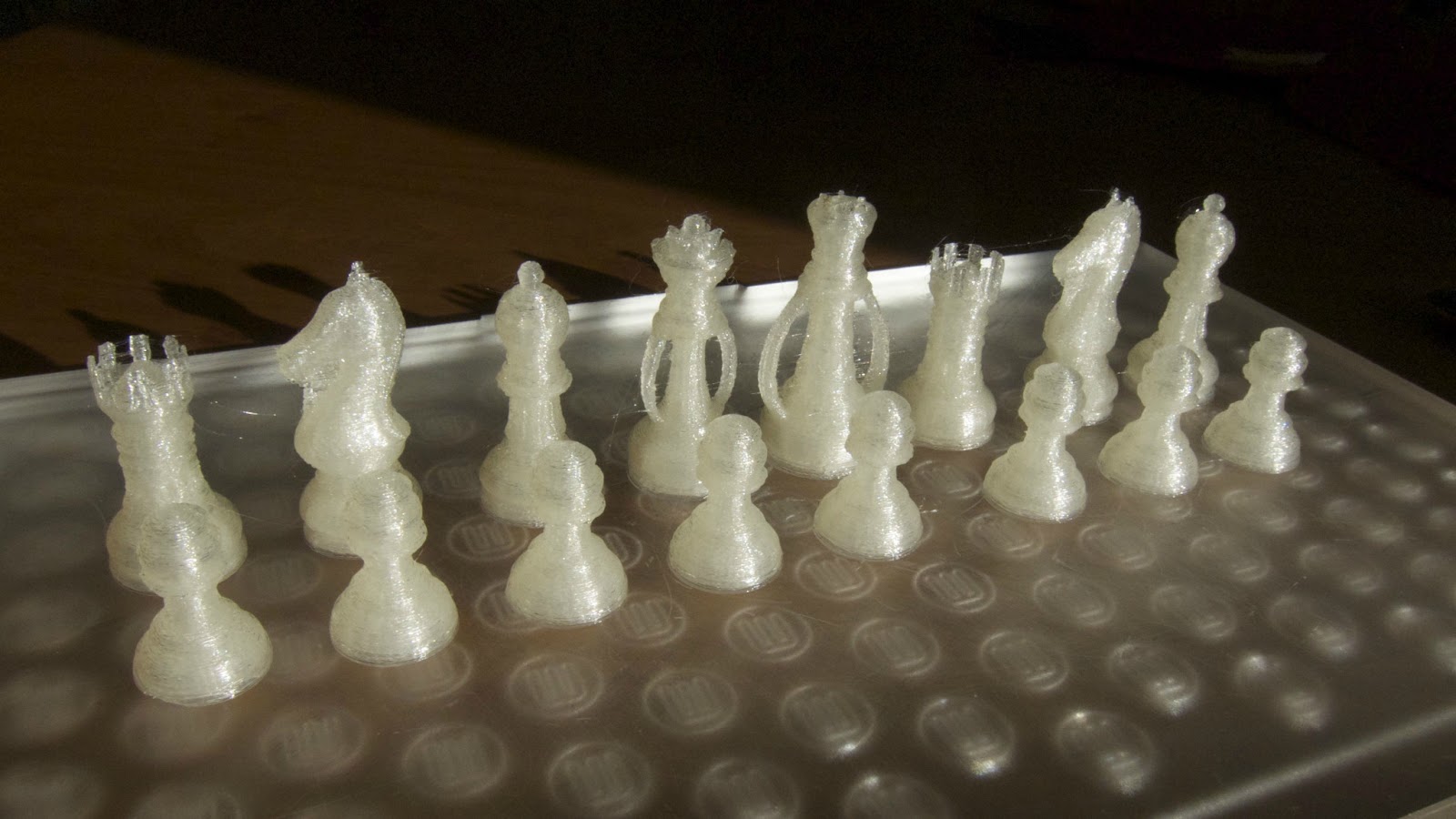
Here is my latest attempt at medium quality - too bad high quality is not working properly.

The print head frooze up (the print head stopped moving) at 99% right on top of the King's crown putting a hole there from the hot extruder.

Dan Newman

unread,
Nov 7, 2012, 4:42:34 PM11/7/12
to make...@googlegroups.com
I bet using ReplicatorG + SF-50 would work better. Unfortunately, there's
no default Replicator 2 profile in RepG 39…. However, there is one in
the current MBI RepG repo on github,

https://github.com/makerbot/ReplicatorG/tree/master/skein_engines/skeinforge-50/skeinforge_application/prefs

If you installed RepG 39 from

https://code.google.com/p/replicatorg/downloads/list

you could then drop that directory into the appropriate location in the installed RepG directory
and then give things a try.

The attached .zip file is the "Replicator 2 Slicing Defaults" directory from
github. I have no idea what state MBI considers them in -- I'm just suggesting
you give them a try if you feel up to it.

Dan
rep2-sf-50-defaults.zip

John Biehler

unread,
Nov 8, 2012, 2:33:12 AM11/8/12
to make...@googlegroups.com
Thanks for the heads up Dan! Trying it now.

Avandss

unread,
Nov 8, 2012, 2:34:17 AM11/8/12
to make...@googlegroups.com
I have to say the prints i see in these pictures are not exactly the out of the box high quality 100 micron prints advertised by makerbot?

i guess i will find out soon enough when i get my machine (dont get me wrong i am sure with a few updates and a little tweaking it will be better then advertised.. but right now the quality does not have the "100 micron" look

Steve

unread,
Nov 8, 2012, 12:45:34 PM11/8/12
to make...@googlegroups.com


Replicator 2 Users:


Are you printing directly on the build plate or using the blue painters tape?

John Biehler

unread,
Nov 8, 2012, 1:56:02 PM11/8/12
to make...@googlegroups.com
I'm printing directly on the (smooth side of the) build plate. I like the finish better than on heated glass on my Reprap.

Steve

unread,
Nov 8, 2012, 2:15:28 PM11/8/12
to make...@googlegroups.com


John Biehler:

Have you had any issues with the PLA being difficult to remove from the build platform or the platform being marked or damaged?


Mose Andre:

Since MakerWare is not quite ready for the high resolution mode, have you asked Tech support about Skeinforge settings for the 
Replicator 2? They show some very nice prints in the video's, so there must be some way to print well in 100 micron resolution. 
We just need to figure out what it is. 

Has anyone else found good Skeinforge settings that work well in high resolution mode with the Replicator 2?


 .


On Thursday, November 8, 2012 11:02:50 AM UTC-8, Mose Andre wrote:
I've had mine for a week or so and it definitely hasn't been out of the box 100 micron prints.  My problems seem related to the slicer being used (and settings).  For the 'high' (100 micron) resolution it uses Skeinforge and most of the settings are hidden from you (in MakerWare).  At the 'medium' (270micron) quality I was almost printing nicely out of the box, but have had to clean out the drive gear in the extruder system and adjust the tension and play with the temperature a little.  But, at 'medium' it uses the Miracle Grue slicer which works nicely (albeit at lower resolution).

I've tried ReplicatorG to slice and generate an s3g file but I'm not sure Replicator2 is truly supported -- the 039 release has a Replicator2 machine profile, but no default slicing settings.  The GitHub repo has some slicing profile checked in, but copying it into my 0039 ReplicatorG directory as recommended in this thread didn't seem to result in generating gcode that my Replicator2 enjoyed.  In fact, during all of this the machine shut down oddly several times (LED display goes off, no communication, LED build area light stays on).  So, I'm not sure what I should be able to do with ReplicatorG and my Replicator2 right now -- jog the axes? Or send an s3g file MakerWare exports?

I've also tried printing from the SD card.  Printing from an SD card requires an s3g file.  An s3g file is a little more than a gcode file and the https://github.com/makerbot/s3g repo has some tools for dealing with s3g (e.g. converting from s3g, decompiling).  My idea was to try Slic3r to generate gcode, create s3g using makerbot/s3g example scripts and then drop that on the SD card. Unfortunately, I was not able to create gcode in Slic3r that Makerbot's s3g was happy to convert -- there are PreProcessors (recently renamed GcodeProcessors) in to convert gcode from, e.g., Slic3r to Makerbot dialect, before generating the s3g from the processed gcode, but I haven't had time to figure out why it isn't converting nicely.

All that said, I am new to operating a 3d printer.  I did not expect to have this much difficulty when I bought a Replicator2 but I still like the thing more than most things.  I expect some of these issues are my fault being new and kinda dumb sometimes, and some of this Makerbot will release software fixes for in the near future.


On Wednesday, November 7, 2012 11:34:17 PM UTC-8, Avandss wrote:

John Biehler

unread,
Nov 8, 2012, 2:27:33 PM11/8/12
to make...@googlegroups.com
Not really...if you have your nozzle too close to the platform, it will be harder to remove a print...of course if you're too far away from the platform, the prints won't stick well so it's a balance.

Usually I'm able to remove it with my hand but sometimes use either a palate knife (from an art store) or a paint scraper to pry a corner up and things usually just pop off. 

The acrylic platform seems very resilient to any kind of scratching/abuse which is nice - mine looks like new still.

Mose

unread,
Nov 8, 2012, 2:35:22 PM11/8/12
to make...@googlegroups.com
Steve:

I've contacted support recently but haven't received a reply.  I should have mentioned that I have printed at 100micron in MakerWare, almost successfully, with a 'real' model.  With a 20mm cube it has worked fine, but with this model (Fennec Fox http://www.thingiverse.com/thing:20748) the support structure was badly stuck to the model and there are some holes from the top where the plastic seems to have fallen into the infill (so perhaps I need a denser infill).  Again, I am kinda new to operating one of these.

Steve

unread,
Nov 8, 2012, 6:36:40 PM11/8/12
to make...@googlegroups.com


John Biehler:

Thanks for the feedback on the acrylic platform. How many prints have you done with the Replicator 2, 
and have you used MakerWare or ReplicatorG for slicing? Have you had to change any of the default settings
to get good prints?


Mose:

I would be interested in the feedback you get from support. Did you try increasing the number of shells and the %
infill to see if you get better prints?


 . 

John Biehler

unread,
Nov 8, 2012, 7:32:34 PM11/8/12
to make...@googlegroups.com
Ive printed about 2 spools worth of objevts so far. Just using Makerware so far.

Dan Newman

unread,
Nov 8, 2012, 7:32:54 PM11/8/12
to make...@googlegroups.com

On 8 Nov 2012 , at 11:02 AM, Mose Andre wrote:

> I've had mine for a week or so and it definitely hasn't been out of the box
> 100 micron prints. My problems seem related to the slicer being used (and
> settings). For the 'high' (100 micron) resolution it uses Skeinforge and
> most of the settings are hidden from you (in MakerWare). At the 'medium'
> (270micron) quality I was almost printing nicely out of the box, but have
> had to clean out the drive gear in the extruder system and adjust the
> tension and play with the temperature a little. But, at 'medium' it uses
> the Miracle Grue slicer which works nicely (albeit at lower resolution).
>
> I've tried ReplicatorG to slice and generate an s3g file but I'm not sure
> Replicator2 is truly supported -- the 039 release has a Replicator2 machine
> profile, but no default slicing settings. The GitHub repo has some slicing
> profile checked in, but copying it into my 0039 ReplicatorG directory as
> recommended in this thread didn't seem to result in generating gcode that
> my Replicator2 enjoyed.

The start end code file has a typo in it. I ran across that last night
with my Replicator 1. RepG then misparses the gcode and generates some
"interesting" s3g.

If, in the RepG directory you navigate to the subdirectory machines/replicator2/
you will see the start & end gcode files. The Single_Head_start.gcode file
is missing a terminating ")" on line #8. I reported that to MBI last night and
they indicated that they would fix it. (Indeed, I can see that they did this
morning.)

That may not be the only issue… but it's the one I hit last night.

> In fact, during all of this the machine shut down
> oddly several times (LED display goes off, no communication, LED build area
> light stays on).

Sounds like the "interesting" s3g I encountered.

> I've also tried printing from the SD card. Printing from an SD card
> requires an s3g file. An s3g file is a little more than a gcode file

Well, not really. A lot of work goes into transforming the gcode to s3g.
Units are converted from mm to steps. All the max feed rates are applied
(decompose the velocity into components and apply along each axis), and
per machine interpretations of various details made.

Dan

Steve

unread,
Nov 8, 2012, 7:58:39 PM11/8/12
to make...@googlegroups.com
dnewman:

Should we edit the start code and add the missing ')' or download a newer version of the software? 
What is the effect of making this change?


What do you use for default settings in ReplicatorG/Skeinforge when using the Replicator 2?


 . 

Dan Newman

unread,
Nov 8, 2012, 9:28:17 PM11/8/12
to make...@googlegroups.com

On 8 Nov 2012 , at 4:58 PM, Steve wrote:

> dnewman:
>
> Should we edit the start code and add the missing ')' or download a newer version of the software?

That's up to you. It's software under development (as witness the checkins
by MBI). What I pulled yesterday worked for me modulo that one error.
What you pull down tonight or tomorrow will possibly have other changes.

> What is the effect of making this change?

Well, if you're uncertain of the change, then perhaps using under development
code isn't something you want to be doing. You need to be comfortable with
diagnosing problems if you will be using under development code. And not
my recommendation had merely been to use the SF profile for the Replicator 2.
Not to download and use the development copy of ReplicatorG itself.

> What do you use for default settings in ReplicatorG/Skeinforge when using the Replicator 2?\

The default settings are, well, the default settings.

Dan

Dan Newman

unread,
Nov 8, 2012, 10:36:10 PM11/8/12
to make...@googlegroups.com
>> What is the effect of making this change?
>
> Well, if you're uncertain of the change, then perhaps using under development
> code isn't something you want to be doing. You need to be comfortable with
> diagnosing problems if you will be using under development code. And not
> my recommendation had merely been to use the SF profile for the Replicator 2.
> Not to download and use the development copy of ReplicatorG itself.

As to adding that paren, the effect is to correct a bug in the gcode provided
by that file. Namely, the comment introduced by the '(' wasn't terminated with a ')'
and thus made additional lines of the gcode be ignored. And it also seems to have
thrown RepG for a loop as witness the bad s3g I found generated as a result.

>
>> What do you use for default settings in ReplicatorG/Skeinforge when using the Replicator 2?\
>
> The default settings are, well, the default settings.

Put differently, the files I mentioned *are* the default settings. Again, those
files are,

https://github.com/makerbot/ReplicatorG/tree/master/skein_engines/skeinforge-50/skeinforge_application/prefs

and those are the default Skeinforge (SF) slicing profiles for the Replicator 2, Replicator 1,
and other bots. They are the default settings.

Dan

Steve

unread,
Nov 9, 2012, 12:35:54 AM11/9/12
to make...@googlegroups.com


dnewman:


Thanks. I just edited the the start code file on my system to add the ')' to make 
the comment line valid. 

I was wondering if there was a single file with all the default
Skeinforge values for the Replicator 2. I see from your link that changes to different
sections of Skeinforge settings are checked in as changes/improvements are necessary.
Do these then get combined into the next release of Skeinforge? And if you want to try then out
prior to the next release then you can look through the files you linked to and make any
changes you are interested in manually? I have just started to work on getting familiar with
Skeinforge settings and what they do. I am making progress, and your inputs have helped.


 . 

Dan Newman

unread,
Nov 9, 2012, 1:50:09 AM11/9/12
to make...@googlegroups.com

On 8 Nov 2012 , at 9:35 PM, Steve wrote:

>
>
> dnewman:
>
>
> Thanks. I just edited the the start code file on my system to add the ')' to make
> the comment line valid.
>
> I was wondering if there was a single file with all the default
> Skeinforge values for the Replicator 2.

Default settings for Skeinforge are hard coded in the Python code for the individual SF plugins.
SF is maintained by yet another group, disjoint from MBI.

> I see from your link that changes to different
> sections of Skeinforge settings are checked in as changes/improvements are necessary.

Those are SF "profiles" which specify non-default SF settings.
However, you can think of them as MBI's default SF settings for a given bot. To
use SF with a bot using MBI's recommended base settings -- MBI's recommended default
settings -- you select one of the SF profiles which MBI has supplied with a ReplicatorG
release from MBI.

> Do these then get combined into the next release of Skeinforge?

No. They are not part of SF per se.

> And if you want to try then out
> prior to the next release then you can look through the files you linked to and make any
> changes you are interested in manually?

Correct. However, the typical way to changes things are via RepG

1. In RepG, select GCode > Edit Slicing Profiles...
2. In the popup window, select a profile and click "Duplicate"
3. Then select the duplicated profile and edit it.

> I have just started to work on getting familiar with
> Skeinforge settings and what they do. I am making progress, and your inputs have helped.

Unfortunately, there's next to no useful documentation on the MANY SF settings.
RepG's Print-o-Matic tries to make using SF easier.

Dan

SteedMaker

unread,
Nov 9, 2012, 1:30:03 PM11/9/12
to make...@googlegroups.com
One of the reasons you don't see the 100 micron quality is that, at least for my machine, the high quality setting does not work, so all my prints are medium quality.

Eighty

unread,
Nov 9, 2012, 1:38:34 PM11/9/12
to make...@googlegroups.com
Here's what I don't understand...
 
The fancy pictures of the Replicator 2 (on MakerBot's website) show printed items of a quality that no one has been able to reproduce.  I have to believe that they used their own software, so what's the deal?
 
Of course, they also printed with materials that they don't sell (such as black and silver PLA for the tractor).  So I wonder if they're getting high quality by using something besides their own products.  Seems a bit misleading.

Dan Newman

unread,
Nov 9, 2012, 5:30:06 PM11/9/12
to make...@googlegroups.com
FWIW,

I successfully used ReplicatorG 0040 to slice at a layer height of 0.1mm a squirrel,


Indeed, it was the first print I've done on a Replicator 2.  I did make one deviation
from the supplied SF slicing profile, "Replicator 2 slicing defaults".  Namely, I dumped
the s3g file for Mr. Shark and noticed that it begins at a Z=0.14mm height.  With that
default SF profile, it would have started the print at a height of Z=0.05mm (which is
one-half the layer height).  So, I edited the profile and enabled the Bottom plugin and
set the Altitude to 0.09mm.  That way, Mr. Squirrel began at the same height as Mr. Jaws --
0.14mm.   NOTE: doing that isn't necessary and you can instead tweak the Z home offset.
However, I wanted to have things set up so that RepG prints and prints from the MBI
SD card would BOTH print without my having to make levelling or Z home offsets tweaks.

Printing at 0.1 mm is not something you want to try to do the first day unless you are
quite familiar with 3d printing, ReplicatorG, and Skeinforge.  For example, I had to
get the build platform leveling dialed in and it took me a couple of tries.  Also a
little bit of observation to convince myself that that was the issue I was seeing.
That RepG 0040 has a really good default profile to begin with helped *immensely*.  My
using Bottom wasn't essential as I could have gone the other some other routes.

Dan

Some pictures: the PLA doesn't work well with a flash camera, but it's dark and
snowing off and on here and I was in a rush.

Dan

Dan Newman

unread,
Nov 9, 2012, 6:04:23 PM11/9/12
to make...@googlegroups.com

On 9 Nov 2012 , at 2:30 PM, Dan Newman wrote:

> FWIW,
>
> I successfully used ReplicatorG 0040 to slice at a layer height of 0.1mm a squirrel,
>
> http://www.thingiverse.com/thing:11705
>
> Indeed, it was the first print I've done on a Replicator 2. I did make one deviation
> from the supplied SF slicing profile, "Replicator 2 slicing defaults". Namely, I dumped
> the s3g file for Mr. Shark and noticed that it begins at a Z=0.14mm height. With that
> default SF profile, it would have started the print at a height of Z=0.05mm (which is
> one-half the layer height). So, I edited the profile and enabled the Bottom plugin and
> set the Altitude to 0.09mm. That way, Mr. Squirrel began at the same height as Mr. Jaws --
> 0.14mm. NOTE: doing that isn't necessary and you can instead tweak the Z home offset.
> However, I wanted to have things set up so that RepG prints and prints from the MBI
> SD card would BOTH print without my having to make levelling or Z home offsets tweaks.

P.S. I used Print-o-Matic with the following settings

Use Raft/Support -- not checked
Use support material -- none
Use default start/end gcode -- checked
Use P-o-M -- checked
Object infill 20%
Layer Height -- 0.1
Number of shells -- 2
Feedrate (mm/s) -- 60
Travel Feedrate -- 150
Print temperature -- 240

Filament Diameter (mm) -- 1.75 (I didn't measure -- just went with that)

Nozzle Diameter (mm) -- 0.4

Dan

Aimar Egaña

unread,
Nov 10, 2012, 1:45:29 AM11/10/12
to make...@googlegroups.com
Good news for rep2 users. thanks a lot Dan.


I will try today and expose my experience.


--
You received this message because you are subscribed to the Google Groups "MakerBot Operators" group.

Dan Newman

unread,
Nov 10, 2012, 2:37:38 AM11/10/12
to make...@googlegroups.com

On 9 Nov 2012 , at 10:45 PM, Aimar Egaña wrote:

> Good news for rep2 users. thanks a lot Dan.
>
>
> I will try today and expose my experience.

I can also report success with the other models I built
using RepG.

Again, the most important thing for me was good leveling of the
build platform. I tend to just use a sheet of normal printer
paper to test the gap after first ensuring that there's no plastic
stuck to the bottom of the extruder nozzle. I didn't need to use
a dial indicator, feeler guage, or anything else exotic. (Mind you,
it's okay to use such things. They aren't however, necessary to
get a 0.1mm layer height print.)

Dan

Aimar Egaña

unread,
Nov 10, 2012, 2:42:14 AM11/10/12
to make...@googlegroups.com
The only thing I have not clear is the offset adjustment told before. If the piece is laid on the build platform must I modify code or something else?


Dan

Dan Newman

unread,
Nov 10, 2012, 3:00:31 AM11/10/12
to make...@googlegroups.com

On 9 Nov 2012 , at 11:42 PM, Aimar Egaña wrote:

> The only thing I have not clear is the offset adjustment told before. If
> the piece is laid on the build platform must I modify code or something
> else?

So as to match the initial starting height of 0.14 mm I saw in the data file for Mr. Jaws,
I told RepG to use what it calls a starting "Altitude" of 0.09 mm. That way,
when I sliced the model at a 0.1 mm layer height, I knew that RepG would produce
an initial starting heigth of 0.09 mm + (layer height / 2) = 0.14 mm.

I accomplished that by activating RepG's "Bottom" plugin ( Gcode > Edit Slicing Profiles… )
and in the Bottom plugin settings the Altitude to 0.09.

So you don't modify code. You edit the slicing profile using RepG's "GCode" menu item.
On that menu, select the submenu "Edit Slicing Profiles…". Then duplicate the "Replicator 2 Slicing Defaults"
and edit that duplicate. Select "Bottom", check the "Activate" button in it, and set the Altitude
to 0.09 mm. Then select "Save and Close" from the File menu. Then click "Done" in the winodw
which let you select the profile to edit.

Then when you click the "generate gcode button", be sure to select your edit profile in
the drop down list of possible profiles.

Dan

Aimar Egaña

unread,
Nov 10, 2012, 5:16:29 AM11/10/12
to make...@googlegroups.com
Ok, but this "adjustment" is only for the Mr. Jaws file?


Dan

itzalak2

unread,
Nov 10, 2012, 6:15:11 AM11/10/12
to make...@googlegroups.com
I did a try with replicatorG 0040 with sample file "whistle". Generated gCode (few minutes) and then I generated s3g file to print from the SD card. This step was very very fast (1-2 seconds). I insert SD into the printer and printed but the extruder goes on from 1 square to other and starts to print but it finish in 10 secons without making nothing!

Any idea?


To unsubscribe from this group, send email to makerbot+unsubscribe@googlegroups.com.

Aimar Egaña

unread,
Nov 10, 2012, 6:22:52 AM11/10/12
to make...@googlegroups.com
The code generated for the whistle is:

(** This GCode was generated by ReplicatorG 0040 **)
(*  using Skeinforge (50)  *)
(*  for a Single headed Replicator 2  *)
(*  on 2012/11/10 11:51:07 (+0100) *)
(**** start.gcode for Replicator 2, single head ****)
M103 (disable RPM)
M73 P1 (display progress)
M73 P0 (enable build progress)
M73 P2 (display progress)
G21 (set units to mm)
M73 P3 (display progress)
G90 (set positioning to absolute)
M73 P4 (display progress)
M104 S240 T0 (set extruder temperature) (temp updated by printOMatic)
M73 P5 (display progress)
(**** begin homing ****)
M73 P6 (display progress)
G162 X Y F2500 (home XY axes maximum)
M73 P7 (display progress)
G161 Z F1100 (home Z axis minimum)
M73 P8 (display progress)
G92 Z-5 (set Z to -5)
M73 P9 (display progress)
G1 Z0.0 (move Z to "0")
M73 P10 (display progress)
G161 Z F100 (home Z axis minimum)
M73 P11 (display progress)
M132 X Y Z A B (Recall stored home offsets for XYZAB axis)
M73 P12 (display progress)
(**** end homing ****)
G1 X-141 Y-74 Z150 F3300.0 (move to waiting position)
M73 P13 (display progress)
G130 X20 Y20 Z20 A20 B20 (Lower stepper Vrefs while heating)
M73 P14 (display progress)
M6 T0 (wait for toolhead, and HBP to reach temperature)
M73 P15 (display progress)
G130 X127 Y127 Z40 A127 B127 (Set Stepper motor Vref to defaults)
M73 P16 (display progress)
M108 R3.0 T0
M73 P17 (display progress)
G0 X-141 Y-74 (Position Nozzle)
M73 P18 (display progress)
G0 Z0.6      (Position Height)
M73 P19 (display progress)
M108 R5.0    (Set Extruder Speed)
M73 P20 (display progress)
M101         (Start Extruder)
M73 P21 (display progress)
G4 P2000     (Create Anchor)
M73 P22 (display progress)
(**** end of start.gcode ****)
M73 P23 (display progress)
(** This GCode was generated by ReplicatorG 0040 **)
M73 P24 (display progress)
(*  using Skeinforge (50)  *)
M73 P25 (display progress)
(*  for a Single headed Replicator 2  *)
(*  on 2012/11/10 08:28:54 (+0100) *)
M73 P26 (display progress)
(**** start.gcode for Replicator 2, single head ****)
M73 P27 (display progress)
M73 P2 (display progress)
M73 P28 (display progress)
M103 (disable RPM)
M73 P29 (display progress)
M73 P5 (display progress)
M73 P30 (display progress)
M73 P0 (enable build progress)
M73 P31 (display progress)
M73 P8 (display progress)
M73 P32 (display progress)
G21 (set units to mm)
M73 P33 (display progress)
M73 P11 (display progress)
M73 P34 (display progress)
G90 (set positioning to absolute)
M73 P35 (display progress)
M73 P14 (display progress)
M73 P36 (display progress)
M104 S240 T0 (set extruder temperature) (temp updated by printOMatic)
M73 P37 (display progress)
M73 P17 (display progress)
(**** begin homing ****)
M73 P38 (display progress)
M73 P20 (display progress)
M73 P39 (display progress)
G162 X Y F2500 (home XY axes maximum)
M73 P40 (display progress)
M73 P22 (display progress)
M73 P41 (display progress)
G161 Z F1100 (home Z axis minimum)
M73 P42 (display progress)
M73 P25 (display progress)
M73 P43 (display progress)
G92 Z-5 (set Z to -5)
M73 P44 (display progress)
M73 P28 (display progress)
M73 P45 (display progress)
G1 Z0.0 (move Z to "0")
M73 P46 (display progress)
M73 P31 (display progress)
M73 P47 (display progress)
G161 Z F100 (home Z axis minimum)
M73 P48 (display progress)
M73 P34 (display progress)
M73 P49 (display progress)
M132 X Y Z A B (Recall stored home offsets for XYZAB axis)
M73 P50 (display progress)
M73 P37 (display progress)
(**** end homing ****)
M73 P51 (display progress)
M73 P40 (display progress)
M73 P52 (display progress)
G1 X-141 Y-74 Z150 F3300.0 (move to waiting position)
M73 P53 (display progress)
M73 P42 (display progress)
M73 P54 (display progress)
G130 X20 Y20 Z20 A20 B20 (Lower stepper Vrefs while heating)
M73 P55 (display progress)
M73 P45 (display progress)
M73 P56 (display progress)
M6 T0 (wait for toolhead, and HBP to reach temperature)
M73 P57 (display progress)
M73 P48 (display progress)
M73 P58 (display progress)
G130 X127 Y127 Z40 A127 B127 (Set Stepper motor Vref to defaults)
M73 P59 (display progress)
M73 P51 (display progress)
M73 P60 (display progress)
M108 R3.0 T0
M73 P61 (display progress)
M73 P54 (display progress)
M73 P62 (display progress)
G0 X-141 Y-74 (Position Nozzle)
M73 P57 (display progress)
M73 P63 (display progress)
G0 Z0.6      (Position Height)
M73 P64 (display progress)
M73 P60 (display progress)
M73 P65 (display progress)
M108 R5.0    (Set Extruder Speed)
M73 P66 (display progress)
M73 P62 (display progress)
M73 P67 (display progress)
M101         (Start Extruder)
M73 P68 (display progress)
M73 P65 (display progress)
M73 P69 (display progress)
G4 P2000     (Create Anchor)
M73 P70 (display progress)
M73 P68 (display progress)
M73 P71 (display progress)
(**** end of start.gcode ****)
M73 P72 (display progress)
M73 P71 (display progress)
M73 P73 (display progress)
(******* End.gcode*******)
M73 P74 (display progress)
M73 P75 (display progress)
M73 P100 ( End  build progress )
M73 P77 (display progress)
M73 P76 (display progress)
G0 Z150 ( Send Z axis to bottom of machine )
M73 P77 (display progress)
M73 P80 (display progress)
M73 P78 (display progress)
M18 ( Disable steppers )
M73 P79 (display progress)
M73 P82 (display progress)
M73 P80 (display progress)
M104 S0 T0 ( Cool down the Right Extruder )
M73 P81 (display progress)
M73 P85 (display progress)
M73 P82 (display progress)
G162 X Y F2500 ( Home XY endstops )
M73 P83 (display progress)
M73 P88 (display progress)
M73 P84 (display progress)
M18 ( Disable stepper motors )
M73 P85 (display progress)
M73 P91 (display progress)
M73 P86 (display progress)
M70 P5 ( We <3 Making Things!)
M73 P87 (display progress)
M73 P94 (display progress)
M72 P1  ( Play Ta-Da song )
M73 P88 (display progress)
M73 P97 (display progress)
M73 P89 (display progress)
(*********end End.gcode*******)
M73 P90 (display progress)
(******* End.gcode*******)
M73 P91 (display progress)
M73 P100 ( End  build progress )
M73 P92 (display progress)
G0 Z150 ( Send Z axis to bottom of machine )
M73 P93 (display progress)
M18 ( Disable steppers )
M73 P94 (display progress)
M104 S0 T0 ( Cool down the Right Extruder )
M73 P95 (display progress)
G162 X Y F2500 ( Home XY endstops )
M73 P96 (display progress)
M18 ( Disable stepper motors )
M73 P97 (display progress)
M70 P5 ( We <3 Making Things!)
M73 P98 (display progress)
M72 P1  ( Play Ta-Da song )
M73 P99 (display progress)
(*********end End.gcode*******)


To view this discussion on the web visit https://groups.google.com/d/msg/makerbot/-/7YYU8fuc-m0J.

To post to this group, send email to make...@googlegroups.com.
To unsubscribe from this group, send email to makerbot+u...@googlegroups.com.

Aimar Egaña

unread,
Nov 10, 2012, 6:43:16 AM11/10/12
to make...@googlegroups.com
Ok, I'm stupid. I discovered that I have to use "export" file.

This code is much bigger but when I try to print the it starts instantly without waiting to heat the header. Why?

Dan Newman

unread,
Nov 10, 2012, 11:44:16 AM11/10/12
to make...@googlegroups.com

On 10 Nov 2012 , at 2:16 AM, Aimar Egaña wrote:

> Ok, but this "adjustment" is only for the Mr. Jaws file?

No, it's for slicing models using RepG 40 at a layer height of 0.1 mm.
I've not actually printed anything from the sample SD card. I've only
printed models of my own or from Thingiverse which I sliced myself with
RepG 40.

Dan

Dan Newman

unread,
Nov 10, 2012, 12:03:32 PM11/10/12
to make...@googlegroups.com

On 10 Nov 2012 , at 3:43 AM, Aimar Egaña wrote:

> Ok, I'm stupid. I discovered that I have to use "export" file.
>
> This code is much bigger but when I try to print the it starts instantly
> without waiting to heat the header. Why?

I do not know what you're doing wrong, but your gcode is still not correct.
That's definitely not the correct gcode. Even towards the very beginning
it deviates from what I would expect to see. (I'm running on Mac OS 10.7.)

I'm guessing that you went into the Skeinforge slicing profile and
changed a number of things which you should not have. Otherwise, why did you
discover that you needed to enable the Export plugin? Do NOT try to setup
your on Skeinforge slicing profile. Use MBI's supplied default profile,
"Replicator 2 slicing defaults". Using RepG's GCode > Edit Slicing Profiles…
duplicate it to make your own private copy. Then in that copy simply
activate the Bottom plugin, set the Altitude to 0.09mm, and use "Save and Close".
Then, to generate your GCode, click the "Generate GCode" button when in the
"Model" view. In the popup window be sure to select your private slicing
profile in the drop down list at the very top of that popup window.

And start with a much simpler model such as the "20mm_Calibraton_Box".
A much better whistle to try is

http://www.thingiverse.com/thing:16286

I've never tried that one in PLA, but in ABS it works quite well.

Dan

Here's the start of what I see in the gcode.

(** This GCode was generated by ReplicatorG 0040 **)
(* using Skeinforge (50) *)
(* for a Single headed Replicator 2 *)
(* on 2012/11/10 08:49:42 (-0800) *)
(**** start.gcode for Replicator 2, single head ****)
M103 (disable RPM)
M73 P0 (enable build progress)
G21 (set units to mm)
G90 (set positioning to absolute)
M104 S240 T0 (set extruder temperature) (temp updated by printOMatic)
(**** begin homing ****)
G162 X Y F2500 (home XY axes maximum)
G161 Z F1100 (home Z axis minimum)
G92 Z-5 (set Z to -5)
G1 Z0.0 (move Z to "0")
G161 Z F100 (home Z axis minimum)
M132 X Y Z A B (Recall stored home offsets for XYZAB axis)
(**** end homing ****)
G1 X-141 Y-74 Z150 F3300.0 (move to waiting position)
G130 X20 Y20 Z20 A20 B20 (Lower stepper Vrefs while heating)
M6 T0 (wait for toolhead, and HBP to reach temperature)
G130 X127 Y127 Z40 A127 B127 (Set Stepper motor Vref to defaults)
M108 R3.0 T0
G0 X-141 Y-74 (Position Nozzle)
G0 Z0.6 (Position Height)
M108 R5.0 (Set Extruder Speed)
M101 (Start Extruder)
G4 P2000 (Create Anchor)
(**** end of start.gcode ****)
(<format> skeinforge gcode </format>)
(<version> 12.03.14 </version>)
(<created> 12.11.10|8:48 </created>)
(<extruderInitialization>)
(<craftTypeName> extrusion </craftTypeName>)
….

Aimar Egaña

unread,
Nov 10, 2012, 3:09:13 PM11/10/12
to make...@googlegroups.com
Hi,

I have bad news. This morning suddenly the X axis stops working. And the problem is the control of the X motor. I have verified the X motor and works well with other printer. I disconnected belt to see what happens when moving x axis and the motor goes forward and backward all the time. This causes a hard vibration and no displacement in x axis. I verified the drivers are fine changing X and Y as markerbot support says to me.

After all those verifications the only thing could be firmware or eeprom problem. I tried restoring all but nothing changes. Hope Makerbot give me a solution soon. :(


--
You received this message because you are subscribed to the Google Groups "MakerBot Operators" group.
To post to this group, send email to make...@googlegroups.com.

Dan Newman

unread,
Nov 10, 2012, 3:20:27 PM11/10/12
to make...@googlegroups.com

On 10 Nov 2012 , at 12:09 PM, Aimar Egaña wrote:

> Hi,
>
> I have bad news. This morning suddenly the X axis stops working. And the
> problem is the control of the X motor. I have verified the X motor and
> works well with other printer. I disconnected belt to see what happens when
> moving x axis and the motor goes forward and backward all the time. This
> causes a hard vibration and no displacement in x axis. I verified the
> drivers are fine changing X and Y as markerbot support says to me.
>
> After all those verifications the only thing could be firmware or eeprom
> problem. I tried restoring all but nothing changes. Hope Makerbot give me a
> solution soon. :(

So, you cannot move the along the X axis using the LCD menu's Utilities -> Jpg Mode?

Dan

Aimar Egaña

unread,
Nov 10, 2012, 3:30:01 PM11/10/12
to make...@googlegroups.com
No, it starts to vibrate (fast forward and backward small movements) and can't do nothing,


Dan Newman

unread,
Nov 10, 2012, 3:41:08 PM11/10/12
to make...@googlegroups.com

On 10 Nov 2012 , at 12:30 PM, Aimar Egaña wrote:

> No, it starts to vibrate (fast forward and backward small movements) and
> can't do nothing,

That's typically the sign of a the motor struggling or the stepper driver.
Since you saw the same behavior when swapping the little stepper driver cards,
you're left with a motor issue. That the motor worked fine with no load
isn't surprising. That leaves either something up with the X axis
mechanics (e.g., too much friction, out of alignment and binding, etc.)
or the stepper motor itself (failure in the motor or for some reason it's
simply not getting enough current and binding). The Vref values from
RepG's Machine > Onboard Preferences should be 118, 118, 40,
118, and 118. They show up on the second tab, "Homing/VREFs".

Before connecting to the bot over USB with RepG, make sure
that you've first selected "Replicator 2" as the Machine > Machine Type (driver).

Dan

Aimar Egaña

unread,
Nov 10, 2012, 3:52:26 PM11/10/12
to make...@googlegroups.com
Hi Dan,

1) I removed the X motor from its support and verified the movement without load. It makes the "crazy forward-backward" movement when I pulse x direction in jog mode.

2) Then I connected the Y motor to the X motor connector and the Y motor do the same movement as the X motor.

3) I connect the X motor to the Y connector and it works flawlessly

4) I swapped the drivers of the X and Y motors and same result.

5) With steppers off I can move by hand X axis applying the same force of the Y axis.


Conclusion: The problem looks like something with the eeprom or similar.

¿Any idea?


Dan

Dan Newman

unread,
Nov 10, 2012, 4:03:36 PM11/10/12
to make...@googlegroups.com

On 10 Nov 2012 , at 12:52 PM, Aimar Egaña wrote:

> Hi Dan,
>
> 1) I removed the X motor from its support and verified the movement without
> load. It makes the "crazy forward-backward" movement when I pulse x
> direction in jog mode.
>
> 2) Then I connected the Y motor to the X motor connector and the Y motor do
> the same movement as the X motor.
>
> 3) I connect the X motor to the Y connector and it works flawlessly
>
> 4) I swapped the drivers of the X and Y motors and same result.
>
> 5) With steppers off I can move by hand X axis applying the same force of
> the Y axis.
>
>
> Conclusion: The problem looks like something with the eeprom or similar.
>
> ¿Any idea?

Well, I find it hard to see how it could be a firmware or eeprom issue.
For instance, if you used the homing utility to home the axes, then
the X axis homing merely runs the stepper motor step-step-step-step-step
at a given speed. Not much which can go wrong in the firmware.

Some *hardware* possibilities still remain:

1. I could be the wiring for the X stepper motor. You've not eliminated
that variable.

2. It could be the X axis endstop is stuck on or turning on and off
at a high frequency. Eliminating that from the equation involves
looking at it -- does it look like its red LED is lit or dimly lit?
(Dimly lit would indicate it's switching on/off quickly.) I do not
know if the electronics will behave correctly if you simply disconnect
the X endstop cable briefly to test.

If I had to guess, I'd guess it's some sort of problem with the X stepper
motor wiring harness.

Dan
It is loading more messages.
0 new messages