
PS/2 and USB Keyboard

fig8r
In continuation of ...
"Figgipad Encoder" thread, posts on FIGnition as USB host
https://groups.google.com/d/msg/fignition/QmsQnWlZ_lw/9_pGkLckTB4J
numerous sources suggest that it should be possible to consider a simpler goal of interfacing with a dual USB and PS/2 enabled keyboards via a familiar USB type A receptacle.
Here's some references on PS/2 and dual USB-PS/2 keyboard/mouse interfaces:
- USB to PS/2 mouse or keyboard adapter pinout
http://pinouts.ru/InputCables/usb_ps2_mouse_pinout.shtml
- USB and PS/2 Multimedia Keyboard Interface based on Freescale M68HC08 MCU
has inner workings of a PC keyboard and dual PS/2 and USB considerations
http://www.freescale.com/files/microcontrollers/doc/ref_manual/DRM014.pdf
- PS/2 Keyboard Or Mouse, from Practical Arduino
http://www.practicalarduino.com/projects/ps2-keyboard-or-mouse
- Replace USB with PS/2
http://deskthority.net/workshop-f7/replace-usb-with-ps-2-t2209.html
- The Seeing-Eye-Mouse - a mouse position-tracking robot with dual PS/2-USB interface
http://imakeprojects.com/Projects/seeing-eye-mouse/
- USB to PS/2 convertor
http://www.instructables.com/id/USB-to-PS2-convertor/
fig8r
Hi All,
Here is a prototype of FIGnition PS/2 keyboard connection. This video demonstrates PS/2 Keyboard connected to FIGnition via Arduino.
http://youtu.be/km-ksxF0fuU
The PS/2 connector is mounted on a prototype shield over Arduino.
FIGnition provides power to Arduino and the keyboard. No computer is
connected. The demo is "Amazing new FIGgy program" by Julian Skidmore.
There are two pieces working together:
1. The Figgipad Encoder, described earlier
2. The PS/2 Keyboard Arduino library with CTRL support, PS2Keyboard 2.3-Ctrl
Supported characters:
- all alpha-numeric
- all syntax chars in Figgipad
(which excludes tilda '~' and underscore '_' mysteriously omitted)
- Enter, Space, Backspace
- Arrow keys
- Special keys:
- Ctlr+A "Again" - repeat last key
- Ctrl+B "Begin" - set marker
- Ctrl+C "Command" - editor commands and octal character entry
- Ctrl+D "Dup" - copy character from marker
- the Esc key, which exists from Figgy editor and can be used to exit
other programs, needs to be pressed once (since Esc is not used to
encode complex keys)
The code of the combined PS/2 and Figgipad Encoder is attached. Note: there is no need for additional memory buffer and the PS/2 library buffer is sufficient to keep up with human typing speed and it is not expected to transfer blocks of data.
Connections:
Figgipad Encoder: Arduino -> FIGnition:
Gnd -> Gnd
D8 -> PB0, D9 -> PD7
D4 -> PC0, D5 -> PC1, D6 -> PC2, D7 -> PC3
PS/2 connections: Arduino -> PS/2:
D3 -> 1 DATA
GND -> 3 GND
+5V -> 4 +5V
D2 -> 5 CLK
Power: Arduino -> FIGnition
5V -> 5V
(Only FIGnition is powered and shares power with Arduno and the keyboard.)
Oleg


Carl Attrill
what Ardino do in need to obtain to get my keyboard working, I have no previous experience of dev boards, do you have to burn a chip?
well done though, and a great video too.

James Grimwood
Oh and to be vaguely on topic the Arduino has its own little programming environment you use. Or you can use avrdude in a similar way to uploading firmware to the Fignition.

Stuart Taylor
Carl Attrill
fig8r
- When I was about to post the Arduino code, I realized that the MemBuffer used for transferring blocks in Figgipad Encoder over Serial is not needed for PS/2. While updating the code, I made an incorrect assumption about the use of PROGMEM to store ASCII map in program Flash space. Here the updated program code is re-attached.
A couple broken links:
- "Amazing new FIGgy program" by Julian Skidmore is described in
https://groups.google.com/d/msg/fignition/2VuX9ppqt80/9uDpnqC6uNgJ
- The Figgipad Encoder is described in
https://groups.google.com/d/msg/fignition/QmsQnWlZ_lw/b20b6GRxqNMJ
fig8r
Carl Attrill wrote:
>> what Ardino do in need to obtain to get my keyboard working, ... do you have to burn a chip?
Arduino was used as a prototype, because it was available and easy to program and understand. The compact size, simple USB connection, pin header extensibility, shields etc make it a very attractive entry level board. The development environment is very simple and to the point, which lowers the adoption barrier for the rest of us who always wanted to try embedded electronics but were afraid to ask. At the same time, Arduino programming is not toy cover language like BASIC, it is the same embedded C used in much more complex and professional environments like AVR Studio or WinAVR, so you can use more hardcore style with it like bit-wise port manipulation rather than Arduino "pins".
Stu Taylor wrote
>> The Arduino itself isn't needed, its just a development environment.
As for a shield, a custom PCB would be a nice thing. Yet FIGnition is nicely compatible with proto/strip board for a shield too.
Piku wrote:
>> Since an arduino is used to handle the ps/2 keyboard, and the Fignition has the same micro controller, does that make a Fignition with keyboard a dual core machine?
There are a few ways to go about providing keyboard connectivity.
1) An capable add-on board/shield, as discussed here. I think a USB-enabled stamp board like Teensy or Atmega32u4 Breakout would be a good choice because it can:
- be mounted on a FIGnition shield, which can also be easily made from a proto/strip board
- be removable for other uses
- provide USB/serial connection to PC to re-use PC keyboard (without additional chips like FTDI)
- be reprogrammable without additional boards
- transfer data to/from PC, e.g. via I2C/SPI to Serial bridge
- act as USB device to PC, possibly exposing FIGnition Flash as Mass Storage - see LUFA library
- have power and memory to support complex I/O tasks above
- cost is adequate for function: $16-20
- and it already has all the support circuitry and can be powered by FIGnition (further with a couple of diodes it can seamlessly switch between USB and FIGnition power)
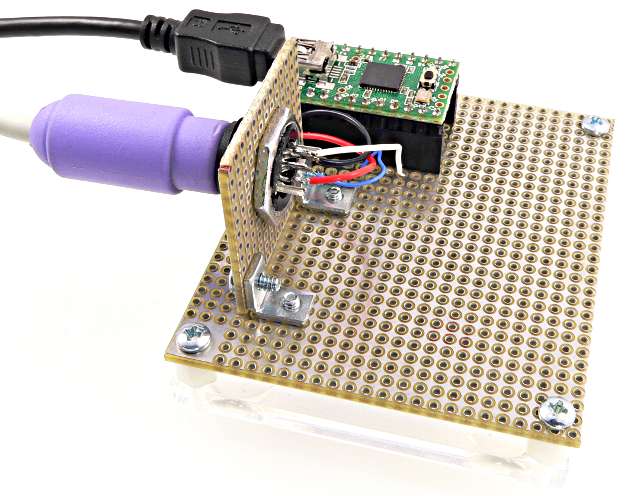
2) A minimal I/O chip such as ATTiny. It can provide a really low-cost solution for FIGnition. It probably has to be the largest memory with most pins such as ATtiny4313
3) Replacing the FIGnition keyboard driver

Julian Skidmore
Hi folks,
1) An capable add-on board/shield, as discussed here. I think a USB-enabled stamp board like Teensy or Atmega32u4 Breakout would be a good choice because it can:
Of course, one way is to compile the V-USB driver for a remote usbasp protocol loader that can program an AVR via its SPI port and load it as normal firmware for FIGnition.
Then the clever bit is that we just build the PS/2 FIGgy shield with links for the e.g. AtTiny2313 SPI port; upload the programmer firmware to the FIGnition; reboot FIGnition (it'll go into remote usbasp mode) then avrdude the AtTiny2313 firmware. Hey presto - the FIGnition is also the programmer!
Reload the normal FIGnition firmware and whoopie, you've done it! Cost £0.00 and it means FIGnition can also be promoted as a programmer!
3) Replacing the FIGnition keyboard driver
That's a separate topic. From what we learnt, it would be tight, but probably possible to fit PS/2 driver in ~700b code. The Arduino library uses interrupts to sense clock signals. This should be reconciled with (timer?) screen refresh interrupts. Since the keypad won't be usable, the space can be used to mount the PS/2 connector.
Yes. There's a bit of documentation on the FIGgy GitHub about doing this, we'd have to remember to hold clock down (or is it data?) during video scanning so that the keyboard doesn't try to communicate with the FIGgy then, but other than that, it should be feasible. 700b is certainly within the bounds of the existing driver.
Keep up the good work!
-cheers from julz
--
The DIY 8-bit computer from nichemachines™

Dr. Mike Reddy
PS/2 and USB Keyboard
Julian Skidmore
Aaah well - I'm sure you're not alone! However, it's summer vacation
time isn't it, perhaps there'll be more of an opportunity :-) ?
-cheers from julz
fig8r
Of course, one way is to compile the V-USB driver for a remote usbasp protocol loader that can program an AVR via its SPI port and load it as normal firmware for FIGnition.
Then the clever bit is that we just build the PS/2 FIGgy shield with links for the e.g. AtTiny2313 SPI port; upload the programmer firmware to the FIGnition; reboot FIGnition (it'll go into remote usbasp mode) then avrdude the AtTiny2313 firmware. Hey presto - the FIGnition is also the programmer!
Reload the normal FIGnition firmware and whoopie, you've done it! Cost £0.00 and it means FIGnition can also be promoted as a programmer!
Yes, this is really clever. It is amazing how AVR devices support self-programmability (writing it's own Flash via SPI) and also capable of acting as programmer to another AVR device.
I wonder if that can be taken even further: by using the same ATtiny2313 on the shield to act as the bootloader programmer for FIGnition. AFAIU, the usbasp magic is done in the bootloader and it needs an external programmer to get updated (?). For the ATtiny as programmer, I have the USBTiny library in mind and an SPI programmer based on it, such as USBTinyISP.
Oleg
Julian Skidmore
Yes, self reprogramming is pretty cool! For the sake of clarity, I
always refer to the firmware as code that gets loaded at 0x0000; and
the Bootloader as code that gets loaded at 0xF800 (the last 2Kb of the
firmware). So, to put my original proposal another way:
Original Scenario, we initially have a memory map of:
[0x0000: FIGnition Forth and 'OS'][0xF800: V-USB self-programming Bootloader]
We'd load a variant of V-USB configured as an ISP for an external AVR
into the firmware giving:
[0x0000: V-USB ISP Programmer][0xF800: V-USB self-programming Bootloader]
If we run FIGnition with SW1 held down we're back in USB-based
self-programming Bootloader, otherwise a normal Boot puts us in the
ISP Programmer mode (though communicating by USB). Is that how you
understood it?
> I wonder if that can be taken even further: by using the same ATtiny2313 on
> the shield to act as the bootloader programmer for FIGnition. AFAIU, the
> usbasp magic is done in the bootloader and it needs an external programmer
> to get updated (?). For the ATtiny as programmer, I have the USBTiny library
> in mind and an SPI programmer based on it, such as USBTinyISP.
to update the Bootloader. All you need is to download a firmware image
which contains the bootloader as a block of data and reprograms the
bootloader, I call this the self-programmer:
Originally:
[0x0000: FIGnition Forth and 'OS'][0xF800: V-USB self-programming Bootloader]
After download:
[0x0000: Self Programmer with New Bootloader Image ][0xF800: V-USB
self-programming Bootloader]
The Self Programmer could generate a video display and verify with the
user that they really want to overwrite the Bootloader.
After running the Self programmer:
[0x0000: Self Programmer with New Bootloader Image ][0xF800: New Bootloader]
Note: on an AVR you can program any part of the flash with software,
it's just that if you are programming any flash from the firmware
section the CPU is halted during the Erase/Write cycle (about 4.5ms).
Hence, main firmware is not so good as a self-programmer that also
needs to communicate with a host.
Your idea is what I'd call a bitstrapper. For example, a manual
bitstrapper would be a few TTL chips and 2 (to enter: '0'/'1' and Clk)
that allow you to program in a minimal bootstrap in a laborious way,
which you'd then use to upload a slightly more convenient (and larger)
bootloader manually and then use that to program in a true bootloader.
This would be a process much like that for ancient 60s minicomputers,
but with a greater degree of torture. However, for anyone who has
typed in several Kb of machine code with a hex loader it'd be a blast
from the past ;-) I'm not quite crazy enough to attempt this!
Of course, as you say you could use the V-USB ISP firmware method to
upload a bitstrapper to another AVR.
-cheers from julz
--
Carl Attrill

Julian Skidmore
Well done, that's really great :-) !
-cheers from julz
--
Carl Attrill
Carl Attrill
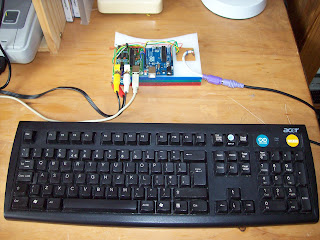
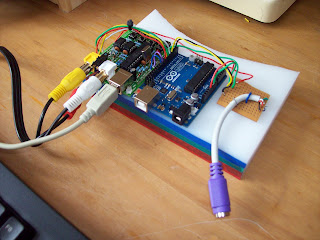
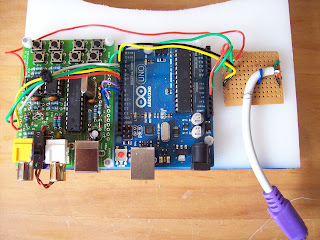
Hi these are the observations that I made building the Keyboard interface, I have also blogged this and liked it back to here, thanks Again Fig8r!
I used all of the information that Oleg provided in his thread and download the Library for the Keyboard to work and downloaded the .ino file in his addendum post here, the wiring was very straight forward, and it would have worked straight away would it not be for the error that I made.
The only difference in my attempt was that my PS2 socket and lead had differing colours to Olegs, therefore I searched online to see what Red,Green,Black and White were in PS2 protocol, this was confusing as it was four wires, but I found references to Data minus and plus, not CLK, so I used my logic and soldered what I thought it was.
Mistakes
This was a mistake as although I had wired the FIGnition to the arduino, there was no way of really knowing if I did this correctly, I began to try other combinations, it is usefull to know that if you cross 5 volt+ with gnd, blue smoke will come from the FIGnition and you will blow diodes, D7 and/or D6, just saying!
I also had to re-check the Arduino pins by running a simple LED fade programme for my pins, thankfully they all worked.
Getting it Right
So the only way to really find the role of each wire was to open the keyboard and test each one with my multi meter, I discovered that I was very wrong but now knew without doubt that Green was 5+V White was GND Black was CLK leaving RED to be DATA.
The 'Click' moment.
When this was wired up I fired it up to discover that it did not work correctly, now that I had become familiar with what Olegs sketch was doing I realised that I was dowloading the wrong sketch, you have to be careful, the filenames are the same and although I was adding the file, the Arduino software was pulling the file from a folder it had made with the old .ino programme in it!
So after adding uploading the correct sketch it worked perfectly, even the commands are Mapped with with the CTRL key and A B C D.
Carl Attrill
forgot to say that the blog is http://retrotext.blogspot.com


Ancient Atarian
I'm new to this group, so let me first say "hats off" to Julian Skidmore. You are a first class engineer and visionary! The Fignition is wonderful accomplishment and you deserve to be very proud of it. I'm planning on buying one, even if I have to use my ardunio to interface a keyboard. I'd like to wait a bit, however, in case you are planning on releasing a PS/2 keyboard interface to the Fignition board. I certainly would pay a bit more for a much easier to use device. I would also be willing to pay more for more working memory and static memory that could be used for storing programs and data (unless we are "pushing" what the microprocessor can handle). Long term, if the fignition could be interfaced to some sort of communications -- serial, modem, or an arduino network board the possibility of telnet and ftp would open a whole new world of possibilities (reading mail, transferring files, inbound remote sessions, etc..). But perhaps these are not only too ambitious but beyond the design goals. Regardless, great job!!! -- Kelly
fig8r
I believe the FIGnition board is fairly stable as it is now, in terms of peripheral extensibility. It has the same pinout for connections as Arduino (moreover all ports are grid aligned, which makes it more custom/proto board friendly). There much more potential for interface and experimentation inherited from the ATmega chip than being exploited.
I envision peripherals, such as PS/2, serial/TTL, I2C, screens, Ethernet, radio, sensors, motors, etc built on top of the current platform by means of shields and/or smaller breakout boards in a similar way as for Arduino or other development boards.
If you already have an Arduino, you can use it to quite easily connect PS/2 to FIGnition or use PC as keyboard, as well as transfer blocks of code back and forth.
The idea of Forth Server Pages is exciting. I wonder how hard it is to intercept the Forth's native "puts"/echo in order to redirect to SPI (interface of Ethernet shield).
: <H1>  ." <H1>"  ;
: </H1> ." </H1>" ;
<H1> ." Hello, world!" </H1>
Oleg
Julian Skidmore
> I'm new to this group, so let me first say "hats off" to Julian Skidmore.
> You are a first class engineer and visionary! The Fignition is wonderful
> accomplishment and you deserve to be very proud of it.
> I'm planning on buying one
> even if I have to use my ardunio to interface a keyboard. I'd
> like to wait a bit, however, in case you are planning on releasing a PS/2
> keyboard interface to the Fignition board.
FIGnition to be as standalone as possible. The FIGgypad design is a
patent-free chordal keyboard that's better than a mobile phone keypad
and can (and should) be used more widely. On FIGnition it's valuable
for helping people understand how switch matrix keyboards work. PS/2
is a protocol, like SPI, and therefore, from an educational viewpoint,
not as important.
However, that doesn't mean we won't see PS/2 keyboard interfaces for
FIGnition. One of the FIGnition members, Oleg was planning on making a
standalone PS/2 shield containing an At2313 Microcontroller to do the
conversions. Simon, another member has been working (when he has time)
on replacing the normal FIGnition keypad driver with a PS/2 driver.
That version would require less hardware (just a simple shield with a
PS/2 connector), but is probably further away from completion.
> I certainly would pay a bit more
> for a much easier to use device. I would also be willing to pay more for
> more working memory and static memory that could be used for storing
> programs and data (unless we are "pushing" what the microprocessor can
> handle).
(32Kbyte) and 8Mbit Amic 25L080 Flash chips. Anyone can buy these
chips (in the UK) via RS Components. In theory the Flash driver could
(with minor modifications to recognize the chip IDs etc) work with up
to 256MBit (32MByte) Flash chips. Going back to the RAM, FIGnition
only really expects 8KByte RAM chips and its editing area is at the
end of that, but it would be able to access the other 24Kb for data
(and even code with a little trickery).
Going beyond that would be problematic. SRAM really is limited to
32KByte, because FIGnition Forth uses 16-bit addresses. It's not a
restriction of the Microcontroller, since it has no concept of
external RAM at all and the transparent access to Serial RAM is
entirely due to the Forth Virtual Machine on FIGnition.
> Long term, if the fignition could be interfaced to some sort of
> communications -- serial, modem, or an arduino network board the possibility
> of telnet and ftp would open a whole new world of possibilities (reading
> mail, transferring files, inbound remote sessions, etc..). But perhaps
> these are not only too ambitious but beyond the design goals.
suitably modified shields it should be possible to use an Arduino
ethernet shield, since the standard Microchip based shield has an SPI
interface.
> Regardless, great job!!!
Thanks Kelly!
-cheers from julz
Ancient Atarian
Carl Attrill
great news! How did you find out about the Fignition?
Ancient Atarian
I've been searching for an 8-bit machine for some recreational programming and hardware hacking. Forth has limited commercial usefulness (I'm contract IT guy) but it's such a neat language concept I'd like to learn it anyway. I have several old Atari 8-bits, but don't really want to use them as I'm beginning to see them as investments ($$$) to care for now and possibly sell later. I work on a team that supports several thousand mission-critical servers, and frankly, it would not take that much to change a little educational tool like the Fignition computer into a commercial server. The processor is just a bit too weak on Fignition, but I forsee a day when small micro based servers will be common (such as Arm based or Raspberry Pi like). A simple, clean, modular hardware design like Fignition could be a good starting point for developing a real, production-ready, service-providing server. The electrical needs, heat and vibrations problems, and racking costs of large energy-hungry servers in a data center makes you appreciate tiny little computers like Fignition. -- Kelly
fig8r
This is an update to the original Figgipad PS/2 connection (Jun 21, 22)
https://groups.google.com/d/msg/fignition/Uh6KL0P1cx0/ArLhU4fuOY4J
to reflect the changes for the new ragged editor FIGnition firmware
Announcement: FIGnition Firmware 0.9.7!
https://groups.google.com/d/msg/fignition/xWf8Ami62pE/dENXgENf1-cJ
This version is in line with Figgipad Encoder v2.2
https://groups.google.com/d/msg/fignition/QmsQnWlZ_lw/8HiJizU9UEQJ
Summary of changes:
- Ctrl+Enter and Ctrl+J on PC are mapped to Shift+Enter with key code 141 (128+13) / 0x8D (08+0D)
(because Ctrl+J in terminal maps to LF line feed in ASCII)
- Ctrl+E on PC is mapped to Shift+Space with key code 160 (128+32) / 0xa0 (08+20)
(stands for "auto completE" or "Extend")
- Esc on PC is mapped to Shift+Del with key code 27 / 0x1B
- all other keys work as described in the original Figgipad PS/2
- on start/reset, in serial terminal the logo says "Figgipad PS/2 v2.2"
Note:
- This code requires the *updated* PS/2 Keyboard Arduino library with CTRL+ENTER support, PS2Keyboard 2.3-Ctrl-Enter
fig8r
https://groups.google.com/d/msg/fignition/Uh6KL0P1cx0/ofvXNw3B_QUJ
Julian Skidmore
Thanks for that!
-cheers from julz
On Tue, Sep 11, 2012 at 5:17 PM, fig8r <ole...@yahoo.com> wrote:
> This is the attached code for Figgipad PS/2 v2.2
> https://groups.google.com/d/msg/fignition/Uh6KL0P1cx0/ofvXNw3B_QUJ
>
Carl Attrill
fig8r
Could you confirm that you are using the latest
CTRL+ENTER support, PS2Keyboard 2.3-Ctrl-Enter
It's been specifically updated to support Ctrl+Enter.
Oleg