
Changing kernel form 4.4 to 4.14 and problems booting...

Adam Kearn
- UEFI: Sandisk Cruzer Blade 1.27
- Sandisk Cruzer Blade 1.27


nathan.d...@intel.com

gro...@google.com
This is with an AMI BIOS, suggesting that the hardware is not a Chromebook. Are you trying to run Chrome OS/Chromium OS on a non-Chromebook ? If so, you'll have to provide a lot of additional information, such as the target hardware, the kernel configuration, and the exact kernel version.
On Sunday, May 27, 2018 at 3:49:49 PM UTC-7, Adam Kearn wrote:
Adam Kearn
- CPU - x64 Intel(R) Core(TM) i5-3337U - 1901Mhz
- RAM - 4gb
- CPU - x64 Ryzen 5 1600
- RAM - 16gb
- CPU - x64 Ryzen 5 1600
- RAM - 16gb
Guenter Roeck
--
--
Chromium OS Developers mailing list: chromiu...@chromium.org
View archives, change email options, or unsubscribe:
https://groups.google.com/a/chromium.org/group/chromium-os-dev
---
You received this message because you are subscribed to a topic in the Google Groups "Chromium OS Development" group.
To unsubscribe from this topic, visit https://groups.google.com/a/chromium.org/d/topic/chromium-os-dev/ecOM1Jpjfm4/unsubscribe.
To unsubscribe from this group and all its topics, send an email to chromium-os-d...@chromium.org.
Adam Kearn
Guenter Roeck
I have even tried installing Ubuntu on a different HDD, but then I cant change "sudoers".
How would I "start with an upstreamv4.14" as you said??
Adam Kearn
Adam Kearn
Guenter Roeck
Sorry I didn't see the 2nd part you put.I don't know how to change the kernel, so how can I use the "one from Ubuntu"?
Also what info do u need to know about my build environment to help you understand?
Adam Kearn

Hi again, sorry if this is kinda long I wanted to include everything that has happened.
Let me know if I missed something that you need to know. :)
Background Context:
I am working on this project with my schools IT Technicians, we are replacing the old, outdated and slow Windows PC's with a custom build of
chromium OS. We want our build to include the following:
Support for older hardware (dell optiplex 745)
Schools logo on boot-up
Enrolled to schools domain
I started by installing Ubuntu on an old HDD I had laying around, then I followed the 'developer_guide’s instructions'.
After downloading the source and burning it onto a USB I was getting problems booting the image. Then I remembered that I was getting errors when trying to change the 'sudoers'
This is the error I was getting: visudo: /etc/sudoers.d/relax_requirements.tmp unchanged
After trying different ways of changing the ‘sudoers’ I was able to change it, after rebuilding (using the commands below) I was able to boot off my image without any problems :) (I’m not sure how I did this)
Commands used to build the image:
export BOARD=amd64-generic
./setup_board --board=${BOARD}
./build_packages --board=${BOARD}
./build_image --board=${BOARD} --noenable_rootfs_verification dev
cros flash usb:// ${BOARD}/latest
It was all working perfectly all that I needed to do was add the 'API KEYS' and change the 'boot_splash_logo'.
I decided to change the ‘boot_splash_image’ first.
I started by opening the 'chroot' in file explorer and located the folder 'images_100_percent' and changed the images for our school's logo, after that I repeated the same process for the 'images_200_percent' folder.
After re-building the image using the same commands above and burning it onto my USB, I booted the image on my laptop once again to check my work, nothing had changed, the default 'chromium logo' was still there. (No changes were made)
I tried changing it multiple of times (using the same method) and it still didn't work, at the end I decided to take a break and work on the 'API KEYS' instead, so I followed the instructions on this page I couldn't get that to work as well.
At this point, the image is still working and booting on my laptop, It was just missing the ‘API_KEYS’ and our schools logo.
I left it for a couple of days, then I tried changing the 'API KEYS' again, but after re-building the image it wouldn't boot.
I don’t know why or how. I was getting stuck on this screen no matter how long I left it
Out of pure frustration, I decided to have a clean start, so I grabbed another HDD and installed Ubuntu on that too, (Hoping that a fresh-start would fix things). Despite all my tries I still couldn't get this to work..... I was getting stuck at the 'sudoers' once again.
(this is where I am at the moment)
When the image was still working before booting on my laptop, I tried to boot it on one of the computers at my school and all I got was a blank screen. Not even the ‘GRUB’ page. That's why I think I need to change the kernel to get it to work on those systems.
But I’m not worried about getting it to work on the older computers at the moment, I’m more concentrated on getting it working properly on my laptop. Then getting it working on the older computers.
I have prepared a clean install for Ubuntu to work on with you, so far I have installed ‘git’ and ‘curl’ using the commands provided on the documentation
sudo apt-get install git-core gitk git-gui curl lvm2 thin-provisioning-tools python-pkg-resources python-virtualenv python-oauth2client
Next I installed ‘depot_tools’ using these command:
git clone https://chromium.googlesource.com/chromium/tools/depot_tools.git
export PATH="${PATH}:${HOME}/chromiumos/depot_tools"
Now I am faced with the same problem I was having before once again, (changing the ‘sudoers’)
Whenever I run what the documentation says it always gives me this error
(The line that is in red is the error)
cd /tmp
cat > ./sudo_editor <<EOF
#!/bin/sh
echo Defaults \!tty_tickets > \$1 # Entering your password in one shell affects all shells
echo Defaults timestamp_timeout=180 >> \$1 # Time between re-requesting your password, in minutes
EOF
chmod +x ./sudo_editor
sudo EDITOR=./sudo_editor visudo -f /etc/sudoers.d/relax_requirements
[input password for sudo]
visudo: /etc/sudoers.d/relax_requirements.tmp unchanged
What do you think is causing this error/problem?
Also, if I moved the system over to a VM would that be easier for you to debug? As I could give you access to that.
Hopefully together we can get this working!!
Thanks. Adam.

Ben
I’m getting the same problem as you I think.
“visudo: /etc/sudoers.d/relax_requirements.tmp unchanged”

dub...@codeweavers.com
Ben
Adam Kearn
Guenter Roeck
>
> Hmmm that's weird.
>
> If I'm understanding this right, Ben and I can't get our images to boot and both get the same errors when changing the sudoers. However "codeweavers" can boot his images but still has the same problem with changing the sudoers.
> should this be reported as a "crbug"??
>
"sudo vi <sudoers-file>" directly, especially on a system with just
one user. I understand that there is a problem, but I suspect that the
focus on the operation of "visudo" may distract from the real problem.
On top of that, I think I am missing something. The visudo problem is
mentioned in the context of Ubuntu. What is the "crbug" in this
context ?
Thanks,
Guenter
>
> On Saturday, June 9, 2018 at 9:01:31 PM UTC+1, Ben wrote:
>>
>> I have the same problem as Adam, Not being able to make my images boot on my PC and changing the sudoers.
>>
>>
>>
>> On Saturday, 9 June 2018 17:35:48 UTC+1, dub...@codeweavers.com wrote:
>>>
>>> On Saturday, June 9, 2018 at 10:28:01 AM UTC-5, Ben wrote:
>>>>
>>>> Hey Adam,
>>>> I’m getting the same problem as you I think.
>>>>
>>>> “visudo: /etc/sudoers.d/relax_requirements.tmp unchanged”
>>>
>>>
>>> fwiw, I have always gotten that message trying to modify the sudoers, both on Ubuntu 17.10 and 18.04. I have no idea whether the whatever problem the tty_tickets issue thing caused would have changed on more modern distros, but in practice I have simply gone ahead with the remaining instructions and produced working images.
>>>
>>> I think that portion of the documentation may be out-of-date.
>
Adam Kearn
Guenter Roeck
>
> Sorry, I was confused...
> I thought crbug's were for bugs in chromiumos as well as chromium
>
presumably Chromium OS), running visudo would result in "visudo:
/etc/sudoers: Read-only file system" unless the root file system was
re-mounted as read-write. If I remount the root file system as rw, I
get "visudo: /etc/sudoers.tmp unchanged", but only if it is truly
unchanged.
Guenter
Adam Kearn
Guenter Roeck
>
> I've never had "visudo: /etc/sudoers: Read-only file system" before and I have never remounted the 'root fs' as "rw"
>
real hardware. Sorry I missed that.
Either case, as mentioned before, visudo only generates the message if
the file in question is unchanged. On top of that, it does appear that
you are running the command from a Ubuntu system, though I am not sure
if it is inside the chroot or not. Either case, sure, please send me a
pointer to the VM.
> Would it be alright if I make a VM and sent it to you with the setup I have at the moment?
>
about the setup.
Adam Kearn

Guenter Roeck
Does this help?

Dmitry Torokhov
On Mon, Jun 11, 2018 at 10:13 AM Adam Kearn <adamk...@gmail.com> wrote:
Does this help?Not really. Are you actually _changing_ the file ? Also, I have no idea what sudo_editor is.
Guenter
To unsubscribe from this group and all its topics, send an email to chromium-os-dev+unsubscribe@chromium.org.
Adam Kearn


Adam Kearn


Dmitry Torokhov
Adam Kearn
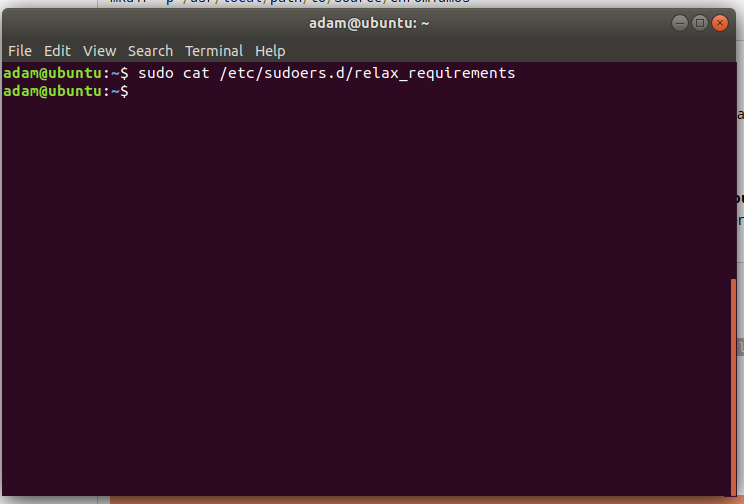
Dmitry Torokhov
Defaults timestamp_timeout=180
How exactly you do it is not really important. The script should have worked, but maybe newer Ubuntus changed something.
Adam Kearn

Guenter Roeck
OK, you need to make sure it has:Defaults !tty_tickets
Defaults timestamp_timeout=180
How exactly you do it is not really important. The script should have worked, but maybe newer Ubuntus changed something.
Adam Kearn
Adam Kearn
3 LONG HOURS LATER.........

Guenter Roeck
3 LONG HOURS LATER.........
Do u think its the sudoers causing this?
Adam Kearn
Adam Kearn
Guenter Roeck
Sorry, this took longer than I thought.I converted the VM to a .rar file to make it smaller, just use WinRAR to extract it.I tried uploading it to google drive but it was getting stuck somewhere so instead I uploaded it to MEGA
Adam Kearn
Adam Kearn
Adam Kearn
Guenter Roeck
If you don't feel comfortable using that method, you could build your own VM and send me the same commands you used.or I might be able to set up remote access if that would be more convenient for you?
Adam Kearn
Adam Kearn
mkdir -p ${HOME}/cros
cd ${HOME}/cros

git clone https://chromium.googlesource.com/chromium/tools/depot_tools.git
export PATH="${PATH}:${HOME}/cros/depot_tools"

repo init -u https://chromium.googlesource.com/chromiumos/manifest.git --repo-url https://chromium.googlesource.com/external/repo.git
repo sync

cros_sdk
export BOARD=amd64-generic
./setup_board --board=${BOARD}
./build_packages --board=${BOARD}
./build_image --board=${BOARD} --noenable_rootfs_verification dev
cros flash usb:// ${BOARD}/latest

I've never had this error before "Trying to terminate EFI services again"
I left it for about 10 minitus and still, nothing happened.
What do you think is causing this.
Ben
Adam Kearn
Ben
To unsubscribe from this topic, visit <a href="https://groups.google.com/a/chromium.org/d/topic/chromium-os-dev/ecOM1Jpjfm4/unsubscribe" rel="n