
Can't Read Specific QR Code with Java zxing 3.4.1
1,187 views
Skip to first unread message

Uman H
Nov 11, 2020, 11:41:39 PM11/11/20
to zxing
Hello,
i've a question why my code can't read attached file :
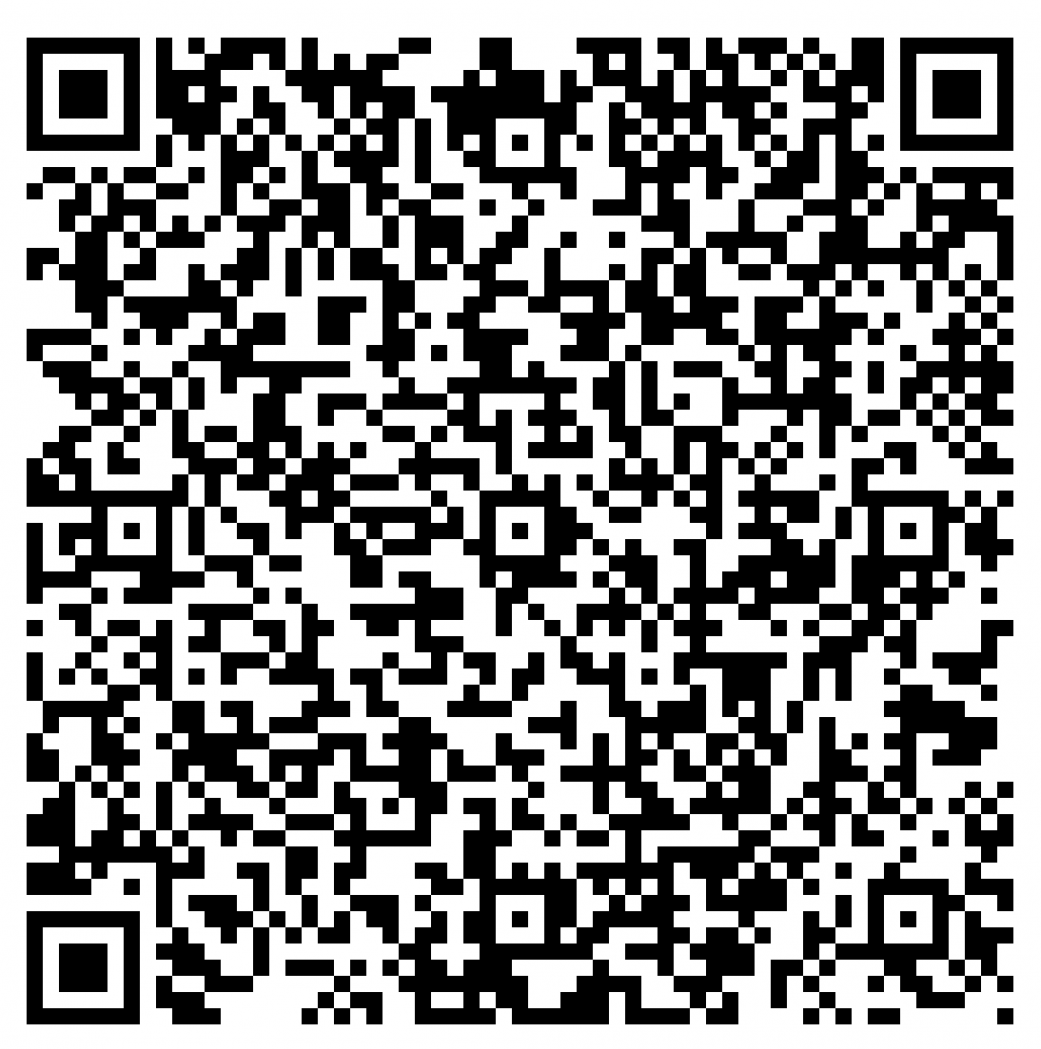
`
import java.io.FileInputStream;
import java.io.FileNotFoundException;
import java.io.IOException;
import java.util.HashMap;
import java.util.Map;
import javax.imageio.ImageIO;
import com.google.zxing.BarcodeFormat;
import com.google.zxing.BinaryBitmap;
import com.google.zxing.ChecksumException;
import com.google.zxing.DecodeHintType;
import com.google.zxing.EncodeHintType;
import com.google.zxing.FormatException;
import com.google.zxing.LuminanceSource;
import com.google.zxing.MultiFormatReader;
import com.google.zxing.NotFoundException;
import com.google.zxing.Reader;
import com.google.zxing.Result;
import com.google.zxing.ResultPoint;
import com.google.zxing.client.j2se.BufferedImageLuminanceSource;
import com.google.zxing.common.DecoderResult;
import com.google.zxing.common.DetectorResult;
import com.google.zxing.common.HybridBinarizer;
import com.google.zxing.multi.GenericMultipleBarcodeReader;
import com.google.zxing.qrcode.decoder.Decoder;
import com.google.zxing.qrcode.decoder.ErrorCorrectionLevel;
import com.google.zxing.qrcode.detector.Detector;
import java.awt.image.BufferedImage;
import java.io.BufferedInputStream;
import java.io.BufferedWriter;
import java.io.File;
import java.io.FileWriter;
import java.nio.charset.StandardCharsets;
import java.util.Arrays;
import java.util.TreeMap;
import java.util.Hashtable;
public class BarcodeImageDecoderTest {
public static void main(String[] args) throws Exception {
System.out.println(new BarcodeImageDecoderTest().readQRCode("./input/"));
}
private static Result[] readQRCode(String qrCodeImage) throws IOException, NotFoundException {
BufferedImage bfi = null;
File[] files = new File(qrCodeImage).listFiles();
int counttiffs = 0;
String filename = null;
TreeMap<String, Exception> errormap = new TreeMap<String, Exception>();
int onebarcode = 0;
int twobarcodes = 0;
int threebarcodes = 0;
BufferedImage cropedImage = null;
for (int i = 0; i < files.length; i++) {
if (files[i].isFile()) {
try (BufferedInputStream bfin = new BufferedInputStream(new FileInputStream(files[i]))) {
filename = files[i].getName();
bfi = ImageIO.read(bfin);
} catch (FileNotFoundException e) {
e.printStackTrace();
} catch (IOException e) {
e.printStackTrace();
}
if (
bfi != null) {
LuminanceSource ls = new BufferedImageLuminanceSource(bfi);
BinaryBitmap bmp = new BinaryBitmap(new HybridBinarizer(ls));
Reader reader = new MultiFormatReader();
GenericMultipleBarcodeReader greader = new GenericMultipleBarcodeReader(
reader);
Result[] result = null;
Hashtable<DecodeHintType, Object> decodeHints = new Hashtable<DecodeHintType, Object>();
decodeHints.put(DecodeHintType.TRY_HARDER, Boolean.TRUE);
decodeHints.put(DecodeHintType.POSSIBLE_FORMATS, Arrays.asList(BarcodeFormat.QR_CODE));
decodeHints.put(DecodeHintType.CHARACTER_SET, StandardCharsets.UTF_8.name());
decodeHints.put(DecodeHintType.PURE_BARCODE, Boolean.TRUE);
try {
result = greader.decodeMultiple(bmp, decodeHints);
} catch (NotFoundException e) {
errormap.put(filename, e);
} catch (NullPointerException e) {
errormap.put(filename, e);
}
if (result != null) {
switch (result.length) {
case 1:
onebarcode++;
break;
case 3:
threebarcodes++;
break;
default:
twobarcodes++;
}
try (BufferedWriter bfwr = new BufferedWriter(
new FileWriter("test.txt", true))) {
bfwr.write(filename + ": number of barcodes found = "
+ result.length);
bfwr.newLine();
for (int j = 0; j < result.length; j++) {
bfwr.write(result[j].getText());
}
bfwr.newLine();
bfwr.write("---------------------------------------------------------");
bfwr.newLine();
counttiffs++;
} catch (IOException e) {
e.printStackTrace();
}
}
}
else {
System.out.println("No Buffered Image for "
+ files[i].getName());
}
}
}
return null;
}
}`
Please help
Thank You

Sean Owen
Nov 12, 2020, 9:41:56 AM11/12/20
to zxing
I'm able to read it with the online decoder at zxing.org:
00020101021126680019COM.PERMATABANK.WWW011893600013160002576602120088004101930303UKE51440014ID.CO.QRIS.WWW0215ID10200529006170303UKE5204599953033605802ID5925Mustopa Moslem Collection6007BANDUNG61054038362070703A016304CE6C
Maybe don't use the multiple barcoder reader. Just use the QRCodeReader.
Uman H
Nov 12, 2020, 10:57:12 PM11/12/20
to zxing
Thank You for your reply.
i've test it before read it with online decoder and it able to read also.
can you tell me the script using just QRCodeReader?
if test it with this code, it not able to read also :
public static String readQRCode(String filePath, String charset, Map hintMap)
throws FileNotFoundException, IOException, NotFoundException, FormatException, ChecksumException {
Hashtable hints = null;
DecoderResult decoderResult;
BinaryBitmap binaryBitmap = new BinaryBitmap(new HybridBinarizer(
new BufferedImageLuminanceSource(
ImageIO.read(new FileInputStream(filePath)))));
ResultPoint[] points;
Decoder decoder = new Decoder();
DetectorResult detectorResult = new Detector(binaryBitmap.getBlackMatrix()).detect(hints);
decoderResult = decoder.decode(detectorResult.getBits(), hints);
points = detectorResult.getPoints();
Result qrCodeResult = new Result(decoderResult.getText(), decoderResult.getRawBytes(), points, BarcodeFormat.QR_CODE);
return qrCodeResult.getText();
}
public static String readQR(String img) throws FileNotFoundException, IOException, NotFoundException, ChecksumException, FormatException{
try {
// Encoding charset
String charset = "ISO-8859-1";
//String charset = "UTF-8";
Map<EncodeHintType, ErrorCorrectionLevel> hintMap = new HashMap<EncodeHintType, ErrorCorrectionLevel>();
hintMap.put(EncodeHintType.ERROR_CORRECTION, ErrorCorrectionLevel.Q);
String qrCodeContent = readQRCode(img, charset, hintMap);
System.out.println("QRCode output: " + qrCodeContent);
return qrCodeContent;
} catch (FileNotFoundException e) {
return null;
} catch (IOException e) {
return null;
} catch (NotFoundException e) {
return null;
} catch (ChecksumException e) {
return null;
} catch (FormatException e) {
return null;
}
}
Thank you
Sean Owen
Nov 12, 2020, 11:16:32 PM11/12/20
to zxing
You can see how it works in the source code in zxingorg/ See DecodeServlet.
Uman H
Nov 12, 2020, 11:31:13 PM11/12/20
to zxing
i've check the code, but still return null.
can you check my code :
System.out.println(BarcodeImageDecoderTest.processImage("./input/Test_qr only.png"));
private static String processImage(String fileInput) throws IOException {
BufferedInputStream bfin = new BufferedInputStream(new FileInputStream(fileInput));
BufferedImage image = ImageIO.read(bfin);
LuminanceSource source = new BufferedImageLuminanceSource(image);
BinaryBitmap bitmap = new BinaryBitmap(new GlobalHistogramBinarizer(source));
Collection<Result> results = new ArrayList<>(1);
try {
Reader reader = new MultiFormatReader();
ReaderException savedException = null;
Map<DecodeHintType, ?> HINTS = null;
try {
// Look for multiple barcodes
MultipleBarcodeReader multiReader = new GenericMultipleBarcodeReader(reader);
Result[] theResults = multiReader.decodeMultiple(bitmap, HINTS);
if (theResults != null) {
results.addAll(Arrays.asList(theResults));
}
} catch (ReaderException re) {
savedException = re;
}
if (results.isEmpty()) {
try {
Map<DecodeHintType, ?> HINTS_PURE = null;
// Look for pure barcode
Result theResult = reader.decode(bitmap, HINTS_PURE);
if (theResult != null) {
results.add(theResult);
}
} catch (ReaderException re) {
savedException = re;
}
}
if (results.isEmpty()) {
try {
// Look for normal barcode in photo
Result theResult = reader.decode(bitmap, HINTS);
if (theResult != null) {
results.add(theResult);
}
} catch (ReaderException re) {
savedException = re;
}
}
if (results.isEmpty()) {
try {
// Try again with other binarizer
BinaryBitmap hybridBitmap = new BinaryBitmap(new HybridBinarizer(source));
Result theResult = reader.decode(hybridBitmap, HINTS);
if (theResult != null) {
results.add(theResult);
}
} catch (ReaderException re) {
savedException = re;
}
}
if (results.isEmpty()) {
try {
throw savedException == null ? NotFoundException.getNotFoundInstance() : savedException;
} catch (FormatException | ChecksumException e) {
} catch (ReaderException e) { // Including NotFoundException
}
return null;
}
} catch (RuntimeException re) {
}
return null;
}
Sean Owen
Nov 13, 2020, 12:04:45 AM11/13/20
to zxing
I'm not going to debug it, no. You already have suggestions to try like a different binarizer and need to do the homework.
Uman H
Nov 13, 2020, 2:12:33 AM11/13/20
to zxing
i've figure it out, thank you Sean! :)


Vignesh Palanisamy
May 24, 2021, 1:15:59 AM5/24/21
to zxing
I too face the same problem you face can I know how you figured it out.
Reply all
Reply to author
Forward
0 new messages