
Add Authorization header in active scan
4,187 views
Skip to first unread message

Hammad Ul Hassan
Apr 26, 2022, 3:07:30 AM4/26/22
to OWASP ZAP User Group
Hey All,
I'm trying to add the Authorization header while zap is doing the active Scan. In my case Authentication is done by JSON , I have done the following step to authenticate into the application.
Note : I have selected the zest script because in my scenario some headers are required in the request. i.e (Origin, Content-Type, Authorizaton : Bearer undefined).
- Record a Zest Script while login and save it for authentication purpose. i.e AuthenticationScript.zst
- In the Authentication tab I have selected the Authentication method as follow :
- script Based Authentication
- load Zest Script(AuthenticatinScript) previously saved.
- Finally I have successfully login in to application using this method.
But for the active scan purpose, I need the Authorization token in my every request
(Authorization: Bearer eyJhbGciOiJIUzI1NiIsInR5cCI6IkpXVCJ9.eyJpZCI6MSwidXNlcm5hbWUiOiJhZG1pbiIsImlhdCI6MTY1MDYyNzAwMSwiZXhwIjoxNjUwNjMwNjAxfQ.w7A3oNeldNdoKOOOFaghdELOfsDMnCXsJ5NqtmtZE08 ).
how do I achieve this?

Simon Bennetts
Apr 26, 2022, 4:59:23 AM4/26/22
to OWASP ZAP User Group
First of all have a look at the auth docs: https://www.zaproxy.org/docs/authentication/ - as you will see these are WIP.
You will need to extract the authorization token in your Zest script and store it in a script variable.
Then you will either need a session or httpsender script which checks to see if the variable is set and if it is then injects it into every request.
This script does some of what you want but you will need to tweak it: https://github.com/zaproxy/community-scripts/blob/main/httpsender/add-more-headers.js
Cheers,
Simon
Hammad Ul Hassan
Apr 28, 2022, 4:21:04 AM4/28/22
to OWASP ZAP User Group
Hi,
Thanks for the quick response now I have extracted the token through the Zest script and also Set the Zest Action Global variable. Now I want to access it in python HTTPSender script. Is there a way?
Simon Bennetts
Apr 28, 2022, 4:44:09 AM4/28/22
to OWASP ZAP User Group
The way to access global script variables is defined on https://www.zaproxy.org/docs/desktop/addons/script-console/#custom-globalscript-variables
We do have some examples in the Community Scripts repo but they all appear to be written in JavaScript: https://github.com/zaproxy/community-scripts/search?q=ScriptVars
However python scripts can easily access Java classes as well (eg https://github.com/zaproxy/community-scripts/blob/main/standalone/WebSocketExportToOrg.py#L39) so hopefully you can work out the correct syntax.
If not then let us know.
Cheers,
Simon
Hammad Ul Hassan
May 10, 2022, 2:54:21 AM5/10/22
to OWASP ZAP User Group
Hi Simon,
I have successfully achieved this. Now in my scenario, for an authenticated spidering I need to specify the "POLL URL" for Logged in Indicator and Add the multiple headers in Additional Poll Request Headers using the ZAP API. However, I go through the ZAP API and tried the thing mentioned there but didn't find any way to do it.
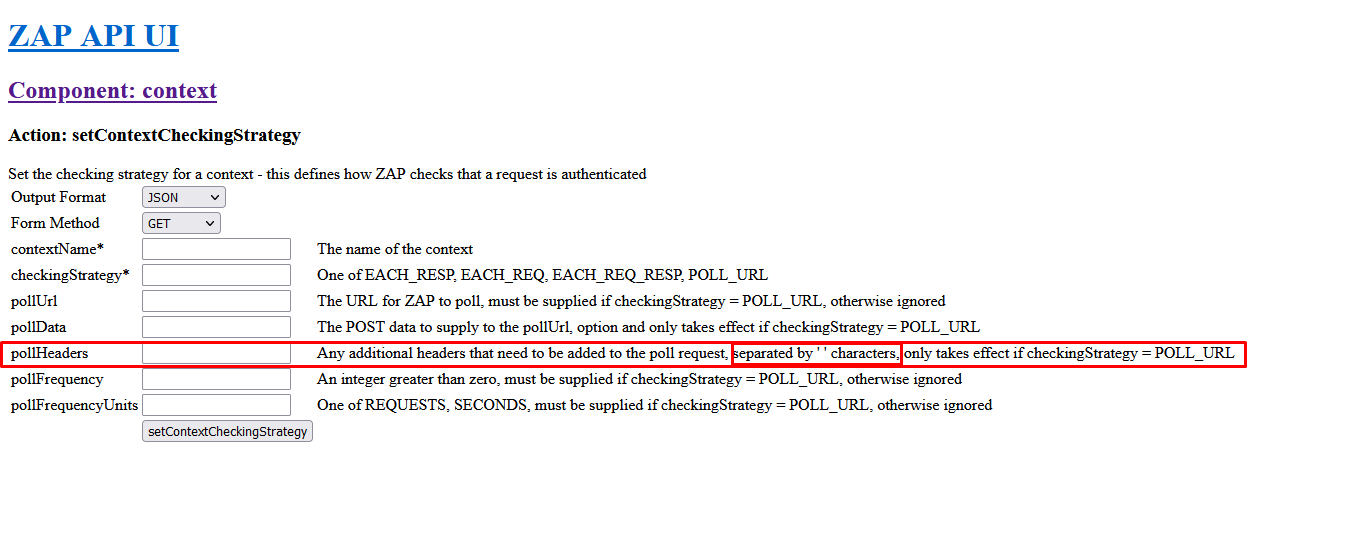
I have successfully achieved this. Now in my scenario, for an authenticated spidering I need to specify the "POLL URL" for Logged in Indicator and Add the multiple headers in Additional Poll Request Headers using the ZAP API. However, I go through the ZAP API and tried the thing mentioned there but didn't find any way to do it.
also tried another possible way (load session file) to achieve this but faced two major problems during it.
1. It takes too much time to load a session file and sometimes through error/some time didn't load the complete file.
2. It corrupts the session file after loading so I was unable to load it next time/data was not loaded completely. (worst behavior)
Kindly look into this.
Cheers,
Hammad
Simon Bennetts
May 10, 2022, 4:13:02 AM5/10/22
to OWASP ZAP User Group
Replies inline...
On Tuesday, 10 May 2022 at 07:54:21 UTC+1 hammadh...@gmail.com wrote:
Hi Simon,
I have successfully achieved this. Now in my scenario, for an authenticated spidering I need to specify the "POLL URL" for Logged in Indicator and Add the multiple headers in Additional Poll Request Headers using the ZAP API. However, I go through the ZAP API and tried the thing mentioned there but didn't find any way to do it.
What did you actually try?
FYI the recommended approach is to create and test the context in the ZAP desktop, export the context and then import it via the API.
also tried another possible way (load session file) to achieve this but faced two major problems during it.1. It takes too much time to load a session file and sometimes through error/some time didn't load the complete file.

The long load time is a known problem: https://github.com/zaproxy/zaproxy/issues/1364
I dont think we are aware of any problems which mean a session file fails to load.
Have a look in the zap.log file and let us know any errors in there: https://www.zaproxy.org/faq/somethings-not-working-what-should-i-do/#check-the-log-file
2. It corrupts the session file after loading so I was unable to load it next time/data was not loaded completely. (worst behavior)Kindly look into this.
We cant investigate anything without any evidence :)
Cheers,
Simon

kingthorin+owaspzap
May 10, 2022, 6:58:57 AM5/10/22
to OWASP ZAP User Group
The missing information is "\n". I'll open a PR to fix that.
Hammad Ul Hassan
May 26, 2022, 1:50:45 AM5/26/22
to OWASP ZAP User Group
Thanks for Identifying the exact issue and raising a PR. As per Simon's suggestion, I created context, then tested and saved it, and load it via API but In the response, I'm getting this error don't know why :/.
Kindly look into this.
Thanks
Regards,
Hammad Ul Hassan

salman...@gmail.com
May 30, 2022, 2:48:08 AM5/30/22
to OWASP ZAP User Group
Hi,
Kindly, do share the PR. Is it fixed or still in pending?

thc...@gmail.com
May 30, 2022, 2:55:03 AM5/30/22
to zaprox...@googlegroups.com
Yes, it was: https://github.com/zaproxy/zaproxy/pull/7280
If you are still having problems after using the newline character
provide the details in a new thread.
Best regards.
On 30/05/2022 07:48, salman...@gmail.com wrote:
> Hi,
> Kindly, do share the PR. Is it fixed or still in pending?
>
> On Tuesday, 10 May 2022 at 15:58:57 UTC+5 kingthorin+owaspzap wrote:
>
>> The missing information is "\n". I'll open a PR to fix that.
>>
>> On Tuesday, May 10, 2022 at 2:54:21 AM UTC-4 hammadh...@gmail.com wrote:
>>
>>> Hi Simon,
>>>
>>> I have successfully achieved this. Now in my scenario, for an
>>> authenticated spidering I need to specify the "POLL URL" for Logged in
>>> Indicator and *Add the multiple headers in Additional Poll Request
>>> Headers using the ZAP API*. However, I go through the ZAP API and tried
>>> faced two major problems during it.*
>>>>>>> *Note : I have selected the zest script because in my scenario some
>>>>>>>
>>>>>>> 1. Record a Zest Script while login and save it for
>>>>>>> authentication purpose. i.e AuthenticationScript.zst
>>>>>>> 2. In the Authentication tab I have selected the Authentication
>>>>>>> method as follow :
>>>>>>>
>>>>>>>
>>>>>>> - script Based Authentication
>>>>>>> - load Zest Script(AuthenticatinScript) previously saved.
>>>>>>>
>>>>>>>
>>>>>>> 1. Finally I have successfully login in to application using this
>>>>>>> method.
>>>>>>>
>>>>>>> *But for the active scan purpose, I need the Authorization token in
>>>>>>> my every request*
If you are still having problems after using the newline character
provide the details in a new thread.
Best regards.
On 30/05/2022 07:48, salman...@gmail.com wrote:
> Hi,
> Kindly, do share the PR. Is it fixed or still in pending?
>
> On Tuesday, 10 May 2022 at 15:58:57 UTC+5 kingthorin+owaspzap wrote:
>
>> The missing information is "\n". I'll open a PR to fix that.
>>
>> On Tuesday, May 10, 2022 at 2:54:21 AM UTC-4 hammadh...@gmail.com wrote:
>>
>>> Hi Simon,
>>>
>>> I have successfully achieved this. Now in my scenario, for an
>>> authenticated spidering I need to specify the "POLL URL" for Logged in
>>> Headers using the ZAP API*. However, I go through the ZAP API and tried
>>> the thing mentioned there but didn't find any way to do it.
>>>
>>> [image: zap poll headers.png]
>>>
>>> *also tried another possible way (load session file) to achieve this but
>>>
>>> [image: zap poll headers.png]
>>>
>>> faced two major problems during it.*
>>>>>>> headers are required in the request. i.e (Origin, Content-Type,
>>>>>>> Authorizaton : Bearer undefined).*
>>>>>>>
>>>>>>> 1. Record a Zest Script while login and save it for
>>>>>>> authentication purpose. i.e AuthenticationScript.zst
>>>>>>> 2. In the Authentication tab I have selected the Authentication
>>>>>>> method as follow :
>>>>>>>
>>>>>>>
>>>>>>> - script Based Authentication
>>>>>>> - load Zest Script(AuthenticatinScript) previously saved.
>>>>>>>
>>>>>>>
>>>>>>> 1. Finally I have successfully login in to application using this
>>>>>>> method.
>>>>>>>
>>>>>>> *But for the active scan purpose, I need the Authorization token in
>>>>>>> my every request*
salman...@gmail.com
May 30, 2022, 2:59:44 AM5/30/22
to OWASP ZAP User Group
How do we ensure, that those changes are in our OWASP ZAP. Should we just Update our OWASP ZAP ?
thc...@gmail.com
May 30, 2022, 3:03:21 AM5/30/22
to zaprox...@googlegroups.com
That's a documentation change, the underlying functionality is working
as expected.
In any case, if you need the latest changes you can use the weekly
releases: https://www.zaproxy.org/download/#weekly
Best regards.
as expected.
In any case, if you need the latest changes you can use the weekly
releases: https://www.zaproxy.org/download/#weekly
Best regards.
Reply all
Reply to author
Forward
0 new messages