
Not able to see saved zest script (zest123.zst) under Script drop down and Load button is disabled.
257 views
Skip to first unread message

lakshmi
May 2, 2017, 1:10:34 PM5/2/17
to OWASP ZAP User Group
Not able to see saved zest script (zest123.zst) under Script drop down and Load button is disabled.
1. I have recorded login sequence using Zest recorder and saved the file with extension .zst under ZAP home directory (Windows machine, ZAP 2.6.0 version, C:\Program Files\OWASP\Zed Attack Proxy\Scripts)
2. Open ZAP>open existing session> context> authentication> script based authentication> Script drop down field> no file is listed.
Kindly suggest where to save the file to get it under Script field and to click Load button.

thc...@gmail.com
May 2, 2017, 1:15:43 PM5/2/17
to zaprox...@googlegroups.com
The script needs to be added to ZAP and be of "Authentication" type, to
be able to use it there.
You can load it again and choose the Authentication type. [1]
Once added to ZAP you should be able to choose it.
[1] https://github.com/zaproxy/zap-core-help/wiki/HelpAddonsScriptsTree
Best regards.
be able to use it there.
You can load it again and choose the Authentication type. [1]
Once added to ZAP you should be able to choose it.
[1] https://github.com/zaproxy/zap-core-help/wiki/HelpAddonsScriptsTree
Best regards.
lakshmi
May 2, 2017, 1:58:36 PM5/2/17
to OWASP ZAP User Group
Thanks for valuable inputs. Able to get actual ZAP home directory which is under the username not under Program Files.. :(
sorry for mis communicating about the path.
Now able to load the .zst file which has authentication type. However looks like this script is not recognized.
when i run the active scan at context level which has 3 sites added and after loading this file from Scripts of context, under Output folder getting this message:
No indicators have been set for identifying authentication. Assuming response is authenticated for https://accounts----- and i can see there is no login request is identified.
Please guide if i am doing something wrong here.
thc...@gmail.com
May 2, 2017, 2:19:37 PM5/2/17
to zaprox...@googlegroups.com
You also need to provide the indicators (Logged in and/or out),
otherwise ZAP will not know when the User is authenticated (and just
assume it is).
That's done in the Authentication context panel as well.
More details in:
https://github.com/zaproxy/zap-core-help/wiki/HelpStartConceptsAuthentication
Best regards
otherwise ZAP will not know when the User is authenticated (and just
assume it is).
That's done in the Authentication context panel as well.
More details in:
https://github.com/zaproxy/zap-core-help/wiki/HelpStartConceptsAuthentication
Best regards
lakshmi
May 2, 2017, 3:10:07 PM5/2/17
to OWASP ZAP User Group
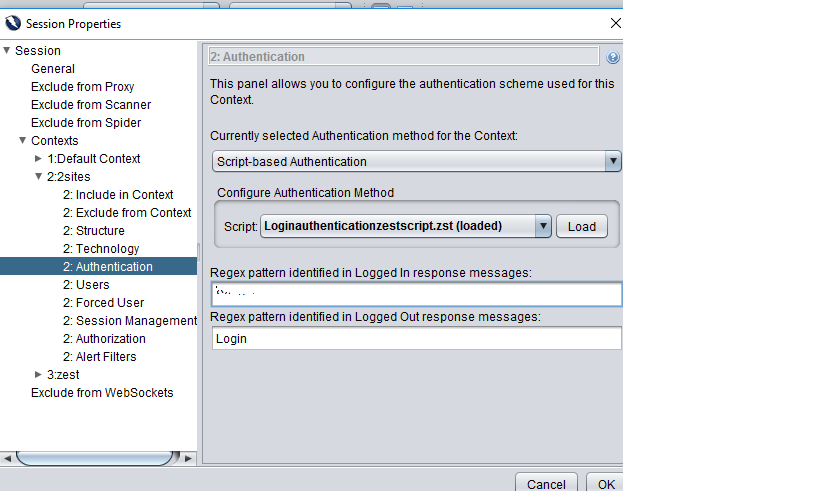
I have set logged in and out indicators and loaded the .zst file. Getting output results as Authentication successful. under Output tab. However i can see for Active scan - almost all requests shows 404 not found and trying to input as query= in the request uri. And the main thing is it is not capturing the login flow at all.
I have attached the .zst file. Please look at it and suggest. also screen shot.
I really need help to resolve the issue.

0 new messages