
Hi Simon ! Regarding ZAP Automation Framework implementation [java.util.ArrayList cannot be cast to java.util.LinkedHashMap]
385 views
Skip to first unread message

Khopithan Sathiyakeerthy
Jun 22, 2021, 6:22:16 AM6/22/21
to OWASP ZAP User Group
I have installed ZAP on Windows and installed "Automation framework" addon. Then I tried to run this command


zap.bat -cmd -autorun C:\Users\Administrator\Desktop\Newfolder\zap-config.yaml
This is the .yaml file that I used,
- type: spider
parameters:
context: myapp
url: http://example.com
- type: spiderAjax
parameters:
context: myapp
url: http://example.com
- type: activeScan
parameters:
context: myapp
- type: report
parameters:
template: traditional-html
But I got this error
java.util.ArrayList cannot be cast to java.util.LinkedHashMap
This is the zap.log
I tried to solve this error, but I couldn't fix this. Hope you help me to fix this out.
Regards,
Khopi

Simon Bennetts
Jun 22, 2021, 7:39:49 AM6/22/21
to OWASP ZAP User Group
Hi Khopi,
For a start you need an environment section - thats mandatory: https://www.zaproxy.org/docs/desktop/addons/automation-framework/environment/
Cheers,
Simon
Khopithan Sathiyakeerthy
Jun 22, 2021, 11:55:05 PM6/22/21
to OWASP ZAP User Group
Hi Simon,

Thank you for your kind support. And I have added the env like below. But I got error. I am not that much familiar with .yaml files.
---
env:
contexts :
- name: myapp
url: http://example.com
includePaths: myapp
parameters:
failOnError: true
failOnWarning: false
progressToStdout: true
- type: spider
parameters:
context: myapp
url: http://example.com
- type: spiderAjax
parameters:
context: myapp
url: http://example.com
- type: activeScan
parameters:
context: myapp
- type: report
parameters:
template: traditional-html
Can you plz correct this? [Actually, I need a .yaml file to run all full scans and generate report]. If there is any .yaml file, it would be more helpful.
Best & Regards,
Khopi
Simon Bennetts
Jun 23, 2021, 3:52:26 AM6/23/21
to OWASP ZAP User Group
Thats still not the right format and is (as the site states) invalid yaml.
We will be adding a UI for the Automation Framework in time but for now the best option is to generate an initial template file via the `-autogenmin` command line option as per https://www.zaproxy.org/docs/desktop/addons/automation-framework/
Here is a valid template from our tests: https://github.com/zaproxy/zap-extensions/blob/main/addOns/automation/src/test/resources/org/zaproxy/addon/automation/resources/template-min.yaml
Cheers,
Simon
Khopithan Sathiyakeerthy
Jun 25, 2021, 3:00:19 AM6/25/21
to OWASP ZAP User Group
Hi Simon,
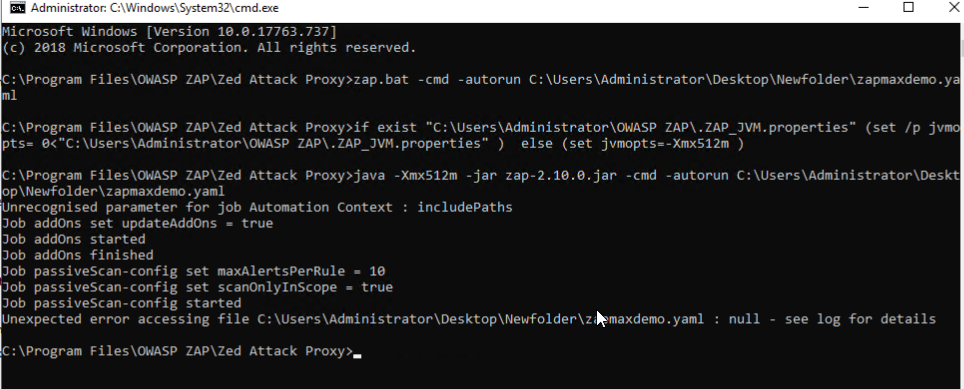

I have generated the yaml file and configured it to scan my app but I got this error.
Unexpected error accessing file C:\Users\Administrator\Desktop\Newfolder\zapmaxdemo.yaml : null - see log for details
This is zap.log file
This is my yaml file
--- # OWASP ZAP automation configuration file, for more details see https://www.zaproxy.com/docs/(TBA)
env: # The environment, mandatory
contexts : # List of 1 or more contexts, mandatory
- name: context 1 # Name to be used to refer to this context in other jobs, mandatory
url: https://example.com # The top level url, mandatory, everything under this will be included
includePaths: myapp/login.php # TBA: An optional list of regexes to include
excludePaths: # TBA: An optional list of regexes to exclude
authentication: # TBA: In time to cover all auth configs
parameters:
failOnError: true # If set exit on an error
failOnWarning: false # If set exit on a warning
progressToStdout: true # If set will write job progress to stdout
jobs:
- type: addOns # Add-on management
parameters:
updateAddOns: true # Update any add-ons that have new versions
install: # A list of non standard add-ons to install from the ZAP Marketplace
uninstall: # A list of standard add-ons to uninstall
- type: passiveScan-config # Passive scan configuration
parameters:
maxAlertsPerRule: 10 # Int: Maximum number of alerts to raise per rule
scanOnlyInScope: true # Bool: Only scan URLs in scope (recommended)
maxBodySizeInBytesToScan: # Int: Maximum body size to scan, default: 0 - will scan all messages
rules: # A list of one or more passive scan rules and associated settings which override the defaults
- id: # Int: The rule id as per https://www.zaproxy.org/docs/alerts/
name: # String: The name of the rule for documentation purposes - this is not required or actually used
threshold: # String: The Alert Threshold for this rule, one of Off, Low, Medium, High, default: Medium
- type: graphql # GraphQL definition import
parameters:
endpoint: # String: the endpoint URL, default: null, no schema is imported
schemaUrl: # String: URL pointing to a GraphQL Schema, default: null, import using introspection on endpoint
schemaFile: # String: Local file path of a GraphQL Schema, default: null, import using schemaUrl
maxQueryDepth: # Int: The maximum query generation depth, default: 5
lenientMaxQueryDepthEnabled: # Bool: Whether or not Maximum Query Depth is enforced leniently, default: true
maxAdditionalQueryDepth: # Int: The maximum additional query generation depth (used if enforced leniently), default: 5
maxArgsDepth: # Int: The maximum arguments generation depth, default: 5
optionalArgsEnabled: # Bool: Whether or not Optional Arguments should be specified, default: true
argsType: # Enum [inline, variables, both]: How arguments are specified, default: both
querySplitType: # Enum [leaf, root_field, operation]: The level for which a single query is generated, default: leaf
requestMethod: # Enum [post_json, post_graphql, get]: The request method, default: post_json
- type: openapi # OpenAPI definition import
parameters:
apifile: # String: Local file containing the OpenAPI definition, default: null, no definition will be imported
apiurl: # String: URL containing the OpenAPI definition, default: null, no definition will be imported
targeturl: # String: URL which overrides the target defined in the definition, default: null, the target will not be overriden
- type: soap # SOAP WSDL import
parameters:
wsdlFile: # String: Local file path of the WSDL, default: null, no definition will be imported
wsdlUrl: # String: URL pointing to the WSDL, default: null, no definition will be imported
- type: spider # The traditional spider - fast but doesnt handle modern apps so well
parameters:
context:
myapp/login.php # String: Name of the context to spider, default: first context
url:
https://example.com # String: Url to start spidering from, default: first context URL
failIfFoundUrlsLessThan: # Int: Fail if spider finds less than the specified number of URLs, default: 0
warnIfFoundUrlsLessThan: # Int: Warn if spider finds less than the specified number of URLs, default: 0
maxDuration: # Int: The max time in minutes the spider will be allowed to run for, default: 0 unlimited
maxDepth: # Int: The maximum tree depth to explore, default 5
maxChildren: # Int: The maximum number of children to add to each node in the tree
acceptCookies: # Bool: Whether the spider will accept cookies, default: true
handleODataParametersVisited: # Bool: Whether the spider will handle OData responses, default: false
handleParameters: # Enum [ignore_completely, ignore_value, use_all]: How query string parameters are used when checking if a URI has already been visited, default: use_all
maxParseSizeBytes: # Int: The max size of a response that will be parsed, default: 2621440 - 2.5 Mb
parseComments: # Bool: Whether the spider will parse HTML comments in order to find URLs, default: true
parseGit: # Bool: Whether the spider will parse Git metadata in order to find URLs, default: false
parseRobotsTxt: # Bool: Whether the spider will parse 'robots.txt' files in order to find URLs, default: true
parseSitemapXml: # Bool: Whether the spider will parse 'sitemap.xml' files in order to find URLs, default: true
parseSVNEntries: # Bool: Whether the spider will parse SVN metadata in order to find URLs, default: false
postForm: # Bool: Whether the spider will submit POST forms, default: true
processForm: # Bool: Whether the spider will process forms, default: true
requestWaitTime: # Int: The time between the requests sent to a server in milliseconds, default: 200
sendRefererHeader: # Bool: Whether the spider will send the referer header, default: true
threadCount: # Int: The number of spider threads, default: 2
userAgent: # String: The user agent to use in requests, default: '' - use the default ZAP one
- type: spiderAjax # The ajax spider - slower than the spider but handles modern apps well
parameters:
context:
myapp/login.php # String: Name of the context to spider, default: first context
url:
https://example.com # String: Url to start spidering from, default: first context URL
failIfFoundUrlsLessThan: # Int: Fail if spider finds less than the specified number of URLs, default: 0
warnIfFoundUrlsLessThan: # Int: Warn if spider finds less than the specified number of URLs, default: 0
maxDuration: # Int: The max time in minutes the ajax spider will be allowed to run for, default: 0 unlimited
maxCrawlDepth: # Int: The max depth that the crawler can reach, default: 10, 0 is unlimited
numberOfBrowsers: # Int: The number of browsers the spider will use, more will be faster but will use up more memory, default: 1
browserId: # String: Browser Id to use, default: firefox-headless
clickDefaultElems: # Bool: When enabled only click the default element: 'a', 'button' and input, default: true
clickElemsOnce: # Bool: When enabled only click each element once, default: true
eventWait: # Int: The time in millseconds to wait after a client side event is fired, default: 1000
maxCrawlStates: # Int: The maximum number of crawl states the crawler should crawl, default: 0 unlimited
randomInputs: # Bool: When enabled random values will be entered into input element, default: true
reloadWait: # Int: The time in millseconds to wait after the URL is loaded, default: 1000
- type: passiveScan-wait # Passive scan wait for the passive scanner to finish
parameters:
maxDuration: 5 # Int: The max time to wait for the passive scanner, default: 0 unlimited
- type: activeScan # The active scanner - this actively attacks the target so should only be used with permission
parameters:
context:
myapp/login.php # String: Name of the context to attack, default: first context
policy: # String: Name of the scan policy to be used, default: Default Policy
maxRuleDurationInMins: # Int: The max time in minutes any individual rule will be allowed to run for, default: 0 unlimited
maxScanDurationInMins: # Int: The max time in minutes the active scanner will be allowed to run for, default: 0 unlimited
addQueryParam: # Bool: If set will add an extra query parameter to requests that do not have one, default: false
defaultPolicy: # String: The name of the default scan policy to use, default: Default Policy
delayInMs: # Int: The delay in milliseconds between each request, use to reduce the strain on the target, default 0
handleAntiCSRFTokens: # Bool: If set then automatically handle anti CSRF tokens, default: false
injectPluginIdInHeader: # Bool: If set then the relevant rule Id will be injected into the X-ZAP-Scan-ID header of each request, default: false
scanHeadersAllRequests: # Bool: If set then the headers of requests that do not include any parameters will be scanned, default: false
threadPerHost: # Int: The max number of threads per host, default: 2
policyDefinition: # The policy definition - only used if the 'policy' is not set
defaultStrength: # String: The default Attack Strength for all rules, one of Low, Medium, High, Insane (not recommended), default: Medium
defaultThreshold: # String: The default Alert Threshold for all rules, one of Off, Low, Medium, High, default: Medium
rules: # A list of one or more active scan rules and associated settings which override the defaults
- id: # Int: The rule id as per https://www.zaproxy.org/docs/alerts/
name: # Comment: The name of the rule for documentation purposes - this is not required or actually used
strength: # String: The Attack Strength for this rule, one of Low, Medium, High, Insane, default: Medium
threshold: # String: The Alert Threshold for this rule, one of Off, Low, Medium, High, default: Medium
- type: report # Report generation
parameters:
template: traditional-html # String: The template id, default : traditional-html
reportDir: C:\Users\Administrator\Desktop\Newfolder # String: The directory into which the report will be written
reportFile: # String: The report file name pattern, default: {{yyyy-MM-dd}}-ZAP-Report-[[site]]
reportTitle: # String: The report title
reportDescription: # String: The report description
displayReport: # Boolean: Display the report when generated, default: false
risks: # List: The risks to include in this report, default all
- high
- medium
- low
- info
confidences: # List: The confidences to include in this report, default all
- high
- medium
- low
- falsepositive
sections: # List: The template sections to include in this report - see the relevant template, default all
Did I miss anything to run complete Passive, Spider, Spider Ajax and Active scan (alpha included) scan and generate a pdf report (using report generation addon - installedalready) ?
Regards,
Khopi
Reply all
Reply to author
Forward
0 new messages