
OWASP ZAP when using spider showing in Spider tab “OUT OF CONTEXT” with url “weburl/Site.css”
409 views
Skip to first unread message

Nisarg Patel
Mar 24, 2017, 8:12:31 AM3/24/17
to OWASP ZAP User Group
I am new to OWASP ZAP and started manually testing through contexts and using Session Properties.
But I cannot able to detect all logged in URL's of my huge website with the help of spider. Can anyone give me quick demo for how to detect all URL's through spider by using proxy setting through Firefox.
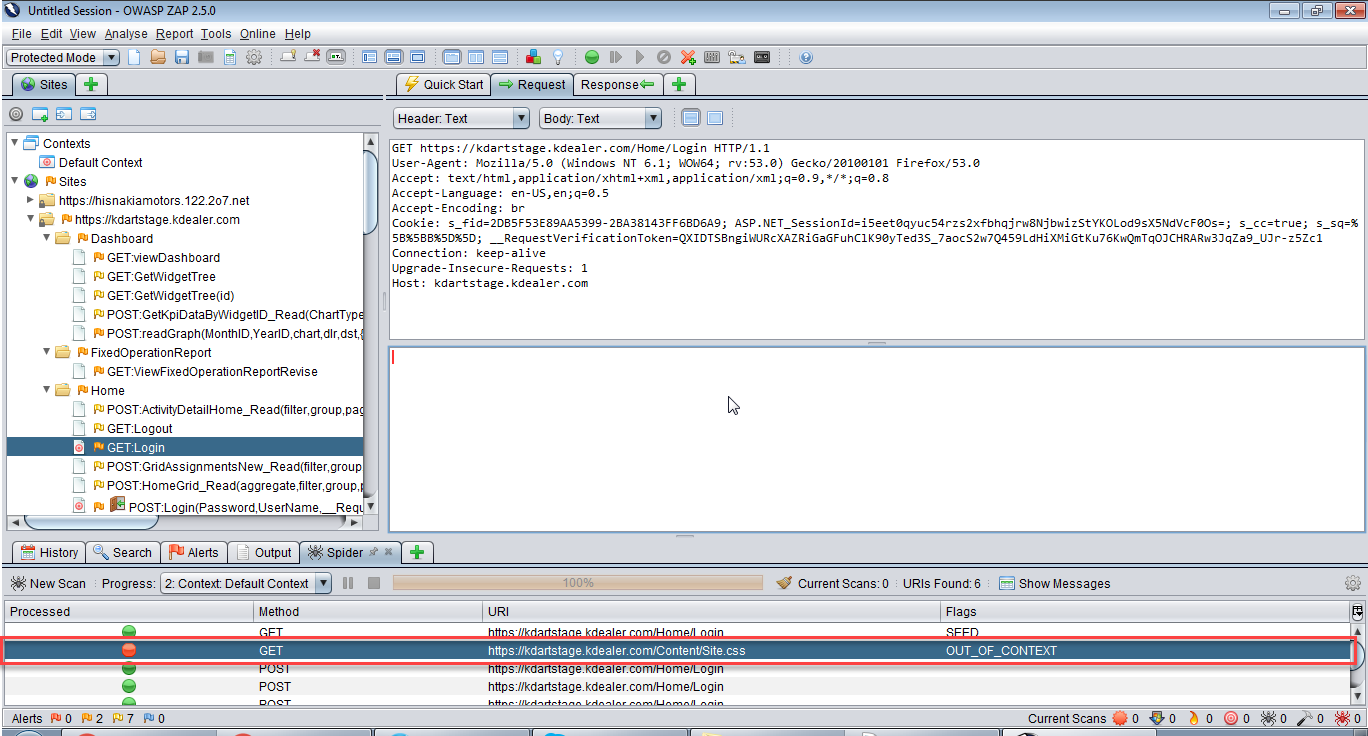
Waiting for your prompt reply!!
Regards,
Nisarg.

kingthorin+owaspzap
Mar 24, 2017, 10:32:06 AM3/24/17
to OWASP ZAP User Group
It looks like your context definition is off. The only thing you've included in context is your \Login page, as can be seen by the fact that it's the only thing with a bull's eye icon.
https://github.com/zaproxy/zap-core-help/wiki/HelpUiDialogsSessionContexts
https://github.com/zaproxy/zap-core-help/wiki/HelpUiDialogsSessionContexts
Nisarg Patel
Mar 25, 2017, 12:08:38 AM3/25/17
to OWASP ZAP User Group
Thank you @Kingthorin for your quick feedback!! Actually below values I am adding in Session Properties under Default Context.
1. Include in Context : login URL
2. Exclude in Context : Logout URL
3. Structure :
4. Technology : All Selected
5. Authentication : Form Based Authentication
Login Form Target URL : Login URL
Login Request POST Data : Login URL
Username Parameter : variable name which is used in above url for username.
Password Parameter : variable name which is used in above url for password.
Users : Added 1 valid user
Forced User :
Session Management : Cookie-based Session Management
Please let me know if any steps I am missing. Waiting for your prompt reply!!
Regards,
Nisarg.
kingthorin+owaspzap
Mar 25, 2017, 5:30:38 AM3/25/17
to OWASP ZAP User Group
Include in Context should be a Regex (or set of regexes) that represent the entire footprint that you want to test. Such as .*example.org.*
Nisarg Patel
Mar 25, 2017, 5:38:21 AM3/25/17
to OWASP ZAP User Group
Actually I have kept url as showing below in Include in Context:
\Qhttps://example.com\E.*
Also my purpose is that by adding this url, if I spider it should detect all logged in URL's automatically though not mentioned in Include in Context. Is that possible?
On Friday, March 24, 2017 at 5:42:31 PM UTC+5:30, Nisarg Patel wrote:
kingthorin+owaspzap
Mar 25, 2017, 7:13:37 PM3/25/17
to OWASP ZAP User Group
Yes if everything you care about is hosted by example.com litreally and not on a sub-domain.
Reply all
Reply to author
Forward
0 new messages