
Export fuzzing data
717 views
Skip to first unread message

Kai Castledine
Oct 13, 2015, 4:33:59 AM10/13/15
to OWASP ZAP User Group
Hello
I had issues trying to export 1000 GET results to files . So in the end I used a fuzzer with a 1-22,000 variable in the UR , Each one is a HTML.
Now I've got all my results how do I export the Fuzzed data to individual files ?

Simon Bennetts
Oct 13, 2015, 5:08:50 AM10/13/15
to OWASP ZAP User Group
Hi Kai,
I think the best option would be to write a Fuzzer HTTP Processor script.
Theres an example one included with ZAP: Fuzzer HTTP Processor default template.js
Have a look at that and ask more questions here if you have any problems.
And please consider contributing and scripts you write back to the community-scripts repo :)
Cheers,
Simon
I think the best option would be to write a Fuzzer HTTP Processor script.
Theres an example one included with ZAP: Fuzzer HTTP Processor default template.js
Have a look at that and ask more questions here if you have any problems.
And please consider contributing and scripts you write back to the community-scripts repo :)
Cheers,
Simon
Simon Bennetts
Oct 13, 2015, 5:19:13 AM10/13/15
to OWASP ZAP User Group
You can do pretty much anything you like in ZAP scripts :)
So you should be able to write a Fuzzer HTTP Processor script which saves each response into either one file or one file per response.
Cheers,
Simon
So you should be able to write a Fuzzer HTTP Processor script which saves each response into either one file or one file per response.
Cheers,
Simon
Kai Castledine
Oct 13, 2015, 5:25:55 AM10/13/15
to OWASP ZAP User Group
I'll have to have a proper look at this when I've done time .Was hoping for a simple way of doing it aha .
Ill see what I can come up with on my lunch . Was in a rush to try get the data out asap .
Thank you again :)
Kai Castledine
Oct 13, 2015, 6:03:28 AM10/13/15
to OWASP ZAP User Group
Okay so I've set up the fuzzer like so .
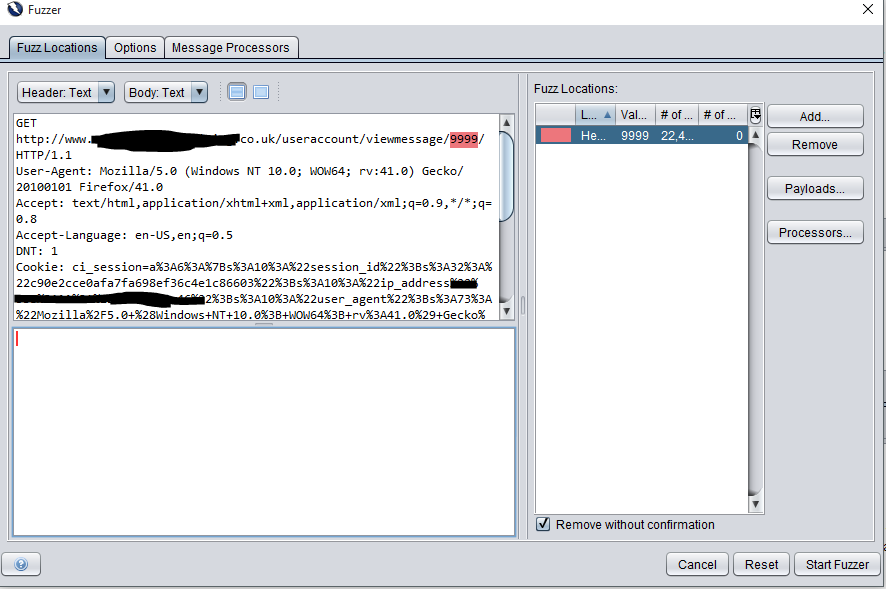

In regards to the script . I'm still not sure how Id add a part to export to a HTML file that includes the title name of the VAR used .
Kai Castledine
Oct 13, 2015, 9:03:43 AM10/13/15
to OWASP ZAP User Group
Has anyone got an idea how to write this code to export the raw data to files ?
Simon Bennetts
Oct 13, 2015, 9:24:30 AM10/13/15
to OWASP ZAP User Group
I couldnt find a way to write files just using JavaSript :(
But its ok, because you can also call Java classes :)
So the following code works as a standalone script:
var file = java.io.PrintWriter("/home/full/path/test.txt")
file.println("test");
file.close();
Do you know how to access the data you need?
If not let us know what you want and how you want to output it.
Cheers,
Simon
But its ok, because you can also call Java classes :)
So the following code works as a standalone script:
var file = java.io.PrintWriter("/home/full/path/test.txt")
file.println("test");
file.close();
Do you know how to access the data you need?
If not let us know what you want and how you want to output it.
Cheers,
Simon


thc...@gmail.com
Oct 13, 2015, 10:06:37 AM10/13/15
to zaprox...@googlegroups.com
Hi.
Do you want to use the value of the payload (VAR)?
Best regards.
On 13/10/15 11:03, Kai Castledine wrote:
>
>
> Okay so I've set up the fuzzer like so .
>
> <https://lh3.googleusercontent.com/-TF-v2ixA9pw/VhzWhn1sIvI/AAAAAAAAAIs/10FGZOMjiL8/s1600/Fuzzer.PNG>
>
>
>
> <https://lh3.googleusercontent.com/-cimymIlKvoU/VhzWh4MlwCI/AAAAAAAAAIw/H4hMlV7zfY0/s1600/Fuzzer1.PNG>
> You received this message because you are subscribed to the Google
> Groups "OWASP ZAP User Group" group.
> To unsubscribe from this group and stop receiving emails from it, send
> an email to zaproxy-user...@googlegroups.com
> <mailto:zaproxy-user...@googlegroups.com>.
> For more options, visit https://groups.google.com/d/optout.
Do you want to use the value of the payload (VAR)?
Best regards.
On 13/10/15 11:03, Kai Castledine wrote:
>
>
> Okay so I've set up the fuzzer like so .
>
>
>
>
> <https://lh3.googleusercontent.com/-cimymIlKvoU/VhzWh4MlwCI/AAAAAAAAAIw/H4hMlV7zfY0/s1600/Fuzzer1.PNG>
>
>
> In regards to the script . I'm still not sure how Id add a part to
> export to a HTML file that includes the title name of the VAR used .
>
> --
>
> In regards to the script . I'm still not sure how Id add a part to
> export to a HTML file that includes the title name of the VAR used .
>
> You received this message because you are subscribed to the Google
> Groups "OWASP ZAP User Group" group.
> To unsubscribe from this group and stop receiving emails from it, send
> an email to zaproxy-user...@googlegroups.com
> <mailto:zaproxy-user...@googlegroups.com>.
> For more options, visit https://groups.google.com/d/optout.
Kai Castledine
Oct 13, 2015, 10:48:27 AM10/13/15
to OWASP ZAP User Group
Thanks for the replies !
The payload will be a text file containing 1-22,00 or something in values. The data will need to be export to HTML files.
Kai Castledine
Oct 13, 2015, 10:49:22 AM10/13/15
to OWASP ZAP User Group
It will be a txt file containing values
thc...@gmail.com
Oct 13, 2015, 11:57:27 AM10/13/15
to zaprox...@googlegroups.com
Not sure if this is what you want but here it goes:
var OUTPUT_DIR = java.nio.file.Paths.get("/path/to/messages/dir/");
function processMessage(utils, message) {
}
function processResult(utils, fuzzResult){
var filename = fuzzResult.getPayloads().get(0) + '.html';
var file =
java.nio.file.Files.newOutputStream(OUTPUT_DIR.resolve(filename),
java.nio.file.StandardOpenOption.CREATE_NEW);
file.write(fuzzResult.getHttpMessage().getResponseBody().getBytes());
file.close();
return true;
}
The above JavaScript "Fuzzer HTTP Processor" script saves the body of
the HTTP responses to files named with the value of the (first, of each
set) payload, appended with "html" extension.
For example, if you are fuzzing a field with 1, 2, 3... it will create
files "1.html", "2.html", "3.html"... in the OUTPUT_DIR.
Tested with ZAP 2.4.2 (using Java 7).
Let us know if you need help on how to create the script.
(Note that you need to enable the script to be able to select it in
"Fuzzer" dialogue)
Best regards.
var OUTPUT_DIR = java.nio.file.Paths.get("/path/to/messages/dir/");
function processMessage(utils, message) {
}
function processResult(utils, fuzzResult){
var filename = fuzzResult.getPayloads().get(0) + '.html';
var file =
java.nio.file.Files.newOutputStream(OUTPUT_DIR.resolve(filename),
java.nio.file.StandardOpenOption.CREATE_NEW);
file.write(fuzzResult.getHttpMessage().getResponseBody().getBytes());
file.close();
return true;
}
The above JavaScript "Fuzzer HTTP Processor" script saves the body of
the HTTP responses to files named with the value of the (first, of each
set) payload, appended with "html" extension.
For example, if you are fuzzing a field with 1, 2, 3... it will create
files "1.html", "2.html", "3.html"... in the OUTPUT_DIR.
Tested with ZAP 2.4.2 (using Java 7).
Let us know if you need help on how to create the script.
(Note that you need to enable the script to be able to select it in
"Fuzzer" dialogue)
Best regards.
Kai Castledine
Oct 14, 2015, 6:14:22 AM10/14/15
to OWASP ZAP User Group
Thank you for this . Ill give it a go later and see what happens !
> <mailto:zaproxy-users+unsub...@googlegroups.com>.
Reply all
Reply to author
Forward
0 new messages