
Using ZAP in Laravel project
1,050 views
Skip to first unread message

T K
Mar 28, 2021, 5:33:36 AM3/28/21
to OWASP ZAP User Group
I need to use ZAP as vulnerabilty detection for my school project. Has anyone have experience to implement ZAP in a Laravel project?
T K
Mar 29, 2021, 11:07:13 AM3/29/21
to OWASP ZAP User Group
I figured out how to use the spider through API, it detects all vulnerabilities.
Is there a way to make a selection which vulnerabilities you want to detect? I only want to detect injections
Op zondag 28 maart 2021 om 11:33:36 UTC+2 schreef T K:

kingthorin+owaspzap
Mar 29, 2021, 2:14:25 PM3/29/21
to OWASP ZAP User Group
You can enable only those Active/Passive scan rules you care about.
T K
Mar 30, 2021, 4:01:43 AM3/30/21
to OWASP ZAP User Group
Thanks for your reply.
How can I apply these rules?
Op maandag 29 maart 2021 om 20:14:25 UTC+2 schreef kingthorin+owaspzap:

Simon Bennetts
Mar 30, 2021, 4:19:08 AM3/30/21
to OWASP ZAP User Group
Have a look at the help which comes with ZAP, also available online
The help explains what these things are and links to pages which describe how to configure them.
T K
Mar 30, 2021, 4:30:42 AM3/30/21
to OWASP ZAP User Group
I am using ZAP 2.10.0, this allow me to disable all passive scan which is good. Now I want to be able to detect a selection of injection for example only SQL injection. How to apply this rule?
Op dinsdag 30 maart 2021 om 10:19:08 UTC+2 schreef psi...@gmail.com:
Simon Bennetts
Mar 30, 2021, 4:35:42 AM3/30/21
to OWASP ZAP User Group
Have you looked at this page? https://www.zaproxy.org/docs/desktop/start/features/ascan/
Noticed the link to Scan Policies?
T K
Mar 30, 2021, 5:46:52 AM3/30/21
to OWASP ZAP User Group
Yes I did, thanks for the link! I disabled everything I don't need and got these results in the UI.
But actually I want these results in the browser. The scan policy I set up doesn't work in the browser:
But actually I want these results in the browser. The scan policy I set up doesn't work in the browser:
Op dinsdag 30 maart 2021 om 10:35:42 UTC+2 schreef psi...@gmail.com:
Simon Bennetts
Mar 30, 2021, 5:54:18 AM3/30/21
to OWASP ZAP User Group
"The scan policy I set up doesn't work in the browser" - sorry, I dont follow you. What are you trying to do?
T K
Mar 30, 2021, 6:06:55 AM3/30/21
to OWASP ZAP User Group
I'm creating a webapp for school that is able to detect some injections/vulnerabilities. It's written in PHP so I followed these steps:
The 'Example' code on that page works perfectly but it scans on all vulnerabilities. Actually I just want to test some vulnerabilities, like SQL injection or XSS.
Op dinsdag 30 maart 2021 om 11:54:18 UTC+2 schreef psi...@gmail.com:
Simon Bennetts
Mar 30, 2021, 6:14:39 AM3/30/21
to OWASP ZAP User Group
So you are creating a web front end for ZAP?
Which API calls are you using?
T K
Mar 30, 2021, 6:28:35 AM3/30/21
to OWASP ZAP User Group
Yes, I am creating a web front end for ZAP. I am not sure what you mean with "Which API calls are you using" I copy pasted the example code from zapv2.
Op dinsdag 30 maart 2021 om 12:14:39 UTC+2 schreef psi...@gmail.com:
Simon Bennetts
Mar 30, 2021, 6:33:30 AM3/30/21
to OWASP ZAP User Group
Oh, you mean https://github.com/zaproxy/zaproxy/tree/main/php/api/zapv2 ?
Thats example code.
It starts an active scan using the default policy.
You either need to configure ZAP to use you new policy as the default one or specify it when you tell ZAP to run the scan.
T K
Mar 30, 2021, 7:39:01 AM3/30/21
to OWASP ZAP User Group
Thanks for your help. Is this the right way to specify the policy?

Op dinsdag 30 maart 2021 om 12:33:30 UTC+2 schreef psi...@gmail.com:
T K
Mar 30, 2021, 8:34:38 AM3/30/21
to OWASP ZAP User Group

The results of the example code, with and without the scan policy parameter, are the same. Both 280 alerts, that's why I think it doesn't work. The UI shows there are only about 20 alerts. What did I do wrong?
Op dinsdag 30 maart 2021 om 13:39:01 UTC+2 schreef T K:
Simon Bennetts
Mar 30, 2021, 9:04:12 AM3/30/21
to OWASP ZAP User Group
The API gives you the raw data - in your case there are 280 individual alert instances.
The UI gives you a view on that data - it shows a hierarchy with unique alerts at the top level and instances of the alerts at the next level.
If you've done the same things then you will get roughly the same number of alerts (its not deterministic).
You can check this by accessing the alerts via the API when using the ZAP desktop.
T K
Mar 30, 2021, 9:15:14 AM3/30/21
to OWASP ZAP User Group
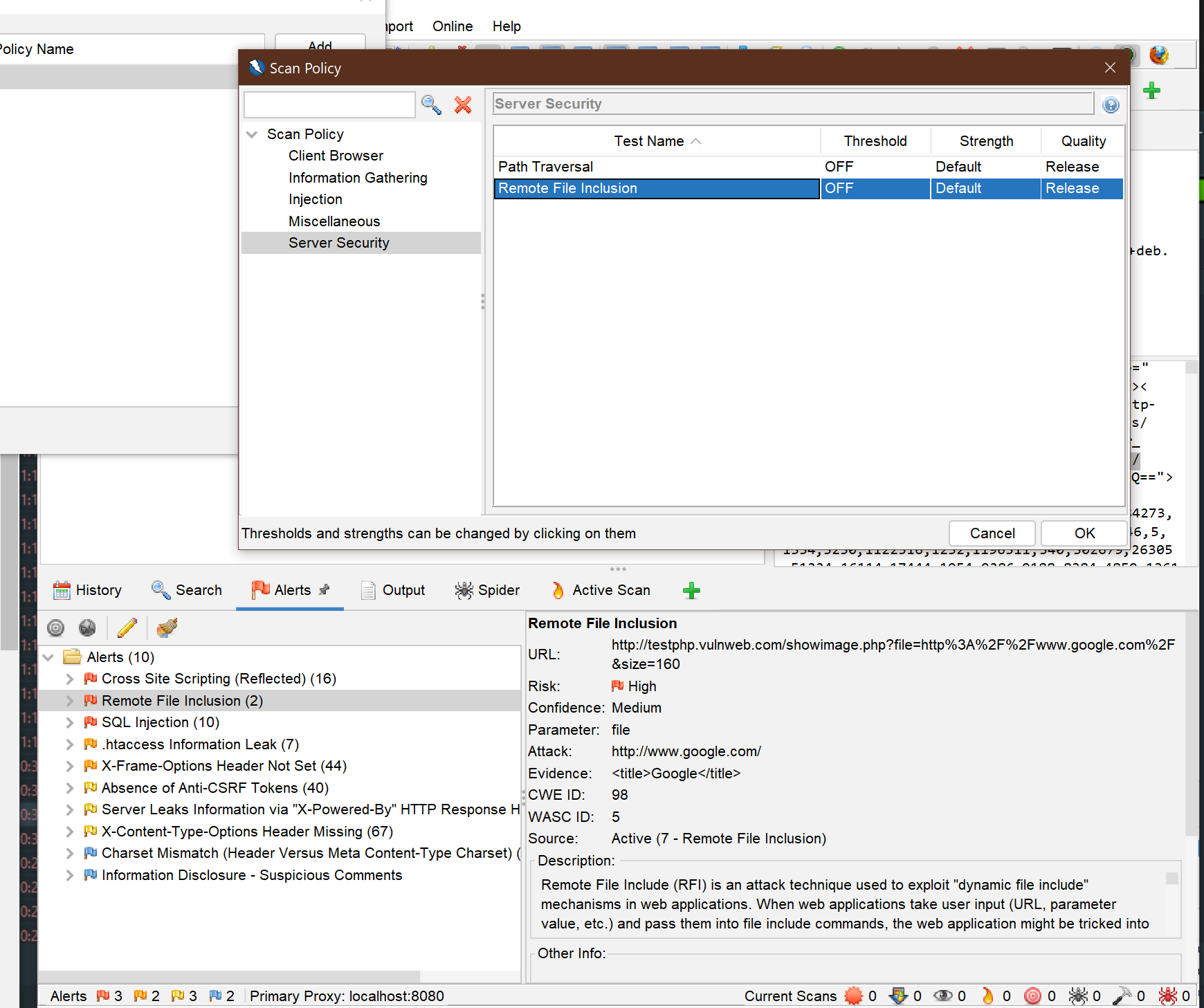
Yes, I can see the alerts. But as you can see "remote file inclusion" is set to OFF in the scan policy but it is still shown in the alerts. How can I specify which alerts are displayed?
Op dinsdag 30 maart 2021 om 15:04:12 UTC+2 schreef psi...@gmail.com:
Simon Bennetts
Mar 30, 2021, 9:23:55 AM3/30/21
to OWASP ZAP User Group
ZAP shows all of the alerts that have been raised.
My guess is that you ran a scan which included the Remote File Inclusion rule before you turned the rule off.
If you want to start from scratch either start a new session or delete the alerts :)
T K
Mar 30, 2021, 12:18:48 PM3/30/21
to OWASP ZAP User Group
No, I turned it off before I ran the scan. Also after serveral times of running the scan it gives the same result.
I have 2 questions:
1) Is this the right way to specify the policy? So to give a string parameter 'new_policy' to the scan() function:
2) Is there maybe another way (codewise) to specify that I only want to scan SQL injection, XSS, code injection and OS command injection?
Op dinsdag 30 maart 2021 om 15:23:55 UTC+2 schreef psi...@gmail.com:
kingthorin+owaspzap
Mar 30, 2021, 2:00:38 PM3/30/21
to OWASP ZAP User Group
T K
Apr 4, 2021, 10:46:39 AM4/4/21
to OWASP ZAP User Group
Thanks that helped me how to specify the right policy in the parameter.

But I still having problems to get the desired output. I only want to get the alerts of SQL injection and XSS, and this is what I specified in the Scan Policy Manager in the UI before I ran the active scan in my own web app.
It shows for example Remote File Inclusion, regardless of the Scan Policy Settings:
What did I do wrong?
Op dinsdag 30 maart 2021 om 20:00:38 UTC+2 schreef kingthorin+owaspzap:
Reply all
Reply to author
Forward
0 new messages