
Quick start tab
1,060 views
Skip to first unread message

psiinon
Nov 30, 2012, 1:50:29 PM11/30/12
to zaproxy...@googlegroups.com
I've just added an extension for a quick start tab:
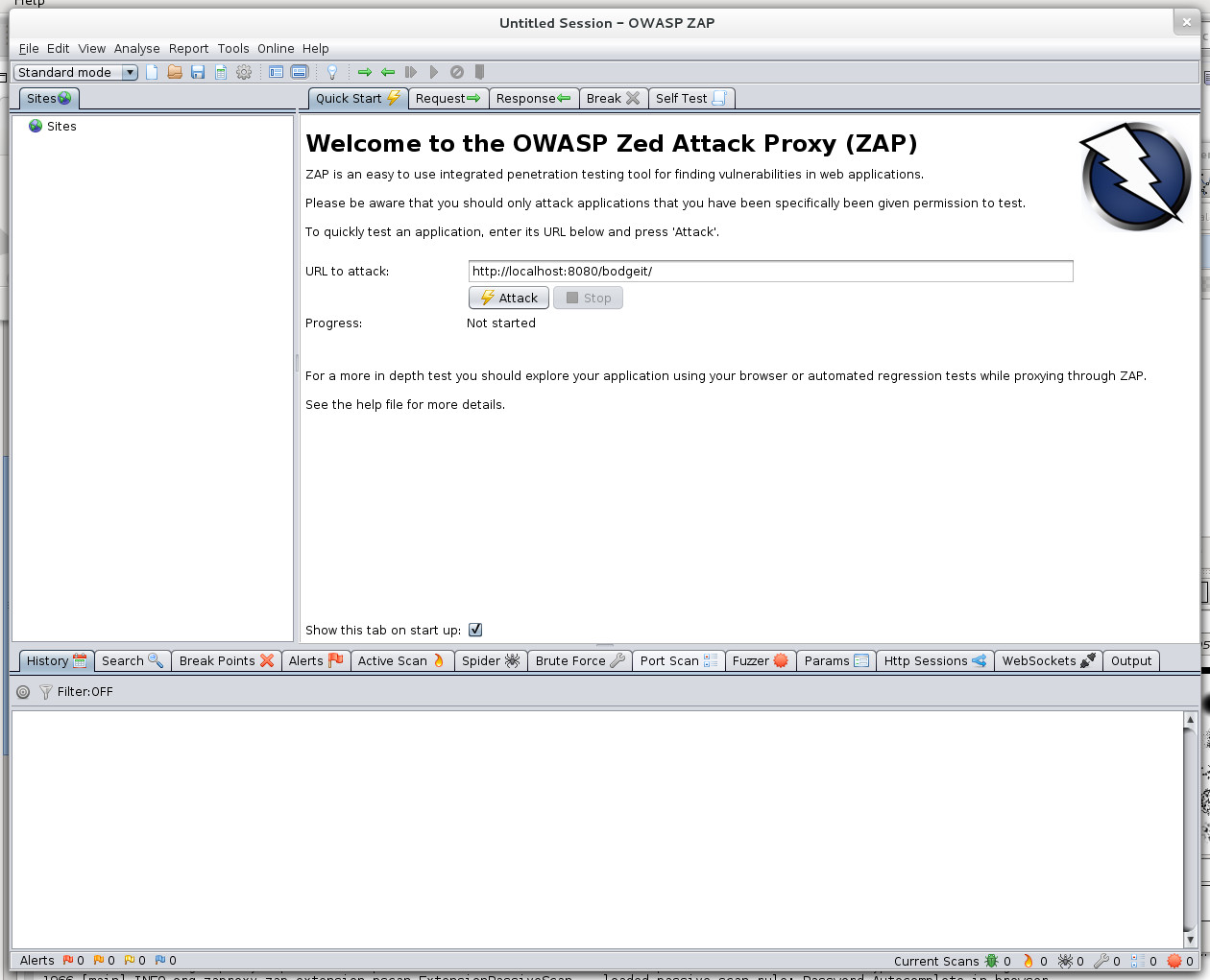
The plan is for this to be the first tab people see. Clicking the 'Attack' button causes the spider and then the active scanner to be run against the URL.
Its also easy to get rid of - unchecking the 'Show this tab on start up' removes the tab straight away (you can get it back).
Any thoughts?
I deliberately havnt added the language file to crowdin as I'd like feedback as to the wording as well as the whole concept.
Oh, and I'd like to include it in the next weekly release - that ok too?
Let me know what you think,
Simon

thc202
Dec 2, 2012, 5:17:52 PM12/2/12
to zaproxy...@googlegroups.com
Hi.
I'm OK with including it in the next weekly release.
Best regards.
I'm OK with including it in the next weekly release.
Best regards.
psiinon
Dec 3, 2012, 7:04:48 AM12/3/12
to zaproxy...@googlegroups.com
The way I've implemented this is to access the URL specified directly and then to spider the subtree from there.
This means that if you attack (say) http://localhost:8080/bodgeit/ then you spider the whole of the bodgeit app, while if you attack http://localhost:8080/bodgeit (no trailing slash) then you just spider the first page.
I dont really want to spider the whole site, as there could be other applications on there that people dont want to attack - otherwise they would have just specified the host and port.
Is this just something users have to be aware of, or is there a neat way around this.
I've considered just appending a slash to the supplied URL and accessing both pages, but that feels very hacky ;)
Any thoughts?
Cheers,
Simon
This means that if you attack (say) http://localhost:8080/bodgeit/ then you spider the whole of the bodgeit app, while if you attack http://localhost:8080/bodgeit (no trailing slash) then you just spider the first page.
I dont really want to spider the whole site, as there could be other applications on there that people dont want to attack - otherwise they would have just specified the host and port.
Is this just something users have to be aware of, or is there a neat way around this.
I've considered just appending a slash to the supplied URL and accessing both pages, but that feels very hacky ;)
Any thoughts?
Cheers,
Simon

kingt...@gmail.com
Jul 10, 2013, 11:44:04 AM7/10/13
to zaproxy...@googlegroups.com
How do I turn it back on or access it once again after I've disabled show on startup? (I'm running 2.1.0 and QS Plugin 12)
On Friday, November 30, 2012 1:50:29 PM UTC-5, psiinon wrote:
On Friday, November 30, 2012 1:50:29 PM UTC-5, psiinon wrote:
Its also easy to get rid of - unchecking the 'Show this tab on start up' removes the tab straight away (you can get it back).
Simon
thc202
Jul 10, 2013, 12:05:38 PM7/10/13
to zaproxy...@googlegroups.com
Hi.
1. Run ZAP;
2. Open the "Options" dialogue;
3. Select "Extensions";
4. Enable the extension "ExtensionQuickStart" (click the check box);
5. Restart ZAP, it should be back once again.
Best regards.
1. Run ZAP;
2. Open the "Options" dialogue;
3. Select "Extensions";
4. Enable the extension "ExtensionQuickStart" (click the check box);
5. Restart ZAP, it should be back once again.
Best regards.
kingt...@gmail.com
Jul 10, 2013, 1:36:56 PM7/10/13
to zaproxy...@googlegroups.com
Perfect, thanks THC.
Sadly it seems I'd simply acted kind L'user'ishly and not dug far enough. /me hangs his head in shame :(
Sadly it seems I'd simply acted kind L'user'ishly and not dug far enough. /me hangs his head in shame :(

Mostafa
Dec 8, 2013, 8:34:06 AM12/8/13
to zaproxy...@googlegroups.com
Hi all, I'm wondering how ZAP handles QuickStart panel. Because, I went through the source code that I had checked out, and found no "quickstart" package in the source code. Any Ideas?
thc202
Dec 8, 2013, 10:08:28 AM12/8/13
to zaproxy...@googlegroups.com
Hi.
The "Quick Start" (add-on) code is in the zap-extensions' [1] trunk [2].
[1] https://code.google.com/p/zap-extensions/
[2] https://code.google.com/p/zap-extensions/source/browse/#svn%2Ftrunk%2Fsrc%2Forg%2Fzaproxy%2Fzap%2Fextension%2Fquickstart
Best regards.
The "Quick Start" (add-on) code is in the zap-extensions' [1] trunk [2].
[1] https://code.google.com/p/zap-extensions/
[2] https://code.google.com/p/zap-extensions/source/browse/#svn%2Ftrunk%2Fsrc%2Forg%2Fzaproxy%2Fzap%2Fextension%2Fquickstart
Best regards.
Mostafa
Dec 8, 2013, 2:05:12 PM12/8/13
to zaproxy...@googlegroups.com
Hi thc202
I could locate it in online repository, but I can not locate it in the directories of the source code I had checked out from the repository. For example, I can not find the "QuickStartPanel.java" in the "src/org/zaproxy/zap/extension" package in my computer. Because there is no "quickstart" package in that. But when I run ZAP from eclipse, It shows up the "QuickStartPanel". So It caused me to wonder, despite there is no such file in the "src" directory, how can ZAP handle it, and show it to me.
I could locate it in online repository, but I can not locate it in the directories of the source code I had checked out from the repository. For example, I can not find the "QuickStartPanel.java" in the "src/org/zaproxy/zap/extension" package in my computer. Because there is no "quickstart" package in that. But when I run ZAP from eclipse, It shows up the "QuickStartPanel". So It caused me to wonder, despite there is no such file in the "src" directory, how can ZAP handle it, and show it to me.
thc202
Dec 8, 2013, 2:56:23 PM12/8/13
to zaproxy...@googlegroups.com
Ah, I see what you mean. The "Quick Start" tab is shown because the"Quick Start" add-on file ("quickstart-release-13.zap") is in the "plugin" [1] directory thus being loaded by ZAP at runtime.
[1] https://code.google.com/p/zaproxy/source/browse/trunk/src/#src%2Fplugin
Best regards.
[1] https://code.google.com/p/zaproxy/source/browse/trunk/src/#src%2Fplugin
Best regards.
Mostafa
Dec 8, 2013, 3:21:32 PM12/8/13
to zaproxy...@googlegroups.com
Is there anyway that we can add the "zap-extension" source code to the eclipse project, and work with the actual ".java" source codes? not loading a ".zap" file at the runtime?
Anyhow, where in the source code, the run time loading happens exactly?
Thanks.
Anyhow, where in the source code, the run time loading happens exactly?
Thanks.
thc202
Dec 8, 2013, 9:26:39 PM12/8/13
to zaproxy...@googlegroups.com
Hi.
Is there anyway that we can add the "zap-extension" source code to the eclipse project, and work with the actual ".java" source codes? not loading a ".zap" file at the runtime?
Yes, following the steps to do that (note that there are several ways of doing it but this is pretty straightforward IMHO):
2. Select "Java Build Path", select the "Source" tab (if it's not already selected) and press the "Link Source..." button;
3. In the "Link Source" dialogue press the "Browse..." button, select (for example) the trunk "src" directory of the checked out "zap-extensions" project and press "OK";
4. Change the "Folder name:" to (for example) "src-extensions-trunk" and press the "Finish" button; There should be two source directories;
5. Select the "Libraries" tab and press the button "Add JARs..." (if you already have the zap-extensions project in your Eclipse workspace, otherwise press "Add External JARs...") navigate to the location of the (corresponding) "zap-extensions" lib directory and select all the JARs (except zap.jar); Note that some of them are duplicated so you might want to remove the duplicates;
6. Press the "OK" button, the linked source directory should be under the "src" directory in your "zaproxy" project, change the files as you normally would.
7. Remove the add-ons from the "plugin" directory that are already included in the linked source directory.
8. Run ZAP as you normally would.
Let me know if you've any question/issue.
Anyhow, where in the source code, the run time loading happens exactly?
Without going into great detail, that would be in the method AddOnLoader#loadClass(String) [1] which is called by the method AddOnLoader#getImplementors(AddOn, String, Class<T>) [2].
Each ZAP "component" is loaded in the corresponding "class" (by calling the method AddOnLoader#getImplementors(AddOn, String, Class<T>)):
1. Extensions in the method ExtensionFactory#loadAllExtension(ExtensionLoader, Configuration) [3];
2. Active scanners in the method PluginFactory#loadAllPlugin(Configuration) [4];
3. Passive scanners in the method ExtensionPassiveScan#getPassiveScannerList() [5].
4. Filters in the method FilterFactory#loadAllFilter() [6];
(and so on...)
The "main" AddOnLoader is instantiated in the method ExtensionFactory#getAddOnLoader() [7] which is where the "plugin" directories are specified.
[1] https://code.google.com/p/zaproxy/source/browse/trunk/src/org/zaproxy/zap/control/AddOnLoader.java#152
[2] https://code.google.com/p/zaproxy/source/browse/trunk/src/org/zaproxy/zap/control/AddOnLoader.java#462
[3] https://code.google.com/p/zaproxy/source/browse/trunk/src/org/zaproxy/zap/control/ExtensionFactory.java#70
[4] https://code.google.com/p/zaproxy/source/browse/trunk/src/org/parosproxy/paros/core/scanner/PluginFactory.java#113
[5] https://code.google.com/p/zaproxy/source/browse/trunk/src/org/zaproxy/zap/extension/pscan/ExtensionPassiveScan.java#174
[6] https://code.google.com/p/zaproxy/source/browse/trunk/src/org/parosproxy/paros/extension/filter/FilterFactory.java#46
[7] https://code.google.com/p/zaproxy/source/browse/trunk/src/org/zaproxy/zap/control/ExtensionFactory.java#61
Best regards.
Each ZAP "component" is loaded in the corresponding "class" (by calling the method AddOnLoader#getImplementors(AddOn, String, Class<T>)):
1. Extensions in the method ExtensionFactory#loadAllExtension(ExtensionLoader, Configuration) [3];
2. Active scanners in the method PluginFactory#loadAllPlugin(Configuration) [4];
3. Passive scanners in the method ExtensionPassiveScan#getPassiveScannerList() [5].
4. Filters in the method FilterFactory#loadAllFilter() [6];
(and so on...)
The "main" AddOnLoader is instantiated in the method ExtensionFactory#getAddOnLoader() [7] which is where the "plugin" directories are specified.
[1] https://code.google.com/p/zaproxy/source/browse/trunk/src/org/zaproxy/zap/control/AddOnLoader.java#152
[2] https://code.google.com/p/zaproxy/source/browse/trunk/src/org/zaproxy/zap/control/AddOnLoader.java#462
[3] https://code.google.com/p/zaproxy/source/browse/trunk/src/org/zaproxy/zap/control/ExtensionFactory.java#70
[4] https://code.google.com/p/zaproxy/source/browse/trunk/src/org/parosproxy/paros/core/scanner/PluginFactory.java#113
[5] https://code.google.com/p/zaproxy/source/browse/trunk/src/org/zaproxy/zap/extension/pscan/ExtensionPassiveScan.java#174
[6] https://code.google.com/p/zaproxy/source/browse/trunk/src/org/parosproxy/paros/extension/filter/FilterFactory.java#46
[7] https://code.google.com/p/zaproxy/source/browse/trunk/src/org/zaproxy/zap/control/ExtensionFactory.java#61
Best regards.
thc202
Jan 7, 2014, 11:03:15 PM1/7/14
to zaproxy...@googlegroups.com
Hi.
There's an error in the previous message. The step #5 is incorrect and will lead to ClassNotFoundException at run-time (since the run-time dependecies are not added to the classpath).
Step #5 should be:
5. Select the "Libraries" tab and press the button "Add JARs..." (if you already have the zap-extensions project in your Eclipse workspace, otherwise press "Add External JARs...") navigate to the locations of all the add-ons' "lib" directory and select all the JARs; Note that some of them are duplicated so you might want to remove the duplicates;
Sorry for any incovienience that I may have caused.
Best regards.
There's an error in the previous message. The step #5 is incorrect and will lead to ClassNotFoundException at run-time (since the run-time dependecies are not added to the classpath).
Step #5 should be:
5. Select the "Libraries" tab and press the button "Add JARs..." (if you already have the zap-extensions project in your Eclipse workspace, otherwise press "Add External JARs...") navigate to the locations of all the add-ons' "lib" directory and select all the JARs; Note that some of them are duplicated so you might want to remove the duplicates;
Sorry for any incovienience that I may have caused.
Best regards.

yha...@gmail.com
Jan 8, 2014, 10:07:13 AM1/8/14
to zaproxy...@googlegroups.com
While executing it gives to me some errors related to:
quickstart.cmdline.url.help
script.cmdline.out.help
missing inside the Message.properties
I take a look at the version inside the repository and they seem to be not present...
quickstart.cmdline.url.help
script.cmdline.out.help
missing inside the Message.properties
I take a look at the version inside the repository and they seem to be not present...
yha...@gmail.com
Jan 8, 2014, 10:12:37 AM1/8/14
to zaproxy...@googlegroups.com
Ooops... only the script.cmdline.out.help is missing...
psiinon
Jan 8, 2014, 10:23:01 AM1/8/14
to zaproxy...@googlegroups.com
Can you update zaproxy-extensions again?
I thought I fixed that problem before posting (it should have been "quickstart.cmdline.out.help" ;) ...Simon
--
You received this message because you are subscribed to the Google Groups "OWASP ZAP Developer Group" group.
To unsubscribe from this group and stop receiving emails from it, send an email to zaproxy-devel...@googlegroups.com.
For more options, visit https://groups.google.com/groups/opt_out.
--
OWASP ZAP Project leader
yha...@gmail.com
Jan 8, 2014, 11:00:31 AM1/8/14
to zaproxy...@googlegroups.com
OK it works
Reply all
Reply to author
Forward
0 new messages